1. 중요 안전 지침
Please read all safety instructions carefully before using this appliance. Failure to follow these instructions may result in electric shock, fire, or serious personal injury.
- 청소나 유지관리 작업을 하기 전에는 항상 팬의 플러그를 뽑으세요.
- 선풍기가 작동 중일 때는 통풍구에 손가락이나 다른 물체를 넣지 마십시오.
- 선풍기가 넘어지지 않도록 안정적이고 수평인 표면에 놓으세요.
- 전원 코드를 뜨거운 표면에서 멀리 두세요.
- 손상된 코드나 플러그로 팬을 작동하지 마십시오.
- 이 제품은 실내에서만 사용하세요.
2. 패키지 내용
패키지에 모든 품목이 포함되어 있는지 확인하세요.
- 1 × Dreo Poly Fan (DR-HPF007S)
- 1 × 전원 어댑터
- 1 × Remote Control (Battery included)
- 1 × Screw for Base
- 1 × Screwdriver for Base
3. 설치 및 조립
Follow these steps to assemble your DREO Smart Fan:
- 포장에서 모든 구성 요소를 조심스럽게 제거합니다.
- Attach the fan body to the pedestal column.
- Secure the base to the bottom of the pedestal column using the provided screw and screwdriver.
- Attach the remote control holder to the pedestal column at a convenient height.
- Plug the power adapter into the fan and then into a power outlet.
Video: PolyFan Assembly and Clean
This video demonstrates the step-by-step assembly process and how to clean the PolyFan. It shows how to attach the base, secure the column, and connect the power adapter. It also covers disassembling parts for cleaning.
Video: Dreo HPF004S Installation Video
This video provides a visual guide for the installation of the Dreo HPF004S fan, which shares similar assembly steps with the DR-HPF007S model.
4. 사용 설명서
Your DREO Smart Fan offers multiple control methods and customizable settings for optimal comfort.
4.1 제어 방법
- 터치 컨트롤: Use the intuitive touch panel on the fan's pedestal.
- 원격 제어: Operate the fan from a distance with the included remote.
- DREO App: Connect via Wi-Fi for advanced features, scheduling, and voice control.
- 음성 제어: Alexa 또는 Google Assistant와 통합하여 핸즈프리로 작동할 수 있습니다.
4.2 Fan Speeds and Airflow Modes
- 9 팬 속도: Adjust airflow intensity from a gentle breeze to powerful circulation.
- 6 Airflow Modes: Choose from Normal, Natural, Sleep, Auto, Custom, and Turbo modes to suit your preference.

Image: Fan Modes and Speeds
The fan's display shows the current speed and selected mode, offering 9 speed levels and 6 distinct airflow modes for personalized comfort.
4.3 진동
- 3D 진동: Enjoy wide-area coverage with 150° horizontal and 120° vertical oscillation.
- Position-based Oscillation: (DREO app exclusive) The fan adjusts its airflow direction based on your movement within the room.

Image: 3D Oscillation
This image illustrates the fan's ability to oscillate both horizontally (150°) and vertically (120°), providing comprehensive air circulation.
Video: Dreo Smart Position-based Oscillation Fan TurboPoly Fan 707S
This video highlights the smart position-based oscillation feature of the fan, demonstrating how it tracks movement to maintain airflow.
4.4 타이머 기능
지정된 시간 후 선풍기가 자동으로 꺼지도록 설정하세요.
- 기기에서: 최대 8 시간.
- DREO App: Up to 12 hours for extended control.
4.5 Smart Features via DREO App
- 일정: Program the fan to turn on/off at specific times.
- Temperature Triggers: Set the fan to adjust speed based on ambient temperature.
- 데스크톱 위젯: Quick access to fan controls from your smartphone home screen.
- 조용한 작동: Operates as low as 25dB for undisturbed sleep.
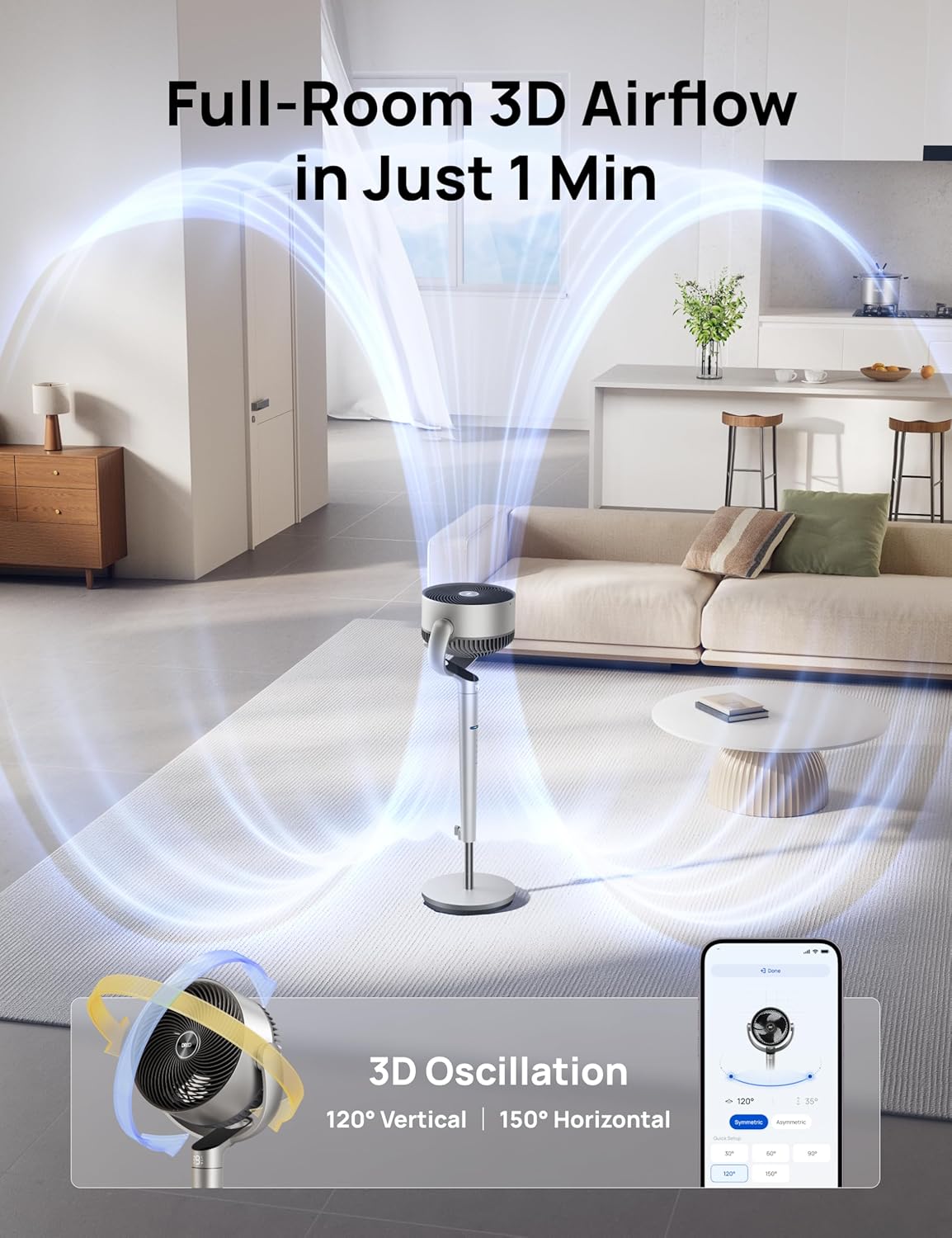
Image: App Control Interface
The DREO app provides comprehensive control over fan settings, including modes, speeds, oscillation, and smart features.
5. 청소 및 유지 관리
정기적으로 청소하면 팬의 최적의 성능과 수명을 보장할 수 있습니다.
- 청소하기 전에는 항상 선풍기의 플러그를 뽑으세요.
- 부드러운 d로 외부 표면을 닦으십시오.amp 옷감.
- To clean the fan blades, remove the front grille by rotating it counter-clockwise.
- Rotate the blade cap counter-clockwise to remove it, then carefully take out the blade from the shaft.
- Rinse the cap, blade, and grille under running water. Dry all parts thoroughly before reassembling.
- Reassemble the fan by reversing the disassembly steps.
Video: PolyFan Assembly and Clean
This video demonstrates how to disassemble the fan for cleaning and reassemble it, ensuring proper maintenance.
6. 문제 해결
If you encounter any issues with your DREO Smart Fan, refer to the following common solutions:
- 팬이 켜지지 않음: Ensure the power cord is securely plugged into a working outlet. Check if the power adapter is correctly connected to the fan.
- 약한 공기 흐름: Verify that the fan speed is set to an appropriate level. Clean the fan blades and grilles to remove any dust buildup.
- 이상한 소음: Ensure all parts are assembled correctly and securely. Clean the fan to remove any foreign objects that might be causing noise.
- 원격 제어가 작동하지 않음: Check the battery in the remote control. Ensure there are no obstructions between the remote and the fan.
- Wi-Fi 연결 문제: Ensure your Wi-Fi network is 2.4GHz. Restart your router and the fan, then try connecting again via the DREO app.
7. 사양
| 특징 | 세부 사항 |
|---|---|
| 상표 | 드레오 |
| 모델명 | DR-HPF007S |
| 제품 치수 | 13.7인치 깊이 x 8.7인치 너비 x 42.52인치 높이 |
| 전원 | DC |
| 왓tage | 50 와트 |
| 권tage | 120 볼트 |
| 소음 수준 | 25데시벨 |
| 기류 용량 | 분당 1404입방 피트 |
| 속도 | 초속 8미터 |
| 전력 수준의 수 | 9 |
| 특별 기능 | Adjustable Height, Adjustable Tilt, Oscillating, Remote Controlled, Timer, Wi-Fi, Voice Control |
| 제어 방법 | 앱, 리모컨, 터치 |
| 실내/실외 사용 | 실내 |
| 품목 무게 | 17.96파운드 |
| 한국어: | 810142858212 |
8. 보증 및 지원
For product support, warranty information, or any inquiries, please contact Dreo customer service:
- Web대지: www.dreo.com
- 이메일: support@dreo.com
- 핸드폰: (888) 290-1688 (Mon-Fri, 9:00 AM-5:00 PM PST/PDT)


