중요한 안전 정보
- 이 지침을 읽고 주의하십시오.
- 본 제품을 물 근처에서 사용하지 마십시오.
- 마른 천으로만 닦으십시오.
- 볼륨을 확인하세요tag귀하의 지역 주 전원 공급 장치.
- Do not block any ventilation openings. Install under the manufacturer's instructions.
- 라디에이터, 난방 조절기, 스토브 또는 기타 장치(다음을 포함)와 같은 열원 근처에 설치하지 마십시오. amp열을 생성하는 발전기.
- 제조업체가 지정한 부착된 장점/액세서리만 사용하세요.
- 번개가 치거나 장기간 사용하지 않을 때는 이 제품의 플러그를 뽑으십시오.
- 모든 서비스는 자격을 갖춘 서비스 담당자에게 의뢰하세요.
패키지 내용
도너 엠AMP4 5.1 Channel Audio Amplifier 패키지에는 다음이 포함됩니다.
- 도너 MAMP4 스테레오 수신기
- 원격 제어
- FM 안테나
- 사용자 설명서
설치 가이드
1. Connecting Speakers and Subwoofer
그들을AMP4 amplifier supports a 5.1 channel setup, allowing connection of 5 speakers and 1 subwoofer. Ensure correct polarity (+/-) when connecting speakers.

Image: Diagram showing the 5.1 channel speaker and subwoofer connections on the rear panel of the Donner MAMP4 amp리퍼.

이미지: 상세 view of the rear panel of the Donner MAMP4 amplifier, highlighting speaker terminals and various input/output ports.
2. 오디오 소스 연결
그만큼 amplifier offers multiple input options for various audio sources:
- 블루투스 5.3 : 호환 장치에서 무선 오디오 스트리밍을 위해.
- USB: Connect a USB drive (up to 64 GB) for direct music playback.
- RCA : Connect devices like CD/DVD players or other audio equipment.
- AC-3: For surround sound input.
- 광/동축: Digital audio inputs for smart TVs and other digital sources.
- AUX 입력 : General auxiliary input.
- FM 라디오 : 라디오 수신을 위해 동봉된 FM 안테나를 연결하세요.
- Microphone Inputs (2x 1/4''): For karaoke or public address.

Image: Front panel of the Donner MAMP4 amplifier showing various input options including USB, AUX, and microphone jacks, along with Bluetooth and FM indicators.
3. 전원 연결
Connect the power cord to a wall outlet. Ensure the unit is turned off before making any connections.
4. 초기 전원 켜기
전면 패널의 전원 버튼을 눌러 전원을 켜세요. amplifier on. The LED display will illuminate.

이미지: 도너 MAMP4 amplifier integrated into a home theater setup, demonstrating its role in enhancing stereo and surround sound.
작동 지침
1. 입력 선택
Use the 'MODE' button on the front panel or the 'INPUT' button on the remote control to cycle through available input modes: Bluetooth, USB, FM, RCA, AC-3, Optical, Coaxial, and AUX.
2. Volume and EQ Control
Adjust the master volume using the large knob on the front panel or the 'VOL+/-' buttons on the remote. The amplifier features independent controls for Treble, Midrange, and Bass on both the unit and the remote, allowing for customized sound profiles. The MAMP4 automatically saves your mode selection, volume, and EQ settings for convenience.
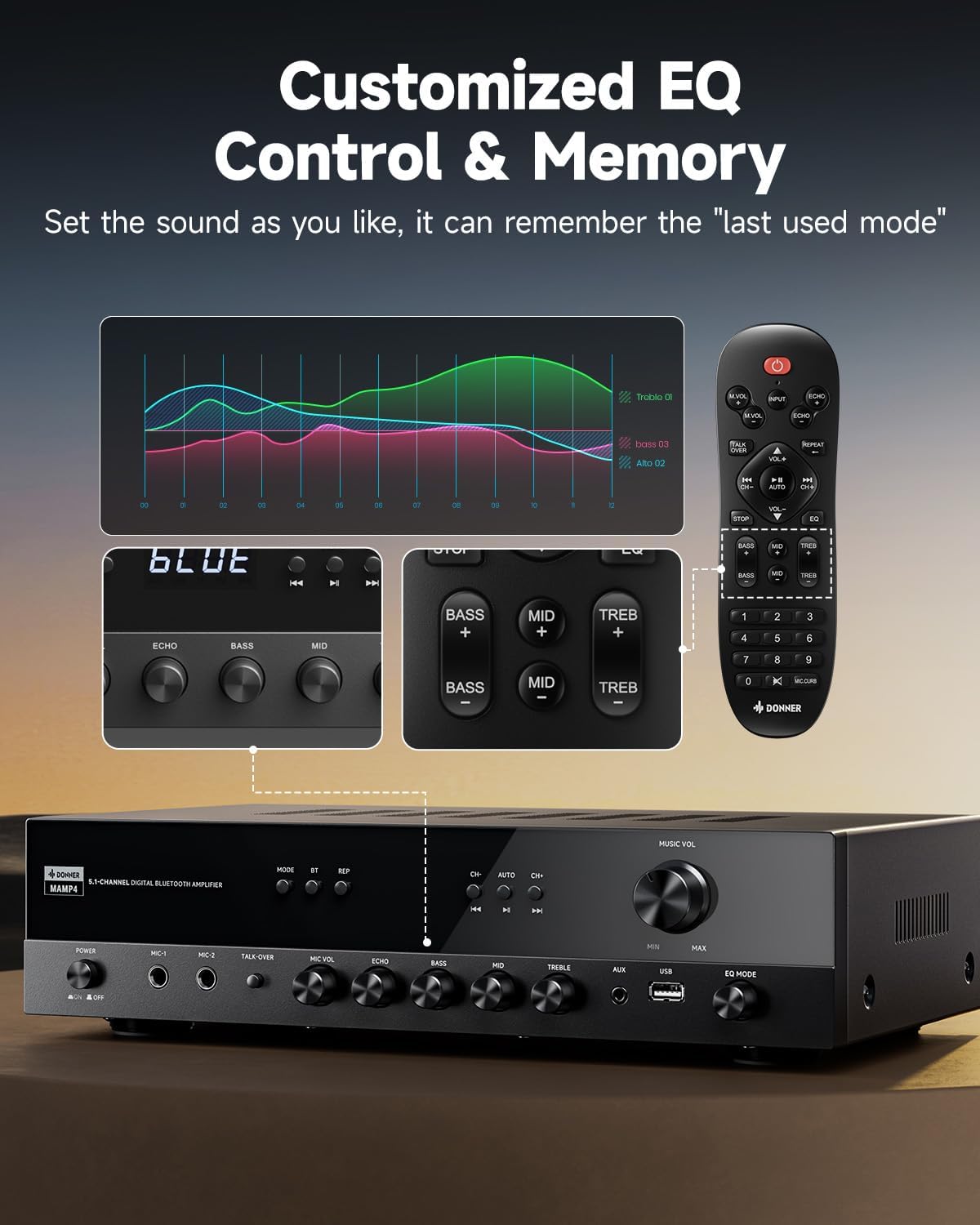
Image: Close-up of the Donner MAMP4 amplifier's front panel and remote control, illustrating the customizable EQ settings for bass, mid, and treble, and the memory function.
3. 블루투스 페어링
Select 'Bluetooth' mode. On your device, search for 'DONNER MAMP4' and pair. Use the Play/Pause button or Prev/Next buttons on the remote to control playback.
4. FM 라디오 작동
In FM mode, you can quickly select your preferred FM frequency by entering the numbers directly using the remote control. Use the 'CH+/-' buttons for automatic channel search.

이미지: 도너 MAMP4 amplifier with its remote control, demonstrating the ease of selecting FM frequencies by direct numerical input.
5. 마이크 기능
그만큼 amplifier includes dual 1/4'' microphone jacks. Adjust microphone volume and echo effect using dedicated knobs. The 'Talk Over' function lowers background music for clearer voice output during events or speeches.
6. 원격 제어
The upgraded remote control provides full functionality, including treble, midrange, bass, echo, and Talkover settings in any input mode.

Image: Comparison of the new and old style remote controls for the Donner amplifier, highlighting the expanded functionality of the upgraded remote for input selection, EQ, echo, and Talkover.
7. 제품 요약 영상
Video: A product summary video for the Donner amp리파이어, 쇼크asing its features and functionalities.
8. Donner 5.1 Channel Stereo Receiver Overview
영상: 공식 발표view video from DonnerDirect, detailing the features and benefits of the Donner 5.1 Channel Stereo Receiver.
유지
Donner M의 수명과 최적의 성능을 보장하기 위해AMP4 amplifier의 경우 다음 유지 관리 지침을 따르세요.
- 청소: 제품 외부를 닦을 때는 부드럽고 마른 천을 사용하십시오. 액체 세척제나 연마성 재질은 사용하지 마십시오.
- 통풍: Ensure that all ventilation openings on the amplifier are clear and unobstructed to prevent overheating.
- 저장: If the unit will not be used for an extended period, unplug the power cord from the outlet.
- 원격 제어 배터리: Replace batteries in the remote control as needed. Dispose of used batteries properly according to local regulations.
문제 해결
Donner M 사용 중 문제가 발생하면AMP4 amp증폭기의 경우, 다음의 일반적인 해결책을 참조하십시오.
- 전원 없음: 전원 코드가 양쪽 콘센트에 제대로 꽂혀 있는지 확인하십시오. amplifier and a working wall outlet. Check the power switch on the front panel.
- 소리 없음: Verify that the correct input source is selected. Check all speaker and audio source connections for proper seating and polarity. Adjust volume levels.
- Hissing Sound in Standby: 그들을AMP4 has optimized noise reduction with added relays. If a persistent hissing sound occurs, ensure all connections are secure and try unplugging the unit for a few minutes before reconnecting.
- 블루투스 페어링 문제: 확인하십시오 amplifier is in Bluetooth mode and your device's Bluetooth is enabled and discoverable. Try restarting both devices.
- FM 라디오 수신 불량: Ensure the FM antenna is properly connected and extended. Try repositioning the antenna for better signal.
- 마이크가 작동하지 않음: Ensure microphones are securely plugged into the correct jacks. Adjust 'MIC VOL' and 'ECHO' knobs.
For persistent issues, please contact Donner customer support or refer to qualified service personnel.
명세서
| 특징 | 설명 |
|---|---|
| 모델 | MAMP4 |
| 출력 전력(RMS) | L/R Speakers: 60W/4R; Surround & Center Speakers: 25W × 3 |
| 채널 | 5.1채널 |
| 블루투스 버전 | 5.3 |
| USB 지원 | 최대 64GB |
| 오디오 입력 | 1 RCA, 1 AC-3, 2 Mic-in, AUX IN, Optical, Coaxial |
| FM 라디오 주파수 | 76-108MHz |
| EQ 제어 | Treble, Midrange, Bass (independent adjustment) |
| 특별 기능 | Talk Over function, Settings Memory, Low Noise Design |
| 제품 치수 | 9.76 x 14.96 x 3.86 인치 |
| 품목 무게 | 13.2파운드 |
보증 및 지원
For warranty information, technical support, or any inquiries regarding your Donner MAMP4 amplifier, please contact Donner customer service.
- 제조업체: 도너
- 애프터 서비스 이메일: service@donnermusic.com
- 전문가의 도움: 모든 서비스는 자격을 갖춘 서비스 담당자에게 의뢰하세요.


