1. 서론
Thank you for choosing the WOLFANG WDV01 Portable DVD Player. This manual provides essential information for setting up, operating, and maintaining your device. Please read it carefully before use to ensure optimal performance and longevity of your product.
The WOLFANG WDV01 is designed for portable entertainment, featuring a 9.5-inch unit with a 7.5-inch HD swivel screen, stereo speakers, and a long-lasting battery. It supports various disc and file formats, making it versatile for different media content.
2. 패키지 내용
패키지에 모든 품목이 들어 있는지 확인하세요.
- WOLFANG WDV01 Portable DVD Player
- 원격 제어
- 사용자 설명서
- AC 충전기
- 자동차 충전기
- 3-in-1 AV 케이블

Image: Contents of the WOLFANG WDV01 package, showing the DVD player, remote control, user manual, AC charger, car charger, and AV cable.
3. 제품 오버view
3.1 주요 특징
- 표시하다: 9.5-inch unit with 7.5-inch HD eye-protection screen.
- 화면 회전 : 270° horizontal rotation and 180° vertical flip for flexible view각도를 나타냅니다.
- 오디오: 내장형 스테레오 스피커.
- 배터리 수명: Up to 6 hours of playback on a full charge.
- 전원 옵션: AC power adapter and car charger included.
- 메모리 기능: Breakpoint memory resumes playback from the last stopped point.
- 미디어 호환성: Supports DVD, SVCD, VCD, CD-R/RW discs.
- File 형식 지원: JPEG, WMA, MPG, MP3, DIVX, VOB, AVI.
- 외부 연결: USB port, SD card slot (max 32GB), AV input, AV output, 3.5mm headphone jack.
3.2 장치 레이아웃
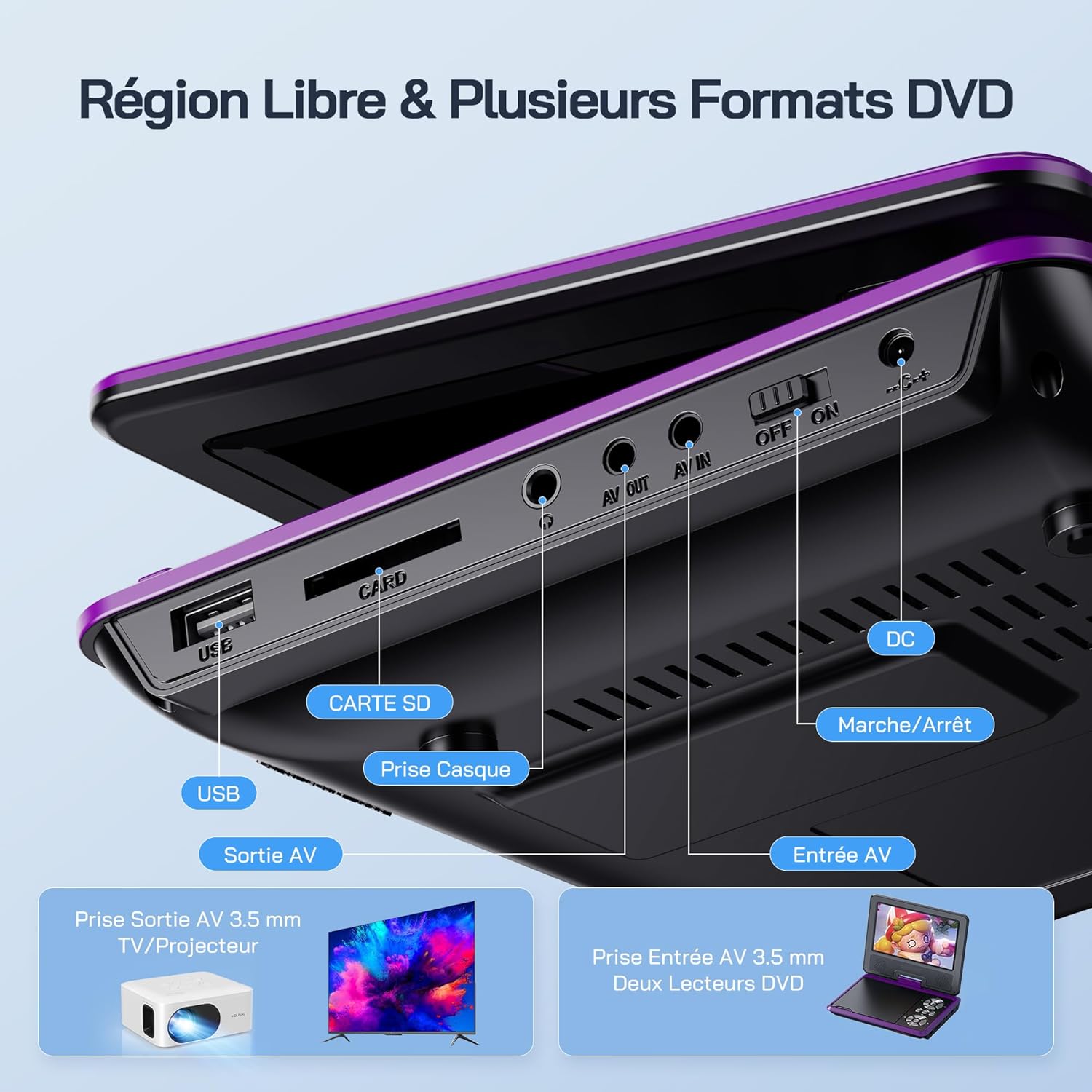
이미지: 상세 view of the side panel of the WOLFANG WDV01, highlighting the USB port, SD card slot, headphone jack, AV OUT, AV IN, DC power input, and ON/OFF switch.
- USB 포트: USB 플래시 드라이브 연결용입니다.
- SD 카드 슬롯: For inserting SD/MMC cards.
- 헤드폰 잭: 헤드폰용 3.5mm 오디오 출력 단자.
- AV 출력 : Audio/Video output for connecting to a TV or projector.
- AV 입력 : Audio/Video input for connecting external devices or another DVD player.
- DC 입력 : AC 어댑터 또는 차량 충전기를 위한 전원 입력입니다.
- 온 / 오프 스위치: 장치의 전원 제어.
4. 설정
4.1 초기 충전
Before first use, fully charge the device. Connect the AC charger to the DC IN port on the player and plug it into a wall outlet. The charging indicator light will illuminate. Once fully charged, the light may change color or turn off, depending on the model.
4.2 전원 켜기/끄기
To power on the device, slide the ON/OFF switch to the "ON" position. To power off, slide it to the "OFF" position.
4.3 화면 조정
The screen can be rotated 270 degrees horizontally and flipped 180 degrees vertically. Adjust the screen to your preferred viewing angle. This feature is particularly useful for mounting in a car or for shared view주고받음.

Image: Illustration demonstrating the 270-degree rotation and 180-degree flip capabilities of the WOLFANG WDV01 screen.
5. 사용 설명서
5.1 DVD/CD 재생
- 디스크 덮개를 조심스럽게 여세요.
- Place a compatible DVD or CD onto the spindle, label side up.
- 디스크 커버를 닫습니다.
- The player will automatically detect and begin playback. If not, select "Disc" from the main menu.
메모: This device supports DVD, SVCD, VCD, CD-R/RW discs. It is not compatible with 1080p, 4K, or Blu-ray discs.
5.2 Playing from USB/SD Card
- USB 플래시 드라이브를 USB 포트에 삽입하거나 SD 카드를 SD 카드 슬롯에 삽입합니다.
- From the main menu, select "USB" or "SD" depending on your media source.
- 폴더들을 탐색하고 files using the control buttons or remote control.
- 원하는 것을 선택하세요 file (JPEG, WMA, MPG, MP3, DIVX, VOB, AVI) to begin playback.
메모: Maximum supported Micro SD card capacity is 32GB. Video files should have a resolution up to 720x480. Image files should have a resolution up to 2650x1440.
5.3 Breakpoint Memory Function
The player automatically remembers the last playback position. When you power on the device again or re-insert the same disc/media, it will prompt you to resume playback from where you left off. This function may need to be activated in the system settings.

Image: Visual representation of the breakpoint memory feature, illustrating how the player can pause and resume video playback from the exact point of interruption.
5.4 Connecting to an External Display (TV/Projector)
Use the provided 3-in-1 AV cable to connect the player to a TV or projector.
- AV 케이블의 한쪽 끝을 DVD 플레이어의 AV OUT 포트에 연결하십시오.
- Connect the other end of the AV cable to the corresponding AV input ports (Yellow for Video, Red for Right Audio, White for Left Audio) on your TV or projector.
- TV 또는 프로젝터에서 올바른 AV 입력 소스를 선택하십시오.
- The player's screen content will now be displayed on the external screen.

Image: A WOLFANG WDV01 Portable DVD Player connected to a large television screen, displaying content for a family watching together, demonstrating the TV sync feature.
5.5 Connecting to Another DVD Player (AV IN)
The AV IN port allows you to connect another compatible device, such as a second DVD player, to display its content on the WOLFANG WDV01 screen.
- Connect one end of an AV cable to the AV OUT port of the external device.
- Connect the other end of the AV cable to the AV IN port on the WOLFANG WDV01.
- Switch the WOLFANG WDV01 to AV input mode (refer to the on-screen menu or remote control for this option).
6. 유지관리
6.1 장치 청소
- 청소하기 전에 장치의 전원이 꺼져 있고 플러그가 뽑혀 있는지 확인하십시오.
- Use a soft, dry cloth to wipe the exterior of the player.
- 화면을 닦을 때는 전자 기기 화면 전용으로 제작된 부드럽고 보풀 없는 천을 사용하십시오. 연마성 세척제나 용제를 사용하지 마십시오.
- To clean the disc lens, use a specialized DVD lens cleaning disc. Do not attempt to clean the lens manually.
6.2 배터리 관리
- 기기를 극한의 온도(더위나 추위)에 노출시키지 마세요.
- If storing the device for an extended period, charge the battery to approximately 50% to prolong its lifespan.
- 내부 배터리를 직접 교체하지 마십시오. 배터리에 문제가 발생하면 고객 지원 센터에 문의하십시오.
6.3 보관
Store the player in a cool, dry place away from direct sunlight and moisture. Keep it in its original packaging or a protective case when not in use to prevent damage.
7. 문제 해결
| 문제 | 가능한 원인 | 해결책 |
|---|---|---|
| 전원이 없습니다 | Battery drained, power adapter not connected, power switch off. | Charge the battery, ensure power adapter is securely connected, slide power switch to ON. |
| 디스크가 재생되지 않음 | Incompatible disc format, disc dirty/scratched, disc inserted incorrectly. | Check disc compatibility (no Blu-ray/4K), clean disc, insert disc label side up. |
| 소리가 나지 않습니다 | Volume too low, headphones connected, audio settings incorrect. | Increase volume, disconnect headphones, check audio output settings. |
| TV에 영상이 나오지 않아요 | AV cable loose, incorrect TV input selected. | Ensure AV cable is securely connected, select correct AV input on TV. |
| USB/SD 카드가 인식되지 않습니다 | Incompatible format, card/drive damaged, incorrect file 체계. | Ensure media is formatted to FAT32, check for damage, try another USB/SD card. Max 32GB SD card. |
If the problem persists after trying these solutions, please contact WOLFANG customer support.
8. 사양
| 특징 | 세부 사항 |
|---|---|
| 상표 | 볼팡 |
| 모델 | WDV01 |
| 화면 크기 | 7.5인치 |
| 단위 크기 | 9.5 인치(대각선) |
| 화면 해상도 | 최대 800 x 480픽셀 |
| 디스크 호환성 | DVD, SVCD, VCD, CD-R/RW |
| File 형식 지원 | Video: AVI, MPG, MP3, DIVX, VOB; Audio: WMA, MP3; Image: JPEG |
| USB/SD 카드 지원 | Max 32GB (Micro SD) |
| Video Resolution (USB/SD) | 최대 720 x 480픽셀 |
| Image Resolution (USB/SD) | 최대 2650 x 1440픽셀 |
| 배터리 수명 | 4-6시간 |
| 품목 무게 | 1100그램 |
| 한국어: | 850067892205 |
9. 보증 및 지원
9.1 제조업체 보증
The WOLFANG WDV01 Portable DVD Player comes with a 24개월 제조사 보증 구매일로부터. 본 보증은 정상적인 사용 상태에서 발생하는 재료 및 제조상의 결함에 적용됩니다. 오용, 사고, 무단 개조 또는 정상적인 마모로 인한 손상에는 적용되지 않습니다.
보증 청구를 위해 구매 증명서를 보관하십시오.
9.2 고객 지원
For any questions, technical assistance, or warranty claims, please contact WOLFANG customer support. Our team is available to assist you and aims to respond within 24 hours.
Contact information can typically be found on the official WOLFANG web사이트나 구매 플랫폼을 통해서도 구매하실 수 있습니다.


