소개
This manual provides detailed instructions for the installation, operation, and maintenance of your Alpine ILX-W670-S 7-inch Double-DIN Digital Multimedia Receiver with Backup Bullet Camera. Please read this manual thoroughly before using the product to ensure proper operation and to prevent damage.
안전 정보
부상이나 장비 및 차량 손상을 방지하기 위해 항상 다음 안전 수칙을 준수하십시오.
- 운전에 방해가 되는 방식으로 기기를 작동하지 마십시오. 항상 도로 안전을 최우선으로 생각하세요.
- Ensure all wiring is correctly connected to prevent short circuits or electrical hazards. Incorrect wiring can cause fire or damage.
- 설치 단계에 대해 확신이 없다면 전문가에게 문의하세요.
- 긴급 차량 소리 등 외부 소리가 들릴 수 있는 수준으로 볼륨을 유지하세요.
- 제품을 분해하거나 개조하지 마십시오. 손상이 발생할 수 있으며 보증이 무효화될 수 있습니다.
패키지 내용
패키지에 모든 품목이 들어 있는지 확인하세요.
- Alpine ILX-W670-S Digital Multimedia Receiver
- BULCAMC-1 후방 불렛 카메라
- 배선 하네스 및 커넥터
- 장착 하드웨어
- 사용 설명서 (본 문서)

그림 1: Alpine ILX-W670-S Digital Multimedia Receiver with included Backup Bullet Camera. The image displays the 7-inch touchscreen receiver unit, the compact bullet-style backup camera, and a small key fob accessory.
설정
수신기 설치
The ILX-W670-S is designed for standard double-DIN vehicle openings. Its shallow-mount chassis is beneficial for vehicles with limited dash space. Professional installation is recommended for optimal performance and safety.
- 준비: 전기 작업을 시작하기 전에 차량 배터리의 음극 단자를 분리하십시오.
- 설치: Secure the receiver into the double-DIN opening using the provided mounting hardware. Ensure it is firmly seated.
- 배선 연결:
- Connect the main power harness (constant 12V, accessory 12V, ground).
- 차량의 스피커 시스템에 스피커 선을 연결하세요.
- Connect the backup camera input cable.
- Connect the USB and AUX input cables as needed.
- For steering wheel control integration, connect the SWC adapter via the 3.5mm mini jack.
- 외부를 사용하는 경우 amplifiers, connect the 4V pre-outs (front, rear, subwoofer).
- 테스트: 대시보드를 완전히 다시 조립하기 전에 배터리를 다시 연결하고 기본 기능 테스트를 수행합니다.
백업 카메라 설치
The BULCAMC-1 bullet camera provides a wide-angle view for enhanced safety when reversing.

그림 2: 클로즈업 view of the BULCAMC-1 Backup Bullet Camera. This image highlights the compact design and mounting bracket of the camera, which is designed for discreet installation.
- 장착 위치: Choose a central location at the rear of the vehicle, typically near the license plate, that offers a clear, unobstructed view.
- 안전한 장착: Drill necessary holes (if required) and securely mount the camera using the provided hardware. Ensure the camera is aimed correctly.
- 배선:
- Connect the camera's power wire to the vehicle's reverse light circuit (12V) so it activates when the vehicle is in reverse.
- Run the video signal cable from the camera to the camera input on the ILX-W670-S receiver.
- 방수: Ensure all connections are properly sealed, as the camera is IP67-68 waterproof rated.
작동 지침
전원 켜기/끄기
The unit will power on automatically when the vehicle's ignition is turned to the accessory or on position. To turn off the unit, turn off the vehicle's ignition.
터치스크린 인터페이스
The ILX-W670-S features a responsive 6.75-inch touchscreen display with 800 x 480 resolution. The home screen is customizable, allowing you to arrange icons and even upload your own background image. The key illumination can be set to one of five colors (red, green, blue, amber, white).
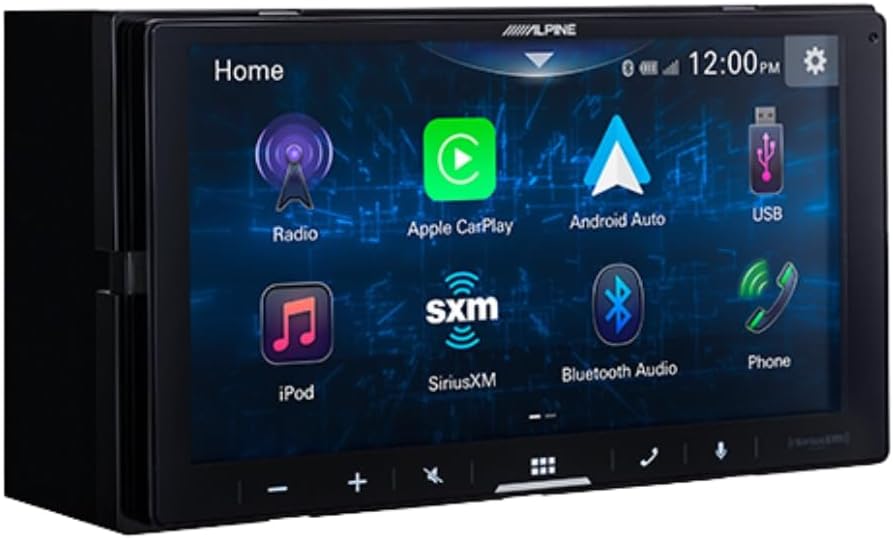
그림 3: Alpine ILX-W670-S home screen displaying various application icons. This image shows the customizable interface with options for Radio, Apple CarPlay, Android Auto, USB, iPod, SiriusXM, Bluetooth Audio, and Phone.
오디오 기능
- 이퀄라이저 : Utilize the 13-band graphic EQ to fine-tune audio frequencies to your preference.
- 시간 수정: The 6-channel time correction feature allows for precise adjustment of sound delivery to each speaker, optimizing the sound stage.
- 크로스오버: Adjust front, rear, and subwoofer crossovers to manage frequency distribution to your speakers.
- 사운드 부스트 메뉴: Access dedicated controls for bass, mid-bass, and subwoofer output.
- 지원되는 오디오 형식: The unit supports AAC, FLAC, MP3, and WMA audio playback.
연결성
- Apple CarPlay 및 Android Auto: Connect your compatible smartphone via USB for wired access to navigation, music, messaging, and other apps directly on the receiver's screen.

그림 4: Alpine ILX-W670-S display showing the Apple CarPlay interface. This image illustrates the integration of smartphone applications like Phone, Music, Maps, Messages, and Podcasts onto the receiver's screen.
- 블루투스: Pair your smartphone for hands-free calling and wireless audio streaming.
- SiriusXM 지원: The unit is compatible with SiriusXM satellite radio (requires a separate SiriusXM Connect Vehicle Tuner and subscription).
- 보조 입력: Connect external audio devices using the 3.5mm auxiliary input.
- USB 입력 : Use the USB port for media playback or smartphone connectivity.
- 스티어링 휠 제어(SWC): Integrate with your vehicle's factory steering wheel controls using a compatible adapter connected to the 3.5mm mini jack.
비디오 재생
The receiver supports various video formats including MP4, MKV, MOV, H.264, FLV, MPEG-4, and AVC. Video playback is typically restricted while the vehicle is in motion for safety reasons.
후방 카메라 작동
차량을 후진 기어로 바꾸면 디스플레이가 자동으로 카메라 화면으로 전환됩니다. view, providing a 155-degree wide-angle perspective. The camera has a low light sensitivity of 0.5 lux, ensuring visibility in various lighting conditions.
유지
- 화면 청소: 부드럽고 보풀이 없는 천을 사용하여 터치스크린을 부드럽게 닦으세요. 잘 지워지지 않는 얼룩은 가볍게 닦아주세요.amp천에 물이나 화면에 안전한 세척제를 묻혀 닦아주세요. 연마재나 강한 화학 물질은 사용하지 마세요.
- 일반 관리 : 본체에 먼지와 이물질이 들어가지 않도록 하십시오. 모든 연결부가 단단히 고정되어 있는지 확인하십시오.
- 카메라 청소: Periodically clean the camera lens with a soft cloth to ensure a clear view.
문제 해결
| 문제 | 가능한 원인 | 해결책 |
|---|---|---|
| 장치에 전원이 공급되지 않음 | 퓨즈가 끊어졌습니다. 배선이 잘못되었습니다. 전원 연결이 느슨합니다. | Check vehicle fuses and the unit's fuse. Verify power and ground connections. Ensure the ignition is on. |
| 사운드 출력이 없습니다 | Volume too low; mute activated; speaker wires disconnected; incorrect audio source selected. | Increase volume. Check if mute is active. Verify speaker wiring. Select the correct audio source. |
| Apple CarPlay/Android Auto가 연결되지 않습니다. | Faulty USB cable; phone not compatible; software issue; phone settings. | Use a high-quality, certified USB cable. Ensure your phone's OS is updated. Check phone settings for CarPlay/Android Auto permissions. Restart phone and receiver. |
| 백업 카메라가 표시되지 않음 | Camera power issue; video cable disconnected; vehicle not in reverse. | Ensure vehicle is in reverse. Check camera power connection (to reverse lights). Verify video cable connection to the receiver. |
| 터치스크린이 응답하지 않음 | 일시적인 소프트웨어 오류; 화면 손상. | 차량을 껐다가 다시 켜서 장치를 재시작하십시오. 문제가 지속되면 지원팀에 문의하십시오. |
명세서
Alpine ILX-W670-S Digital Multimedia Receiver
- 표시하다: 6.75-inch capacitive touchscreen (800 x 480 resolution)
- 주요 조명: 5-color customizable (red, green, blue, amber, white)
- Amp정수기: Built-in 16W RMS / 45W peak x 4 channels
- 오디오 처리 : 13-band graphic EQ, 6-channel time correction, Sound Boost menu, Front/Rear/Subwoofer crossovers
- 프리아웃: 3 pairs (Front, Rear, Subwoofer) at 4V
- 입력: 1x AUX (3.5mm), 1x USB, 1x Camera, SWC adapter via 3.5mm mini jack
- 연결성: Wired Apple CarPlay, Wired Android Auto, Bluetooth (hands-free calling & audio streaming), SiriusXM-ready
- 지원되는 오디오 형식: AAC, FLAC, MP3, WMA
- 지원되는 비디오 형식: MP4, MKV, MOV, H.264, FLV, MPEG-4, AVC
- 치수: 8.75 x 6 x 7인치(제품)
- 무게: 3.4파운드
BULCAMC-1 후방 불렛 카메라
- 감지기: CMOS
- 해결: 420줄
- 최소 조명: 0.5 럭스
- View 각도: 155도
- 방수 등급: IP67-68
- 작동 온도: -30~70℃(-22~158°F)
보증 정보
Alpine products are manufactured to high-quality standards. For specific warranty terms and conditions, please refer to the warranty card included with your product or visit the official Alpine web사이트. 보증 청구를 위해 구매 증빙 자료를 보관하세요.
지원하다
For further assistance, technical support, or to download the latest firmware updates, please visit the official Alpine web사이트에서 www.alpine-usa.com. You may also contact Alpine customer service directly for personalized support.


