소개
The Volkano Galena Series Wireless Keyboard is a compact, versatile input device designed for efficiency and portability. It offers multi-device connectivity and seamless switching, making it suitable for various operating systems including Windows, Android, and MacOS. This manual provides essential information for setting up, operating, maintaining, and troubleshooting your keyboard.
패키지 내용
- Volkano Galena Series Wireless Keyboard
- AAA 배터리 2개
- 사용 설명서
설정
1. 배터리 설치
The Volkano Galena Series Wireless Keyboard operates on two AAA batteries. These are included in the package.
- 키보드 아랫부분에서 배터리 덮개를 찾으세요.
- 덮개를 밀어 엽니다.
- AAA 배터리 두 개를 넣을 때, 극성(+와 - 단자)을 정확히 맞춰주세요.
- 배터리 덮개를 단단히 닫으세요.
2. 전원 켜기 / 끄기
Locate the power switch on the keyboard. Slide it to the 'ON' position to power on the keyboard. Slide it to the 'OFF' position when not in use to conserve battery life. The keyboard features an auto-power saving mode to further extend battery life during periods of inactivity.
3. 블루투스 페어링
The keyboard supports Bluetooth 5.0 for a stable wireless connection. It can be paired with up to two devices simultaneously.

Image: The Volkano Galena Series keyboard, illustrating its compact design and key features such as Bluetooth 5.0 + BT 3.0 connectivity, multi-device switching, anti-slip rubber feet, and compatibility with Windows and Android operating systems.
- 키보드의 전원이 켜져 있는지 확인하세요.
- On your device (Laptop, PC, Smart TV, Tablet), enable Bluetooth and search for available devices.
- 를 누르고 계세요 Fn + 1 key combination for the first device, or Fn + 2 for the second device, until the corresponding indicator light (usually above the '1' or '2' key) starts blinking, indicating pairing mode.
- Select "Volkano Galena" or a similar name from the list of available Bluetooth devices on your screen.
- 화면의 안내에 따라 페어링 과정을 완료하세요. 페어링이 완료되면 표시등이 깜빡임을 멈춥니다.
작동 지침
1. 다중 장치 전환
The keyboard allows for quick switching between two paired devices.

이미지: 자세한 view of the Volkano Galena Series keyboard, showcasing its compact form factor and features like Bluetooth device switching, non-slip feet, a dedicated Copilot shortcut key, scissor-structure keycaps, and auto-power saving mode.
- To switch to the first paired device, press Fn + 1.
- To switch to the second paired device, press Fn + 2.
2. 기능 키(Fn)
The keyboard includes multimedia and special function keys accessible by pressing the Fn key in combination with the corresponding F-keys or other designated keys.
- Fn+F1-F12: Access various multimedia controls and system functions (e.g., volume, playback, screen brightness). Refer to the icons on the F-keys for specific functions.
- FN + Q/W/E: Switch between operating system layouts (e.g., Android, Windows, iOS/MacOS).
- Copilot Shortcut Key: A dedicated key for quick access to AI assistant features on compatible operating systems.
3. 타이핑 경험
The keyboard features quiet keys with a scissor structure, providing a comfortable and responsive typing experience suitable for focused environments.
유지
1. 청소
- 청소하기 전에 키보드의 전원이 꺼져 있는지 확인하세요.
- 부드럽고 마른 보풀 없는 천으로 키보드 표면을 닦으십시오.
- 잘 지워지지 않는 더러움에는 가볍게 damp천에 물이나 순하고 연마성이 없는 세제를 묻혀 닦아주세요. 과도한 습기는 피하세요.
- 세척액을 키보드에 직접 뿌리지 마세요.
- 압축 공기를 사용하여 키 사이의 이물질을 제거하십시오.
2. 보관
- 키보드는 직사광선과 극한의 온도를 피해 시원하고 건조한 곳에 보관하세요.
- 장기간 보관할 경우 누액을 방지하기 위해 AAA 배터리를 제거하십시오.
문제 해결
- 키보드 전원이 켜지지 않음: Check if the batteries are correctly inserted and fully charged. Replace batteries if necessary. Ensure the power switch is in the 'ON' position.
- 키보드가 Bluetooth를 통해 연결되지 않음:
- 기기에서 Bluetooth가 활성화되어 있는지 확인하세요.
- Make sure the keyboard is in pairing mode (indicator light blinking).
- Delete previous pairings on your device and attempt to re-pair.
- Ensure the keyboard is within the 8-10 meter Bluetooth range of your device.
- 키보드와 기기를 다시 시작해 보세요.
- 키가 응답하지 않음: Check battery level. Ensure the keyboard is properly connected to your device. Clean any debris from around the keys.
- 입력 지연 또는 딜레이: Ensure there are no strong interferences (e.g., other wireless devices) nearby. Check battery level.
명세서
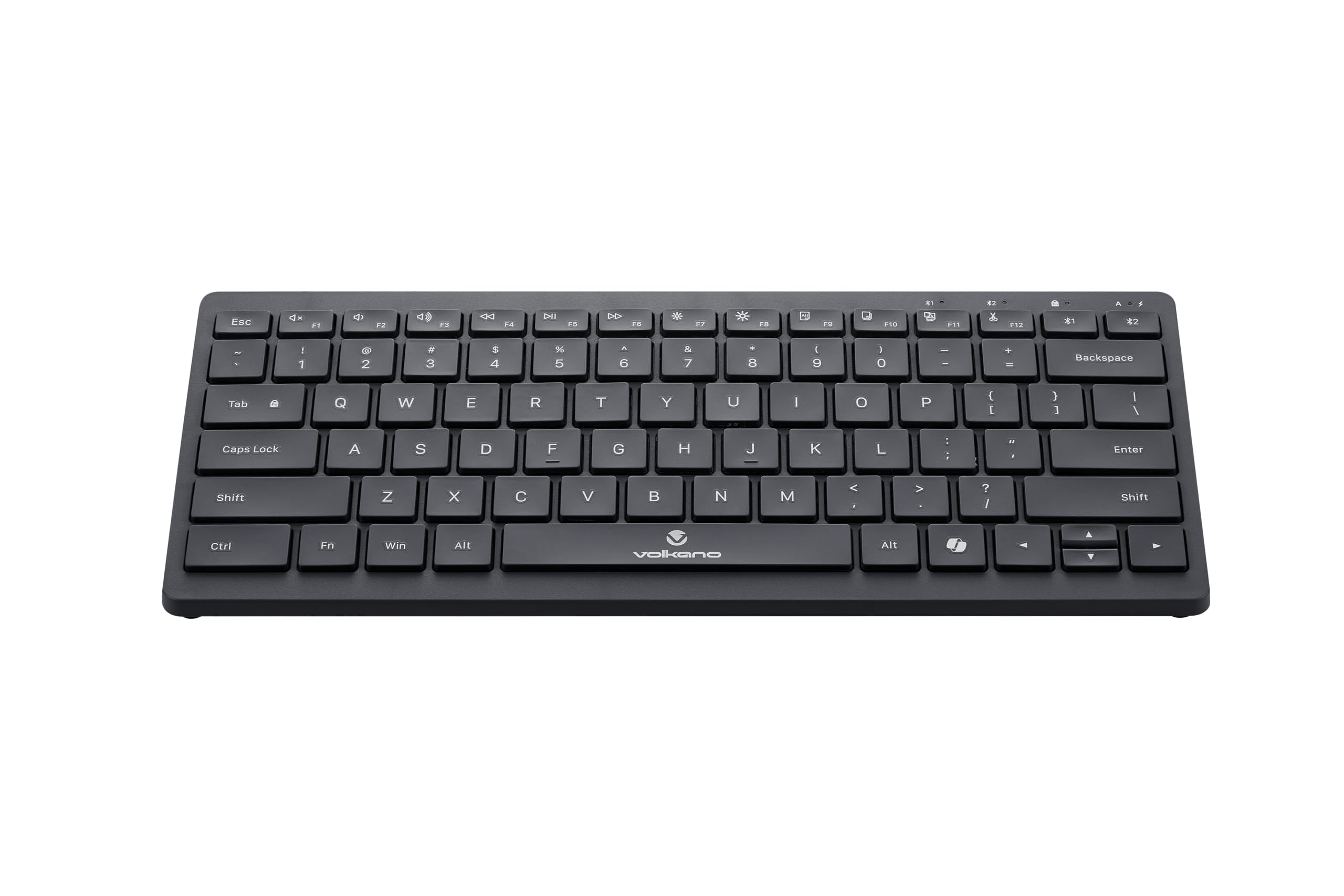
Image: A clear, angled view of the Volkano Galena Series Wireless Keyboard, highlighting its sleek black design and full key layout.
| 특징 | 세부 사항 |
|---|---|
| 모델 번호 | VK-20247-BK |
| 연결성 | 블루투스 무선 기술 |
| 블루투스 버전 | Bluetooth 5.0 + Bluetooth 5.0 (Dual Channel) |
| 무선 범위 | 8-10 미터 |
| 전원 | AAA 알카라인 배터리 2개(포함) |
| 키 유형 | Scissor Structure Keycaps |
| 특별 기능 | Quiet keys, Multi-device pairing, Instant switching, Anti-slip rubber base, Auto-power saving mode, Lightweight, Portable, Copilot Shortcut Key |
| 호환 장치 | Laptop, PC, Smart TV, Tablet (Windows, Android, MacOS) |
| 치수(길이 x 너비 x 높이) | 29.5L x 12.8W x 2.2H 센티미터 |
| 재료 | 플라스틱 |
| 색상 | 검은색 |
보증 및 지원
1. 제한 보증
This Volkano product is covered by a 12-Month Limited Coverage from the date of purchase. You can extend this coverage by an additional 12 months, for a total of 24 months, by registering your product with Volkano.
2. 고객 지원
For any questions, assistance, or support regarding your Volkano Galena Series Wireless Keyboard, please contact Volkano customer service through their official channels. Refer to the Volkano web연락처 정보는 해당 사이트나 제품 포장을 참조하세요.