소개
This manual provides instructions for the RENPHO MorphoScan Base Smart Body Composition Scale. This advanced scale utilizes eight-electrode dual-frequency and segmental Bioelectrical Impedance Analysis (BIA) technology to deliver comprehensive body composition data. It measures various metrics including body weight, body fat percentage, BMI, muscle mass, water ratio, and more, with high precision. The scale features a clear LED display and connects to the user-friendly RENPHO Health App for detailed health reports and progress tracking.
비디오: 오버view of the RENPHO MorphoScan Base Smart Body Fat Scale, highlighting its features and benefits for body composition analysis.
상자 안에 무엇이 들어있나요?
- RENPHO MorphoScan Base Smart Body Composition Scale
- 사용자 설명서
- AAA 배터리 4개
설정
1. 배터리 설치
Open the battery compartment on the underside of the scale. Insert the 4 AAA batteries, ensuring correct polarity. Close the compartment.
2. Download and Install the RENPHO Health App
검색 "RENPHO Health" in your device's app store (Apple App Store or Google Play Store) and install the application.
Video: Step-by-step guide on how to download and install the Renpho Health App, register an account, and connect the scale via Bluetooth.
3. 회원가입 및 로그인
Open the RENPHO Health App. Register for a new account or log in if you already have one.
4. Connect the Scale via Bluetooth
Ensure Bluetooth is enabled on your smartphone. In the RENPHO Health App, follow the prompts to add a new device and connect to your MorphoScan Base scale.
작동 지침
1. 배치
저울을 단단하고 평평한 표면에 놓으십시오. 정확한 측정을 위해 카펫이나 고르지 않은 바닥은 피하십시오.
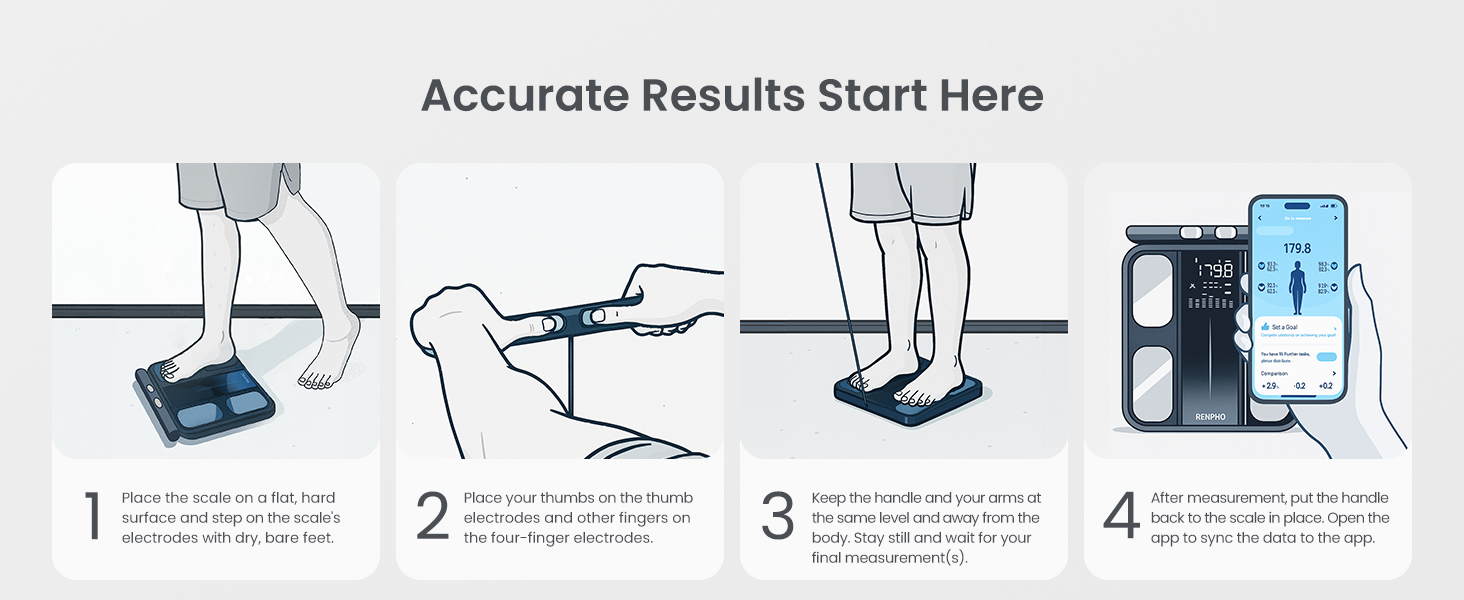
Image: A person placing the RENPHO scale on a flat, hard surface, emphasizing proper placement for accurate measurements.
2. 측정하기
Step onto the scale with bare, dry feet, ensuring your feet are positioned on the electrode pads.
Grasp the handle and pull it up, keeping your arms straight and held at a 30-45 degree angle away from your body. Ensure continuous contact with all eight electrode pads (four on the scale platform, four on the handle).

Image: A person standing on the RENPHO scale, holding the retractable handle with both hands, demonstrating the correct body position for a full body composition analysis.
Hold this position until the measurement is complete and the report is generated in the app.
After measurement, return the handle to its resting position and step off the scale.

Image: A visual guide illustrating the four steps for accurate measurement: placing the scale, placing thumbs on electrodes, keeping arms straight, and viewing results on the app.
데이터 이해
The RENPHO Health App provides a detailed body composition analysis report. This report includes metrics such as:
- 무게
- BMI(신체질량지수)
- 체지방률tage
- 골격근 백분율tage
- 내장지방지수
- 체수분율tage
- 뼈 질량
- 단백질 비율tage
- BMR(기저대사율)
- 대사 연령
- Segmental Fat Analysis (Left Arm, Right Arm, Trunk, Left Leg, Right Leg)
- Muscle Balance
The app also displays a seven-day weight trend and allows for tracking progress over time. You can generate and print comprehensive health reports for personal use or to share with fitness professionals.

Image: A smartphone screen showing the RENPHO Health App interface with detailed body composition analysis, including segmental fat and muscle data, and a comprehensive health report.

Image: An infographic listing over 15 body metrics measured by the RENPHO scale, such as Weight, BMI, Body Fat, and Muscle Mass, indicating the depth of analysis available through the app.
유지
청소
스케일을 제거하려면 부드러운 천을 사용하십시오.amp cloth. Avoid abrasive cleaners or harsh chemicals. Ensure the scale is dry before storage or next use.
Video: A user demonstrating how to clean the scale by spraying it and wiping it down with a cloth.
배터리 교체
The scale operates on 4 AAA batteries. When the battery indicator appears on the display, replace all four batteries with new ones.
명세서
| 특징 | 세부 사항 |
|---|---|
| 상표 | 렌포 |
| 모델 | MorphoScan Base |
| 중량 제한 | 180 Kilograms / 400 lbs |
| 디스플레이 유형 | 주도의 |
| 전극 | 8 (Dual-frequency BIA) |
| 전원 | 4 AAA 배터리(포함) |
| 배터리 수명 | 최대 130일 |
| 연결성 | 블루투스 |
| 앱 호환성 | RENPHO Health App, Apple Health, MyFitnessPal, Samsung Health |
문제 해결
부정확한 판독
- 저울을 단단하고 평평한 표면에 놓으세요.
- Make sure your feet are bare and dry, and in full contact with all electrode pads.
- Hold the handle correctly, ensuring continuous contact with all handle electrodes.
- Avoid taking measurements immediately after intense exercise, showering, or consuming large amounts of food/drink, as these can affect hydration levels and readings.
- 배터리 잔량을 확인하고 필요한 경우 교체하십시오.
앱 연결 문제
- 스마트폰에서 Bluetooth가 활성화되어 있는지 확인하세요.
- Restart the RENPHO Health App.
- Try re-pairing the scale with the app.
- 스마트폰의 운영체제가 최신 상태인지 확인하세요.
저울이 켜지지 않음
- 배터리가 올바르게 설치되었는지 확인하세요.
- 배터리를 새 것으로 교체하세요.
보증 및 지원
보증 정보 및 고객 지원에 대해서는 RENPHO 공식 웹사이트를 참조하십시오. web사이트에서 확인하거나 고객 서비스에 직접 문의하세요. 구매 증빙 자료로 구매 영수증을 보관하세요.
메모: The data results from this device are intended solely for athletic fitness and health monitoring purposes and are not a substitute for medical equipment. For any decisions regarding diagnosis and treatment, please consult a qualified medical professional.


