1. 서론
Thank you for choosing the Oakcastle IR200 Internet Radio. This manual provides essential information for the safe and efficient operation of your device. Please read it thoroughly before use and retain it for future reference.
The Oakcastle IR200 is a versatile audio system offering multiple listening options, including Internet Radio, DAB+, FM, Bluetooth 5.3, and AUX input. It features a color display, remote control, and podcast support for a comprehensive audio experience.
2. 패키지 내용
상자를 조심스럽게 개봉하여 아래 나열된 모든 품목이 있는지, 그리고 양호한 상태인지 확인하십시오.
- Oakcastle IR200 Internet Radio Unit
- 전원 케이블
- 원격 제어
- 사용 설명서 (본 문서)
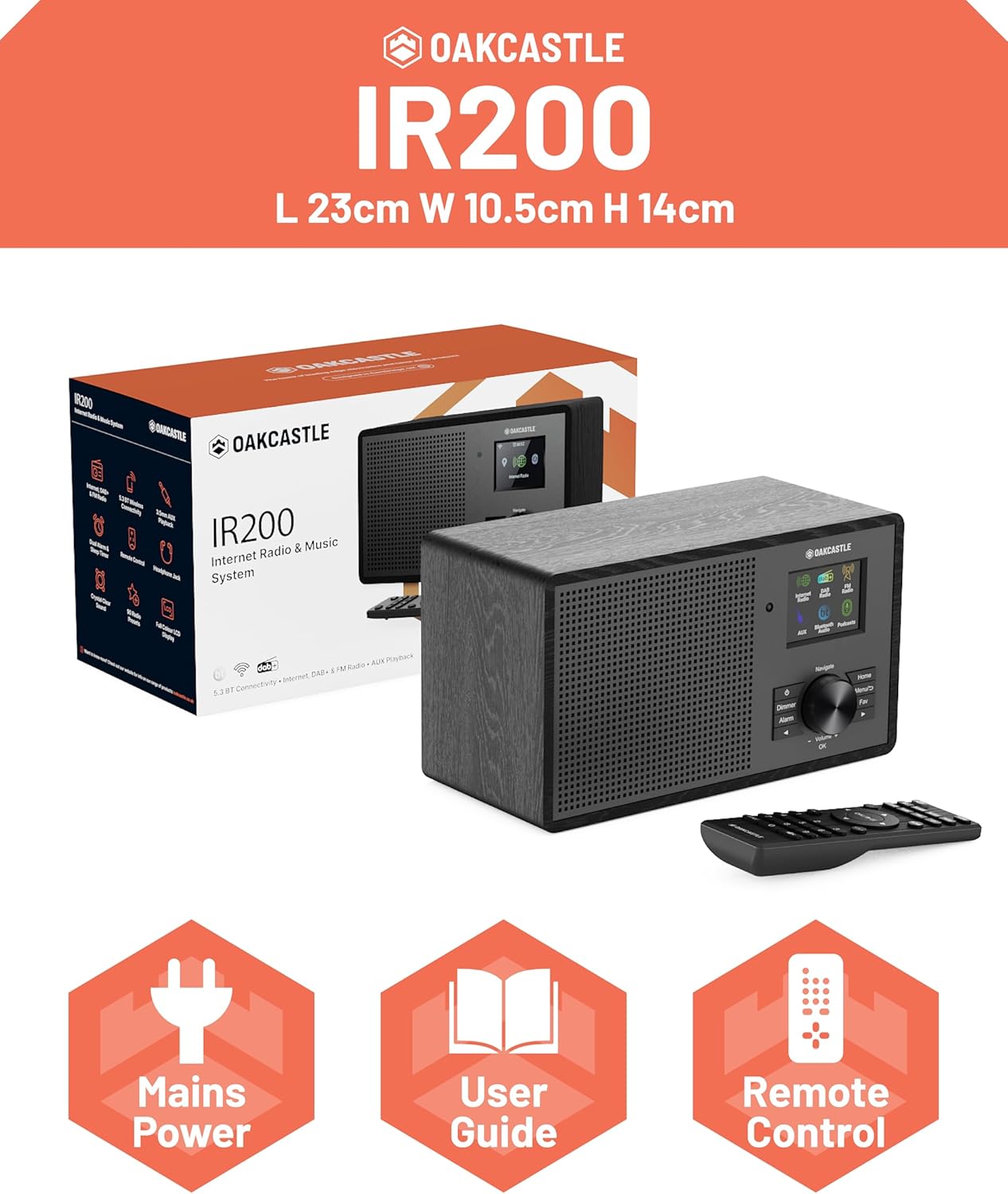
Image 2.1: Contents of the Oakcastle IR200 package, including the radio unit, its box, power cable, remote control, and user manual.
3. 제품 오버view
Familiarize yourself with the main components and controls of your Oakcastle IR200 radio.
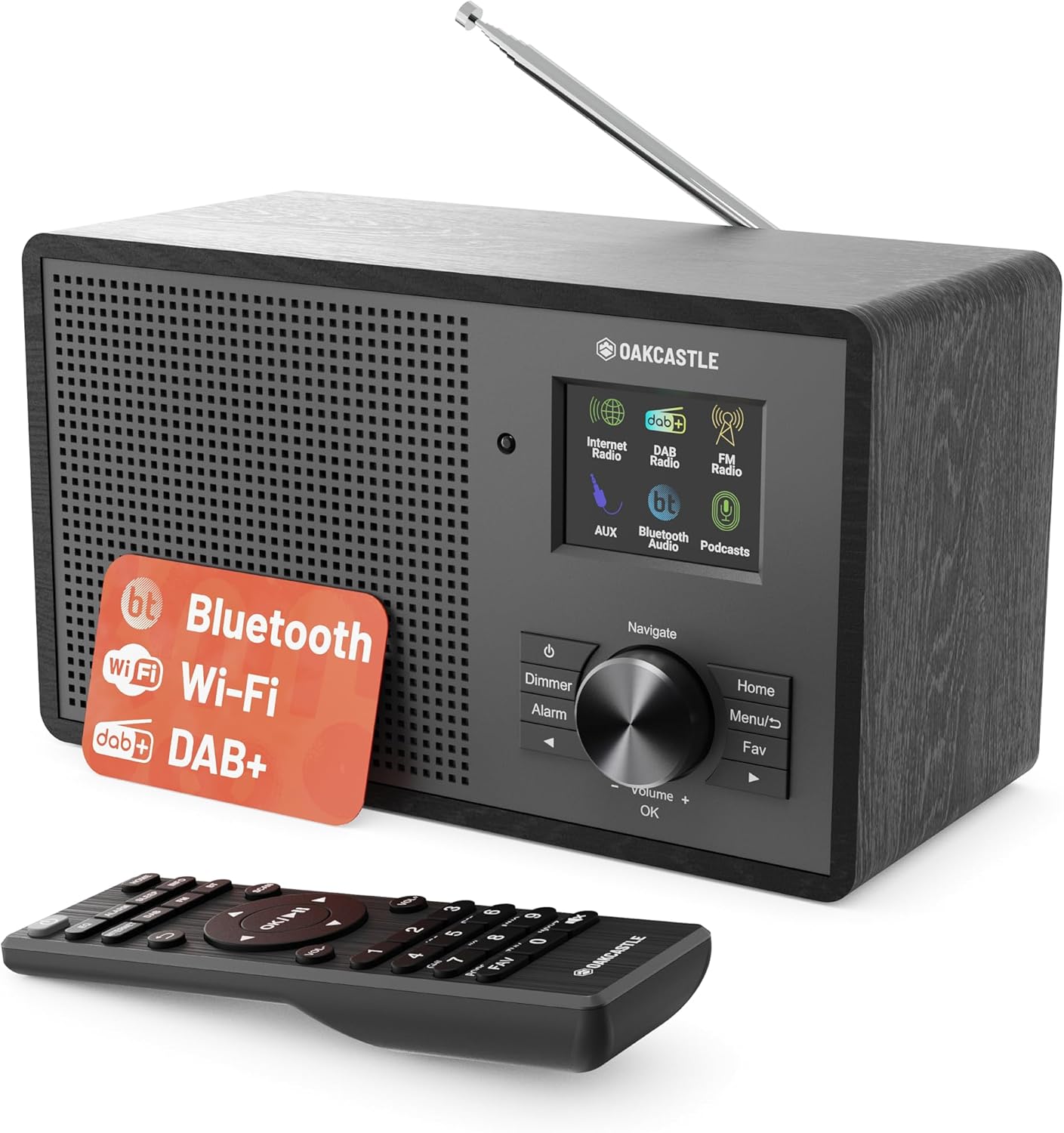
이미지 3.1: 앞면 view of the Oakcastle IR200 radio, showcasing the display, control knob, buttons, and the included remote control.
3.1 전면 패널 컨트롤
- 디스플레이 화면: 역 정보, 시간, 메뉴 옵션을 표시합니다.
- Navigate/Volume/OK Knob: Rotate to navigate menus or adjust volume; press to confirm selections.
- 전원 버튼: 장치를 켜거나 끄거나 대기 모드로 전환합니다.
- 디머 버튼: 디스플레이 밝기를 조정합니다.
- 알람 버튼: 알람 설정에 접근합니다.
- 홈 버튼: 메인 메뉴로 돌아갑니다.
- 메뉴 버튼: Accesses mode-specific menus.
- 즐겨찾기 버튼: Accesses favorite station presets.
3.2 후면 패널 연결

이미지 3.2: 후면 view of the Oakcastle IR200, highlighting the headphone output and AUX input ports.
- 텔레스코픽 안테나: DAB+ 및 FM 수신용입니다.
- 보조 입력: 외부 오디오 장치를 연결합니다.
- 헤드폰 출력: 개인 청취를 위해 헤드폰을 연결하십시오.
- DC 입력 : 전원 어댑터 연결.
4. 초기 설정
4.1 전원 연결
- Insert the power cable into the DC IN port on the rear of the radio.
- 전원 케이블의 다른 쪽 끝을 벽면 콘센트에 꽂으세요.
- 전면 패널 또는 리모컨의 전원 버튼을 눌러 라디오를 켜세요.
4.2 안테나 조정
For optimal DAB+ and FM reception, fully extend the telescopic antenna located at the rear of the unit.
4.3 Network Connection (for Internet Radio)
- Upon first power-on, the radio will guide you through the network setup.
- 메뉴에서 "네트워크 마법사" 또는 "Wi-Fi 설정"을 선택하세요.
- 라디오가 사용 가능한 Wi-Fi 네트워크를 검색합니다. 목록에서 네트워크를 선택하세요.
- Enter your Wi-Fi password using the navigation knob and OK button.
- 연결이 완료되면 라디오에 확인 메시지가 표시됩니다.
5. 작동 모드
The Oakcastle IR200 offers several listening modes. Press the "Home" button to access the main menu and select your desired mode.
5.1 인터넷 라디오
Access thousands of global radio stations via your Wi-Fi connection.

Image 5.1: The radio's display screen in Internet Radio mode, showing station information.
- 메인 메뉴에서 "인터넷 라디오"를 선택하세요.
- You can browse stations by location, genre, or search by name.
- Rotate the Navigate knob to scroll through options and press OK to select.
- To save a station as a favorite, press the "Fav" button during playback.
5.2 DAB+ 라디오
고품질 디지털 라디오 방송을 즐겨보세요.

Image 5.2: The radio's display screen in DAB+ Radio mode, showing the current station.
- 메인 메뉴에서 "DAB+ 라디오"를 선택하세요.
- 라디오는 자동으로 사용 가능한 DAB+ 방송국을 검색합니다.
- Use the Navigate knob to select a station from the list.
- To save a station as a favorite, press the "Fav" button during playback.
5.3 FM 라디오
기존 아날로그 FM 방송에 맞춰 청취하세요.
- 메인 메뉴에서 "FM 라디오"를 선택하세요.
- To auto-scan for stations, press and hold the OK button or use the scan function via the menu.
- To manually tune, rotate the Navigate knob.
- To save a station as a favorite, press the "Fav" button during playback.
5.4 블루투스 연결
블루투스 지원 기기에서 무선으로 오디오를 스트리밍하세요.

Image 5.3: The radio's display screen in Bluetooth mode, indicating readiness for pairing.
- From the main menu, select "Bluetooth". The radio will enter pairing mode.
- On your external device (e.g., smartphone), enable Bluetooth and search for "Oakcastle IR200".
- Select "Oakcastle IR200" to pair. Once connected, you can stream audio.
5.5 AUX 입력
3.5mm 오디오 케이블을 사용하여 외부 오디오 소스를 연결합니다.
- Connect one end of a 3.5mm audio cable to the AUX IN port on the rear of the radio.
- 다른 쪽 끝을 외부 장치의 헤드폰 잭이나 오디오 출력에 연결합니다.
- From the main menu, select "AUX".
- 외부 장치에서 재생을 제어합니다.
5.6 팟캐스트
Browse and listen to a wide range of podcasts.
- From the main menu, select "Podcasts".
- Browse podcasts by category or search for specific titles.
- Select a podcast to start listening.
6. 설정 및 기능
6.1 시스템 설정
Access general system settings via the main menu to configure time, language, display, and more.
- 일시: Set time format, synchronize time.
- 언어: Select your preferred language for the menu.
- 표시하다: Adjust backlight, color scheme.
- 회로망: 와이파이 설정을 다시 구성하세요.
- 소프트웨어 업데이트: Check for and install firmware updates.
6.2 이퀄라이저(EQ)
Customize the audio output to your preference using the equalizer settings, accessible via the remote control or system menu.
6.3 프리셋
The radio supports over 90 presets for your favorite Internet, DAB+, and FM stations. To recall a preset, press the "Fav" button and select from the list.
6.4 알람
Set alarms to wake up to your favorite radio station or a buzzer sound. Access alarm settings via the "Alarm" button on the front panel or remote.
7. 원격 제어
함께 제공되는 리모컨을 사용하면 멀리서도 모든 라디오 기능을 편리하게 조작할 수 있습니다.
Ensure batteries are correctly inserted. Point the remote control towards the front of the radio for optimal response.
7.1 리모콘 기능
- 힘: On/Off/Standby.
- 볼륨 +/- : 볼륨 레벨을 조정합니다.
- 탐색 버튼(위/아래/왼쪽/오른쪽): 메뉴를 탐색합니다.
- OK : 선택을 확인합니다.
- Mode Buttons (Internet, DAB, FM, Bluetooth, AUX): 모드 간을 전환합니다.
- 사전 설정 버튼(1-90개 이상): Directly select saved favorite stations.
- EQ : 이퀄라이저 설정에 액세스합니다.
- 메뉴: Access mode-specific menus.
- 즐겨찾기: Access favorite station list.
8. 유지관리
8.1 청소
To clean the radio, use a soft, dry cloth. Do not use abrasive cleaners, waxes, or solvents as these may damage the finish.
8.2 일반 관리
- 본 제품을 직사광선, 열원, 습기로부터 멀리 보관하세요.
- 기기를 떨어뜨리거나 강한 충격을 주지 마십시오.
- 장치 주변의 적절한 환기를 확인하십시오.
9. 문제 해결
| 문제 | 가능한 원인 | 해결책 |
|---|---|---|
| 전원이 없습니다 | 전원 케이블이 연결되지 않았습니다. 벽면 콘센트가 작동하지 않습니다. | Check power cable connection; try a different wall socket. |
| 소리가 나지 않습니다 | 볼륨이 너무 낮습니다. 음소거가 활성화되었습니다. 잘못된 소스가 선택되었습니다. | Increase volume; Check mute status; Select correct input mode. |
| 인터넷 라디오가 연결되지 않습니다 | Incorrect Wi-Fi password; Weak Wi-Fi signal; Router issue. | Re-enter Wi-Fi password; Move radio closer to router; Restart router. |
| DAB+/FM 수신 불량 | Antenna not extended; Poor signal area. | Fully extend antenna; Reposition radio for better signal. |
| 블루투스가 페어링되지 않습니다 | Radio not in pairing mode; Device too far; Device already paired. | Ensure radio is in Bluetooth mode; Move device closer; Unpair from other devices. |
10. 사양
| 특징 | 세부 사항 |
|---|---|
| 상표 | 오크캐슬 |
| 모델 | IR200 |
| 색상 | 검은색 |
| 연결 기술 | Wi-Fi, Bluetooth 5.3, AUX |
| 튜닝 기술 | 인터넷 라디오, DAB+, FM |
| 특별 기능 | Bluetooth, EQ, Podcasts, Internet Radio, Remote Control |
| 전원 | Electric Cable (Mains) |
| 제품 크기(높이 x 너비 x 깊이) | 14cm x 10.5cm x 23cm (대략) |
| 제품 무게 | 0.94kg |
| 호환 장치 | MP3 플레이어, 스마트폰, 태블릿 |
11. 보증 및 지원
11.1 보증 정보
The Oakcastle IR200 comes with a standard warranty. An extended 3-year warranty is available upon product registration on the manufacturer's website. Please refer to the warranty card included in your package or visit the official Oakcastle web자세한 내용은 사이트.
11.2 고객 지원
For technical assistance, troubleshooting, or further inquiries, please contact Oakcastle customer support. Contact details can typically be found on the official Oakcastle web사이트나 보증 카드에 적혀 있습니다.


