1. 서론
Thank you for choosing the Darmoshark M5PRO Mini Wireless Gaming Mouse. This manual provides detailed instructions for setting up, operating, and maintaining your new gaming mouse. The M5PRO features a tri-mode connection (2.4G wireless, Bluetooth, wired), a high-precision PAW3950 optical sensor, and a lightweight design for optimal performance.
2. 제품 오버view
The Darmoshark M5PRO is designed for competitive gaming, offering versatile connectivity and advanced sensor technology. Its ergonomic shape is ideal for finger grip players, providing responsive control and comfort during extended use.

Image: Darmoshark M5PRO Mini Wireless Gaming Mouse in various colors, highlighting its design.
주요 특징:
- 3중 모드 연결: Seamlessly switch between 2.4G wireless, Bluetooth 5.0, and wired USB connections.
- PAW3950 광학 센서: Provides up to 30000 DPI, 750 IPS tracking speed, and 50G acceleration for precise and responsive tracking.
- 8KHz 폴링 속도: Experience ultra-low latency with an 8KHz polling rate in 2.4G wireless mode, ensuring rapid response times.
- 초경량 디자인: Weighing approximately 38 grams, the mouse reduces hand fatigue during long gaming sessions.
- 5개의 프로그래밍 가능 버튼: Customize button functions via the dedicated software.
- 내장형 리튬 배터리: High-capacity rechargeable battery for extended wireless usage.
- 폭넓은 호환성: Compatible with Windows and Apple Mac operating systems.
3. 패키지 내용
다음 품목이 패키지에 포함되어 있는지 확인하세요.
- Darmoshark M5PRO Mini Wireless Gaming Mouse
- 2.4G 무선 수신기(USB 동글)
- USB-C-USB-A 케이블 (충전 및 유선 연결용)
- 사용 설명서 (본 문서)
- Grip Tape (optional accessory, if included)
4. 설정 및 연결
4.1. 유선 모드
- 제공된 케이블의 USB-C 단자를 마우스에 연결하십시오.
- 케이블의 USB-A 끝을 컴퓨터의 사용 가능한 USB 포트에 연결합니다.
- 마우스가 자동으로 유선 모드로 전환되고 충전이 시작됩니다.
4.2. 2.4G Wireless Mode (with 8KHz Receiver)
- 패키지에서 2.4G 무선 수신기(USB 동글)를 찾으세요.
- 2.4G 무선 수신기를 컴퓨터의 사용 가능한 USB 포트에 꽂습니다.
- On the bottom of the mouse, locate the tri-mode switching key. Switch it to the 2.4G wireless icon (usually indicated by a small antenna or 'G' symbol).
- The mouse should automatically connect. If not, press and hold the pairing button (if available, refer to the diagram) on the mouse until the indicator light flashes, then release.

Image: M5PRO mouse with its 8KHz wireless receiver for 2.4G connectivity.
4.3. 블루투스 모드
- On the bottom of the mouse, switch the tri-mode switching key to the Bluetooth icon.
- The mouse's indicator light will start flashing, indicating it is in pairing mode.
- 컴퓨터나 기기에서 Bluetooth 설정을 엽니다.
- 검색 new devices and select "Darmoshark M5PRO" from the list.
- 화면의 지시에 따라 페어링 과정을 완료하세요.
5. 마우스 작동
5.1. 버튼 기능
The M5PRO mouse features 5 programmable buttons and a scroll wheel.
- 좌 클릭: 표준 기본 클릭.
- 마우스 오른쪽 버튼으로 클릭: 표준 보조 클릭.
- Track Roller Key (Scroll Wheel): 스크롤 기능을 하며, 마우스 가운데 버튼처럼 작동합니다.
- DPI 조정 키: 사전 설정된 DPI 레벨을 순환합니다.
- 앞으로 버튼: Default function for navigating forward in web 브라우저 또는 file 탐험가.
- 백스페이스 버튼: Default function for navigating backward in web 브라우저 또는 file 탐험가.

이미지: 폭발 view of the M5PRO mouse showing internal components and button layout.
5.2. DPI 조정
Press the DPI Adjustment Key (located on the underside of the mouse, refer to the product diagram) to cycle through different DPI sensitivity levels. The default DPI settings can be customized using the Darmoshark software.
5.3. 마우스 충전
When the battery is low, the mouse's indicator light will typically flash red. Connect the mouse to your computer using the provided USB-C cable to charge it. The indicator light will show charging status and turn off or change color when fully charged.
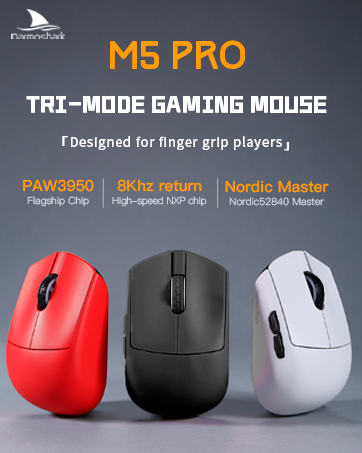
Image: Darmoshark M5PRO mouse charging via USB-C cable, highlighting its built-in lithium battery.
6. 소프트웨어 맞춤 설정
To unlock the full potential of your Darmoshark M5PRO mouse, download and install the official Darmoshark driver software from the manufacturer's web사이트. 이 소프트웨어를 사용하면 다음을 수행할 수 있습니다.
- Customize DPI settings and create multiple profiles.
- 프로그램 버튼 기능 및 매크로.
- 투표율을 조정하세요.
- 전원 설정과 배터리 수명을 관리하세요.
- 펌웨어를 업데이트합니다.

Image: Darmoshark proprietary driver software interface for mouse customization.
7. 사양
| 모델 | 엠포프로 |
| 감지기 | PAW3950 광 센서 |
| 디피에이 | 최대 30000 DPI |
| 추적 속도 | 750 IPS |
| 가속 | 50G |
| 폴링 속도 | 8KHz (2.4G Wireless), 1KHz (Wired/Bluetooth) |
| 연결성 | 2.4G 무선, 블루투스 5.0, USB-C 유선 |
| 버튼 | 5개의 프로그래밍 가능한 버튼 |
| 무게 | 약 38g |
| 치수(길이 x 너비 x 높이) | 91.7mm x 57.4mm x 35.7mm |
| 배터리 | 내장 리튬 배터리 (300mAh) |
| 호환성 | 윈도우, 애플 맥 |
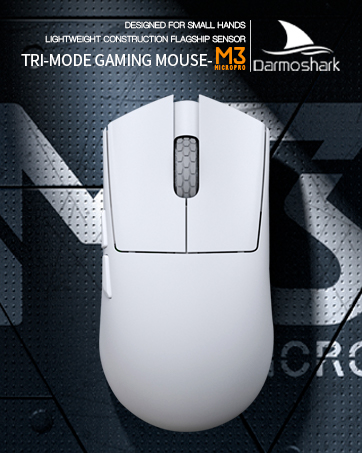
Image: Product parameter diagram with mouse dimensions.
8. 유지관리
- 청소: 부드럽고 마른 천을 사용하여 마우스를 닦으세요. 강한 화학 물질이나 연마재는 사용하지 마세요.
- 저장: 마우스를 직사광선과 극한의 온도를 피해 시원하고 건조한 곳에 보관하세요.
- 배터리 관리 : 배터리 수명을 연장하려면 마우스를 자주 완전히 방전시키지 마십시오. 배터리 부족 표시등이 켜지면 충전하십시오.
9. 문제 해결
9.1. 마우스가 응답하지 않음
- 유선 모드 : USB 케이블이 마우스와 컴퓨터에 제대로 연결되어 있는지 확인하십시오. 다른 USB 포트를 사용해 보십시오.
- 2.4G 무선 모드: Ensure the 2.4G receiver is plugged in and the mouse is switched to 2.4G mode. Try re-pairing the mouse with the receiver. Ensure the mouse battery is charged.
- 블루투스 모드 : Ensure Bluetooth is enabled on your device and the mouse is in Bluetooth pairing mode. Try re-pairing the mouse in your device's Bluetooth settings. Ensure the mouse battery is charged.
9.2. 커서 이동이 불규칙하거나 정확하지 않음
- 부드럽고 마른 천으로 마우스 밑면의 광학 센서를 닦으세요.
- 마우스를 적절한 표면(예: 마우스 패드)에서 사용하고 있는지 확인하세요. 반사율이 높거나 투명한 표면은 피하세요.
- Adjust the DPI settings using the DPI Adjustment Key or the software.
- Check for any software conflicts or outdated drivers. Update mouse drivers if necessary.
9.3. 무선 연결 문제
- 마우스와 수신기/장치 사이의 거리를 줄이십시오.
- 수신기를 다른 무선 장치나 간섭 발생원(예: Wi-Fi 라우터, 무선 전화기) 근처에 두지 마십시오.
- 마우스가 완전히 충전되었는지 확인하세요.
10. 공식 제품 영상
Watch the official product video for a visual guide on the Darmoshark M5PRO Mini Wireless Gaming Mouse.
비디오: 오버view 다르모샤크 M5PRO 무선 게이밍 마우스의 특징을 보여줍니다.asing its design and features in various colors.
11. 보증 및 지원
For warranty information and technical support, please refer to the warranty card included with your product or visit the official Darmoshark web대지.
제조업체: 다르모샤크
Web대지: Darmoshark Official Store


