소개
This manual provides detailed instructions for the New Bee M53 Bluetooth Headset. Please read this manual carefully before using the product to ensure proper operation and to maximize its performance and lifespan. Keep this manual for future reference.
패키지 내용
패키지에 모든 품목이 들어 있는지 확인하세요.
- Bluetooth Earpiece (1 unit)
- 500mAh Charging Case (1 unit)
- Ear Tips (3 sizes: S/M/L)
- Type-C Cable (1 unit, AC adapter not included)
- 사용 설명서(1부)
제품 끝view
The New Bee M53 Bluetooth Headset features an ergonomic design for comfortable wear and intuitive controls. Below is a general view of the headset and its charging case.
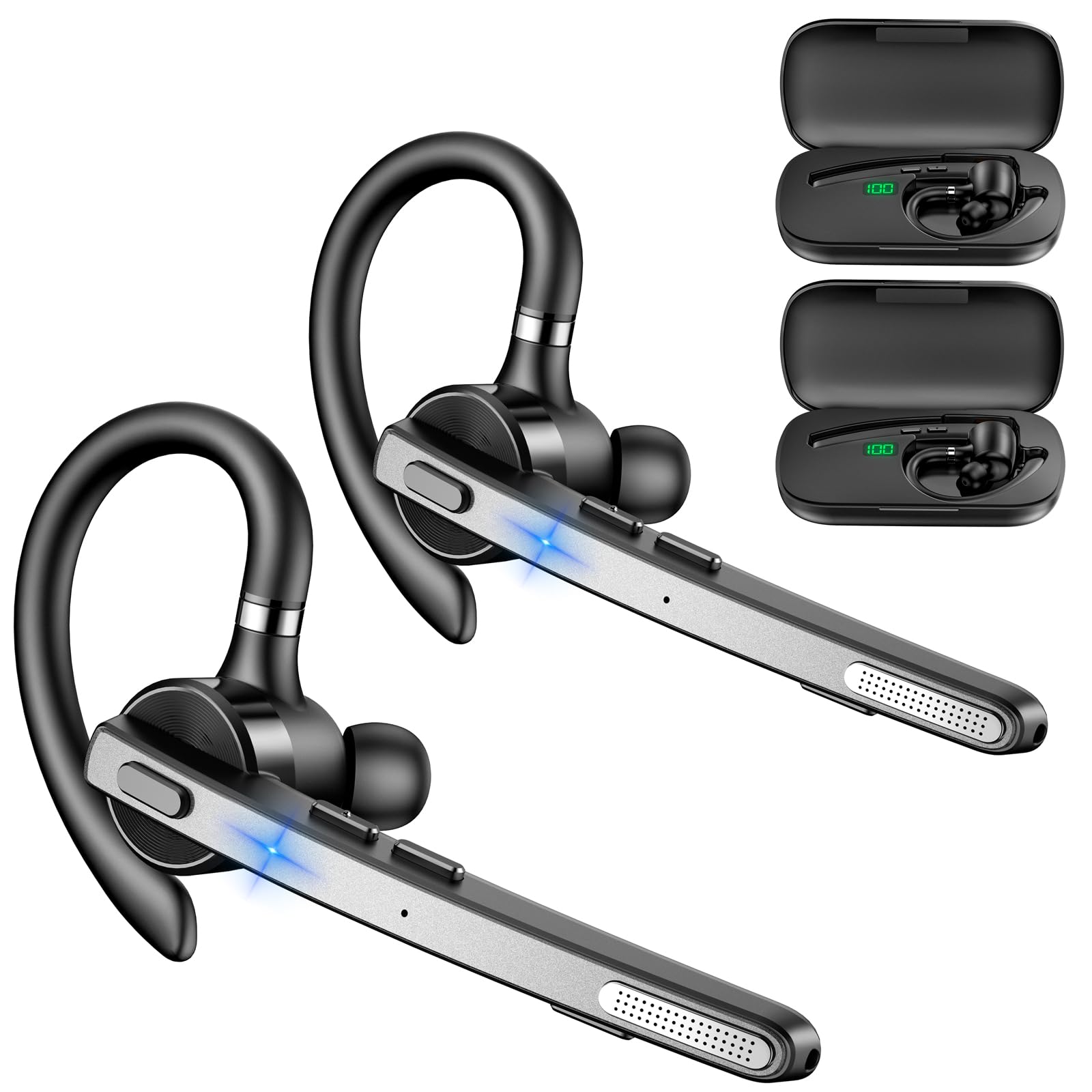
Image: New Bee M53 Bluetooth Headset with its charging case and included ear tips.
Image: Diagram illustrating the various buttons and their functions on the New Bee M53 Bluetooth Headset, including power, volume, call control, mute, and Type-C charging port.
설정
1. 헤드셋과 케이스 충전
Before first use, fully charge the headset and its charging case. The charging case has a digital display to indicate the remaining power.
- Connect the provided Type-C cable to the charging port on the case and to a USB power source (e.g., computer, wall adapter).
- Place the headset into the charging case.
- 완전 충전에는 약 2시간이 걸립니다.
- The 500mAh charging case provides approximately 72 hours of total playtime for the headset.
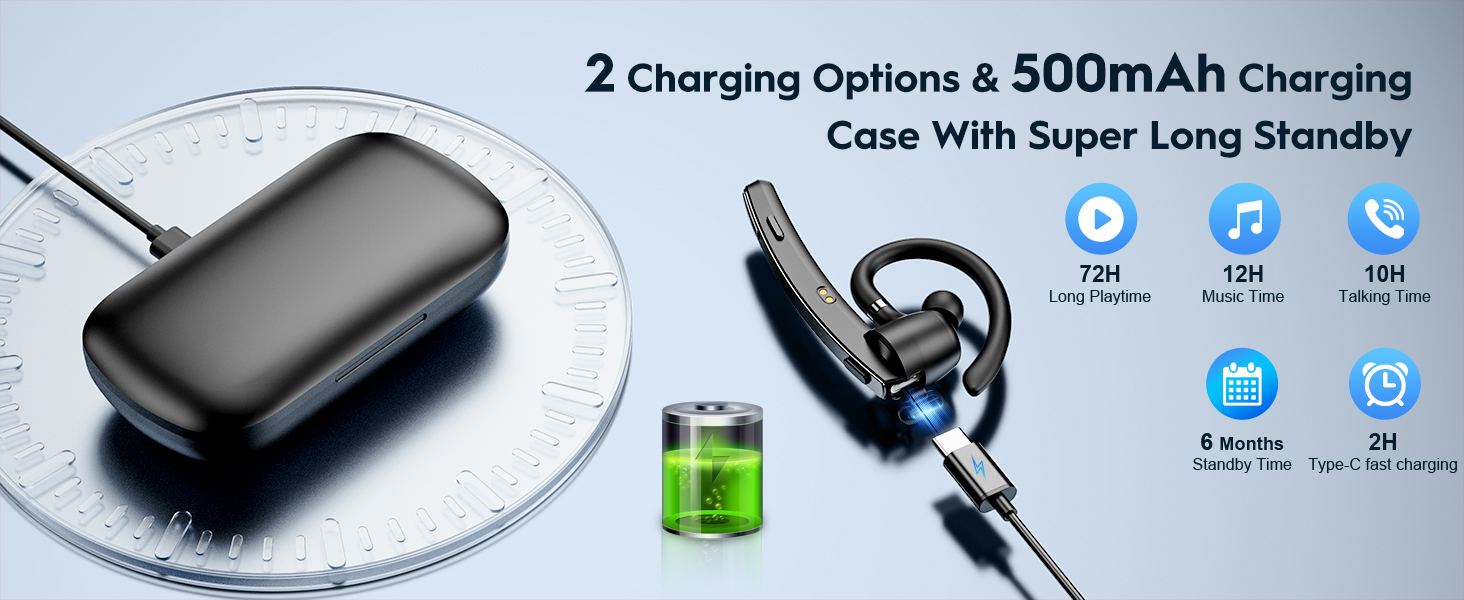
Image: The New Bee M53 charging case displaying battery level, with the headset inside, illustrating its long battery life capabilities.
2. 헤드셋 착용하기
The headset is designed for comfortable and secure fit. It can be worn on either the left or right ear.
- The flexible ear hook can be rotated 180° to fit either ear.
- The earphone arm can be rotated 270° to adjust the microphone position.
- Choose from the three included ear tip sizes (S, M, L) for the best fit and comfort.
- The headset weighs only 13.6 grams, ensuring comfort during extended wear.

Image: Illustration of the headset's adjustable ear hook for left/right ear use and the three available ear tip sizes (S, M, L).
3. 블루투스 페어링
The headset uses Bluetooth 5.1 technology for quick and stable connections.
- 헤드셋이 충전되어 있고 전원이 꺼져 있는지 확인하세요.
- Press and hold the Power button for 3-5 seconds until the indicator light flashes blue and red, indicating pairing mode.
- 사용하시는 기기(스마트폰, 노트북 등)에서 블루투스를 켜고 사용 가능한 기기를 검색하세요.
- 장치 목록에서 "M53"을 선택하십시오.
- 연결되면 표시등이 파란색으로 천천히 깜박입니다.
The headset supports connecting to two devices simultaneously within a 15-meter (49 feet) range.

Image: The headset shown connecting to a mobile phone, demonstrating Bluetooth 5.1 quick connection and dual device capability.
작동 지침
기본 기능
- 전원 켜기/끄기: Press and hold the Power button for 3 seconds to power on, 5 seconds to power off.
- 재생/일시 중지: 재생/일시정지 버튼을 한 번 누르세요.
- 볼륨 조절: 볼륨 +/- 버튼을 사용하여 소리 크기를 조절하세요.
- 다음/이전 노래: Press and hold Volume + for next song, Volume - for previous song (3 seconds).
통화 관리
- 전화 받기/끊기: Press the Answer/Hang Up button once.
- 전화 거부: Press and hold the Answer/Hang Up button for 2 seconds.
- 마지막 번호 재다이얼: Double-press the Answer/Hang Up button.
- 마이크 음소거: Press the Mic Mute button once during a call to mute/unmute the microphone.
The headset features dual-mic noise reduction and CVC8.0 technology for clear calls by reducing ambient noise and echo.

Image: Illustration of the headset's one-button call answering and mute features for hands-free communication.

Image: Visual representation of the dual-mic noise cancelling technology, showing how external background noise is reduced for clear calls.
유지
To ensure the longevity and optimal performance of your New Bee M53 Bluetooth Headset, follow these maintenance guidelines:
- 청소: Use a soft, dry, lint-free cloth to clean the headset and charging case. Do not use abrasive cleaners, solvents, or aerosol sprays.
- 저장: 먼지와 손상으로부터 보호하기 위해 사용하지 않을 때는 헤드셋을 충전 케이스에 보관하십시오. 극한 온도에 노출되지 않도록 하십시오.
- 물 노출: The headset is not waterproof. Avoid exposure to water, moisture, or excessive humidity.
- 충전 중: Always use the provided Type-C cable for charging. Do not attempt to disassemble or modify the device.
문제 해결
헤드셋 사용 중 문제가 발생하면 다음의 일반적인 해결 방법을 참조하십시오.
| 문제 | 해결책 |
|---|---|
| 헤드셋의 전원이 켜지지 않습니다. | Ensure the headset is fully charged. Place it in the charging case and connect the case to a power source. |
| 기기와 페어링할 수 없습니다. |
|
| 소리가 나지 않거나 볼륨이 작습니다. |
|
| 통화 품질이 좋지 않습니다. |
|
명세서
| 특징 | 세부 사항 |
|---|---|
| 모델명 | M53 |
| 블루투스 버전 | 5.1 |
| 블루투스 범위 | 최대 15미터(49피트) |
| Battery Life (Talktime/Music) | 충전당 약 12시간 |
| 충전 케이스를 사용한 총 재생 시간 | 최대 72시간 |
| 충전 케이스 용량 | 500mAh |
| 충전 시간 | Approximately 2 hours (Type-C) |
| 무게 | 13.6 grams (earpiece) |
| 소음 제어 | Dual-Mic Noise Reduction, CVC8.0 |
| 호환성 | iOS, Android, Windows (Cellphones, Laptops, Desktops) |
| 제어 유형 | 버튼 제어 |

Image: The headset demonstrating its wide compatibility with devices such as tablets, cellphones, laptops, PCs, and Kindles.
보증 및 지원
New Bee provides a 3-year customer support service for this product. If you encounter any issues or have questions, please contact our customer support team. Refer to the contact information provided with your purchase or visit the official New Bee web도움이 필요한 경우 사이트를 방문하세요.
보증을 청구하려면 구매 증빙 서류를 보관하세요.


