소개
구매해주셔서 감사합니다asing the Matbip Multi-Platform Wireless Gaming Controller. This controller is designed to enhance your gaming experience across various platforms, including Nintendo Switch, Android, iOS, and PC. It features advanced functions such as TURBO burst, macro programming, customizable RGB lighting, and HD vibration, providing precise control and immersive feedback. Please read this manual carefully before use to ensure proper operation and to fully utilize all features.
제품 끝view
Familiarize yourself with the various components and buttons of your Matbip controller.
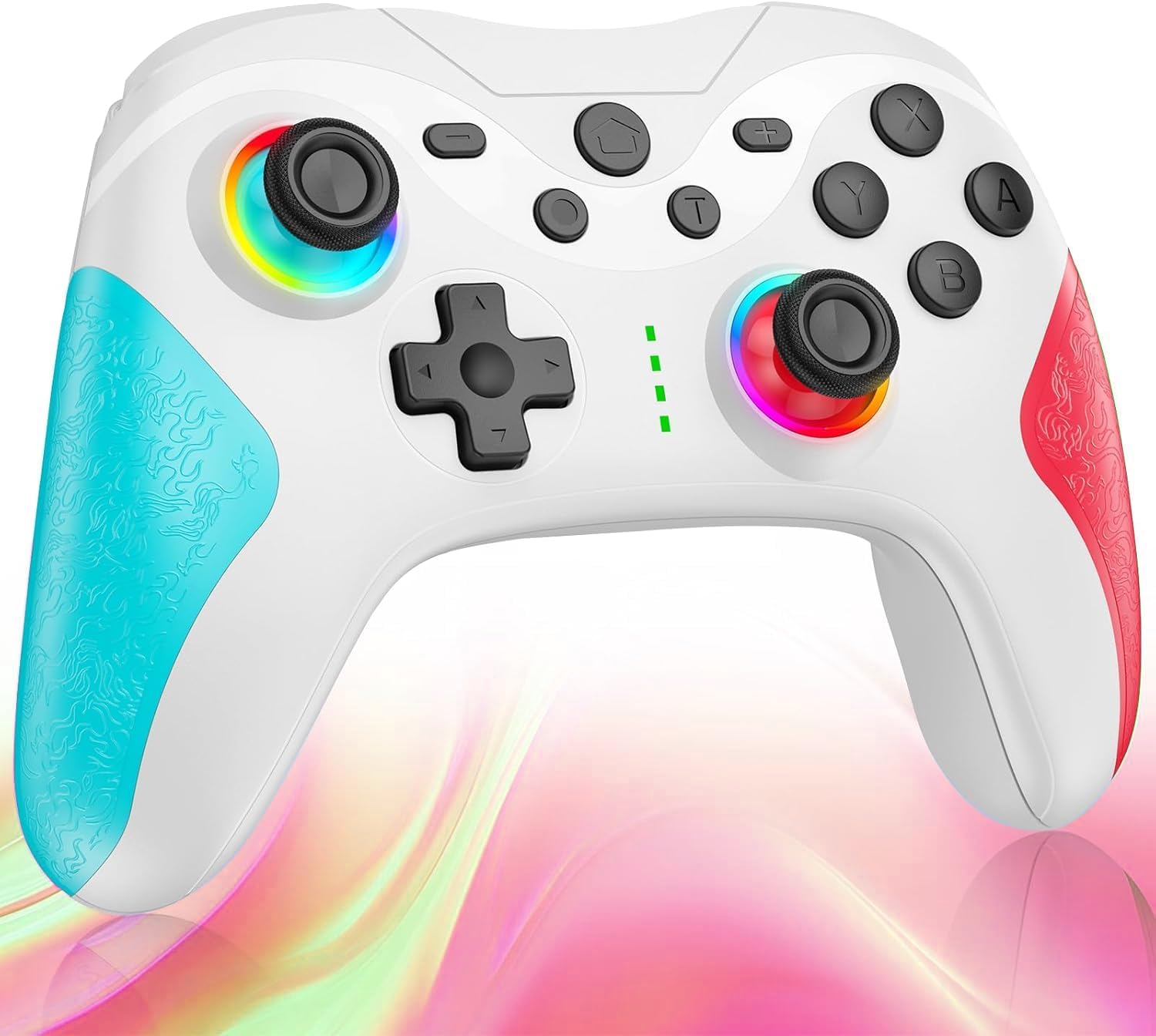
영상: 앞쪽 view of the Matbip Multi-Platform Wireless Gaming Controller. It features a white body with blue textured grips on the left and red textured grips on the right. The joysticks are illuminated with a rainbow RGB light. Standard buttons (A, B, X, Y), a D-pad, and central function buttons (Home, Plus, Minus, T) are visible.
주요 구성 요소:
- 왼쪽/오른쪽 조이스틱: For directional control, with customizable RGB lighting.
- 방향 패드: 정확한 방향 입력을 위해.
- 액션 버튼(A/B/X/Y): 표준 게임 입력 버튼.
- Shoulder Buttons (L/R/ZL/ZR): Top-mounted trigger and bumper buttons.
- 뒷면 버튼: Additional programmable buttons on the rear for strategic gameplay.
- 홈 버튼: 시스템 홈 화면으로 돌아갑니다.
- 플러스(+) / 마이너스(-) 버튼: System-specific function buttons.
- T Button (TURBO): Activates and manages the TURBO burst function.
- 충전 포트: 충전용 USB-C 포트.
- 표시등: 연결 상태와 배터리 수준을 표시합니다.
설정
1. 컨트롤러 충전
Before first use, fully charge the controller. Connect the provided USB-C cable to the controller's charging port and the other end to a USB power source (e.g., console, PC, or USB wall adapter). The indicator lights will show charging status and turn off when fully charged.
2. 장치와 페어링
The controller supports Bluetooth wireless connection across multiple platforms.
Nintendo Switch의 경우:
- On the Switch HOME Menu, select 컨트롤러 > 그립/오더 변경.
- 를 누르고 계세요 홈 버튼 on the Matbip controller for 3-5 seconds until the indicator lights flash rapidly.
- 페어링이 완료되면 컨트롤러의 표시등이 계속 켜져 있습니다.
Android/iOS 기기의 경우:
- Android 또는 iOS 장치에서 Bluetooth를 활성화합니다.
- 를 누르고 계세요 홈 버튼 on the Matbip controller for 3-5 seconds until the indicator lights flash rapidly.
- On your device's Bluetooth settings, select the controller (e.g., "Matbip Controller") from the list of available devices to pair.
PC(Windows)의 경우:
- Ensure your PC has Bluetooth enabled. Go to 설정 > 장치 > Bluetooth 및 기타 장치.
- 딸깍 하는 소리 Bluetooth 또는 기타 장치 추가 > 블루투스.
- 를 누르고 계세요 홈 버튼 on the Matbip controller for 3-5 seconds until the indicator lights flash rapidly.
- Select the controller from the list of devices to pair.
작동 지침
터보 버스트 기능:
The TURBO function allows for rapid, automatic button presses, ideal for combat games.
- TURBO를 활성화하려면: 를 누르고 계세요 T 버튼, then press the desired action button (e.g., A, B, X, Y, L, R, ZL, ZR). The button will now continuously activate when held down.
- TURBO 속도를 조정하려면: 를 잡고 있는 동안 T 버튼, 이동하다 right joystick up or down to cycle through 3 different burst speeds.
- To deactivate TURBO: 를 누르고 계세요 T 버튼그런 다음 동일한 동작 버튼을 다시 누르십시오.
매크로 기능:
Program a sequence of button presses to a single back button for complex actions.
- Specific instructions for macro programming will be detailed in the full manual. Generally, this involves entering a programming mode, pressing the sequence, and assigning it to a back button.
맞춤형 RGB 조명:
The joysticks feature 9-color RGB lighting to enhance your gaming atmosphere.
- To change RGB color/mode: Press a specific button combination (e.g., T + Left Joystick click) to cycle through different colors and lighting effects.
HD Vibration Adjustment:
Adjust the intensity of the HD vibration feedback to your preference (4 levels).
- 진동을 조절하려면: Press a specific button combination (e.g., T + D-Pad Up/Down) to cycle through the 4 vibration levels.
자이로 센서:
The high-precision gyro sensor enables intuitive motion control in supported games.
- The gyro sensor is automatically active when connected to a compatible device (e.g., Nintendo Switch) and used in games that support motion controls.
Sleep Wake-up Function:
The controller supports waking up your Nintendo Switch console from sleep mode.
- When the Switch is in sleep mode, simply press the 홈 버튼 on the controller to wake it up and reconnect.
유지
적절한 유지관리는 컨트롤러의 수명과 최적의 성능을 보장합니다.
- 청소: 부드럽고 마른 천을 사용하여 컨트롤러를 닦으세요. 잘 지워지지 않는 오염의 경우, 가볍게 두드리세요.amp천에 물을 묻혀 닦으세요. 강한 화학 물질이나 연마성 세제는 사용하지 마세요.
- 저장: 컨트롤러는 직사광선, 극한 온도 및 습기를 피해 서늘하고 건조한 곳에 보관하십시오.
- 배터리 관리 : Avoid fully discharging the battery frequently. If storing for a long period, charge the controller to about 50% every few months.
- 낙하 방지: 컨트롤러를 떨어뜨리거나 충격을 가하지 마십시오. 내부 구성 요소가 손상될 수 있습니다.
문제 해결
컨트롤러에 문제가 발생하면 다음의 일반적인 해결 방법을 참조하세요.
| 문제 | 가능한 해결책 |
|---|---|
| 컨트롤러가 켜지지 않습니다. | 컨트롤러가 충전되어 있는지 확인하세요. USB-C 케이블을 사용하여 전원에 연결하세요. |
| 컨트롤러가 페어링되지 않습니다. | Ensure Bluetooth is enabled on your device. Make sure the controller is in pairing mode (flashing lights). Try restarting both the controller and the device. |
| 입력 지연 또는 연결 끊김. | Ensure there are no strong wireless interferences nearby. Move closer to the device. Re-pair the controller. |
| 버튼이나 조이스틱이 반응하지 않습니다. | Try resetting the controller (refer to the full manual for reset instructions, usually a small pinhole button). Ensure no debris is obstructing the buttons. |
| 진동이 작동하지 않습니다. | Check if vibration is enabled in the game or system settings. Adjust the vibration intensity on the controller. |
명세서
| 특징 | 세부 사항 |
|---|---|
| 제품 치수 | 10 x 15 x 6.5cm |
| 무게 | 300g |
| 연결성 | 블루투스 무선 |
| 호환성 | Nintendo Switch, Android, iOS, PC (Windows) |
| 특별 기능 | TURBO Burst, Macro Function, 9-Color RGB Lighting, 4-Level HD Vibration, Gyro Sensor, Back Buttons, Sleep Wake-up |
| ASIN | B0FHWRK7CQ |
| 출시일 | 16년 2025월 XNUMX일 |
보증 및 지원
Matbip is committed to providing high-quality products and customer satisfaction. This product comes with a standard manufacturer's warranty. For detailed warranty information, please refer to the documentation included with your purchase or contact Matbip customer support.
If you require further assistance, have questions, or encounter issues not covered in this manual, please contact our customer support team. A Japanese instruction manual is included with the product to ensure ease of use for first-time users.
연락처 정보: Please refer to the packaging or the official Matbip web고객 지원 담당자 연락처 최신 정보를 확인할 수 있는 사이트입니다.


