1. 서론
구매해주셔서 감사합니다asing the Moukey MAMP3 2.0 채널 스테레오 Amp앰프. 본 설명서는 기기를 안전하고 효율적으로 작동하는 데 필요한 필수 정보를 제공합니다. 사용 전에 꼼꼼히 읽고 나중에 참조할 수 있도록 보관하십시오.
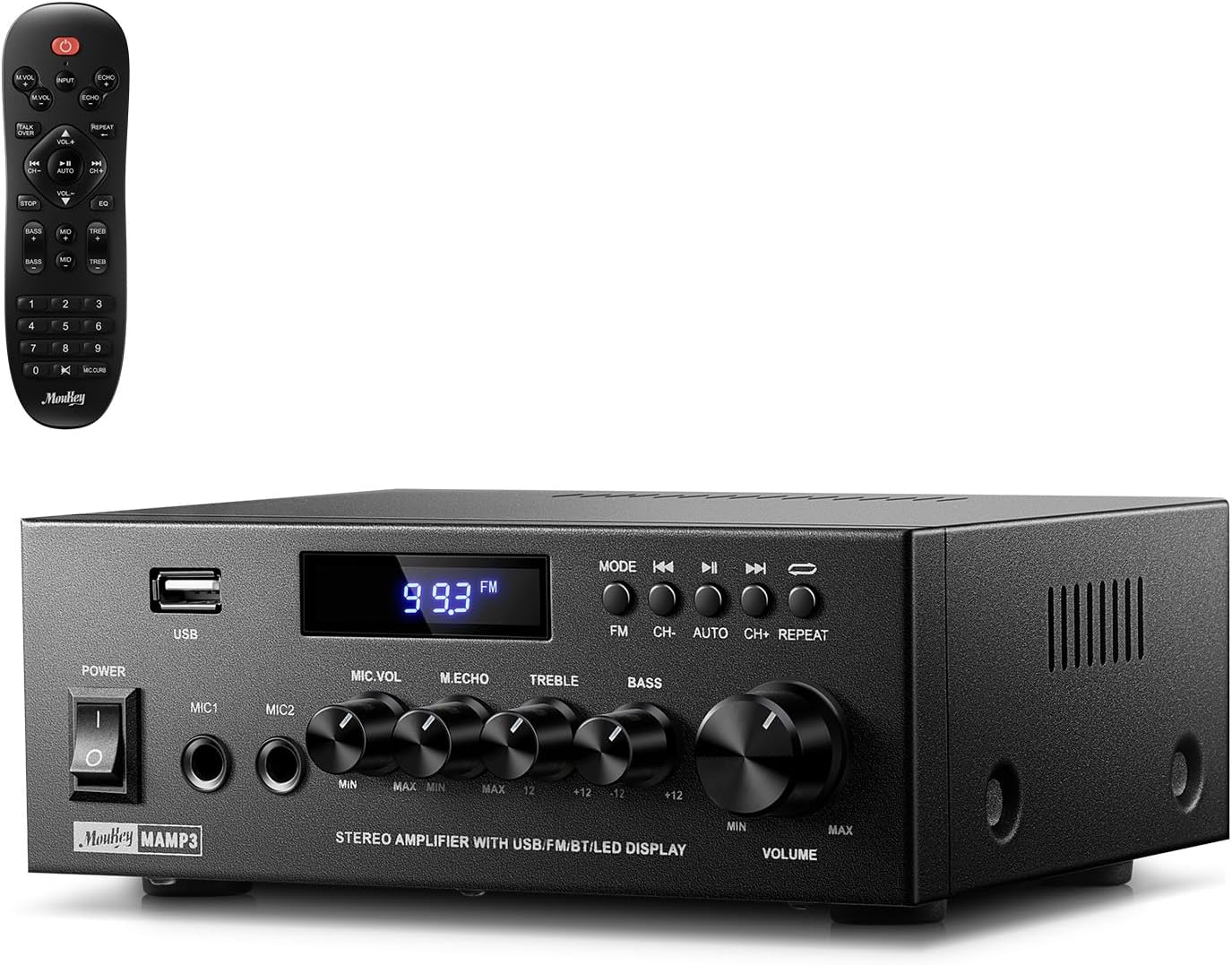
Image 1.1: The Moukey MAMP3 amp앰프와 리모컨.
2. 안전 지침
- 작동하기 전에 모든 지침을 읽으십시오 amp리퍼.
- 유지하다 amplifier away from water, moisture, and extreme temperatures.
- 통풍구를 막지 마십시오. 기기 주변에 적절한 공기 흐름이 유지되도록 하십시오.
- 장치와 함께 제공된 전원 어댑터만 사용하십시오.
- 직접 수리하거나 개조하지 마십시오. 모든 정비는 자격을 갖춘 기술자에게 맡기십시오.
- Disconnect the power cord from the outlet if the unit will be unused for extended periods.
3. 제품 오버view
3.1 주요 특징
- 2.0 Channel Stereo Audio Output
- Bluetooth 5.3 for stable wireless connection
- Multiple Audio Inputs: RCA, USB, FM Radio, 2 Microphone Inputs
- Full-function Remote Control with EQ adjustments
- Customizable Treble, Midrange, and Bass controls
- Memory function for mode, volume, and EQ settings
- 최대 출력 300와트
3.2 전면 패널 컨트롤 및 표시기

Image 3.1: Front Panel Layout
- 전원 스위치: 장치를 켜거나 끕니다.
- MIC1/2: 6.35mm 마이크 입력 잭.
- 마이크 볼륨 노브: 연결된 마이크의 볼륨을 조절합니다.
- 에코 노브: 마이크의 에코 효과를 조정합니다.
- 고음 노브: 고주파 오디오 출력을 조절합니다.
- 베이스 노브: 저주파 오디오 출력을 조정합니다.
- 음악 볼륨 노브: Main volume control for all audio sources.
- USB 슬롯: 오디오 재생을 위해 USB 저장 장치를 연결합니다.
- LED 디스플레이: 현재 모드, 트랙 정보 또는 FM 주파수를 표시합니다.
- MODE 버튼: Switches between input sources (BT, Aux, CD, USB, FM).
- 이전 버튼: Skips to the previous track (USB/BT) or FM station.
- 재생/일시 정지 버튼: Plays or pauses audio (USB/BT).
- 다음 버튼: Skips to the next track (USB/BT) or FM station.
- 반복 버튼: Repeats current track or all tracks (USB).
3.3 후면 패널 연결

이미지 3.2: 후면 패널 연결부
- FM 안테나 입력: 라디오 수신을 위해 동봉된 FM 안테나를 연결하세요.
- 오디오 입력(RCA): Connect external audio sources like CD/DVD players using RCA cables.
- AUDIO OUTPUT (Speaker Terminals): 패시브 스피커를 연결하세요. 극성이 올바른지 확인하세요(+는 +에, -는 -에 연결).
- POWER AC INPUT: 전원 코드를 AC 콘센트에 연결합니다.
4. 설정
4.1 풀기
조심스럽게 amplifier and all accessories from the packaging. Verify that all items listed in the 'What's in the Box' section are present.
4.2 스피커 연결하기
그들을AMP3 amplifier supports two passive speakers. Connect your speakers to the 오디오 출력 terminals on the rear panel. Ensure that the positive (+) terminal on the amplifier connects to the positive (+) terminal on your speaker, and the negative (-) terminal on the amplifier connects to the negative (-) terminal on your speaker. Incorrect polarity can affect sound quality.

Image 4.1: Speaker Connection Diagram
4.3 오디오 소스 연결
그만큼 amplifier offers multiple input options:
- RCA 입력: Use RCA cables to connect devices such as CD players, DVD players, or other audio equipment to the 오디오 입력 후면 패널에 잭이 있습니다.
- USB 입력 : USB 플래시 드라이브를 삽입하세요 USB 슬롯 on the front panel for direct audio playback.
- 블루투스: Pair your Bluetooth-enabled device (smartphone, tablet, laptop) wirelessly.
- FM 라디오 : 동봉된 FM 안테나를 연결하세요. FM 안테나 입력 on the rear panel for radio reception. Extend the antenna for optimal signal.
- 마이크 입력 : 최대 두 개의 마이크를 연결할 수 있습니다. MIC1/2 jacks on the front panel for karaoke or public address.

Image 4.2: Available Signal Inputs
4.4 전원 연결
전원 코드를 POWER AC INPUT on the rear panel and then plug it into a standard AC power outlet.
5. 사용 설명서
5.1 전원 켜기/끄기
를 누르세요 전원 스위치 전면 패널을 돌려서 amp앰프 켜짐/꺼짐. 전원이 켜지면 LED 디스플레이에 불이 들어옵니다.
5.2 입력 선택
를 누르세요 방법 button on the front panel or the remote control to cycle through the available input sources: Bluetooth (BT), Auxiliary (Aux), CD, USB, and FM radio. The selected mode will be shown on the LED display.
5.3 볼륨 조절
큰 것을 회전시키다 Music Volume Knob on the front panel clockwise to increase volume and counter-clockwise to decrease it. Volume can also be adjusted using the remote control.
5.4 이퀄라이저(EQ) 조정
Adjust the sound characteristics using the 트레블 노브 그리고 베이스 노브 on the front panel. The remote control also provides dedicated buttons for Treble, Midrange, and Bass adjustments. The amplifier will automatically save your preferred EQ settings.
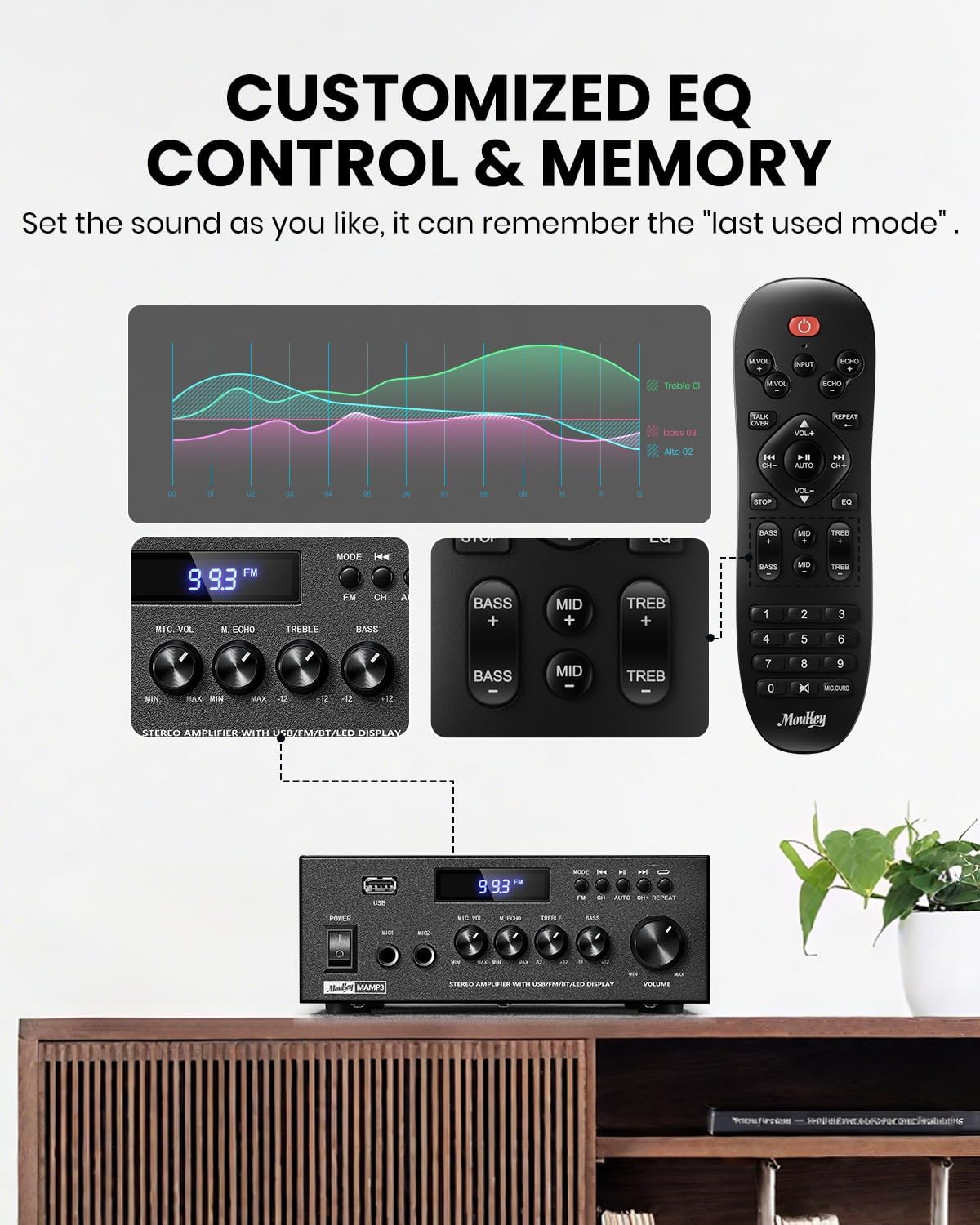
Image 5.1: Customizable EQ Control
5.5 마이크 제어
If microphones are connected, use the 마이크 볼륨 노브 to adjust their output level and the 에코 노브 to add an echo effect. The remote control also features a 'Talkover' function.
5.6 블루투스 작동
- 를 누르세요 방법 button until "BT" appears on the LED display. The amplifier is now in Bluetooth pairing mode.
- On your mobile device, enable Bluetooth and search for "Moukey MAMP3인치.
- Select "Moukey MAMP3" to pair. Once connected, you will hear a confirmation tone.
- 이제 장치에서 오디오를 재생할 수 있습니다. amp리퍼.

Image 5.2: Bluetooth Pairing
5.7 FM 라디오 작동
- 를 누르세요 방법 LED 디스플레이에 "FM"이 나타날 때까지 버튼을 누르십시오.
- 자동 스캔: Press the "AUTO" button on the remote to automatically scan and save available FM stations.
- 수동 조정 : Use the number pad on the remote control to directly enter the desired FM frequency (e.g., for 101.1 MHz, enter 1011).
- 사용하세요 이전의 그리고 다음 buttons to navigate between saved stations or fine-tune frequencies.
5.8 USB 재생
MP3 또는 WAV 오디오 파일이 저장된 USB 플래시 드라이브를 삽입하세요. file에 s USB 슬롯. 그 amplifier will automatically switch to USB mode and begin playback. Use the 이전의, 재생/일시정지, 그리고 다음 buttons to control playback. The 반복하다 이 버튼을 사용하면 현재 트랙 또는 모든 트랙을 반복 재생할 수 있습니다.
5.9 리모컨
The included full-function remote control allows for convenient operation from a distance. It provides control over input selection, volume, EQ settings (treble, midrange, bass), microphone echo, and talkover functions across all input modes.

Image 5.3: Upgraded Remote Control Functionality
6. 유지관리
- 청소: 부드럽고 마른 천을 사용하여 외부를 청소하십시오. amp액체 세척제나 용제는 사용하지 마세요.
- 통풍: Ensure that the ventilation openings are free from dust and debris to prevent overheating.
- 저장: 장기간 사용하지 않을 경우 보관하세요 amp증폭기는 직사광선과 극한 온도 변화를 피해 서늘하고 건조한 곳에 보관하십시오.
7. 문제 해결
| 문제 | 가능한 원인 | 해결책 |
|---|---|---|
| 전원이 없습니다 | 전원 코드가 연결되어 있지 않습니다. 전원 콘센트가 고장났습니다. 전원 스위치가 꺼져 있습니다. | Ensure power cord is securely connected; Test outlet with another device; Turn power switch on. |
| 사운드 출력이 없습니다 | Volume too low; Incorrect input selected; Speaker wires loose/incorrectly connected; Audio source issue. | Increase volume; Select correct input mode; Check speaker wire connections and polarity; Verify audio source is playing. |
| 블루투스가 연결되지 않습니다 | Amplifier not in BT mode; Device too far; Device already connected to another unit; Interference. | 스위치 amplifier to BT mode; Move device closer; Disconnect from other devices; Reduce interference. |
| FM 수신 불량 | 안테나가 연결되지 않았거나 위치가 잘못되었습니다. 신호가 약합니다. | Connect and adjust FM antenna position; Try auto-scan or manual tuning for stronger stations. |
| USB 재생 문제 | 지원되지 않음 file format; USB drive not formatted correctly; USB drive capacity too large. | 보장하다 files are MP3/WAV; Format USB drive to FAT32; Use USB drives 32GB or less. |
8. 사양
| 특징 | 사양 |
|---|---|
| 모델 번호 | MAMP3 |
| 출력 전력 | 300와트(최대) |
| 채널 | 2.0 스테레오 |
| 연결 기술 | Auxiliary, Bluetooth 5.3, FM, USB |
| 호환 장치 | Smartphone, Tablet, Laptop, Computer, Speakers, CD/DVD Player |
| 커넥터 유형 | RCA, USB, 2 Mic input |
| 오디오 출력 모드 | 스테레오 재생 |
| 제품 치수 | 6.1인치 깊이 x 7.1인치 너비 x 2.8인치 높이(15.5 x 18.0 x 7.1cm) |
| 품목 무게 | 2.14파운드(0.97kg) |
| 색상 | 검은색 |
8.1 상자 내용물
- 무키 엠AMP3 Amp리퍼
- 리모컨
- FM 안테나
- 사용자 설명서
- 전원 어댑터
9. 보증 및 지원
9.1 보증 정보
Moukey products are designed and manufactured to the highest quality standards. This product is covered by a limited warranty against defects in materials and workmanship. Please refer to the warranty card included with your purchase for specific terms and conditions, or visit the official Moukey web자세한 보증 정보는 사이트를 참조하십시오.
9.2 고객 지원
If you encounter any issues or have questions regarding your Moukey MAMP3 amplifier, please contact our customer support team. You can find contact information on the official Moukey web사이트나 구매 플랫폼을 통해서도 구매하실 수 있습니다.
Web대지: www.moukey.com (전amp(링크는 실제 제품 설명서를 참조하십시오.)
이메일: support@moukey.com (전ample email, please refer to actual product documentation)


