1. 서론
This manual provides comprehensive instructions for the setup, operation, maintenance, and troubleshooting of your Eversolo Remote-V16 BLE Bluetooth & Infrared Control. This remote is designed to enhance your experience with compatible Eversolo DMP-A10, DMP-A8, and Eversolo DMP/Play series devices, offering both Bluetooth and infrared control capabilities.

Image: The Eversolo Remote-V16 BLE remote control shown alongside its matching silver charging case.
2. 안전 정보
본 제품을 사용하기 전에 모든 안전 지침을 읽고 숙지하십시오. 나중에 참조할 수 있도록 본 설명서를 보관하십시오.
- Do not expose the remote control to water, moisture, or extreme temperatures.
- 리모컨을 떨어뜨리거나 심한 충격을 가하지 마십시오.
- Do not attempt to disassemble, repair, or modify the remote control. This will void the warranty and may cause damage.
- Use only the specified charging method (USB-C) and compatible power sources.
- 리모컨은 어린이와 반려동물의 손이 닿지 않는 곳에 보관하십시오.
- Dispose of the remote control and its battery responsibly according to local regulations.
3. 패키지 내용
패키지에 모든 품목이 들어 있는지 확인하세요.
- Eversolo Remote-V16 BLE Remote Control
- USB-C Charging Cable (may be included, check packaging)
- 사용 설명서 (본 문서)
4. 제품 오버view
The Eversolo Remote-V16 BLE is a versatile remote control designed for seamless interaction with your Eversolo audio devices. It features both Bluetooth Low Energy (BLE) for stable, long-term connection and infrared (IR) for power control, ensuring reliable operation.

이미지: 상단 view of the Eversolo Remote-V16 BLE, highlighting its ergonomic design and button arrangement.

이미지: 사이드 프로file of the Eversolo Remote-V16 BLE, illustrating its slim and comfortable grip.
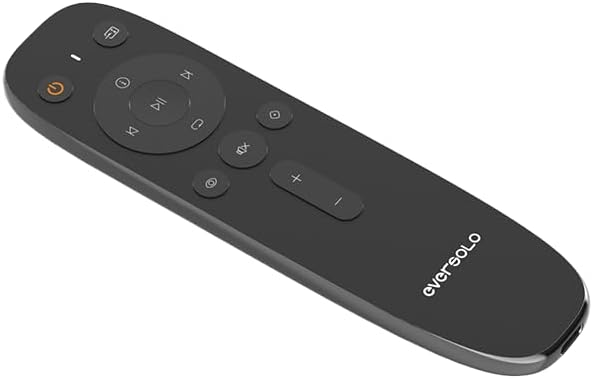
이미지: 각도 view of the Eversolo Remote-V16 BLE, providing a clear look at the button layout and Eversolo branding.
5. 설정
5.1 리모컨 충전
The Remote-V16 BLE features a long-lasting battery and is charged via a USB-C port. Connect the provided USB-C cable to the remote and a compatible USB power source (e.g., a computer USB port or a USB wall adapter). The indicator light on the remote will show charging status.
5.2 호환성
This remote control is specifically designed for use with the following Eversolo devices:
- Eversolo DMP-A10
- Eversolo DMP-A8
- Eversolo DMP-A6 Gen 2
- Eversolo DMP-A6 Master Gen 2
- Eversolo Play series devices
중요한: Please ensure the antenna on your Eversolo DMP device is correctly installed before attempting to use the remote control.
5.3 Pairing (Bluetooth Mode)
To pair the Remote-V16 BLE with your Eversolo device via Bluetooth:
- Ensure your Eversolo device is powered on and within range.
- On the Remote-V16 BLE, press and hold the [Next Track] 그리고 [Volume Down] 버튼을 동시에 3초간 누르세요.
- The indicator light on the remote will begin to flash, indicating it has entered pairing mode.
- Your Eversolo player will automatically recognize and connect to the remote.
- Once successfully paired, the indicator light on the remote will turn off.
- If pairing fails, the indicator light will turn off after 30 seconds, and the remote will exit pairing mode. Repeat the steps if necessary.
6. 사용 설명서
6.1 Dual Mode Operation (Bluetooth & Infrared)
The Remote-V16 BLE operates in two modes: Bluetooth and Infrared. Bluetooth provides a stable, long-term connection for most functions, while the power key specifically utilizes infrared (IR) for reliable power control of your Eversolo device.
6.2 버튼 기능
Familiarize yourself with the functions of each button on your Remote-V16 BLE:
| 단추 | 기능 |
|---|---|
| 전원 버튼 (⑂) | Turns the Eversolo device on or off (operates via IR). |
| 재생/일시 정지(⏸) | Plays or pauses current audio playback. |
| 다음 트랙 (⏭) | Skips to the next track or chapter. |
| 이전 트랙(⏮) | Skips to the previous track or restarts the current track. |
| 볼륨 높이기 (+) | 볼륨 레벨을 높입니다. |
| 볼륨 낮추기 (-) | 볼륨 레벨을 낮 춥니 다. |
| 음소거 (🔇) | 오디오 출력을 음소거하거나 음소거 해제합니다. |
| 집 (⌂) | Returns to the main home screen of the device. |
| 뒤쪽에 (↶) | 이전 메뉴나 화면으로 돌아갑니다. |
| Input Selection (⎌) | 사용 가능한 입력 소스를 순환합니다. |
| 설정 (⚙) | 기기의 설정 메뉴에 접근합니다. |
6.3 Smart Standby Mode
The Remote-V16 BLE incorporates an eco-friendly smart standby design to conserve battery life:
- In 적외선 모드, the remote control automatically enters standby mode after 6 seconds of inactivity.
- In 블루투스 모드, the remote maintains a long-term connection while intelligently managing power consumption.
This smart standby feature effectively extends the battery life of your remote, contributing to energy efficiency.
7. 유지관리
적절한 유지관리는 리모컨의 수명과 최적의 성능을 보장합니다.
- 청소: Use a soft, dry, lint-free cloth to clean the surface of the remote. Do not use abrasive cleaners, solvents, or chemical sprays.
- 저장: 장기간 사용하지 않을 경우 리모컨을 직사광선과 극한 온도 변화를 피해 서늘하고 건조한 곳에 보관하십시오.
- 배터리 관리 : To maintain battery health, avoid fully discharging the remote frequently. Charge it regularly, especially if it will be stored for a long time.
8. 문제 해결
If you encounter issues with your Eversolo Remote-V16 BLE, refer to the following common problems and solutions:
- 원격 응답 없음:
- Ensure the remote is charged. Connect it to a USB-C power source.
- Verify that the Eversolo device is powered on and within range.
- Check if the remote is in Bluetooth mode (for most functions) or if you are using the IR power button correctly.
- Try re-pairing the remote with your Eversolo device (refer to Section 5.3).
- 페어링 문제:
- Ensure no other Bluetooth devices are interfering during the pairing process.
- Make sure the remote is fully charged.
- Confirm that the antenna on your Eversolo DMP device is properly installed.
- Try restarting both the remote (by letting it enter standby) and your Eversolo device.
- 배터리 수명이 짧음:
- 리모컨을 사용하기 전에 완전히 충전되었는지 확인하십시오.
- The smart standby mode helps conserve battery; ensure it's functioning as described in Section 6.3.
- 문제가 지속되면 고객 지원에 문의하십시오.
9. 사양
Key technical specifications for the Eversolo Remote-V16 BLE:
- 모델 번호: Eversolo Remote-V16 BLE
- 상표: 에버솔로
- 연결성: Bluetooth Low Energy (BLE) & Infrared (IR)
- 특징: Smart Standby Mode
- 색상: 실버와 블랙
- 지원되는 최대 장치 수: 1
- 호환 장치: EVERSOLO DMP Series (DMP-A10, DMP-A8, DMP-A6 Gen 2, DMP-A6 Master Gen 2), EVERSOLO Play Series
- 품목 무게: 3.84 온스
- 패키지 크기: 6.61 x 1.89 x 0.75 인치
10. 보증 정보
Eversolo products are designed for quality and reliability. A 12-month after-sales service is promised for this product. For detailed warranty terms and conditions, please refer to the official Eversolo web웹사이트를 방문하거나 고객 지원팀에 문의하십시오. 보증 청구를 위해 구매 증빙 자료를 보관하십시오.
11. 고객 지원
For further assistance, technical support, or inquiries regarding your Eversolo Remote-V16 BLE, please utilize the official Eversolo service channels:
- Visit the official Eversolo website forum.
- Contact Eversolo via their official Facebook or Instagram pages.
- Send an email to Eversolo customer support.
Expect a prompt response from the support team. For the latest information and firmware updates, please visit the Eversolo official web대지.