1. 서론
This manual provides detailed instructions for the assembly, operation, and maintenance of your Perlegear Rolling TV Stand (PGTVMC06) and Perlegear Floor TV Stand (PGFS21B). Please read this manual thoroughly before installation and retain it for future reference. Ensure all components are present and undamaged before proceeding.

이미지 1.1: 이상view of the Perlegear Rolling TV Stand (left) and Floor TV Stand (right).
2. 중요한 안전 정보
Failure to follow these instructions may result in property damage, serious injury, or death. If you do not understand these instructions, or have doubts about the safety of the installation, please contact Perlegear customer support.
- 중량 용량: Do not exceed the maximum weight capacity specified for each stand. Overloading can cause instability and potential collapse.
- TV 크기 : Ensure your TV's screen size and VESA pattern are compatible with the stand.
- 집회: Assemble the stand strictly according to the instructions. Improper assembly can lead to instability.
- 안정: Always ensure the stand is placed on a stable, level surface. For the rolling stand, lock the casters when the stand is in a stationary position.
- 어린이들: 조립하는 동안 어린이가 스탠드에 가까이 가지 않도록 하십시오. 어린이가 스탠드나 TV에 올라가거나 가지고 놀지 못하게 하십시오.
- 도구: Use appropriate tools for assembly. Do not overtighten screws.
3. 제품의 특징 및 사양
3.1 Perlegear Rolling TV Stand (Model: PGTVMC06)
This mobile TV stand is designed for versatility and ease of movement, suitable for various environments.
- Universal TV Compatibility: Accommodates most 23” to 60” LED, LCD, and OLED flat or curved TVs.
- 중량 용량: Supports a maximum weight of 88 lbs (40 kg).
- VESA 호환성: Supports VESA mounting patterns including 100x100mm, 200x100mm, 200x200mm, 300x200mm, 300x300mm, 400x300mm, and 400x400mm.
- 최적 Viewing Customization: Features tilting capabilities up to 15 degrees and leveling adjustments of +3°/-3°.
- 유동성: Equipped with rolling casters for easy relocation.

Image 3.1.1: Compatibility details for the Perlegear Rolling TV Stand (PGTVMC06).
3.2 Perlegear Floor TV Stand (Model: PGFS21B)
This floor TV stand offers a modern design with integrated LED ambient lighting for an enhanced view경험.
- Universal TV Compatibility: Accommodates most 32” to 75” LED, LCD, and OLED flat or curved TVs.
- 중량 용량: Supports a maximum weight of 110 lbs (50 kg).
- VESA 호환성: Supports VESA mounting patterns including 100x100mm, 200x100mm, 200x200mm, 200x300mm, 300x200mm, 300x300mm, 400x200mm, 400x300mm, 400x400mm, 600x200mm, and 600x400mm.
- 조절할 수 있는 Viewing: Features swivel up to ±35° and tilt up to 5° and down 10° for customized comfort.
- 통합 LED 조명: Modern adjustable RGB LED ambient lighting with 16 million colors, brightness, speed, and mode settings.
- 제어 옵션: LED lights can be controlled via mobile app, remote control, or wired in-line switch.
- 사운드 싱크: LED lights can sync with sound or rhythm for an immersive experience.
- 타이머 기능: Includes a timer for LED light operation.

Image 3.2.1: Compatibility and load capacity details for the Perlegear Floor TV Stand (PGFS21B).

Image 3.2.2: Control options for the integrated LED lighting system of the PGFS21B.
4. 패키지 내용
Before assembly, verify that all parts listed in the assembly guide (typically included in the product box) are present and undamaged. If any parts are missing or defective, do not proceed with assembly and contact Perlegear customer support.
5. 조립 설명서
Follow the specific assembly steps provided in the included assembly manual for your model. The general steps below outline the process.
5.1 Perlegear Rolling TV Stand (PGTVMC06) Assembly
- 바닥에 캐스터 부착: Secure the rolling casters to the base of the stand. Ensure two casters are lockable and positioned correctly.
- Assemble Vertical Pole: Connect the sections of the vertical pole.
- 기둥을 받침대에 부착하세요: Secure the assembled vertical pole to the base.
- 미디어 셸프 설치: Mount the adjustable media shelf onto the vertical pole at your desired height.
- TV 브래킷을 TV에 부착하세요: Secure the TV mounting brackets to the back of your television using the appropriate screws and spacers.
- TV를 스탠드에 장착하기: Carefully lift the TV and hook the brackets onto the TV plate on the stand. Secure the TV with safety screws.

Image 5.1.1: The Perlegear Rolling TV Stand (PGTVMC06) fully assembled.
5.2 Perlegear Floor TV Stand (PGFS21B) Assembly
- 베이스 조립: Secure the base components, ensuring stability.
- Assemble Vertical Pole: Connect the sections of the vertical pole.
- 기둥을 받침대에 부착하세요: Secure the assembled vertical pole to the base.
- Install Media Shelves: Mount the adjustable media shelves onto the vertical pole at your desired heights.
- TV 브래킷을 TV에 부착하세요: Secure the TV mounting brackets to the back of your television using the appropriate screws and spacers.
- TV를 스탠드에 장착하기: Carefully lift the TV and hook the brackets onto the TV plate on the stand. Secure the TV with safety screws.
- LED 조명 연결: Install the LED light strips and connect them to the control unit as per the specific instructions for the PGFS21B model.

Image 5.2.1: The Perlegear Floor TV Stand (PGFS21B) fully assembled with LED lights.
6. 사용 설명서
6.1 Adjusting the Rolling TV Stand (PGTVMC06)
- 유동성: Unlock the casters by flipping the lever on each wheel to move the stand. Lock the casters when the stand is in its desired position to prevent accidental movement.
- 기울기 조정: Loosen the tilt knobs on the TV plate, adjust the TV to the desired angle (up to 15 degrees), and then retighten the knobs securely.
- 레벨링 조정: Use the leveling screws on the TV brackets to fine-tune the horizontal level of the TV by +3°/-3°.

Image 6.1.1: Illustrates the tilt adjustment feature of the PGTVMC06.
6.2 Operating the Floor TV Stand LED Lights (PGFS21B)
The integrated RGB LED lights offer multiple control methods:
- 모바일 앱 제어: Download the designated mobile application (refer to the specific LED light manual for app name and QR code). Pair your device with the LED lights via Bluetooth. The app allows control over 16 million colors, brightness, dynamic modes, and the timer function.
- 원격 제어: Use the provided remote control to power the lights on/off, change colors, adjust brightness, select modes, and activate sound sync. Ensure the remote has working batteries.
- Wired In-Line Switch: A physical switch on the LED light cable allows for basic control, typically on/off and cycling through basic colors/modes.
- Sound/Rhythm Sync: Activate this feature via the mobile app or remote to synchronize the LED lights with audio playback, creating an immersive effect.
- Swivel and Tilt Adjustment: The PGFS21B allows for swivel up to ±35° and tilt up to 5° and down 10°. Loosen the appropriate adjustment screws/knobs, position the TV, and then retighten securely.
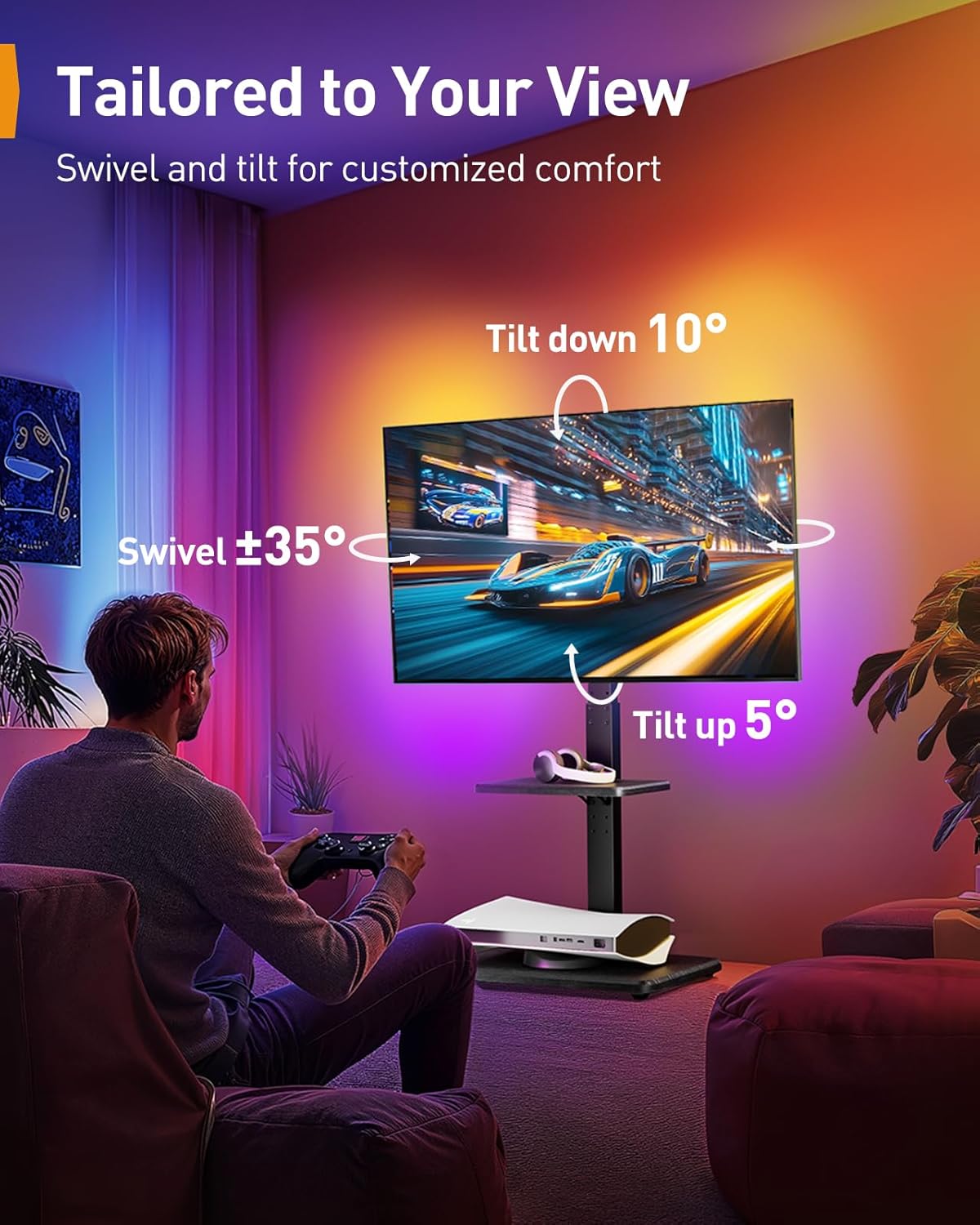
Image 6.2.1: Demonstrates the swivel and tilt capabilities of the PGFS21B.
7. 유지관리
- 청소: 부드럽고 마른 천으로 스탠드를 닦아주세요. 잘 지워지지 않는 얼룩은 약간 거친 천을 사용하세요.amp cloth with mild detergent, then dry thoroughly. Avoid abrasive cleaners or solvents.
- 점검: 모든 나사와 연결부가 단단히 조여져 있는지 정기적으로 점검하세요. 필요하면 다시 조이세요.
- Caster Care (PGTVMC06): 바퀴가 원활하게 굴러가도록 바퀴에 이물질이 없도록 하세요.
- LED Care (PGFS21B): Ensure LED strips are not exposed to excessive moisture or extreme temperatures.
8. 문제 해결
- 스탠드가 불안정합니다. Ensure all screws are tightened. Verify the stand is on a level surface. For the rolling stand, ensure casters are locked. Check that the TV weight and size are within the stand's specifications.
- TV 수평이 맞지 않음: Use the leveling adjustment feature on the TV brackets (PGTVMC06) or adjust the tilt/swivel mechanisms (PGFS21B) to correct the angle.
- LED Lights Not Working (PGFS21B): Check power connection. Ensure the remote control batteries are functional. Try controlling via the mobile app or in-line switch.
- Difficulty Moving (PGTVMC06): Ensure casters are unlocked. Check for obstructions or debris in the wheels.
9. 보증 및 지원
Perlegear 제품은 품질과 내구성을 최우선으로 고려하여 제작되었습니다. 자세한 보증 정보는 제품에 동봉된 보증 카드를 참조하시거나 Perlegear 공식 웹사이트를 방문하십시오. website. For technical assistance, missing parts, or any other inquiries, please contact Perlegear customer support through the contact information provided on the product packaging or web대지.


