1. 서론
This manual provides comprehensive instructions for the Nokia G310 5G TA-1573 smartphone. It covers essential information for setup, operation, maintenance, and troubleshooting to ensure optimal use of your device. The Nokia G310 5G TA-1573 features a 6.6-inch HD+ 90 Hz IPS LCD display, a Snapdragon 480+ octa-core processor, 4 GB of RAM, and 5G connectivity, running on Android 13.
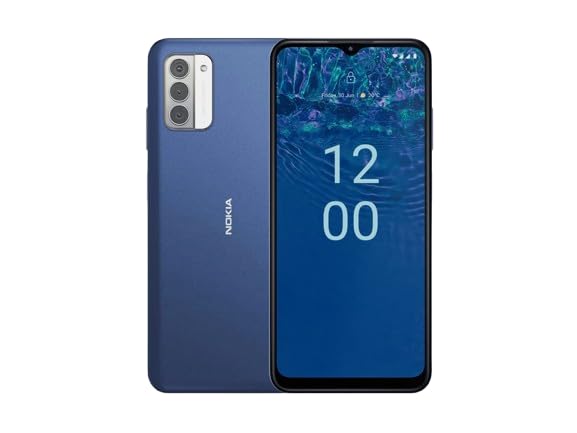
그림 1.1: Nokia G310 5G TA-1573 Smartphone. This image displays the front view of the Nokia G310 5G smartphone, highlighting its display and general form factor.
2. 상자 안에 무엇이 들어있나요?
Upon unboxing your Nokia G310 5G TA-1573, please verify that all the following items are included:
- Nokia G310 5G TA-1573 Smartphone
- USB-C 케이블
- SIM 이젝터 도구
3. 설정
3.1. 장치 충전
Before initial use, fully charge your Nokia G310 5G. Connect the provided USB-C cable to the phone's USB-C port and the other end to a compatible power adapter (sold separately) or a computer's USB port. The battery indicator on the screen will show charging progress.
3.2. SIM 카드 삽입
- 휴대폰 측면에서 SIM 카드 트레이를 찾으세요.
- SIM 꺼내기 도구를 트레이의 작은 구멍에 넣어서 엽니다.
- 나노 SIM 카드의 금색 접촉면이 아래쪽을 향하도록 트레이에 넣고 단단히 고정되었는지 확인하십시오.
- 트레이를 조심스럽게 전화기 안으로 밀어 넣어 딸깍 소리가 나면서 제자리에 고정되도록 합니다.
3.3. 전원 켜기 및 초기 설정
- Press and hold the Power button (usually on the right side) until the Nokia logo appears.
- 화면의 안내에 따라 언어를 선택하고, Wi-Fi 네트워크에 연결하고, Google 계정을 설정하세요.
- 설정 마법사를 완료하여 기기 설정을 개인화하세요.
4. 장치 작동
4.1. 기본 탐색
- 터치스크린 제스처: 탭하여 선택하고, 스와이프하여 스크롤하고, 핀치하여 확대/축소합니다.
- 홈 화면: 앱, 위젯, 알림에 액세스합니다.
- 탐색 바: 화면 하단의 뒤로, 홈, 최근 앱 버튼을 사용하세요.
4.2. 전화 걸기 및 메시지 보내기
- 열기 핸드폰 앱을 사용하여 전화번호를 다이얼하거나 연락처를 선택하세요.
- 열기 메시지 문자 메시지를 작성하고 보내는 앱입니다.
4.3. 네트워크에 연결하기
- 와이파이: 이동하다 설정 > 네트워크 및 인터넷 > 인터넷 사용 가능한 Wi-Fi 네트워크에 연결합니다.
- 블루투스: 이동하다 설정 > 연결된 기기 > 연결 환경설정 > 블루투스 Bluetooth 장치와 페어링합니다.
- 모바일 데이터: 모바일 데이터가 활성화되어 있는지 확인하세요. 설정 > 네트워크 및 인터넷 > SIM 셀룰러 네트워크를 통해 인터넷에 접속합니다.
4.4. 카메라 사용
열기 카메라 app to capture photos and videos. Tap the shutter button to take a picture or hold it to record a video. Explore different modes and settings within the app.
5. 유지관리
5.1. 기기 청소
Use a soft, lint-free cloth to clean the screen and body of your phone. Avoid using harsh chemicals or abrasive materials, which can damage the device's finish or screen coating.
5.2. 배터리 관리
- 휴대전화를 극한 온도에 노출시키지 마세요.
- 배터리가 정기적으로 완전히 방전되지 않도록 하세요.
- 승인된 충전기와 케이블만 사용하세요.
5.3. 소프트웨어 업데이트
기기에 최신 기능, 보안 패치, 성능 향상 기능이 적용되어 있는지 확인하려면 소프트웨어 업데이트를 정기적으로 확인하고 설치하세요. 설정 > 시스템 > 시스템 업데이트.
5.4. 스토리지 관리
최적의 성능을 위해 불필요한 파일을 정기적으로 삭제하세요. files, 사용하지 않는 앱을 제거하고 대용량 미디어를 이동합니다. files to cloud storage or an external device. Check storage usage in 설정 > 저장소.
6. 문제 해결
6.1. 장치가 켜지지 않음
Ensure the battery is charged. Connect the phone to a charger and wait a few minutes before attempting to power it on again. If it still doesn't turn on, try holding the Power button for 10-15 seconds.
6.2. 네트워크 연결 문제
- 신호 없음: Check if your SIM card is properly inserted. Try restarting the phone.
- Wi-Fi가 연결되지 않음: Ensure the Wi-Fi password is correct. Restart your router and phone.
- 블루투스 페어링 문제: 두 기기가 모두 페어링 모드에 있고 범위 내에 있는지 확인하세요.
6.3. 앱 충돌 또는 정지
Try force-closing the app (설정 > 앱 > 모든 앱 보기 > [앱 이름] > 강제 종료). Clear the app's cache and data (설정 > 앱 > 모든 앱 보기 > [앱 이름] > 저장공간 및 캐시 > 캐시 지우기 / 저장공간 지우기). 문제가 지속되면 앱을 제거했다가 다시 설치하세요.
6.4. 공장 초기화
최후의 수단으로 소프트웨어 문제가 지속될 경우 공장 초기화를 수행할 수 있습니다. 경고: 이 작업을 수행하면 휴대폰의 모든 데이터가 삭제됩니다. 계속하기 전에 중요한 데이터를 백업하세요. 설정 > 시스템 > 옵션 재설정 > 모든 데이터 삭제(공장 초기화).
7. 사양
| 특징 | 세부 사항 |
|---|---|
| 모델명 | Nokia G310 5G TA-1573 |
| 운영 체제 | 안드로이드 13.0 |
| 디스플레이 크기 | 6.6 인치 |
| 해결 | 720 x 1560 픽셀 |
| 새로 고침 빈도 | 90Hz |
| CPU 모델 | Qualcomm Snapdragon MSM8260A (Snapdragon 480+ equivalent) |
| CPU 속도 | 2GHz |
| 설치된 RAM 메모리 크기 | 4GB (XNUMX기가바이트) |
| 메모리 저장 용량 | 128GB(내부) |
| 연결 기술 | 5G |
| 배터리 전력 정격 | 3600밀리amp 시간(리튬 이온) |
| 오디오 잭 | USB-C |
| 품목 무게 | 6.9 온스 |
| 색상 | 파란색 |
8. 보증 및 지원
8.1. 보증 정보
For specific warranty details regarding your Nokia G310 5G TA-1573, please refer to the documentation provided by the seller at the time of purchase. As this is a renewed product, warranty terms may differ from new devices. It is recommended to contact the seller directly for precise warranty coverage and duration.
8.2. 기술 지원
이 매뉴얼의 문제 해결 단계를 사용하여 해결할 수 없는 문제가 발생하면 다음으로 문의하세요.
- The seller from whom you purchased the device.
- Nokia's official support channels for general product inquiries.
Please have your device model number (TA-1573) and proof of purchase ready when contacting support.


