1. 서론
Welcome to your new Kaidi KD-7019 TWS Bluetooth Earbuds. This manual provides instructions for the setup, operation, and maintenance of your device. Please read it carefully to ensure proper use and to maximize your listening experience.
패키지 내용
- 1 Pair of Kaidi KD-7019 Earbuds
- 1 Charging Case with Touch Screen
- 1 USB-C 충전 케이블
- 1 사용자 설명서
- 다양한 크기의 실리콘 이어팁 (소형, 중형, 대형)이 포함되어 있습니다.
2. 제품 오버view
이어버드 구성품
The Kaidi KD-7019 earbuds feature an ergonomic in-ear design for a comfortable and secure fit. Each earbud includes a touch-sensitive area for control functions.
터치스크린이 내장된 충전 케이스
The charging case not only protects and charges your earbuds but also features an integrated touch screen display for advanced control and information.

Figure 2.1: The product packaging for the Kaidi KD-7019 TWS Bluetooth Earbuds, displaying the brand 'KRIDI' (Kaidi) and 'ANC TWS Tela Touch' (ANC TWS Touch Screen) along with the model number KD-7019.

Figure 2.2: An illustration of the Kaidi KD-7019 charging case's LCD touch screen, detailing various functions such as music control, volume control, sound equalizer, 'Find My Buds' locator, ambient sound modes (ANC), spatial sound, flashlight, and lock screen wallpaper.
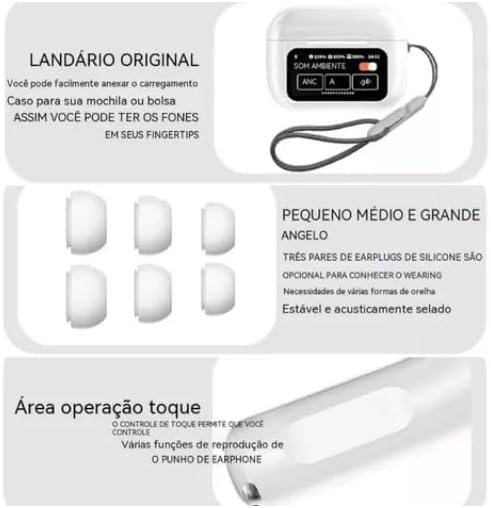
Figure 2.3: This image highlights key features: a lanyard attachment point on the charging case for portability, three pairs of silicone ear tips (small, medium, large) for a comfortable and secure fit, and the touch operation area on the earbuds for controlling playback and other functions.
3. 설정
3.1 이어버드와 케이스 충전
- Connect the provided USB-C cable to the charging case and a compatible power source (e.g., USB wall adapter, computer USB port).
- The touch screen on the charging case will display the current charging status.
- Ensure both earbuds are correctly placed inside the charging case to charge them simultaneously.
- A full charge for both the earbuds and the case typically takes approximately 2 hours.
3.2 블루투스 기기와 페어링
- 충전 케이스 뚜껑을 여세요. 이어버드가 자동으로 켜지고 블루투스 페어링 모드로 전환됩니다.
- On your desired device (e.g., smartphone, tablet, laptop), navigate to the Bluetooth settings.
- Bluetooth를 활성화하고 사용 가능한 장치를 검색합니다.
- Select "Kaidi KD-7019" from the list of detected devices to initiate the connection.
- 이어버드에서 음성 안내가 나오면 페어링이 성공적으로 완료된 것입니다.
4. 사용 설명서
4.1 Basic Earbud Controls (Touch)
The earbuds feature touch-sensitive areas for convenient control of audio playback and calls.
- 재생/일시 중지: 양쪽 이어버드를 한 번 탭하세요.
- 다음 트랙: 오른쪽 이어버드를 두 번 탭하세요.
- 이전 트랙 : 왼쪽 이어버드를 두 번 탭하세요.
- 전화 받기/종료: 양쪽 이어버드를 한 번 탭하세요.
- 전화 거부: Press and hold either earbud for approximately 2 seconds.
- Voice Assistant 활성화 : 양쪽 이어버드를 세 번 탭하세요.
4.2 충전 케이스 터치스크린 기능
The integrated touch screen on the charging case provides additional control and information without needing to access your paired device.
- 음악 제어: Navigate through tracks, play, and pause directly from the screen.
- 볼륨 조절: 오디오 재생 볼륨을 조절하세요.
- 사운드 이퀄라이저: Select from various preset equalizer modes to customize your audio experience (e.g., Acid Rock, Pop, Classical).
- 주변 사운드 모드: Toggle between Active Noise Cancellation (ANC), Transparency Mode, and Normal mode to suit your environment.
- "Find My Buds" Locator: Activate this function to emit a sound from misplaced earbuds, aiding in their retrieval.
- 공간 사운드: Enable or disable spatial audio features for an immersive sound experience.
- 플래시: Activate a small light feature on the charging case for convenience.
- 잠금 화면 배경 화면: Customize the display background of the touch screen.
- 날짜 및 시간 표시: View the current date and time directly on the case screen.
5. 유지관리
5.1 청소
- Use a soft, dry, lint-free cloth to clean the earbuds and the charging case.
- Do not use abrasive cleaners, alcohol, or chemical solvents, as these can damage the device.
- If necessary, gently clean the silicone ear tips with a damp cloth and mild soap, then ensure they are completely dry before reattaching them to the earbuds.
5.2 보관
- 이어폰을 사용하지 않을 때는 항상 충전 케이스에 보관하세요. 이렇게 하면 이어폰이 손상되는 것을 방지하고 충전 상태를 유지할 수 있습니다.
- 장치를 극한의 온도, 직사광선 또는 높은 습도에 노출시키지 마십시오.
6. 문제 해결
일반적인 문제 및 솔루션
- 소리 없음:
- 이어폰이 충분히 충전되었는지 확인하세요.
- Verify that the Bluetooth connection is active and stable.
- Adjust the volume on both your connected device and via the charging case touch screen.
- 페어링할 수 없습니다:
- Confirm that the earbuds are in pairing mode (open case lid).
- 기기에서 Bluetooth를 껐다가 다시 켜세요.
- If previously paired, try forgetting "Kaidi KD-7019" from your device's Bluetooth list and attempt pairing again.
- Ensure no other devices are currently connected to the earbuds.
- 충전 문제:
- Check the USB-C cable and power adapter for damage and proper connection.
- Ensure both earbuds are correctly seated in their charging slots within the case.
- Clean the charging contacts on both the earbuds and the case if they appear dirty.
- 터치 컨트롤이 반응하지 않음:
- Ensure the touch areas on the earbuds are clean and dry.
- Place the earbuds back into the charging case, close the lid, and then reopen it to reset them.
7. 사양
기술 데이터
| 특징 | 세부 사항 |
|---|---|
| 상표 | Kaidi |
| 모델 | KD-7019 (also referred to as 3041) |
| 블루투스 버전 | 5.3 |
| 지원되는 프로토콜 | HFP, HSP, A2DP, AVRCP |
| 드라이버 유닛 | 13mm (XNUMXmm) |
| 전송 거리 | > 10 미터 |
| 이어버드 배터리 용량 | 30mAh |
| 케이스 배터리 용량 | 360mAh |
| 음악 재생 시간 | 최대 5시간(80% 볼륨) |
| 충전 시간 (이어폰 및 케이스 포함) | 약 2시간 |
| 제어 방법 | 만지다 |
| 호환 장치 | 휴대폰, 태블릿, 노트북 |
| 소음 제어 | 환경 소음 제거(ENC) |
| ANATEL 인증 | 10545-23-12308 |
| 제품 무게 | 190g |
| 패키지 크기 | 23 x 13 x 4cm |
8. 보증 및 지원
8.1 보증 정보
Based on the available product information, this product does not come with a manufacturer's warranty. Please refer to the return and warranty policies provided by your retailer or point of purchase for any potential coverage.
8.2 고객 지원
For further assistance, technical support, or inquiries regarding your Kaidi KD-7019 TWS Bluetooth Earbuds, please contact the retailer or seller from whom you purchased the product.


