1. 서론
This manual provides detailed instructions for the safe and effective use of your POSEIDON Wireless Tattoo Pen Kit. Please read this manual thoroughly before operating the device to ensure proper function and longevity of the equipment. This kit is designed for both beginners and experienced artists.
2. 패키지 내용
The POSEIDON Wireless Tattoo Pen Kit includes the following components:
- 1x Wireless Tattoo Pen
- 20x Assorted Tattoo Needle Cartridges (5x1205RL, 5x1207RL, 5x1209RS, 5x1207CM)
- 2x 1800mAh High-Capacity Batteries
- 11x Tattoo Ink Bottles (Black and assorted colors)
- 잉크컵
- 연습용 피부
- Stencil Paper
- 마커펜
- 그립
- USB-C 충전 케이블

이미지 2.1: 이상view of all items included in the POSEIDON Wireless Tattoo Pen Kit.
3. 제품 오버view
3.1 Wireless Tattoo Pen
The tattoo pen features a high-performance motor, an ergonomic non-slip handle, and a universal needle opening compatible with most cartridge needles. The integrated LED display shows voltage, session timer, and battery level.

Image 3.1: Key features of the POSEIDON Wireless Tattoo Pen, including the high-performance motor, non-slip handle, and needle opening.
배터리 3.2개
The kit includes two 1800mAh lithium polymer batteries, providing 5-8 hours of operation per charge. Each battery has a digital display indicating current voltage, frequency, and session time. Charging time is approximately 2 hours via USB-C.

Image 3.2: The two 1800mAh batteries, showing their digital displays for voltage and session time.
4. 설정
4.1 배터리 충전
- 제공된 USB-C 충전 케이블을 배터리의 충전 포트에 연결하십시오.
- 케이블의 다른 쪽 끝을 호환되는 USB 전원 어댑터(포함되지 않음)에 연결합니다.
- The battery display will indicate charging status. A full charge takes approximately 2 hours.
4.2 Assembling the Tattoo Pen
- Ensure the tattoo pen is clean and sterilized according to standard hygiene practices.
- Twist the battery clockwise onto the top of the tattoo pen until securely fastened.
- Select the desired needle cartridge.
- Insert the needle cartridge into the front opening of the pen by pushing it firmly until it clicks into place.
- To remove, twist the cartridge counter-clockwise and pull it out.
5. 사용 설명서
5.1 전원 켜기/끄기
- To power on, press and hold the power button (usually marked with a circle or power symbol) for a few seconds until the display illuminates.
- 전원을 끄려면 디스플레이가 꺼질 때까지 전원 버튼을 다시 길게 누르세요.
- To start/pause operation, short press the power button.
5.2권tage 조정
- 권tage can be adjusted from 4V to 12V in 0.1V increments.
- Use the "+" button to increase voltage.
- Use the "-" button to decrease voltage.
- 현재 권tage is displayed on the LED screen.
5.3 Stroke Length Adjustment
The tattoo pen features 7 adjustable stroke settings, ranging from 2.4mm to 4.2mm. Adjust the stroke length by rotating the grip section of the pen.
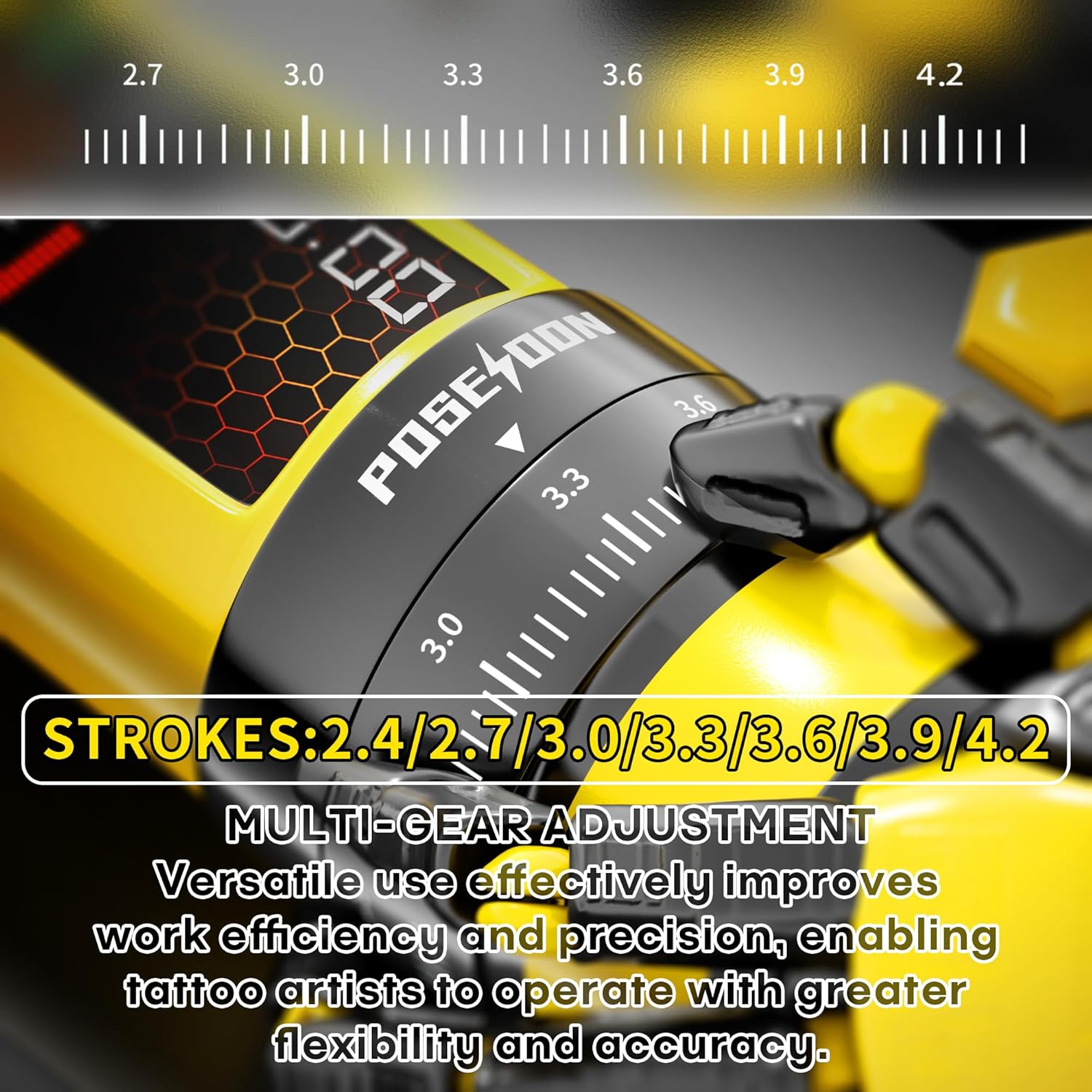
Image 5.1: Detail of the stroke length adjustment mechanism on the tattoo pen.

Image 5.2: Visual guide to the multi-gear stroke adjustment and control buttons for voltage and mode selection.
5.4 Working Modes (Normal/Dot)
- The pen supports two working modes: Normal mode (standard operation) and Dot mode (for precise dotwork/stippling).
- To switch between modes, long press the function switch key (usually marked 'M'). The display will indicate the active mode.
5.5 Session Timer
The integrated digital timer on the LED display tracks the duration of your tattooing session. This feature assists with time management during appointments.
6. 유지관리
6.1 세척 및 살균
- Always disconnect the battery from the pen before cleaning.
- Wipe the exterior of the tattoo pen with a sterile wipe or a cloth dampened with an approved disinfectant solution after each use.
- Do not immerse the tattoo pen or battery in liquid.
- Needle cartridges are single-use and must be disposed of properly after each session.
6.2 보관
- Store the tattoo pen and accessories in a clean, dry place away from direct sunlight and extreme temperatures.
- Ensure batteries are partially charged (around 50%) before long-term storage to maintain battery health.
7. 문제 해결
일반적인 문제와 해결 방법은 아래 표를 참조하세요.
| 문제 | 가능한 원인 | 해결책 |
|---|---|---|
| 펜이 켜지지 않습니다. | 배터리가 방전되었거나 제대로 연결되지 않았습니다. | Charge the battery. Ensure the battery is securely twisted onto the pen. |
| Needle not moving or moving weakly. | 낮은 볼륨tage setting, faulty needle cartridge, or motor issue. | 볼륨 증가tage. Replace the needle cartridge. If problem persists, contact support. |
| 배터리가 충전되지 않습니다. | USB-C 케이블 또는 전원 어댑터에 결함이 있을 수 있습니다. | 다른 USB-C 케이블과 전원 어댑터를 사용해 보세요. 연결이 제대로 되었는지 확인하십시오. |
| 일관성 없는 성능. | Low battery, incorrect stroke setting, or worn-out needle. | Ensure battery is fully charged. Adjust stroke length. Replace needle cartridge. |
8. 사양
| 특징 | 세부 사항 |
|---|---|
| 모델 번호 | TK208-UK |
| 배터리 용량 | 2 x 1800mAh Lithium Polymer |
| 작업 볼륨tage | 4-12V (adjustable in 0.1V increments) |
| Stroke Settings | 7단계 조절 (2.4mm - 4.2mm) |
| 모터 속도 | 8V, 8000RPM |
| 충전 시간 | 약 2시간 |
| 근무시간 | 배터리당 5~8시간 사용 가능 |
| 패키지 크기 | 8.54 x 7.87 x 3.9 인치 |
| 무게 | 2.69 파운드 |
| 한국어: | 716597329713 |
9. 안전 정보
- This device is intended for professional use or supervised training.
- Always follow proper sterilization and hygiene protocols to prevent cross-contamination.
- Use only compatible needle cartridges.
- 기기를 어린이의 손이 닿지 않는 곳에 보관하세요.
- 제품을 분해하거나 개조하지 마십시오. 보증이 무효화될 수 있으며 안전상의 위험이 발생할 수 있습니다.
- Consult a medical professional if you experience any adverse reactions or complications.

Image 9.1: Illustration of the internal silicone safety system designed to reduce skin lesions and protect the machine.
10. 보증 및 지원
For warranty information, technical support, or service inquiries, please contact POSEIDON customer service through the retailer where the product was purchased or visit the official POSEIDON brand store online. Please retain your proof of purchase for warranty claims.


