1. 서론
구매해주셔서 감사합니다asing the MZEIBO KY2020D 80W Bluetooth 5.3 Detachable Sound Bar. This versatile audio system is designed to enhance your home entertainment experience with immersive stereo sound. Its unique 2-in-1 detachable design allows for flexible placement options, adapting to various room layouts and preferences. This manual provides essential information for setting up, operating, and maintaining your sound bar to ensure optimal performance.
2. 패키지 내용
아래 나열된 모든 품목이 패키지에 포함되어 있는지 확인하세요.
- MZEIBO KY2020D Sound Bar (2 detachable sections)
- 원격 제어
- Stand Bases (for vertical speaker setup)
- AUX 케이블
- 전원 어댑터
- 광케이블
- HDMI 케이블
- 벽 장착용 나사 및 앵커
- 사용자 가이드(이 매뉴얼)

그림 2.1: Included accessories for the MZEIBO Sound Bar.
3. 제품 특징
- Premium Dolby Sound: Experience clear dialogue and powerful bass with advanced Dolby audio technology.
- Detachable 2-in-1 Design: Use as a single horizontal soundbar or split into two separate vertical speakers for flexible placement.
- 다중 연결 옵션: Supports Bluetooth 5.3, HDMI ARC, Optical, and 3.5mm AUX for broad compatibility.
- 80W 출력 전력: Delivers robust audio performance for movies, music, and gaming.
- 컴팩트하고 세련된: Sleek, modern design integrates seamlessly into any home decor.
- 최적화된 사운드 모드: Dedicated modes for Music, Movie, and News to enhance specific audio content.

그림 3.1: Internal speaker configuration and audio specifications.
4. 설정
4.1. 조립 및 배치
The MZEIBO Sound Bar offers two primary configurations:
- Single Sound Bar: Connect the two sections by aligning the connectors and gently pushing them together until they click into place. This configuration is ideal for placement directly below your TV on a tabletop or mounted on a wall.
- Two Vertical Speakers: Separate the two sound bar sections. Attach the provided stand bases to the bottom of each section. Place one speaker to the left and one to the right of your TV for a wider stereo soundstage.
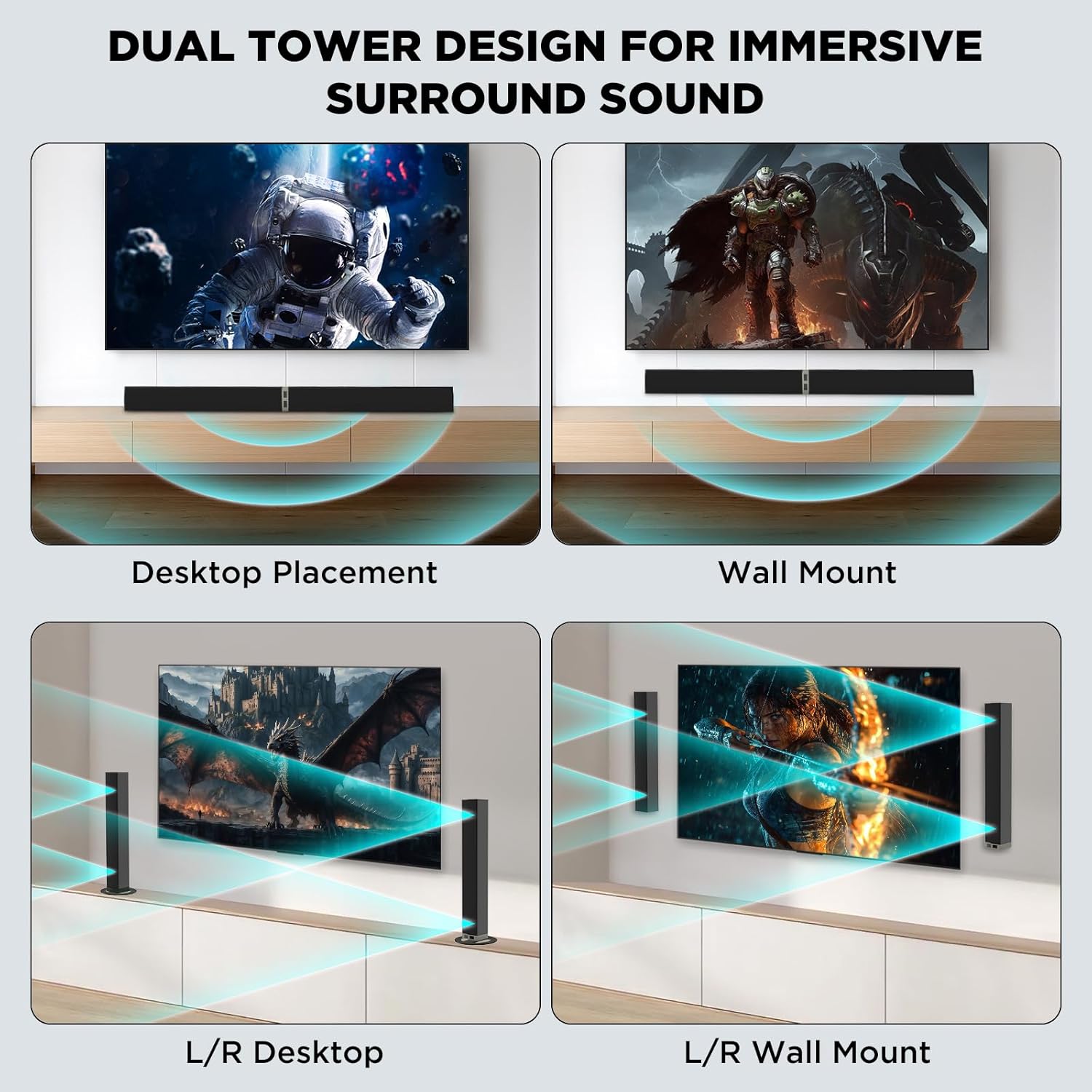
그림 4.1: Versatile placement options for the sound bar.
4.2. 전원에 연결
Connect the provided power supply adapter to the DC IN port on the sound bar and then plug it into a wall outlet.
4.3. 오디오 연결
Choose one of the following methods to connect the sound bar to your audio source (TV, PC, etc.):
- HDMI ARC : Connect one end of the HDMI cable to the HDMI ARC port on your TV and the other end to the HDMI ARC port on the sound bar. Ensure your TV's HDMI ARC function is enabled.
- 광학: Connect one end of the optical cable to the Optical Out port on your TV and the other end to the OPTICAL port on the sound bar. Remove protective caps from the optical cable before use.
- 3.5mm 보조: Connect one end of the 3.5mm AUX cable to the headphone jack or AUX Out port on your device and the other end to the AUX port on the sound bar.
- 블루투스 5.3 :
- 사운드 바의 전원을 켭니다.
- Press the 'BT' button on the remote control or the 'Mode' button on the sound bar until 'BT' appears on the display. The indicator light will flash, indicating pairing mode.
- On your device (e.g., smartphone, smart TV), enable Bluetooth and search for 'MZEIBO Soundbar'.
- Select 'MZEIBO Soundbar' to pair. Once connected, the indicator light will stop flashing and remain solid.
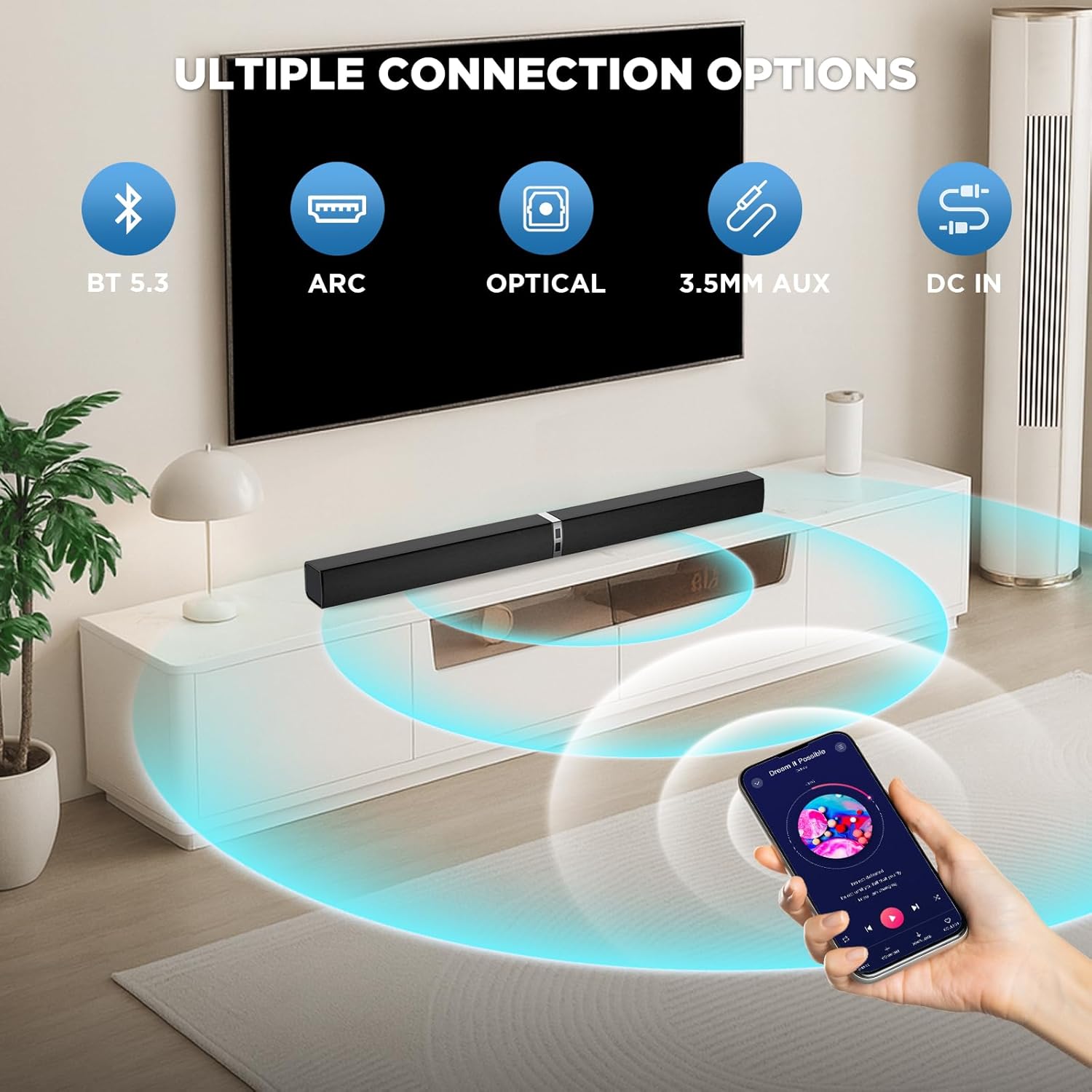
그림 4.2: Available connection options for the sound bar.
5. 운영
5.1. 전원 켜기/끄기
를 누르세요 힘 button on the remote control or the sound bar unit to turn it on or off.
5.2. 볼륨 조절
사용하세요 볼륨 + 그리고 볼륨- buttons on the remote control or the sound bar unit to adjust the volume.
5.3. 입력 소스 선택
를 누르세요 방법 button on the remote control or the sound bar unit to cycle through available input sources: Bluetooth (BT), HDMI ARC, Optical (OPT), and AUX.
5.4. 사운드 모드
The sound bar features optimized sound modes for different content types. Press the corresponding button on the remote control to select:
- 음악 모드: 음악의 명료도와 저음을 향상시킵니다.
- 영화 모드 : Provides an immersive cinematic experience with enhanced dialogue and effects.
- 뉴스 모드: 뉴스 방송과 토크쇼의 음성 선명도를 최적화합니다.

그림 5.1: Sound modes for different content.
6. 유지관리
- 청소: 부드럽고 마른 천으로 사운드바 표면을 닦으십시오. 액체 세척제나 연마성 재질은 사용하지 마십시오.
- 저장: 장시간 사용하지 않을 경우, 사운드바를 직사광선과 극한의 온도를 피해 시원하고 건조한 곳에 보관하세요.
- 액체를 피하세요: Keep the sound bar away from water and other liquids to prevent damage.
- 통풍: Ensure proper ventilation around the sound bar to prevent overheating. Do not block any ventilation openings.
7. 문제 해결
If you encounter issues with your MZEIBO Sound Bar, please refer to the following common solutions:
- 소리 없음:
- Ensure the sound bar is powered on and the volume is not muted or set too low.
- Verify that the correct input source (BT, ARC, OPT, AUX) is selected on the sound bar.
- 모든 오디오 케이블(HDMI, 광케이블, AUX)의 연결이 제대로 되어 있는지 확인하십시오.
- If using HDMI ARC, confirm that your TV's ARC function is enabled and the TV's audio output is set to the sound bar.
- 블루투스 페어링 문제:
- Ensure the sound bar is in Bluetooth pairing mode (indicator light flashing).
- 기기의 블루투스가 켜져 있고 통신 가능 범위(일반적으로 10미터) 내에 있는지 확인하세요.
- 이전에 페어링한 적이 있다면, 기기 페어링을 해제한 후 다시 페어링해 보세요.
- 원격 제어가 작동하지 않음:
- Check if the batteries are correctly inserted and not depleted. Replace if necessary (requires 2x AAA batteries, not included).
- Ensure there are no obstructions between the remote control and the sound bar's sensor.
8. 사양
| 모델명 | KY2020D |
| 상표 | 엠자이보 |
| 스피커 유형 | 사운드바 |
| 스피커 최대 출력 전력 | 80 와트 |
| 주파수 응답 | 20 kHz (XNUMX kHz) |
| 연결 기술 | Bluetooth 5.3, Optical, HDMI ARC, 3.5mm AUX |
| 오디오 출력 모드 | 스테레오 재생 |
| 제품 치수 | 31인치 깊이 x 2.35인치 너비 x 2.3인치 높이 |
| 품목 무게 | 2.43킬로그램(5.35파운드) |
| 장착 유형 | 탁상용 마운트, 벽걸이용 |
| 재료 | 플라스틱 또는 금속 |
9. 보증 및 지원
MZEIBO offers a lifetime warranty for the KY2020D Sound Bar. This includes super free replacement for lost, defective, or damaged units, with no shipping fees and no return required. To activate your warranty, please scan the QR code provided on the product packaging or included documentation.
For further assistance or technical support, please refer to the contact information provided with your product or visit the official MZEIBO web대지.


