소개
This manual provides detailed instructions for the installation, operation, and maintenance of your Reidsport Ceiling Fan Remote Control. Please read this manual thoroughly before use to ensure proper function and safety.
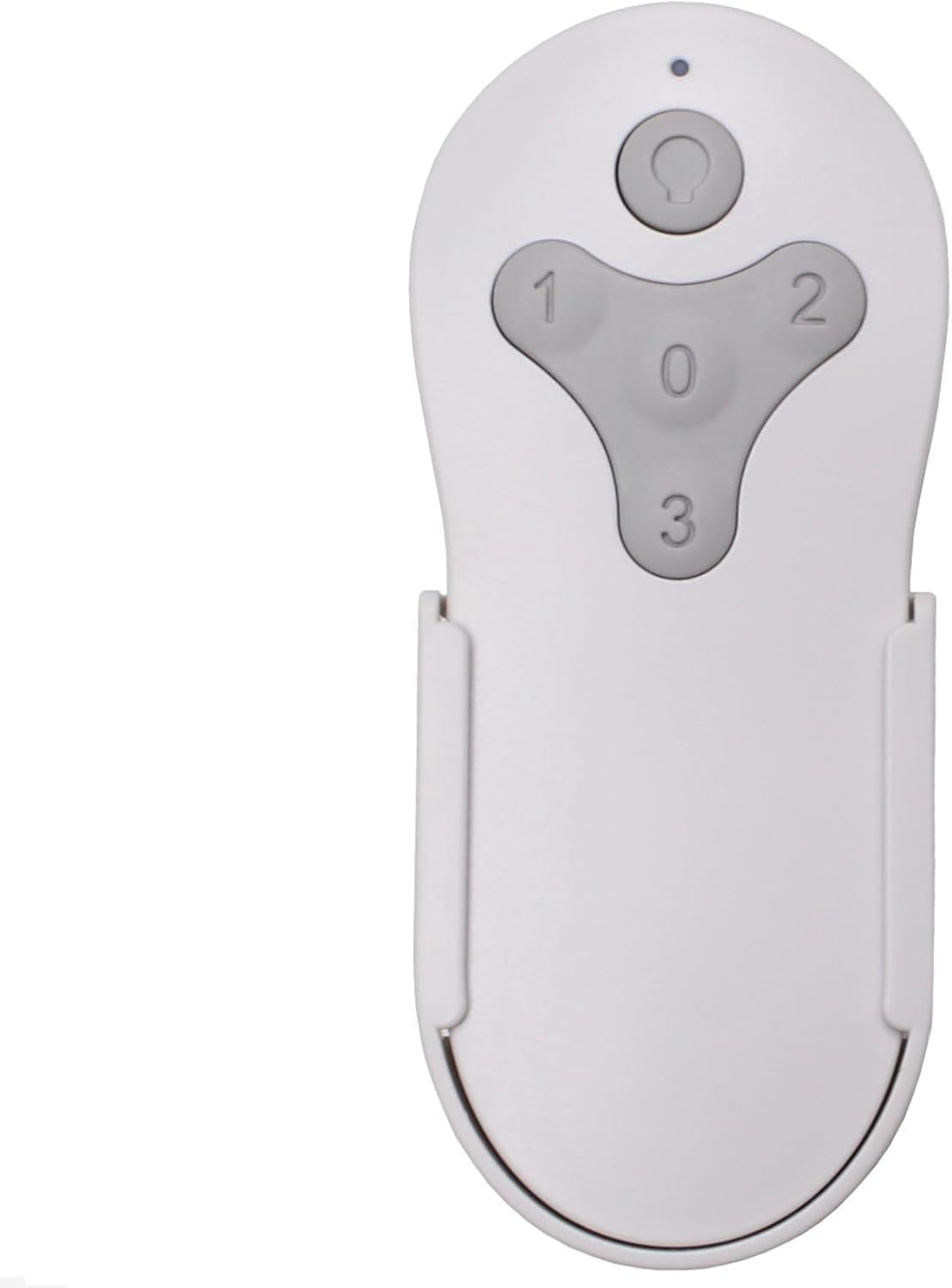
이미지: 앞면 view of the Reidsport Ceiling Fan Remote Control, showing the power button and fan speed buttons (0, 1, 2, 3).
안전 정보
항상 다음 안전 예방 조치를 준수하십시오.
- Ensure power is turned off at the circuit breaker before performing any installation or maintenance.
- 리모컨을 물이나 과도한 습기에 노출시키지 마십시오.
- Use only the specified battery type (12V 23A).
- 배터리를 어린이의 손이 닿지 않는 곳에 보관하세요.
패키지 내용
패키지에 모든 품목이 들어 있는지 확인하세요.
- Reidsport Ceiling Fan Remote Control
- 벽걸이 홀더
- 장착 나사 (2)

Image: The remote control, its wall mount holder, and two mounting screws, indicating the complete package contents.
명세서
| 특징 | 세부 사항 |
|---|---|
| 모델 번호 | CDTR214D |
| 제품 치수 | 2 x 1 x 4 인치 |
| 품목 무게 | 6 온스 |
| 배터리 유형 | 1 x 12V 23A (not included) |
| 호환 장치 | Harbor Breeze Reidsport Ceiling Fans (RDS44MBK5LR, RDS44BNK5LR, RDS44MW5LR, RDS52MBK6LR, RDS52BNK6LR, RDS52MW6LR) |
| 특징 | Radiofrequency (RF) Control |
설정 및 페어링
1. 배터리 설치
The remote control requires one 12V 23A battery (not included).
- 리모콘 뒷면에서 배터리함을 찾으세요.
- 배터리 덮개를 아래로 밀어서 엽니다.
- Insert one 12V 23A battery, ensuring the correct polarity (+ and -).
- 딸깍 소리가 날 때까지 배터리 덮개를 다시 제자리에 밀어 넣습니다.

이미지: 후면 view of the remote control with the battery compartment open, showing where to insert the 12V 23A battery.
2. Pairing with Ceiling Fan Receiver
Follow these steps to pair the remote control with your existing ceiling fan receiver:
- Turn Power Off To Fan: Locate the circuit breaker or wall switch that controls power to your ceiling fan and turn it OFF. Ensure the fan is completely powered down.

Image: A hand turning off a wall light switch, illustrating the first step of cutting power to the fan.
- Turn Power Back On To Fan: After a few seconds, turn the power back ON to the ceiling fan.
- Press and Hold "0" Key: Within 30 seconds of restoring power, press and hold the "0" key on the remote control for 5 seconds. The fan light should blink or the fan should respond, indicating successful pairing.

Image: A close-up of the remote control, with the "0" button highlighted, indicating the button to press for pairing.
If pairing is unsuccessful, repeat the steps. Ensure the remote control is within range of the fan receiver during the pairing process.

Image: The remote control securely placed in its wall mount holder, positioned on a wall near a ceiling fan, illustrating the ease of access after setup.
작동 지침
The remote control provides comprehensive control over your ceiling fan's functions.
- Power Button (Top Button): Press to turn the fan light ON or OFF. Press and hold to dim the fan light.
- Fan Speed Buttons (1, 2, 3, 0):
- "1": 선풍기 속도를 낮음으로 설정합니다.
- "2": 선풍기 속도를 중간으로 설정합니다.
- "3": 선풍기 속도를 높음으로 설정합니다.
- "0": 팬을 끕니다.

Image: The remote control displayed alongside icons and text describing its functions: full speed control, light control, dimming, and compatibility with multiple fan models.
유지
리모컨의 최적 성능과 긴 수명을 보장하려면 다음 사항을 준수하십시오.
- 청소: 리모컨은 부드럽고 마른 천으로 닦으세요. 연마성 세제나 용제를 사용하지 마세요.
- 배터리 교체: Replace the 12V 23A battery when the remote's range decreases or it becomes unresponsive. Dispose of old batteries according to local regulations.
- 저장: Store the remote control in a cool, dry place when not in use for extended periods.
문제 해결
| 문제 | 가능한 원인 | 해결책 |
|---|---|---|
| 리모컨이 응답하지 않습니다. | 배터리가 방전되었거나 잘못 설치되었습니다. | Replace the 12V 23A battery, ensuring correct polarity. |
| Remote control not pairing with fan. | Incorrect pairing procedure or power interruption. | Repeat the pairing steps carefully (Power Off, Power On, Hold "0" for 5 seconds). Ensure power is completely cycled. |
| 제한된 범위 또는 간헐적 제어. | 배터리 부족 또는 간섭. | Replace battery. Ensure no major obstructions between remote and fan receiver. |
| Fan light not dimming. | Fan receiver or light kit does not support dimming. | Verify your ceiling fan's specifications for dimming compatibility. |
보증 및 지원
이 제품에는 다음이 포함되어 있습니다. 1년 제조사 보증.
For technical support or warranty claims, please contact Comfort Direct customer service. Refer to your purchase documentation for contact details or visit the official Comfort Direct web대지.
메모: The warranty does not cover damage caused by improper installation, misuse, or unauthorized modifications.


