소개
This manual provides comprehensive instructions for the setup, operation, and maintenance of your Comfort Direct Bradbury Ceiling Fan Remote Control (Model CDTR214D). Please read this manual thoroughly before use to ensure proper functionality and safety. This remote is designed for use with specific Harbor Breeze Bradbury Ceiling Fan models, including BRD48MBK6LR, BRD48BNK6LR, BRD48OSB6LR, BRD48MWW6LR, BRD60MBK6LR, BRD60BNK6LRS, and BRD60OSB6LR.
안전 정보
Always ensure the power to the ceiling fan is turned off at the circuit breaker before performing any installation or maintenance. Do not expose the remote control to water or excessive moisture. Keep batteries out of reach of children. Dispose of used batteries responsibly.
패키지 내용
- 1 x Comfort Direct Bradbury Ceiling Fan Remote Control
- 1 x 벽걸이 홀더
- 2 x 장착 나사

Image: The remote control, its wall mount holder, and two mounting screws, illustrating the complete package contents.
명세서
| 모델 번호 | CDTR214D |
| 제품 치수 | 2 x 1 x 4 인치 |
| 품목 무게 | 6 온스 |
| 배터리 요구 사항 | 1 x 23A 12V battery (not included) |
| 특징 | Radiofrequency (RF) control |
| 호환 장치 | Harbor Breeze Bradbury Ceiling Fans (BRD48MBK6LR, BRD48BNK6LR, BRD48OSB6LR, BRD48MWW6LR, BRD60MBK6LR, BRD60BNK6LRS, BRD60OSB6LR) |
설정
1. 배터리 설치
- 리모콘 뒷면에서 배터리함을 찾으세요.
- 배터리 덮개를 아래로 밀어서 엽니다.
- Insert one 23A 12V battery, ensuring the polarity (+/-) matches the diagram inside the compartment.
- 딸깍 소리가 날 때까지 배터리 덮개를 다시 제자리에 밀어 넣습니다.

이미지: 후면 view of the remote control with the battery cover removed, revealing the battery compartment for a 23A 12V battery.
2. Pairing the Remote Control with Your Ceiling Fan
중요한: Only one remote can be programmed per fan. You cannot use two separate remotes to control the same fan.
- Turn Power Off To Fan: Ensure the power supply to your ceiling fan is completely off at the wall switch or circuit breaker.
- Turn Power Back On To Fan: 천장 선풍기의 전원을 복원하십시오.
- Press and Hold "0" Key: Within 30 seconds of restoring power, press and hold the "0" button on your remote control for 5 seconds. The fan light should blink or the fan should briefly turn on to indicate successful pairing.

Image: Visual guide for the remote pairing process, showing the three key steps.
3. 벽걸이 설치
The included wall mount holder allows for convenient storage of your remote control.
- 직사광선이나 열원을 피해 벽면의 적절한 위치를 선택하세요.
- Use the two provided screws to securely attach the wall mount holder to the wall.
- Place the remote control into the holder for easy access.

Image: The remote control securely placed in its wall mount holder, demonstrating its convenient placement on a wall.
작동 지침
Once paired, your remote control provides full control over your compatible ceiling fan and its light.
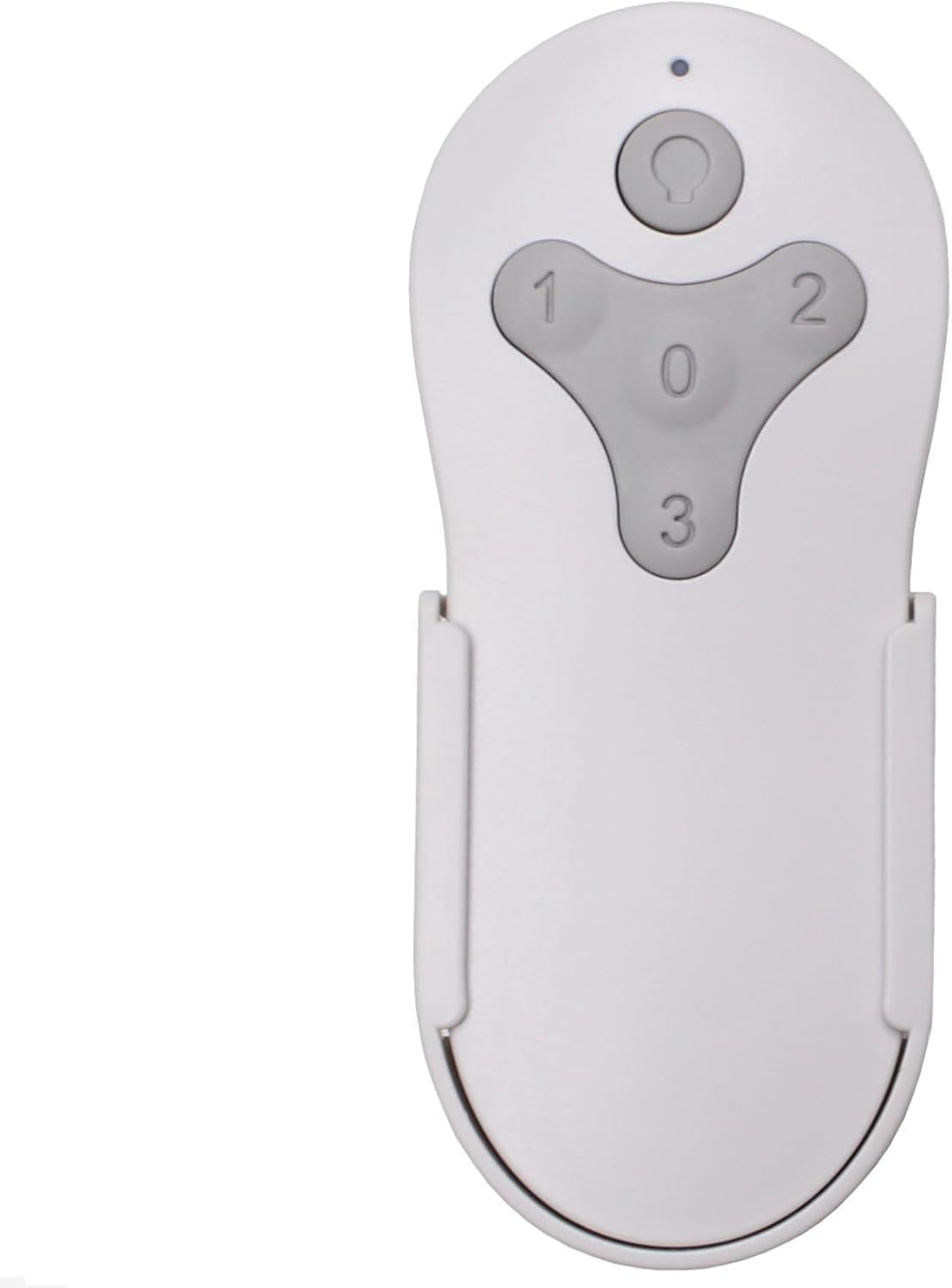
이미지: 앞면 view of the remote control, showing the fan speed buttons (1, 2, 3, 0) and the light control button.
팬 속도 제어
- 누르다 "1" for Low fan speed.
- 누르다 "2" for Medium fan speed.
- 누르다 "3" for High fan speed.
- 누르다 "0" 팬을 끄려면.
Light Control with Dimming
- 를 누르세요 라이트 버튼 (usually depicted as a light bulb icon) to turn the fan light On or Off.
- To dim the light, press and hold the 라이트 버튼. Release the button when the desired brightness level is reached.
유지
배터리 교체
When the remote control's range decreases or it becomes unresponsive, it is likely time to replace the battery. Follow the battery installation steps outlined in the "Setup" section to replace the 23A 12V battery. Ensure proper disposal of the old battery according to local regulations.
청소
리모컨은 부드럽고 마른 천으로 닦아주세요. 연마성 세제나 용제는 표면이나 내부 부품을 손상시킬 수 있으므로 사용하지 마세요.
문제 해결
- 리모컨이 응답하지 않음:
- 배터리가 올바르게 설치되었는지, 충전량이 충분한지 확인하십시오. 필요한 경우 배터리를 교체하십시오.
- Ensure the remote is within range of the fan's receiver.
- "설정" 섹션에 설명된 대로 페어링 과정을 다시 시도하세요.
- Fan or light not responding after pairing:
- Verify that the power to the fan is on at the wall switch or circuit breaker.
- Confirm that the remote was successfully paired (fan light blink or brief fan operation). If not, repeat the pairing steps carefully.
- Ensure no other remote is attempting to control the same fan, as only one remote can be paired per fan.
보증
This Comfort Direct Bradbury Ceiling Fan Remote Control comes with a 1년 제조사 보증 from the date of purchase. This warranty covers defects in materials and workmanship under normal use. Please retain your proof of purchase for warranty claims. For warranty service, please contact Comfort Direct customer support.
지원하다
For further assistance, technical support, or inquiries regarding your Comfort Direct Bradbury Ceiling Fan Remote Control, please visit the Comfort Direct website or contact their customer service department. Contact information can typically be found on the product packaging or the official Comfort Direct web대지.


