1. 서론
구매해주셔서 감사합니다asing the ZEBRONICS Zeb Paradise Neo Wireless Headphones. This manual provides detailed instructions for setup, operation, and maintenance of your device. Please read this manual carefully before use to ensure proper functionality and to maximize your listening experience.
Key features of your Zeb Paradise Neo headphones include 40mm drivers for clear audio, up to 50 hours of playback, rapid charging, a dedicated gaming mode with low latency, three EQ modes, Environmental Noise Cancellation (ENC), and dual pairing capability.

Image 1.1: ZEBRONICS Zeb Paradise Neo Wireless Headphones. This image shows a front-side view of the black ZEBRONICS Zeb Paradise Neo wireless headphones, highlighting their sleek design and on-ear form factor.
2. 패키지 내용
패키지에 모든 품목이 들어 있는지 확인하세요.
- ZEBRONICS Zeb Paradise Neo Wireless Headphones (1 Unit)
- USB Type-C Charging Cable (1 Unit)
- AUX Cable (1 Unit)
- QR Code Guide (1 Unit)
3. 제품 오버view
헤드폰 구성 요소를 숙지하세요:
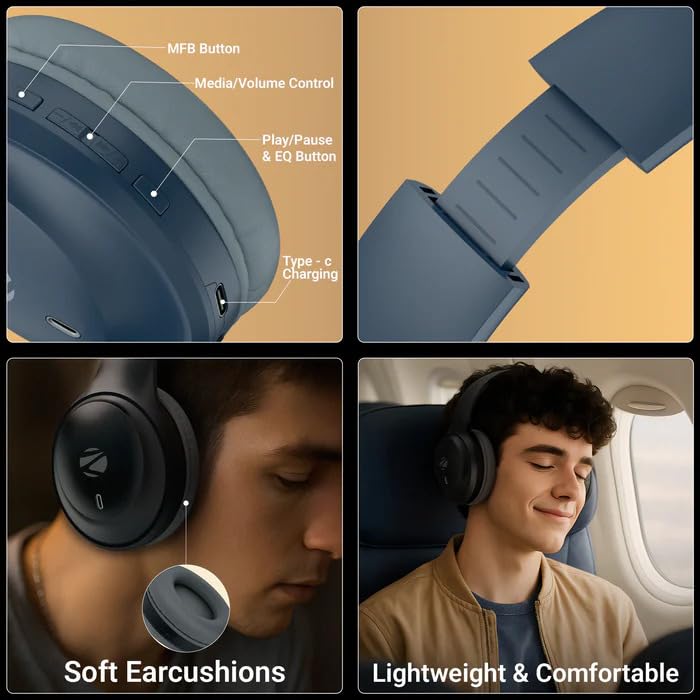
Image 3.1: Headphone Controls and Features. This image displays the various control buttons and features on the ZEBRONICS Zeb Paradise Neo headphones. It highlights the MFB (Multi-Function Button), Media/Volume Control buttons, Play/Pause & EQ Button, and the Type-C Charging port. It also shows the soft ear cushions and the lightweight, comfortable design.
- MFB 버튼: Multi-Function Button for power, pairing, and call management.
- Media/Volume Control: Buttons for adjusting volume and navigating tracks.
- Play/Pause & EQ Button: Controls playback and switches between EQ modes.
- Type-C 충전 포트: 충전 케이블을 연결합니다.
- AUX 포트 : 유선 오디오 연결용.
- 마이크로폰: For call function and voice assistant.
4. 설정 및 충전
4.1 초기 충전
Before first use, fully charge the headphones. Connect the supplied USB Type-C charging cable to the headphone's charging port and the other end to a USB power adapter (not included) or a computer's USB port.
- A red LED indicator will illuminate during charging.
- The LED indicator will turn off once charging is complete.
- 충전 시간은 약 1.5시간입니다.
- Rapid charging provides approximately 7 hours of use from a 10-minute charge.
4.2 전원 켜기/끄기
- 전원 켜기: LED 표시등이 파란색으로 깜빡일 때까지 MFB 버튼을 약 3초 동안 길게 누르십시오.
- 전원 끄기 : MFB 버튼을 약 5초 동안 길게 누르면 LED 표시등이 빨간색으로 깜빡인 후 꺼집니다.
5. 사용 설명서
5.1 블루투스 페어링
- 헤드폰이 완전히 충전되었고 전원이 꺼져 있는지 확인하세요.
- Press and hold the MFB button for approximately 5-7 seconds until the LED indicator flashes red and blue alternately. This indicates pairing mode.
- 모바일 기기에서 블루투스를 활성화하고 사용 가능한 기기를 검색하세요.
- Select "ZEB-PARADISE NEO" from the list of found devices.
- Once paired, the LED indicator will flash blue intermittently.
헤드폰은 전원을 켜면 마지막으로 페어링된 장치에 자동으로 연결을 시도합니다.
5.2 듀얼 페어링
The Zeb Paradise Neo supports dual pairing, allowing connection to two Bluetooth devices simultaneously.
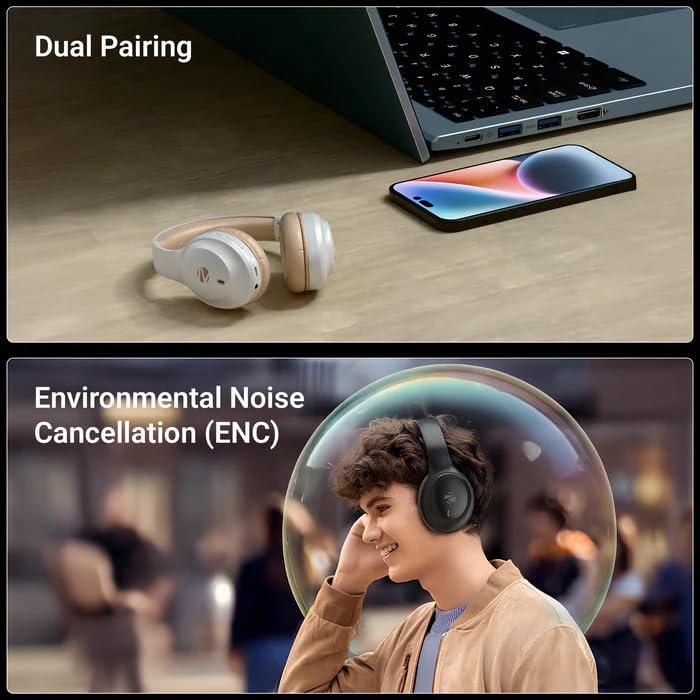
Image 5.1: Dual Pairing Capability. This image illustrates the dual pairing feature of the ZEBRONICS Zeb Paradise Neo headphones, showing them connected to both a laptop and a smartphone simultaneously. This allows seamless switching between audio sources.
- 5.1절에 설명된 대로 헤드폰을 첫 번째 장치(예: 스마트폰)와 페어링하십시오.
- 첫 번째 기기의 Bluetooth를 비활성화하세요. 헤드폰이 다시 페어링 모드로 전환됩니다.
- Pair the headphones with the second device (e.g., laptop).
- 첫 번째 기기에서 Bluetooth를 다시 활성화하세요. 이제 헤드폰이 두 기기에 모두 연결되었을 것입니다.
Audio will play from the device that is actively transmitting sound. You may need to manually select the headphones as the output device on one of the connected sources.
5.3 통화 기능
- 전화 받기/종료: MFB 버튼을 한 번 누르세요.
- 전화 거부: MFB 버튼을 약 2초간 길게 누르세요.
- 마지막 번호 재다이얼: MFB 버튼을 두 번 누르세요.
5.4개의 EQ 모드
The headphones feature 3 Equalizer (EQ) modes to customize your audio experience. Press the Play/Pause & EQ button to cycle through the available modes (e.g., Bass Boost, Balanced, Treble Boost).
5.5 게임 모드(저지연)
Activate Gaming Mode for reduced audio latency, ideal for gaming. Refer to the QR code guide for specific instructions on activating and deactivating Gaming Mode, as this may vary.
5.6 AUX 모드(유선 연결)
To use the headphones with a wired connection, connect the supplied 3.5mm AUX cable to the headphone's AUX port and the other end to your audio source's 3.5mm audio jack. The headphones will automatically switch to AUX mode.
6. 유지관리
- 청소: 부드럽고 마른 천을 사용하여 헤드폰을 닦으세요. 강한 화학 물질이나 연마재를 사용하지 마세요.
- 저장: 헤드폰은 직사광선과 극한의 온도를 피해 시원하고 건조한 곳에 보관하세요.
- 배터리 관리 : 배터리 수명을 연장하려면 헤드폰을 자주 완전히 방전시키지 마세요. 장시간 사용하지 않더라도 정기적으로 충전하세요.
- 물 노출: These headphones are not waterproof. Avoid exposure to water or moisture.
7. 문제 해결
| 문제 | 가능한 해결책 |
|---|---|
| 헤드폰 전원이 켜지지 않습니다. | 헤드폰이 충전되어 있는지 확인하세요. 전원에 연결한 후 다시 시도해 보세요. |
| 기기와 페어링할 수 없습니다. |
|
| 소리가 나지 않거나 볼륨이 작습니다. |
|
| 연결이 간헐적입니다. |
|
8. 사양
| 모델명 | Paradise Neo (ZEB-WHP 11) |
| 블루투스 버전 | 5.4 |
| 무선 범위 | 10미터(장애물 없을 경우) |
| 드라이버 크기 | 40mm |
| 스피커 임피던스 | 32Ω |
| 주파수 응답 | 20Hz - 20kHz |
| 감광도 | 99dB±3dB |
| 마이크 임피던스 | 2.2kΩ |
| 마이크 감도 | -38dB±3dB |
| 충전 시간 | 1.5시간 |
| 재생 시간 | Up to 50 hours* (at 50% volume) |
| 통화 시간 | 최대 40시간* |
| 순중량 | 161g |
| 제품 치수(W x D x H) | 18.8 x 8.4 x 21.5 cm (Package dimension) |
*Battery life may vary based on usage, volume levels, and environmental factors.
9. 보증 및 지원
For warranty information and customer support, please refer to the QR code guide included in your package or visit the official ZEBRONICS web대지. 보증 청구를 위해 구매 영수증을 보관하십시오.
Manufacturer: Zebronics India Pvt Ltd.
Country of Origin: India.


