소개
The Nanlite Pico Portable LED Fill Light is a compact and versatile lighting solution designed for photographers, videographers, and content creators. Weighing only 130g, its palm-sized design allows for easy portability, fitting into a pocket for on-the-go shooting. This light offers full-color RGB capabilities, adjustable color temperature, and various special effects to enhance your creative projects. Its intuitive controls and multiple mounting options make it an essential tool for diverse lighting needs.
상자 안에 무엇이 들어있나요?
- Pico Portable LED Fill Light x1
- Magnetic Attraction Diffuser x1
- Cold Shoe Adapter x1

Image: The Nanlite Pico Portable LED Fill Light, a magnetic diffuser, and a cold shoe adapter are included in the product packaging.
주요 특징
- 소형 및 경량: Weighs only 130g, making it highly portable for outdoor shooting and easy to carry in a pocket.
- 직관적인 컨트롤: Features a single knob and double button design for one-handed parameter adjustment and mode switching.
- 1.28-inch Round Screen: Provides a clear and intuitive display for monitoring settings and battery life.
- 자석베이스: Allows for convenient magnetic adsorption to metal surfaces for flexible placement.
- Flexible Flipping U-Frame: Offers 12 pitch adjustment angles (30° increments) for precise light positioning.
- 내장 배터리: Integrated 1500mAh lithium battery provides 1.3 to 6.5 hours of battery life depending on brightness.
- Full Color RGB: Supports 0-360 hues and 0-100% saturation adjustment with 36,000 rich colors.
- 특수 효과: Includes 14 built-in effects to unlock creative lighting possibilities.
설정
장치 충전하기
The Nanlite Pico features a built-in 1500mAh lithium battery. To charge, connect a USB Type-C cable (not included) to the charging port on the side of the device. The 1.28-inch round screen will display the charging status and estimated battery life. For continuous power during extended shoots, the device can be powered via USB-C.
디퓨저 부착하기
The included magnetic diffuser can be easily attached to the front of the light. Simply align the diffuser with the light panel, and the magnets will secure it in place. This diffuser helps to soften the light output, providing a more even and flattering illumination.

Image: The Nanlite Pico LED light with its magnetic diffuser attached, demonstrating how the diffuser softens the light output.
장착 옵션
The Pico light offers multiple mounting solutions:
- 콜드슈 어댑터: Attach the included cold shoe adapter to the 1/4"-20 mount on the light's base. This allows you to mount the Pico directly onto a camera's hot shoe or any accessory with a cold shoe receiver.
- 1/4"-20 나사산: The light features a standard 1/4"-20 thread on its base, enabling direct attachment to tripods, light stands, or ball heads.
- 자기 흡착: The light's base is magnetic, allowing it to be securely attached to any suitable metal surface for quick and flexible positioning.
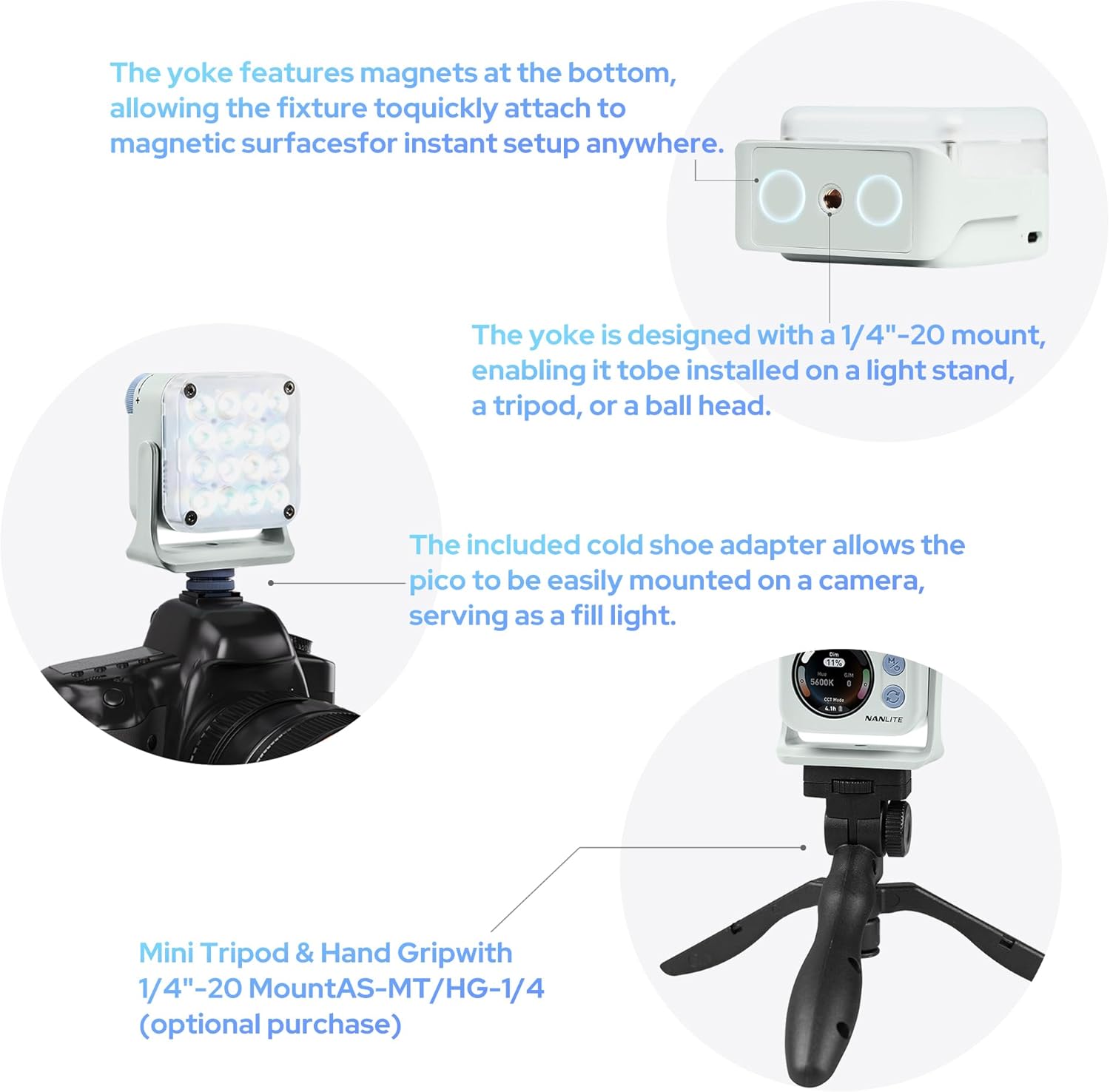
Image: The Nanlite Pico light shown mounted on a camera using the cold shoe adapter and also on a mini tripod, illustrating its versatile attachment options.
작동 지침
전원 켜기/끄기
To power on the device, press and hold the power button (usually combined with the 'M' mode button) for a few seconds until the screen illuminates. To power off, repeat the process.
모드 선택
The Nanlite Pico offers multiple operating modes:
- CCT 모드: Adjusts color temperature from 2700K to 7500K, allowing for warm to cool lighting.
- RGB/HSI Mode: Provides full control over hue (0-360°), saturation (0-100%), and intensity for custom color lighting.
- FX 모드: Access 14 built-in special effects like Police Car, Fire, Lightning, Paparazzi, and more.
Use the mode button to cycle through these main modes. The 1.28-inch round screen will display the current mode and settings.
설정 조정
Use the control knob to adjust parameters within each mode. For example, in CCT mode, rotate the knob to change the color temperature. In RGB/HSI mode, rotate to adjust hue, saturation, or intensity after selecting the parameter with the secondary button.
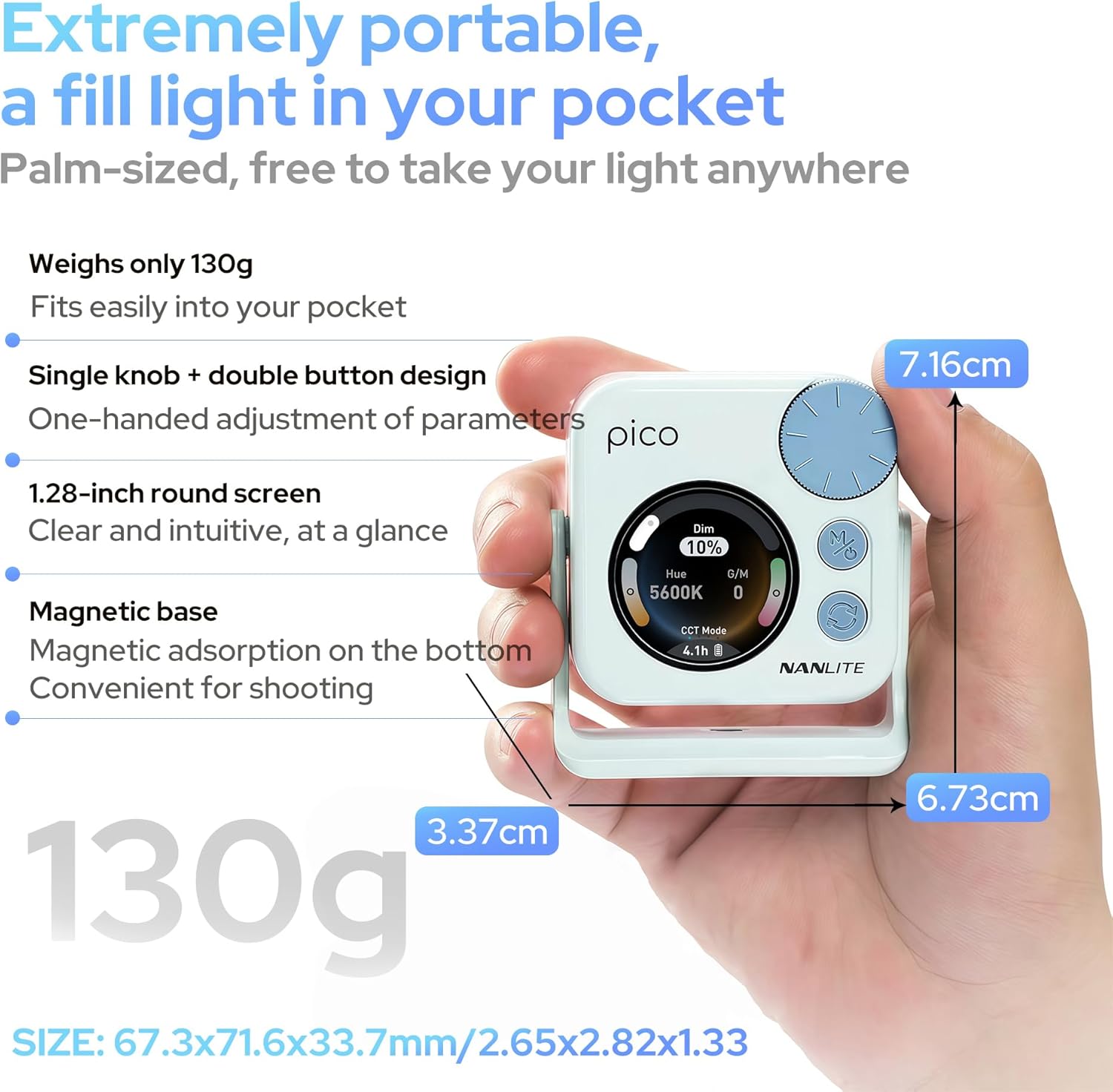
Image: A hand holding the Nanlite Pico light, with a clear view of its 1.28-inch round screen displaying current settings and the control knob for adjustments.
모바일 앱 제어
The Nanlite Pico supports Bluetooth connectivity for control via a mobile application. Download the official Nanlite app to access advanced features, remote control, and precise adjustments from your smartphone or tablet.
Video: A demonstration of the Nanlite Pico LED Video Light, highlighting its pocket-sized design, ease of use, and bright output for various creative applications.
명세서
| 상표 | 난라이트 |
| 모델 번호 | Pico Light |
| 패키지 크기 | 3.94 x 2.76 x 1.93 인치 |
| 품목 무게 | 5.9 온스 |
| 배터리 | 1개의 리튬 이온 배터리 필요(포함) |
| 연결 기술 | 블루투스 |
| 하드웨어 인터페이스 | USB 타입 C |
유지
- 부드럽고 마른 천으로 닦아 장치를 깨끗하게 유지하십시오.
- 빛을 극단적인 온도나 습도에 노출시키지 마십시오.
- 사용하지 않을 때는 장치를 서늘하고 건조한 곳에 보관하십시오.
- 제품을 직접 분해하거나 수리하려고 시도하지 마십시오. 그렇게 할 경우 보증이 무효화될 수 있습니다.
문제 해결
- 불이 켜지지 않음: Ensure the battery is charged. Connect to a USB-C power source to check.
- 컨트롤이 응답하지 않음: Try powering the device off and on again. If using the app, ensure Bluetooth is enabled and the device is paired.
- 빛 출력이 일정하지 않음: Check for any obstructions on the light panel or diffuser. Ensure the device is not overheating.
보증 및 지원
보증 정보, 기술 지원 또는 서비스 문의 사항은 공식 Nanlite를 참조하십시오. web사이트를 방문하거나 고객 서비스에 직접 문의하세요. 보증 청구를 위해 구매 증빙 자료를 보관하세요.


