1. 서론
The Flashpoint Zoom Li-Ion V480C is a high-performance on-camera flash designed for Canon cameras, offering advanced features for professional and enthusiast photographers. This flash integrates with the Flashpoint R2 wireless system, providing versatile lighting control. Key features include a Guide Number of GN50, rapid 1.7-second recycle time, TTL auto flash, manual flash modes, and 2.4GHz wireless control.

Image 1.1: Flashpoint Zoom Li-Ion V480C with an overview of its main features.
2. 포함된 구성 요소
다음 품목이 모두 패키지에 포함되어 있는지 확인하세요.
- Flashpoint Zoom Li-on Compact V480 Flash
- VB22 7.2 V / 2200 mAh Rechargeable Li-ion Battery Pack
- 배터리 충전기
- 미니 스탠드
- 보호 케이스
3. 제품 오버view
Familiarize yourself with the various parts of your Flashpoint V480C flash unit.

이미지 3.1: 앞면과 측면 view of the Flashpoint V480C with numbered components.
- Catchlight Panel (White)
- Built-in Wide Angle Diffuser
- 플래시 헤드
- LED 모델링 Lamp
- 광전지 센서
- 잠금 고리
- 핫슈
- 동기화 코드 잭
- 터치 스크린
- USB-C 펌웨어 업그레이드 포트
- 전원 스위치 버튼
- 설정 버튼
- 다이얼 선택
- 테스트 버튼 / 재활용 표시기
- 핫슈 고정 버클
4. 설정
4.1. 배터리 설치 및 충전
The Flashpoint V480C uses a VB22 7.2V / 2200mAh rechargeable Li-ion battery pack. Ensure the battery is fully charged before first use.
- To install the battery, slide open the battery compartment cover located on the side of the flash unit.
- Insert the VB22 Li-ion battery pack, ensuring the contacts align correctly.
- 배터리 덮개를 딸깍 소리가 나며 제자리에 단단히 고정될 때까지 닫습니다.
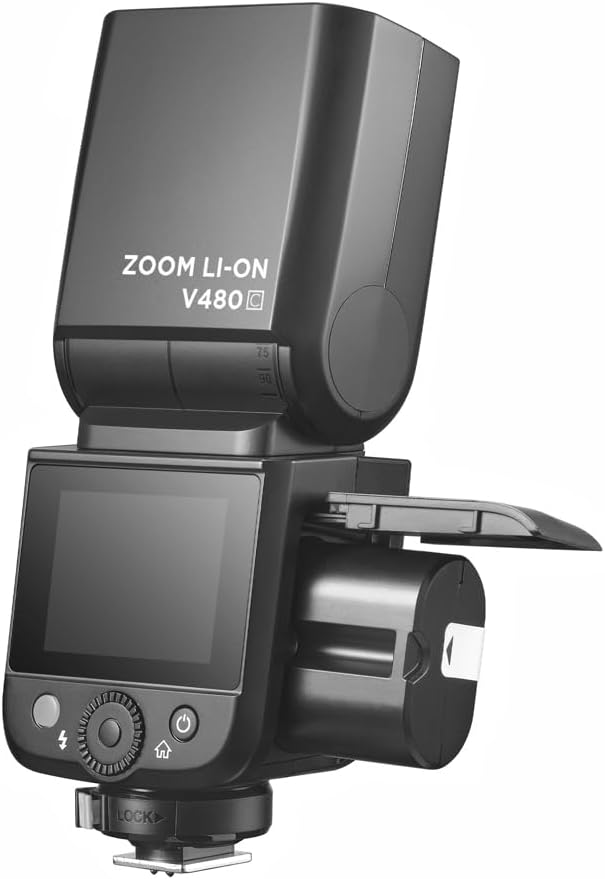
Image 4.1: Battery compartment open for installation.
To charge the battery, use the provided battery charger. Connect the battery to the charger and plug the charger into a power outlet. The indicator light on the charger will show the charging status.
4.2. 플래시를 카메라에 장착하기
The V480C is designed to mount onto a camera's hot shoe.
- 카메라의 전원이 꺼져 있는지 확인하세요.
- Slide the flash's hot shoe (7) into your camera's hot shoe mount.
- Rotate the Hot Shoe Fixing Buckle (15) clockwise to secure the flash firmly in place. Do not overtighten.
5. 플래시 작동법
5.1. Powering On/Off and Basic Controls
To power on the flash, press and hold the Power Switch Button (11) until the screen illuminates. To power off, press and hold the same button.
The V480C features a crisp color touchscreen (9) and tactile buttons for intuitive control.

Image 5.1: Touchscreen and button interface for adjusting flash settings.
- Set Button (12): 선택 사항을 확인하거나 메뉴 옵션을 입력하는 데 사용됩니다.
- Select Dial (13): Rotate to navigate menus and adjust values.
- Test Button / Recycle Indicator (14): Press to fire a test flash. The indicator light shows when the flash is ready to fire.
5.2. 플래시 모드
The V480C supports various flash modes:
- TTL 자동 플래시: 정확한 노출을 위해 플래시 출력을 자동으로 조절합니다.
- 수동 플래시: Allows manual control over flash power output (1/1 to 1/256 in 1/3 stop increments).
- 다중 섬광(스트로보스코프): 단일 노출 중에 일련의 빠른 플래시를 발사하여 여러 가지 움직임을 포착합니다.
5.3. Wireless Operation (R2 System)
The V480C features built-in 2.4GHz R2 wireless functionality, allowing it to act as a master or slave unit within the Flashpoint R2 system. It supports 4 groups and 32 channels with a transmission range of up to 100m.

이미지 5.2: Example of 2.4GHz R2 wireless integration in a studio environment.
Refer to the on-screen menu for setting master/slave modes, group assignments, and channel selection.
5.4. 고속 동기화(HSS)
High-Speed Sync allows the flash to synchronize with shutter speeds up to 1/8000s, enabling you to use flash with wide apertures in bright conditions or to freeze fast motion.

Image 5.3: Demonstration of High-Speed Sync (HSS) capability.
Activate HSS through the flash's menu or your camera's flash control settings.
5.5. LED 모델링 Lamp
The built-in LED Modeling Lamp (4) provides continuous light for focusing in low-light conditions or for previewing lighting effects. Adjust its brightness through the flash's menu.
5.6. 펌웨어 업데이트
The Flashpoint V480C supports firmware updates via its USB-C Firmware Upgrade Port (10). Visit the Flashpoint web최신 펌웨어와 지침은 사이트에서 확인하세요.
6. 유지관리
6.1. 청소
플래시 장치를 청소하려면 부드럽고 마른 천을 사용하십시오. 잘 지워지지 않는 오염의 경우,amp 천으로 닦은 후 마른 천으로 다시 닦아주세요. 강한 세제나 용제는 사용하지 마세요.
6.2. 보관
When not in use for extended periods, remove the battery from the flash unit. Store the flash in a cool, dry place, away from direct sunlight and extreme temperatures. Use the provided protective case for storage and transport.
7. 문제 해결
If you encounter issues with your Flashpoint V480C, refer to the following common problems and solutions:
- 플래시가 터지지 않습니다:
- Ensure the flash is powered on and securely mounted to the camera's hot shoe.
- 배터리 잔량을 확인하고 필요하면 충전하세요.
- Verify camera and flash settings are compatible (e.g., flash enabled in camera menu).
- If using wireless, ensure master and slave units are on the same channel and group.
- Incorrect exposure (too dark/too bright):
- In TTL mode, check for Flash Exposure Compensation (FEC) settings on both flash and camera.
- 수동 모드에서 플래시 출력량을 조절하세요.
- Ensure flash head zoom matches lens focal length or is set to auto.
- Flash recycle time is slow:
- 배터리 잔량이 부족할 수 있습니다. 충전하거나 교체하십시오.
- High power settings naturally result in longer recycle times.
- 무선 연결 문제:
- Ensure all units are within range (100m).
- 다른 2.4GHz 장치의 간섭을 확인하세요.
- Verify channel and group settings are identical on all units.
If problems persist, consult the Flashpoint support web사이트를 방문하거나 고객 서비스에 문의하세요.
8. 사양
| 모델 | V480C |
| 가이드 번호 | GN50(ISO 100, 미터) |
| 재활용 시간 | 약 1.7초 |
| 플래시 모드 | TTL, 수동, 멀티 |
| 무선 기능 | 마스터, 슬레이브, 끄기 |
| 무선 범위 | 약. 100 분 |
| 채널 | 32 (1-32) |
| 여러 떼 | 4 (A, B, C, D) |
| 고속 동기화 | 최대 1/8000초 |
| 전원 | VB22 Li-ion Battery (7.2V / 2200mAh) |
| 치수 | 6.54인치 x 2.8인치 x 1.93인치(16.6 x 7.1 x 4.9cm) |
| 무게(배터리 포함) | 12.7 온스 (360g) |
| 호환 가능한 마운팅 | 정경 |
9. 보증 및 지원
For warranty information, technical support, or service inquiries, please refer to the documentation provided with your purchase or visit the official Flashpoint web사이트. 보증 청구를 위해 구매 증빙 자료를 보관하세요.


