1. 서론
This manual provides detailed instructions for the safe and effective use of your AFEXOA DY20 Night Light Bluetooth Speaker Alarm Clock. Please read this manual thoroughly before operating the device and retain it for future reference.
2. 제품 특징
- 다기능 기기: Integrates a 20W Hi-Fi speaker, white noise machine, sleep sound machine with timer, multi-color touch control LED lamp, night light, and bedside alarm clock.
- 고성능 스테레오 사운드: Delivers clear, undistorted sound with powerful bass, compatible with all Bluetooth devices.
- 디지털 알람 시계: Features 7 selectable alarm sounds (soft music, natural sounds), 30 adjustable volume levels (up to 110 dB), and an unlimited 9-minute snooze function.
- Sensitive Touch Activated Lamp: Offers 8 RGB color options (Red, Green, Blue, Yellow, Purple, Indigo, White, Color cycle) and 3 levels of warm white light for various moods and occasions.
- 30 Soothing Sounds & Sleep Timer: Includes 5 white noise, 5 fan sounds, 6 lullaby sounds, and 14 natural sounds. Features a 15, 30, 60, or 90-minute sleep timer for automatic sound and light shut-off.
- MP3 Player Support: Supports music playback via USB Flash Drive and Micro SD/TF Card input.
3. 패키지 내용
- 1 x AFEXOA DY20 Night Light Bluetooth Speaker Alarm Clock
- 1 x USB 충전 케이블
- 1 x 사용자 설명서
4. 제품 오버view
기기의 구성 요소와 제어 방법을 숙지하십시오.
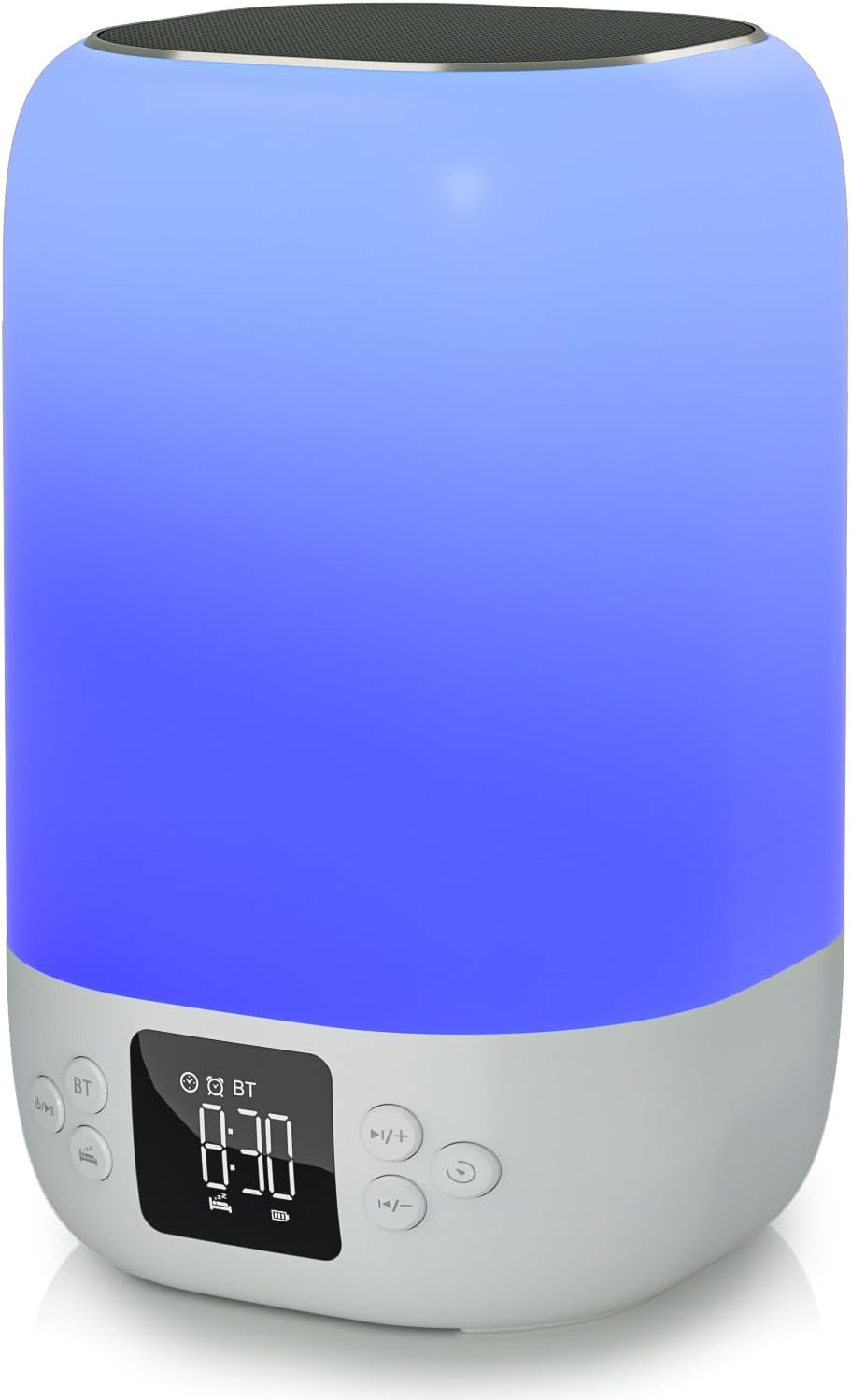
앞쪽 view of the AFEXOA DY20 device, showcasing the digital time display and control buttons.

An illustrative image detailing the five primary functions of the AFEXOA DY20: sound machine, MP3 player, night light, alarm clock, and Bluetooth speaker.

The device connected via Bluetooth to a smartphone playing music, with an inset showing the USB and Micro SD card input ports for MP3 playback.
통제 수단:
- 전원 / 모드 버튼 : Turns the device on/off and switches between modes (Bluetooth, Sound Machine, MP3).
- Bluetooth (BT) Button: 블루투스 페어링 모드를 활성화합니다.
- Volume Up (+)/Next Track Button: Increases volume or skips to the next track/sound.
- Volume Down (-)/Previous Track Button: Decreases volume or goes to the previous track/sound.
- 스누즈/라이트 버튼: Activates snooze during an alarm or changes light modes.
- 시간 표시: Digital display for time and settings.
포트:
- USB 호스트 포트: For connecting a USB flash drive for MP3 playback.
- 마이크로 SD/TF 카드 슬롯: For inserting a Micro SD/TF card for MP3 playback.
- Type-C 충전 포트: For connecting the USB charging cable to power the device.
5. 설정
5.1 초기 충전
- Connect the provided USB charging cable to the Type-C port on the device.
- 케이블의 다른 쪽 끝을 호환되는 USB 전원 어댑터(별도 구매) 또는 컴퓨터의 USB 포트에 연결하십시오.
- Allow the device to fully charge before first use. The battery indicator on the display will show charging status.
5.2 전원 켜기/끄기
- To power on, press and hold the Power/Mode button.
- 전원을 끄려면 전원/모드 버튼을 다시 길게 누르세요.
6. 사용 설명서
6.1 시간 설정
- In normal time display mode, press the 'Time Set' button (often labeled with a clock icon) to enter time setting mode. The hour digits will flash.
- '+' 및 '-' 버튼을 사용하여 시간을 조정하세요.
- Press 'Time Set' again to move to minute setting. Use '+' and '-' to adjust minutes.
- Press 'Time Set' a third time to confirm and exit time setting.
- To switch between 12-hour and 24-hour format, short press the 'Time Set' button.
6.2 알람 설정

The device displaying the time in alarm clock mode, with text indicating 7 wake-up ringtones, 1-30 level volume, and 9-minute snooze.
- Press the 'Alarm 1 Set' button (often labeled with an alarm clock icon) to set the first alarm. The hour digits will flash.
- '+' 및 '-' 버튼을 사용하여 알람 시간을 조정하세요.
- Press 'Alarm 1 Set' again to set the alarm minutes. Use '+' and '-' to adjust minutes.
- Press 'Alarm 1 Set' a third time to select the alarm sound (7 options available). Use '+' and '-' to cycle through sounds.
- Press 'Alarm 1 Set' again to confirm.
- To activate/deactivate Alarm 1, use the dedicated 'Alarm 1 ON/OFF' switch or button. Repeat for Alarm 2 if available.
- When the alarm sounds, press the 'Snooze/Light' button to activate snooze for 9 minutes. Press any other button to turn off the alarm.
6.3 블루투스 스피커 모드
- Turn on the device. Press the Power/Mode button until 'BT' appears on the display, indicating Bluetooth mode.
- On your smartphone or other Bluetooth-enabled device, enable Bluetooth and search for 'AFEXOA DY20' (or similar name).
- Select the device to pair. A confirmation sound will indicate successful pairing.
- You can now play audio from your connected device through the speaker. Use the '+/-' buttons on the speaker or your phone to adjust volume.
6.4 Sound Machine Mode (White Noise)

A person relaxing in bed with the AFEXOA DY20 emitting a warm light and soothing sounds, illustrating its sound machine capabilities.
- If not already in Sound Machine mode, press the Power/Mode button until the sound machine icon or 'FO' (for sound files) appears.
- Use the '+' and '-' buttons to cycle through the 30 available soothing sounds (white noise, fan sounds, lullabies, natural sounds).
- '+' 및 '-' 버튼을 사용하여 볼륨을 조절하세요.
- To set a sleep timer, press the 'Timer' button (if available) and select 15, 30, 60, or 90 minutes. The device will automatically turn off sound and light after the set time.
6.5 야간 조명 모드
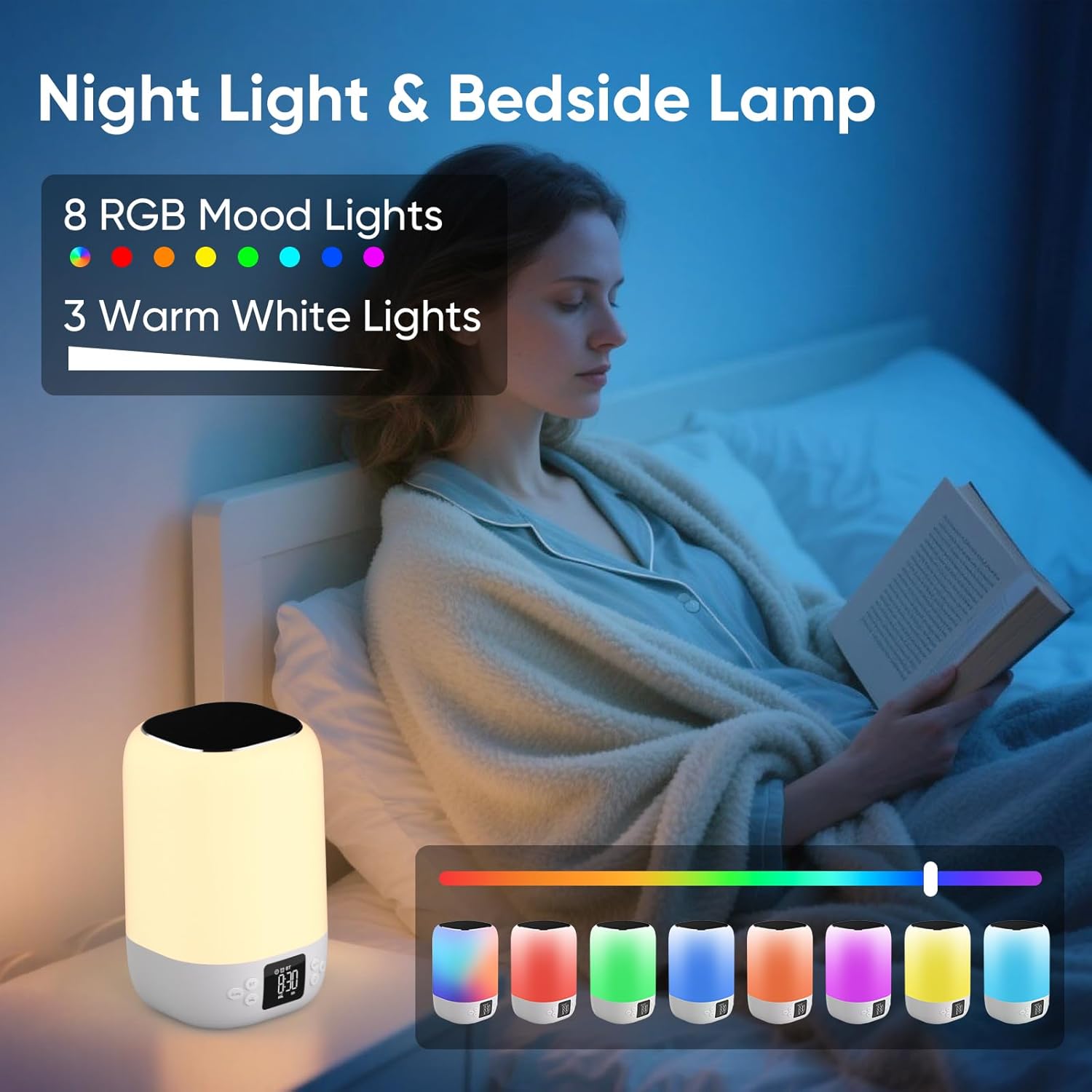
A person reading in bed with the AFEXOA DY20 displaying various light colors, highlighting its 8 RGB mood lights and 3 warm white light options.

A child sleeping peacefully with the AFEXOA DY20 emitting a soft blue light, demonstrating its sleep aid function with an adjustable auto-off timer.
- 따뜻한 흰색 빛: Short press the 'Snooze/Light' button to cycle through 3 levels of warm white light (low, medium, high).
- RGB 색상 변경: Long press the 'Snooze/Light' button to activate the 8 RGB color changing mode. Short press again to pause on a specific color. Long press again to turn off the light.
6.6 MP3 Player Mode (USB/Micro SD)
- Insert a USB flash drive into the USB Host port or a Micro SD/TF card into its dedicated slot.
- The device should automatically switch to MP3 player mode and begin playback. If not, press the Power/Mode button to cycle to this mode.
- Use the '+' and '-' buttons to skip tracks.
- Use the Power/Mode button (short press) to play/pause.
6.7 Charging Other Devices (if applicable)
The product specifications do not explicitly list external device charging capabilities. Please refer to the product packaging or manufacturer's website for confirmation if this feature is desired.
7. 유지관리
- 청소: 부드럽고 마른 천으로 기기를 닦으세요. 연마성 세제나 용제를 사용하지 마세요.
- 저장: 본 기기는 직사광선과 극한의 온도를 피해 시원하고 건조한 곳에 보관하세요.
- 배터리 관리 : 배터리 수명을 연장하려면 기기를 자주 완전히 방전시키지 마십시오. 장기간 사용하지 않더라도 정기적으로 충전하십시오.
8. 문제 해결
| 문제 | 가능한 해결책 |
|---|---|
| 기기가 켜지지 않습니다. | Ensure the device is charged. Connect to power and try again. |
| 블루투스가 연결되지 않습니다. | Ensure the device is in Bluetooth pairing mode. Check your phone's Bluetooth settings and try re-pairing. Ensure no other devices are connected. |
| 스피커에서 소리가 나지 않습니다. | Check volume levels on both the device and your connected source. Ensure the correct mode (Bluetooth/MP3/Sound Machine) is selected. |
| 조명이 작동하지 않습니다. | Ensure the device is powered on. Press the 'Snooze/Light' button to activate or cycle through light modes. |
| 알람이 울리지 않습니다. | Verify alarm time and ensure the alarm is activated (ON). Check alarm volume settings. |
| MP3 재생 문제. | Ensure USB drive or Micro SD card is inserted correctly and contains compatible MP3 files. Try re-inserting or using a different storage device. |
| 장치가 응답하지 않습니다. | Locate the 'RESET' button (often a small pinhole) and use a thin object (like a paperclip) to press it. This will restart the device. |
9. 사양
- 상표: AFEXOA
- 모델: DY20
- 색상: 하얀색
- 디스플레이 유형: 디지털
- 전원: 배터리 구동(리튬 이온 배터리 1개 포함)
- 제품 크기: 폭 3.93인치 x 높이 7.87인치
- 품목 무게: 1.32파운드(600그램)
- 프레임 소재: 플라스틱
- 특징: 큰 소리로 울리는 경보
- 객실 유형: 침실
10. 보증 및 지원
For warranty information or technical support, please refer to the documentation included with your purchase or contact AFEXOA customer service directly. Contact details can typically be found on the product packaging or the official AFEXOA web대지.


