소개
This manual provides detailed instructions for the setup, operation, and maintenance of your FoMaKo K820S 12G-SDI 4K 60FPS NDI PTZ Camera. Designed for professional video production and live streaming, this camera features advanced AI tracking, 20X optical zoom, and multiple high-quality video output interfaces. Please read this manual thoroughly before using the product to ensure optimal performance and longevity.
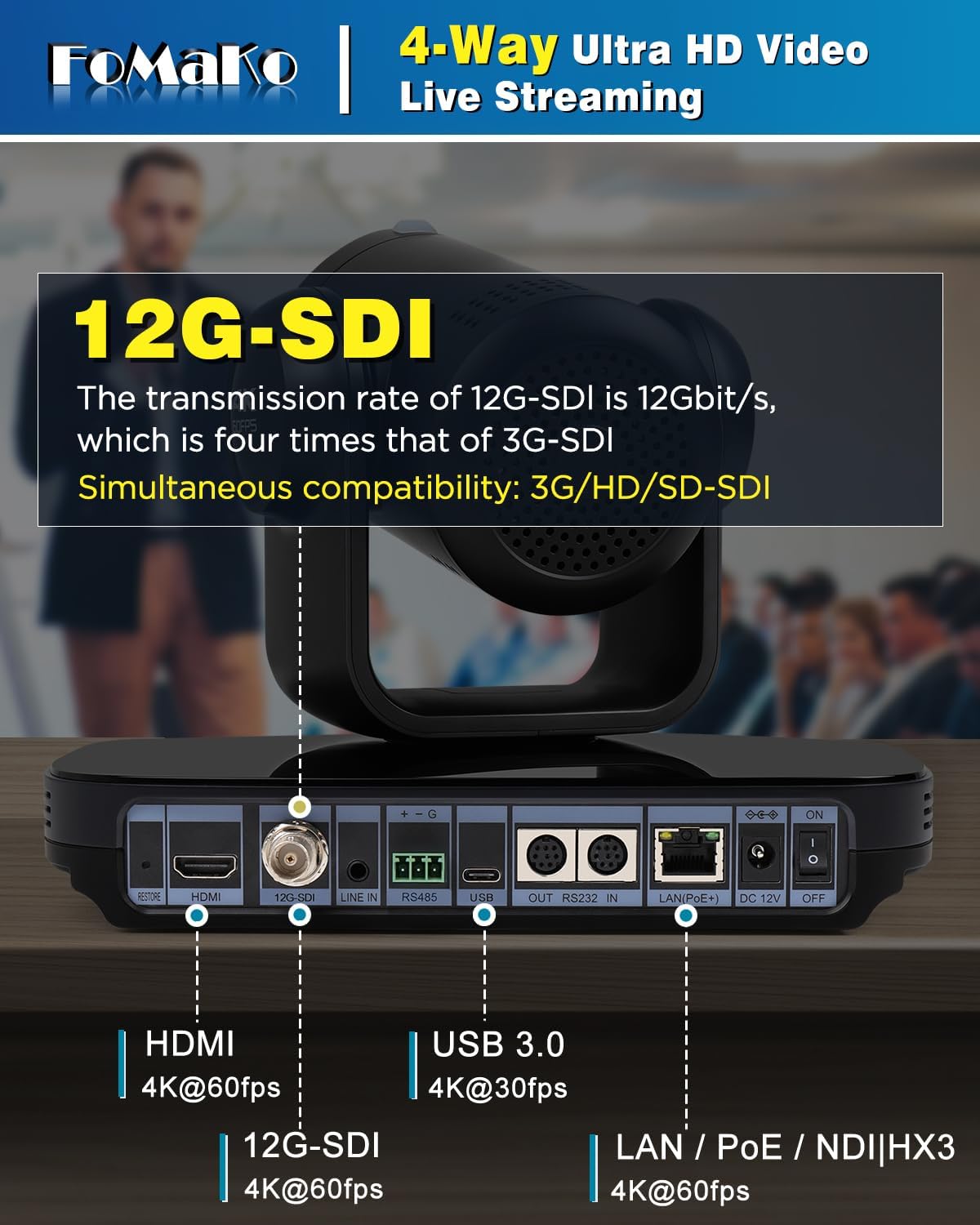
그림 1: 전면 view of the FoMaKo K820S PTZ Camera.
상자 안에 무엇이 들어있나요?
아래 나열된 모든 품목이 패키지에 포함되어 있는지 확인하세요.
- FoMaKo 12G-SDI 4K 60FPS AI Tracking NDI PTZ Camera (20x optical zoom)
- 리모컨
- 벽걸이형
- 천장 브래킷
- USB 케이블
- 12V 2A 전원 어댑터
- 사용자 설명서
제품 끝view
The FoMaKo K820S is a high-performance PTZ camera designed for versatile professional applications. Key features include:
- 4K 60FPS Video: Utilizes a low-power, high-performance Ambarella 4KP60 AI vision chip and a 1/1.8-inch UHD CMOS sensor for uncompressed 4K (3840x2160) at 60fps.
- Advanced AI Auto-Tracking (Gen 3): Offers customized tracking features including adjustable tracking modes, sensitivity, figure size, AI-Track Speed, horizontal tracking, character position, and lost target action. Activate by pressing F3 on the remote.
- NDI | HX3 & NDI | HX2 Support: NDI License Included (Officially Approved by Newtek Inc.) for low-latency, high-quality video transmission over network, even with low bandwidth.
- FreeD Protocol: Delivers real-time, high-precision 3D spatial tracking (camera position, angle, lens data) for seamless virtual/augmented reality integration in live productions.
- 다양한 비디오 출력 인터페이스: Simultaneous 12G-SDI, NDI/LAN, USB3.0 Type-C, and HDMI 2.0 outputs.
- 20X Optical Zoom with 16x Digital Zoom: Provides a maximum field angle of 60 degrees (FOV) for detailed capture.
- PoE(Power over Ethernet): Allows power, control, and video/audio streaming via a single network cable.
- 선도적인 자동 초점(AF) 기술: Fast, accurate, and stable AF with adjustable Pan/Tilt/Zoom speeds and preset speeds. Supports Auto/Manual/One Push Focus modes.

그림 2: 후면 view of the camera showing various input/output ports.
설정
Follow these steps to set up your FoMaKo K820S PTZ Camera:
- 전원 연결: Connect the provided 12V 2A power adapter to the DC 12V port on the camera. Alternatively, if using PoE, connect an Ethernet cable from a PoE-enabled switch to the LAN port.
- 비디오 출력: Connect your preferred video output cable (12G-SDI, HDMI, USB3.0, or Ethernet for NDI/LAN) to your display, capture card, or streaming device.
- 네트워크 연결 : For NDI/LAN control and streaming, connect an Ethernet cable to the LAN port. Ensure your network is properly configured for IP communication.
- 오디오 입력: If external audio is required, connect an audio source to the LINE IN port.
- 제어 연결: For external control, connect an RS232 or RS485 cable to the respective ports, or use the network connection for IP-based control.
- 전원 켜기: Flip the ON/OFF switch to the 'ON' position. The camera will perform a self-test and the LCD screen will display its IP address and resolution.
Video 1: Unboxing and initial setup of the K820S 4K NDI PTZ Camera. This video demonstrates the physical components and basic connections.
운영
AI Auto-Tracking
The K820S features advanced AI auto-tracking to keep your subject in frame automatically. To activate:
- 를 누르세요 F3 button on the remote control to enable AI Auto-Tracking.
- Use the left and right buttons on the remote control to switch between tracking targets if multiple subjects are present.
- Customize tracking modes, sensitivity, figure size, and speed via the camera's web 인터페이스.

Figure 3: AI Auto-Tracking in action, keeping the presenter centered.
팬, 틸트 및 줌 제어
Use the included remote control or an external PTZ controller (e.g., joystick controller) to adjust the camera's pan, tilt, and zoom. Preset positions can be saved and recalled for quick scene changes.
- 원격 제어: The remote allows for direct control of pan, tilt, zoom, focus, and preset recall. Supports ultra-long distance control up to 50 meters.
- 외부 컨트롤러: Compatible with FoMaKo PTZ Camera controllers and third-party software like vMix/OBS for multi-camera production.
Video 2: Demonstrates the integration and preset configuration with a FoMaKo controller.
자동 초점
The camera features industry-leading auto-focus technology. You can switch between Auto, Manual, or One Push Focus modes as needed.
연결성
The K820S offers a wide range of connectivity options for various production environments:
- 12G-SDI: Professional broadcast-grade interface supporting 4KP60, 4KP59.94, 4KP50, 4KP30, 1080P60, 1080I60, 1080I50, etc.
- HDMI 2.0 : Supports 4KP60, 4KP59.94, 4KP50, 4KP30, 1080P60, 1080I60, 1080I50, etc.
- USB3.0 타입-C: Supports 4KP30, 1080P60, etc. for direct connection to computers.
- LAN/NDI: Supports 4KP60, 1080P60, etc. for network-based video transmission and control, including NDI | HX3 and NDI | HX2.
- RS232/RS485: For serial control from external PTZ controllers.
Video 3: Explains NDI advantages, tools, and usage guidelines for FoMaKo PTZ cameras.
설치
The FoMaKo K820S offers flexible installation options:
- 벽걸이 : Use the provided wall mount bracket to secure the camera to a wall.
- 천장 마운트: Utilize the ceiling bracket for inverted mounting. The built-in gravity sensor supports automatic image flip.
- 삼각대 마운트: The camera can be mounted on a standard tripod for portable setups.

그림 4: 예ample of wall mount installation for the PTZ Camera.
명세서
| 특징 | 세부 사항 |
|---|---|
| 상표 | 포마코 |
| 모델 번호 | K820S |
| 품목 무게 | 9파운드 |
| 패키지 크기 | 11.65 x 10.16 x 9.76 인치 |
| 포토 센서 기술 | CMOS |
| 비디오 캡처 해상도 | 4K |
| 최대 초점 거리 | 92 밀리미터 |
| 최대 조리개 | 2.9 피트 |
| 비디오 캡처 형식 | MP4 |
| 지원되는 오디오 형식 | AAC, MP3, PCM |
| 화면 크기 | 2 Inches (LCD screen for IP address and resolution) |
| 연결 기술 | 12G-SDI, NDI, LAN, HDMI, USB3.0 |
| 특별 기능 | AI tracking PTZ Camera, PoE support, FreeD Protocol |
문제 해결
카메라에 문제가 발생하면 다음 사항을 고려하십시오.
- 전원 없음: Ensure the power adapter is securely connected and plugged into a working outlet, or that the PoE connection is active and providing power.
- 비디오 출력 없음: Check all video cable connections (HDMI, SDI, USB, Ethernet). Verify the display or receiving device is set to the correct input. Ensure the camera's resolution and frame rate settings are compatible with the receiving device.
- Network/NDI Issues: Confirm the Ethernet cable is properly connected. Check the camera's IP address on the LCD screen and ensure it's on the same subnet as your control device. Verify NDI tools/software are correctly configured.
- AI Tracking Malfunction: Ensure AI tracking is enabled (F3 on remote). Check for any obstructions in the camera's view or extreme lighting conditions that might interfere with tracking.
- 제어 문제: Verify the remote control has fresh batteries and a clear line of sight. For serial control, check cable connections and baud rate settings. For IP control, confirm network connectivity and correct IP address.
보증 및 지원
Your FoMaKo K820S PTZ Camera comes with comprehensive support:
- 3년 제한 보증: Shop with confidence.
- 30일 환불 보장: 위험 부담 없는 구매.
- 무료 온라인 교육: Get started easily with available training resources.
- 연중무휴 24시간 전문가 지원: Responses within 24 hours (please include your Order ID for prompt service). Remote assistance for setup is available if necessary.
- 평생 고객 기술 지원: 귀하의 만족이 저희의 최우선 순위입니다.

Figure 5: FoMaKo offers 24/7 expert assistance and lifetime technical support.


