1. 서론
Thank you for choosing the NIMO 15.6" IPS FHD-Gaming-Laptop. This manual provides essential information for setting up, operating, maintaining, and troubleshooting your new laptop. Designed for versatile performance, this laptop is equipped with an AMD Ryzen 5 6600H processor, 32GB DDR5 RAM, and a 1TB SSD, making it suitable for work, gaming, and everyday use. Please read this manual thoroughly before using your device to ensure optimal performance and longevity.

Figure 1.1: NIMO 15.6" IPS FHD-Gaming-Laptop
The NIMO 15.6" IPS FHD-Gaming-Laptop features a sleek design with a vibrant Full HD IPS display, ideal for both productivity and entertainment.
2. 상자 안에 무엇이 들어있나요?
패키지에 모든 품목이 들어 있는지 확인하세요.
- 니모 N153 노트북 1대
- Type-C 100W PD 고속 충전기 1개
- 1 x 사용자 설명서
- 윈도우 11 홈 (사전 설치됨)
- 2년 보증, 90일 반품 안내
3. 설정 가이드
3.1 초기 전원 켜기 및 충전
Before first use, ensure your laptop is fully charged. Connect the provided Type-C 100W PD Fast Charger to the laptop's Type-C port and a power outlet. The charge LED indicator will illuminate.
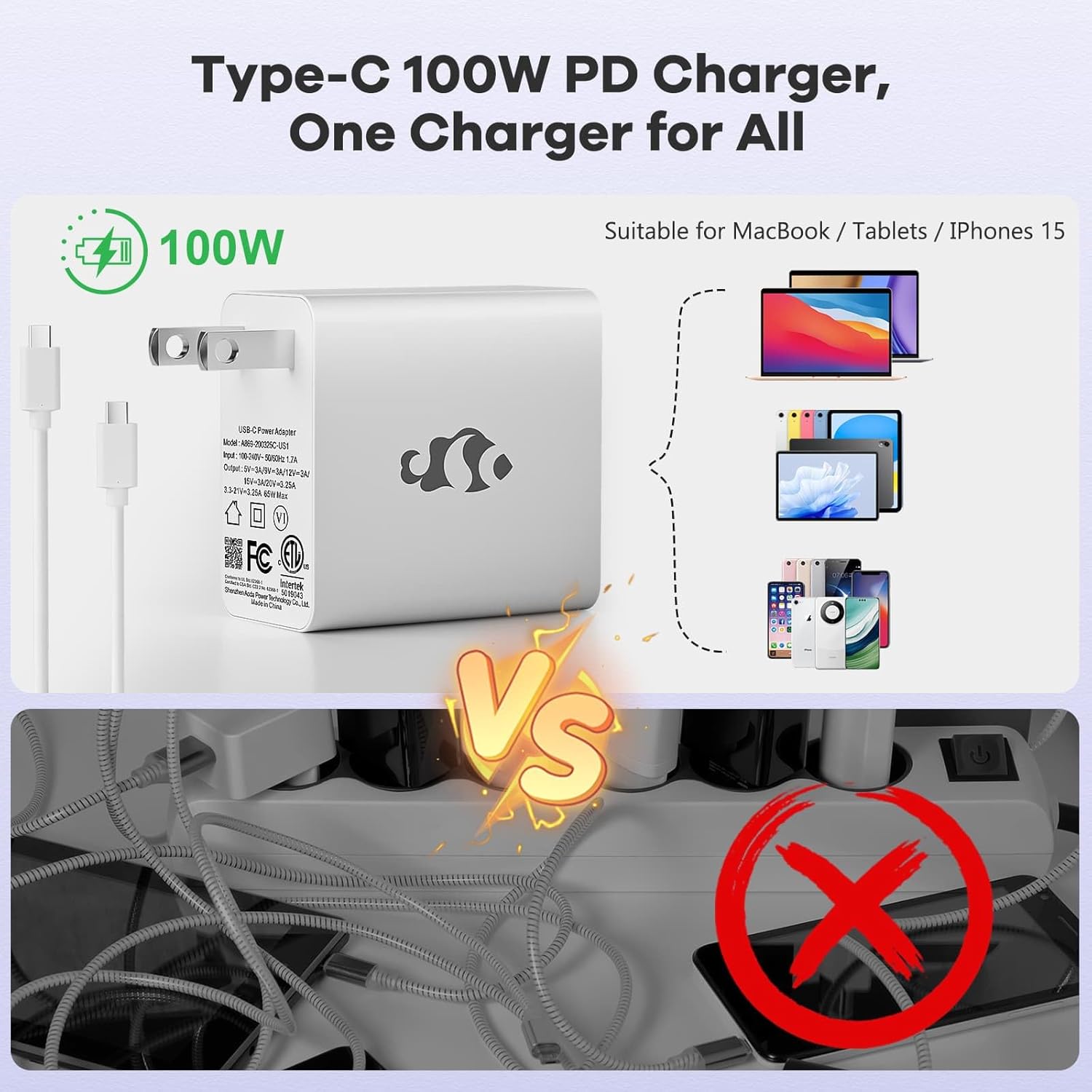
그림 3.1: Type-C 100W PD 고속 충전기
The compact 100W USB-C PD fast charger and 6.56ft cable provide efficient power delivery, compatible with various devices.
3.2 주변기기 연결하기
Your NIMO laptop offers multiple ports for enhanced versatility. Refer to the diagram below for port locations and types:
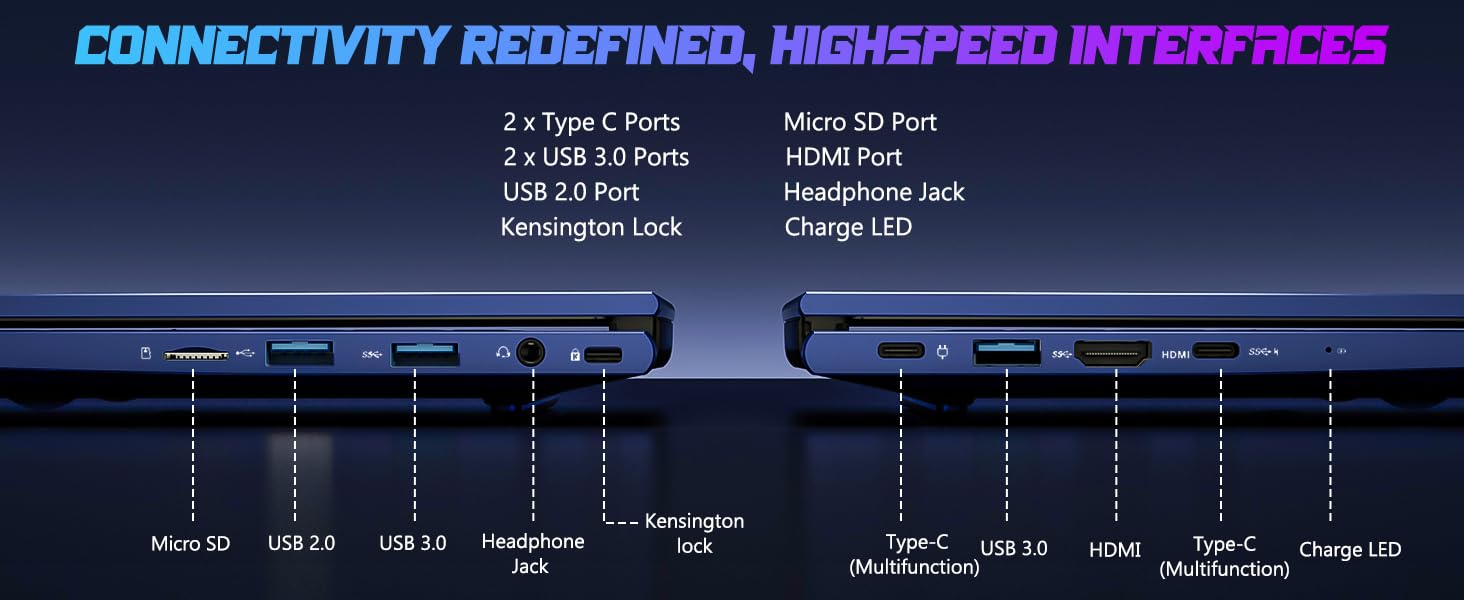
그림 3.2: 연결 포트
The laptop includes 2x Type-C ports, 2x USB 3.0 ports, 1x USB 2.0 port, Micro SD port, HDMI port, Headphone Jack, and Kensington Lock for comprehensive connectivity.
- USB 포트: Connect external devices such as mice, keyboards, or external storage drives.
- HDMI 포트 : 더 큰 화면을 원하시면 외부 모니터나 TV에 연결하세요.
- 헤드폰 잭: 헤드폰이나 외부 스피커로 오디오를 출력합니다.
- 마이크로 SD 슬롯: 추가 저장 공간 또는 데이터 전송을 위해 마이크로 SD 카드를 삽입하세요.
4. 노트북 작동
4.1 디스플레이 기능
The NIMO laptop features a 15.6" FHD IPS (1920x1080) anti-glare display with an 85% screen-to-body ratio, providing clear and vibrant visuals for all your tasks.
4.2 키보드 및 지문 인식기
The laptop is equipped with a backlit keyboard for comfortable typing in various lighting conditions and a multi-touch touchpad for precise navigation. The built-in fingerprint reader allows for secure, one-touch login.

Figure 4.1: Backlit Keyboard and Fingerprint Reader
The backlit keyboard enhances visibility, while the integrated fingerprint reader provides quick and secure access to your system.
4.3 Webcam Privacy
For enhanced privacy, the laptop includes a built-in privacy camera switch, allowing you to easily disable the 2.0M web캠을 사용하지 않을 때.

그림 4.2: Web캠 쉴드
The physical webcam shield provides an extra layer of privacy, ensuring your camera is off when you need it to be.
4.4 성능 이상view
The NIMO laptop is powered by an AMD Ryzen 5 6600H CPU (6 cores, 12 threads, up to 4.5 GHz) and an integrated AMD Radeon 660M GPU (6nm process, 6 GPU cores, 1900 MHz). This configuration provides balanced performance for productivity and light gaming.

Figure 4.3: Outstanding Performance
The AMD Ryzen 5 6600H processor and Radeon 660M iGPU deliver robust performance for various computing tasks.
With 32GB of DDR5 RAM and a 1TB PCIe 4.0 SSD, the laptop ensures seamless multitasking, faster load times, and amp당신을 위한 파일 저장 공간 files and applications. The memory is upgradable to 64GB and the SSD is detachable for future expansion.

Figure 4.4: Seamless Multitasking and Amp르 스토리지
The combination of 32GB DDR5 RAM and a 1TB PCIe 4.0 SSD provides lightning-fast performance and significant storage capacity.
4.5 배터리 수명
The laptop is equipped with a 54Wh smart battery, providing up to 5 hours of active use and up to 10 hours of standby time. A 15-minute charge can provide up to 2 hours of standby time with the 100W PD fast charger.

Figure 4.5: 54Wh Smart Battery
The efficient 54Wh smart battery offers extended usage and quick charging capabilities.
5. 유지관리
NIMO 노트북의 수명 연장과 최적의 성능을 보장하려면 다음 유지 관리 지침을 따르십시오.
- 깨끗하게 유지하세요: 화면은 극세사 천으로 정기적으로 닦고 키보드는 압축 공기로 먼지와 이물질을 제거하십시오.
- 소프트웨어 업데이트: Keep your Windows 11 operating system and drivers updated to ensure security and performance improvements.
- 배터리 관리 : 배터리를 완전히 방전시키는 것을 자주 피하십시오. 장기간 보관할 경우 배터리를 50~60% 정도 충전해 두는 것이 좋습니다.
- 적절한 환기: Ensure the laptop's vents are not obstructed to prevent overheating. Use it on a hard, flat surface.
- 안전한 취급: Avoid dropping or subjecting the laptop to strong impacts.
6. 문제 해결
이 섹션에서는 NIMO 노트북 사용 중 발생할 수 있는 일반적인 문제에 대해 설명합니다.
| 문제 | 가능한 원인 | 해결책 |
|---|---|---|
| 노트북 전원이 켜지지 않습니다 | 배터리 부족; 전원 어댑터 문제 | Connect the charger and wait a few minutes. Ensure the power adapter is securely connected to both the laptop and the outlet. |
| 느린 성능 | Too many applications running; Low disk space; Outdated drivers | 불필요한 애플리케이션을 닫으세요. 디스크 공간을 확보하세요. Windows 및 장치 드라이버를 업데이트하세요. |
| Wi-Fi 연결 문제 | Wi-Fi adapter off; Router issue; Driver issue | Ensure Wi-Fi is enabled in Windows settings. Restart your router. Update Wi-Fi drivers. |
| 키보드 백라이트가 작동하지 않습니다 | Backlight disabled; Driver issue | Press the dedicated backlight key (usually Fn + F key). Check keyboard drivers in Device Manager. |
If you encounter issues not listed here or require further assistance, please contact NIMO customer support.
7. 사양
Detailed technical specifications for the NIMO 15.6" IPS FHD-Gaming-Laptop:
| 특징 | 세부 사항 |
|---|---|
| 스탠딩 스크린 디스플레이 크기 | 15.6 인치 |
| 최대 화면 해상도 | 1920 x 1080 픽셀 (FHD IPS) |
| 프로세서 | AMD Ryzen 5 6600H (6 Cores, up to 4.5 GHz) |
| 숫양 | 32GB DDR5(4800MHz) |
| 하드 드라이브 | 1TB SSD (PCIe 4.0) |
| 그래픽 코프로세서 | AMD 라데온 660M (내장형) |
| 운영 체제 | 윈도우 11 |
| 무선형 | 802.11a/b/g/n/ac |
| USB 포트 | USB 2.0 포트 1개, USB 3.0 포트 3개, Type-C 포트 2개 |
| 평균 배터리 수명 | 5 Hours (active use) |
| 품목 무게 | 3.8파운드 |
| 제품 치수 | 14.07 x 8.98 x 0.76 인치 |
| 색상 | 파란색 |
| 특별 기능 | 백라이트 키보드, 지문 인식기, HD 오디오, 숫자 키패드 |
8. 보증 및 지원
NIMO는 고품질 제품과 탁월한 고객 서비스를 제공하기 위해 최선을 다하고 있습니다.
8.1 보증 정보
Your NIMO laptop comes with a comprehensive 2년 제조사 보증. This warranty covers defects in materials and workmanship under normal use. Additionally, we offer a 90일 무조건 반품 정책 구매일로부터.
8.2 고객 지원
Our dedicated support team is ready to assist you with any questions or issues. For technical support, warranty claims, or general inquiries, please contact us via:
- 이메일: service@nimopc.com
- 온라인: NIMO 공식 웹사이트를 방문하세요. webFAQ 및 지원 리소스를 위한 사이트입니다.
We strive to resolve any issues swiftly and ensure your satisfaction.
8.3개 제품 이상view 동영상
이 공식 영상을 시청하여 빠르게 살펴보세요.view of the NIMO laptop's features and benefits:
Video: NIMO Laptop Overview
This video provides a brief look at the NIMO 15.6" laptop, highlighting its key features and user experience, including its display, camera, and overall performance.


