소개
The Cooler Master Elite 681 White is a computer case designed for high-performance PC builds, featuring a dual-chamber architecture and extensive cooling support. It offers a 270-degree full-view tempered glass design for an unobstructed view of internal components and lighting. This manual provides essential information for setting up, operating, maintaining, and troubleshooting your Elite 681 computer case.
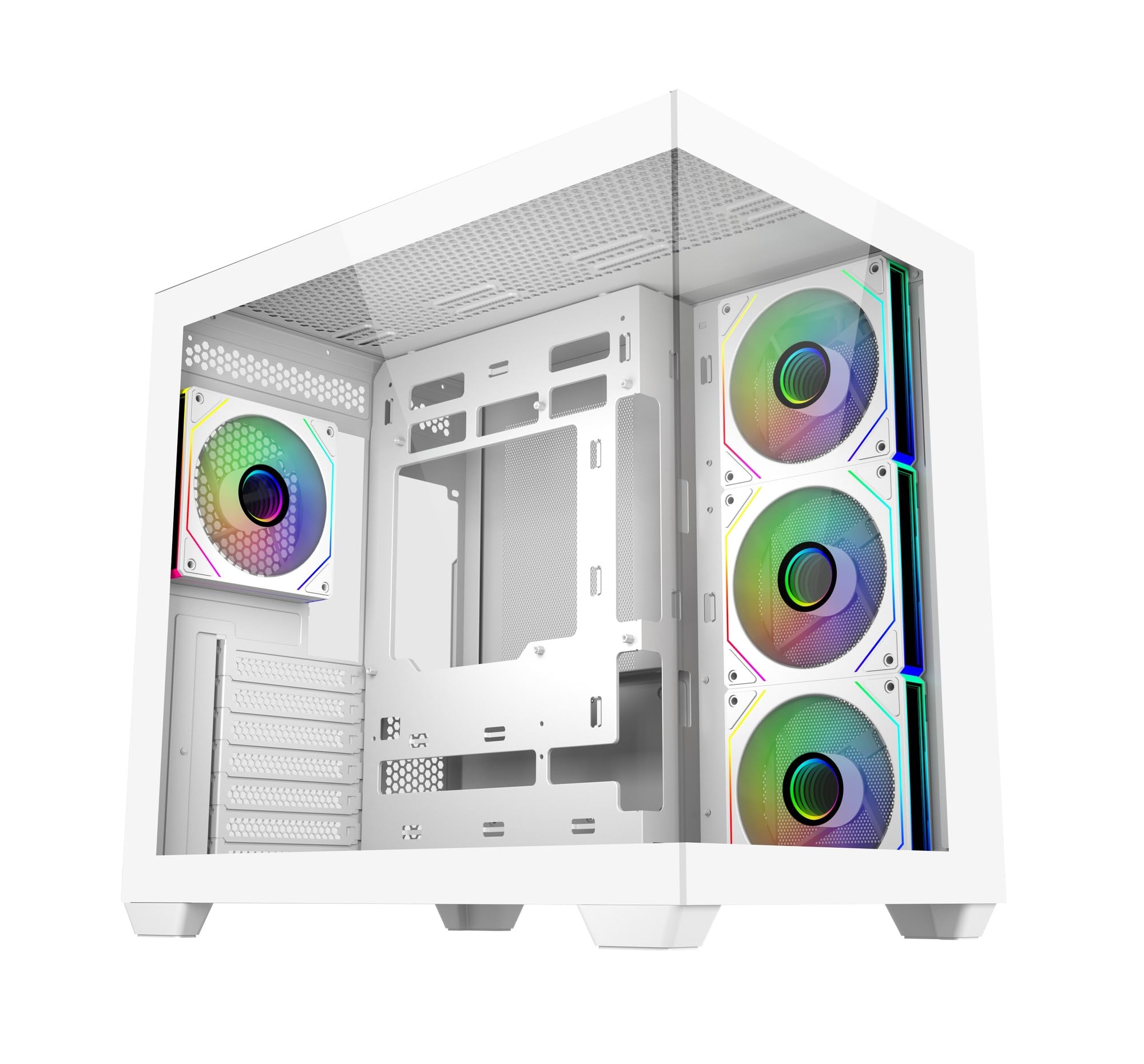
이미지: 앞면 view of the Cooler Master Elite 681 White computer case, showcasin강화 유리 패널과 내부 구조가 특징입니다.
설정 및 설치
Follow these guidelines for proper installation of your components into the Elite 681 case.
구성 요소 호환성
- 마더보드 지원: The Elite 681 supports ATX, Micro-ATX, and ITX motherboards.
- 그래픽 카드 길이: Accommodates graphics cards up to 410mm in length, suitable for RTX 50 Series and other high-end GPUs.
- 라디에이터 지원 : Supports dual 360mm radiators (top and bottom) and a 280mm side-mounted radiator for advanced liquid cooling solutions.
Fan Installation and Airflow
The case includes four pre-installed ARGB fans: three reverse-blade side intake fans and one rear exhaust fan. These fans feature daisy-chain connectors for simplified cable management and are compatible with major motherboard ARGB software for synchronized lighting.

이미지: 내부 view of the Cooler Master Elite 681 White case, showing pre-installed ARGB fans and component mounting areas.
The Elite 681 features a vertical cooling configuration, supporting up to 10 fans in a bottom-to-top airflow layout to enhance thermal performance. Full-size mesh openings on the top and bottom panels ensure superior airflow.
케이블 관리
The true dual-chamber architecture separates the motherboard from the PSU and cabling, providing 95mm of cable management depth in the right chamber. This design simplifies installation and improves airflow.
시스템 작동
Once your system is assembled, utilize the front I/O panel and ARGB fan controls.
전면 I/O 패널
The upgraded high-speed I/O panel provides convenient connectivity:
- Dual USB 3.0 Type-A ports
- One USB 3.2 Gen 2x2 Type-C port (up to 20Gbps transfer speed)
- 3.5mm Audio + Mic jack

Image: Close-up of the Elite 681's top I/O panel, showing USB Type-C, USB Type-A, and audio ports.
ARGB 팬 컨트롤
The pre-installed ARGB fans can be synchronized with your motherboard's ARGB software for customizable lighting effects. Refer to your motherboard's manual for specific instructions on ARGB control software.
유지
정기적인 유지 관리는 컴퓨터 케이스의 최적 성능과 수명 연장을 보장합니다.
먼지 필터
The Elite 681 features full-size mesh openings on the top and bottom panels, which act as dust filters. Periodically remove and clean these filters to prevent dust buildup and maintain efficient airflow. Use compressed air or a soft brush to remove accumulated dust.
강화 유리 패널
강화유리 패널은 부드럽고 보풀 없는 천과 순한 유리 세정제로 닦으십시오. 유리에 흠집이 나거나 손상될 수 있으므로 연마재나 강한 화학 약품은 사용하지 마십시오.
문제 해결
설치 중이나 설치 후에 문제가 발생하면 다음의 일반적인 문제 해결 단계를 고려하세요.
- 전원 없음: Ensure all power supply cables are securely connected to the motherboard, graphics card, and other components. Check the power switch on the PSU and the case's power button connection to the motherboard.
- Fans Not Spinning/ARGB Not Working: Verify that all fan power cables and ARGB cables are correctly connected to the motherboard or a dedicated ARGB controller. Ensure motherboard ARGB software is installed and configured.
- 부품 장착 문제: Double-check component dimensions against the case specifications. Ensure all standoffs are correctly installed for the motherboard size.
- 배송 손상: Inspect the case for any physical damage that may have occurred during shipping, such as bent panels or broken support pieces, which could affect stability or component installation.
명세서
| 특징 | 세부 사항 |
|---|---|
| 상표 | 쿨러마스터 |
| 모델 번호 | E681-WHNN-S00 |
| 케이스 유형 | 탑 |
| 마더보드 호환성 | ATX, 마이크로 ATX, ITX |
| 색상 | 하얀색 |
| 재료 | Aluminium (Frame), Tempered Glass |
| 제품 크기(LxWxH) | 42.5 x 28.5 x 40cm |
| 품목 무게 | 7.13kg |
| USB 3.0 포트 | 2 |
| USB 3.2 Gen 2x2 Type-C Port | 1 |
| 사전 설치된 팬 | 4 x ARGB (3 side intake, 1 rear exhaust) |
| 최대 GPU 길이 | 410mm |
| 라디에이터 지원 | Dual 360mm (top/bottom), 280mm (side) |
보증 정보
For detailed warranty terms and conditions, please refer to the official Cooler Master website or the warranty card included with your product. Warranty coverage typically includes manufacturing defects and material faults for a specified period from the date of purchase.
지원하다
If you require further assistance or have questions not covered in this manual, please visit the official Cooler Master support web대지:
추가 자료, FAQ 및 연락처 정보는 해당 페이지에서도 확인할 수 있습니다. web대지.