1. 서론
구매해주셔서 감사합니다asing the SENCOR SPT 3907 Bluetooth Radio Player. This compact and versatile device offers multiple audio playback options, including CD, Bluetooth, USB, and FM radio. This manual provides essential information for safe and efficient use of your new player. Please read it thoroughly before operation and retain it for future reference.
2. 안전 지침
- 전원: 전원 공급 장치 볼륨을 확인하십시오.tage matches the rating indicated on the unit. Use only the provided power cable.
- 물과 습기: 본 제품을 비, 습기 또는 액체가 떨어지거나 튀는 곳에 노출시키지 마십시오. 꽃병 등 액체가 담긴 물건을 제품 위에 올려놓지 마십시오.
- 통풍: 환기구를 막지 마십시오. 공기가 원활하게 흐르도록 장치 주변에 충분한 공간을 확보하십시오.
- 열: 라디에이터, 난방 장치, 스토브 또는 기타 장치(예: 열원)에서 장치를 멀리 두십시오. amp열을 생성하는 발전기.
- 청소: 청소하기 전에 벽면 콘센트에서 제품의 플러그를 뽑으세요. 부드럽고 마른 천을 사용하세요. 액체 세제나 에어로졸 세제는 사용하지 마세요.
- 서비스: 이 제품을 직접 수리하려고 하지 마십시오. 모든 서비스는 자격을 갖춘 서비스 담당자에게 문의하십시오.
- 배터리: When using batteries, ensure correct polarity. Do not mix old and new batteries, or different types of batteries. Remove batteries if the unit is not used for extended periods.
3. 패키지 내용
패키지에 모든 품목이 들어 있는지 확인하세요.
- SENCOR SPT 3907 Radio Player
- 원격 제어
- AC 전원 케이블
- 문서(이 매뉴얼)
4. 제품 특징
The SENCOR SPT 3907 is designed for versatile audio entertainment:
- 출력 전력: 4W RMS for clear sound.
- CD 플레이어: Supports CD-R/RW discs with programmable playback for up to 20 songs.
- 블루투스 연결: Bluetooth V2.1 + EDR for wireless audio streaming from compatible devices.
- USB 재생 : USB connection for MP3 file playback with programmable playback for up to 99 songs.
- FM 라디오 : Stereo FM radio receiver with digital tuning and 30 station presets.
- AUX-IN : 외부 오디오 소스를 연결하기 위한 3.5mm AUX 입력 단자가 있습니다.
- 표시하다: Backlight LCD display for easy navigation.
- 원격 제어: 모든 기능을 갖춘 리모컨으로 편리하게 조작할 수 있습니다.
- 전원 옵션: Operates on AC 100-240V or D/LR20 batteries for portability.
- 추가 기능: Repeat and random playback modes.
5. 컨트롤 및 기능
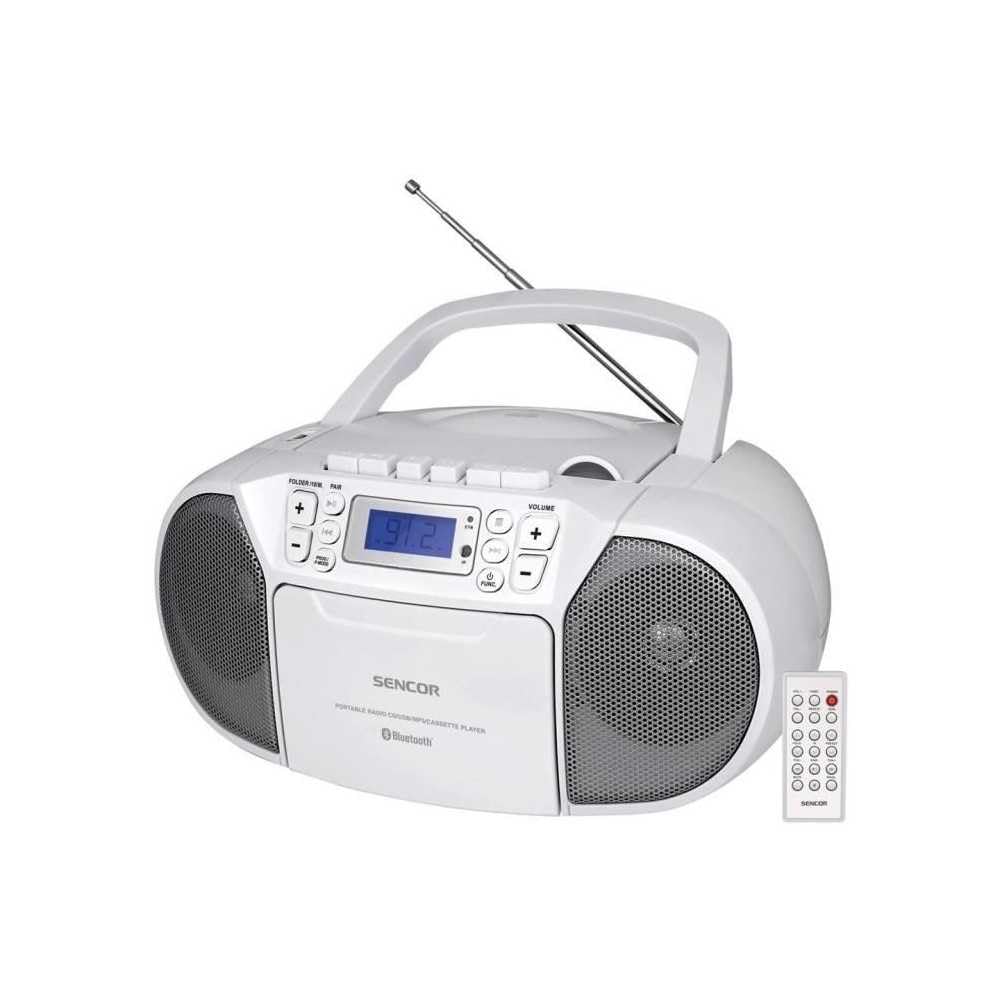
앞쪽 view of the SENCOR SPT 3907 unit, highlighting the control buttons, LCD screen, CD tray, and speakers. The remote control is also visible.
전면 패널 컨트롤:
- 전원 버튼: 장치를 켜거나 끕니다.
- MODE 버튼: Switches between CD, Bluetooth, USB, FM Radio, and AUX-IN modes.
- 볼륨 +/- 버튼: 오디오 출력 레벨을 조정합니다.
- PLAY/PAUSE (►/▮▮) Button: Starts or pauses playback in CD, Bluetooth, or USB mode.
- SKIP (◀◀ / ►►) Buttons: 이전 또는 다음 트랙/역으로 이동합니다.
- STOP (■) 버튼: 재생을 중지합니다.
- FOLDER / PAIR Button: Navigates folders in USB mode; initiates Bluetooth pairing.
- FUNC 버튼: Accesses additional functions (e.g., program, repeat, random).
- LCD 디스플레이: 현재 모드, 트랙 번호, 주파수 및 기타 정보를 표시합니다.
- CD 수납공간: 오디오 CD를 삽입하는 데 사용합니다.
- USB 포트: USB 저장 장치를 연결합니다.
- AUX-IN 잭: 외부 오디오 장치를 연결합니다.
- 헤드폰 출력: 개인적으로 듣기 위한 것입니다.
후면 패널 컨트롤:
- AC 전원 입력: AC 전원 케이블을 연결합니다.
- FM 안테나: Extendable telescopic antenna for FM reception.
원격 제어:
The remote control duplicates most of the front panel functions for convenient operation from a distance. Refer to the remote control diagram in the included documentation for specific button layouts.
6. 설정
6.1 전원 연결
The SENCOR SPT 3907 can be powered by AC mains or batteries.
AC 전원:
- 장치의 스위치가 꺼져 있는지 확인하십시오.
- Connect the supplied AC power cable to the AC input jack on the rear of the unit.
- Plug the other end of the AC power cable into a standard wall outlet (AC 100-240V, 50/60Hz).
배터리 전원:
- 장치 하단에있는 배터리 함 덮개를 엽니 다.
- Insert 6 x D/LR20 size batteries (not included), ensuring correct polarity (+/-) as indicated inside the compartment.
- 배터리 덮개를 단단히 닫으세요.
Note: When the AC power cable is connected, battery power is automatically disconnected. Remove batteries if the unit will not be used for an extended period to prevent leakage.
6.2 안테나 설정
For optimal FM radio reception, fully extend the telescopic FM antenna located on the rear of the unit. Adjust its position for the best signal.
7. 사용 설명서
7.1 전원 켜기/끄기 및 모드 선택
- 를 누르세요 힘 button to turn the unit on. The LCD display will light up.
- 를 누르세요 방법 button repeatedly to cycle through available modes: CD, Bluetooth, USB, FM Radio, AUX-IN. The selected mode will be shown on the LCD display.
- 를 누르세요 힘 버튼을 다시 눌러 기기를 끕니다.
7.2 CD 재생
- 를 누르세요 방법 버튼을 눌러 CD 모드를 선택합니다.
- CD 수납공간 커버를 엽니다.
- Place a CD (CD-R/RW compatible) with the label side facing up onto the spindle.
- CD 삽입구 덮개를 닫으십시오. 기기가 디스크를 읽고 디스플레이에 총 트랙 수가 표시됩니다.
- 를 누르세요 재생/일시정지 버튼을 눌러 재생을 시작합니다.
- 사용하세요 건너뛰기 (◀◀ / ►►) 트랙을 건너뛸 수 있는 버튼.
- 를 누르세요 정지 (■) 버튼을 눌러 재생을 중지합니다.
- 프로그램 재생: STOP 모드에서 버튼을 누르세요. FUNC 프로그램 모드로 들어가려면 버튼을 누르십시오. 건너뛰다 buttons to select tracks and FUNC again to confirm. Up to 20 CD songs can be programmed.
7.3 블루투스 작동
- 를 누르세요 방법 button to select Bluetooth mode. The display will show 'BT' and flash, indicating it's in pairing mode.
- Bluetooth가 활성화된 기기(예: 스마트폰, 태블릿)에서 Bluetooth를 활성화하고 사용 가능한 기기를 검색하세요.
- Select 'SPT 3907' from the list of devices. Once paired, the 'BT' indicator on the display will stop flashing and remain solid.
- Start playing audio on your connected device. The sound will be streamed through the SENCOR SPT 3907.
- 사용하세요 재생/일시정지 그리고 건너뛰다 기기 또는 리모컨의 버튼을 사용하여 재생을 관리할 수 있습니다.
7.4 USB 재생
- USB 플래시 드라이브(MP3 포함)를 삽입하세요 files) USB 포트에 연결합니다.
- 를 누르세요 방법 button to select USB mode. The unit will automatically read the files.
- 를 누르세요 재생/일시정지 버튼을 눌러 재생을 시작합니다.
- 사용하세요 건너뛰기 (◀◀ / ►►) 트랙을 건너뛸 수 있는 버튼.
- 를 누르세요 폴더 button to navigate between folders on the USB drive.
- 프로그램 재생: STOP 모드에서 버튼을 누르세요. FUNC 프로그램 모드로 들어가려면 버튼을 누르십시오. 건너뛰다 buttons to select tracks and FUNC again to confirm. Up to 99 MP3 songs can be programmed.
7.5 FM 라디오 작동
- 를 누르세요 방법 button to select FM Radio mode. The current frequency will appear on the display.
- 더 나은 수신을 위해 망원 안테나를 확장하세요.
- 자동 튜닝: 를 누르고 계세요 건너뛰기 (◀◀ / ►►) 버튼을 몇 초 동안 누르면 다음으로 이용 가능한 방송국을 자동으로 검색합니다.
- 수동 조정 : 짧게 누르세요 건너뛰기 (◀◀ / ►►) buttons to fine-tune the frequency step-by-step.
- 사전 설정된 방송국: 방송국을 저장하려면 원하는 주파수에 맞춘 다음 버튼을 누르세요. FUNC 단추. 사용하다 건너뛰다 버튼을 눌러 미리 설정된 번호(P01-P30)를 선택한 다음 누르십시오. FUNC 다시 확인합니다.
- 저장된 방송국을 불러오려면 버튼을 누르세요. FUNC 저장된 방송국을 순환하려면 버튼을 반복해서 누르세요.
7.6 AUX-IN 연결
- Connect one end of a 3.5mm audio cable (not included) to the AUX-IN jack on the SENCOR SPT 3907.
- 케이블의 다른 쪽 끝을 외부 오디오 장치(예: MP3 플레이어, 스마트폰)의 헤드폰 잭 또는 오디오 출력 단자에 연결하십시오.
- 를 누르세요 방법 버튼을 눌러 AUX-IN 모드를 선택합니다.
- Start playback on your external device. The audio will be played through the SENCOR SPT 3907.
- 를 사용하여 볼륨을 조정합니다. 볼륨 +/- buttons on the unit or remote control, and also on your external device.
8. 유지관리
8.1 장치 청소
Wipe the exterior of the unit with a soft, dry cloth. Do not use abrasive cleaners, waxes, or solvents as they may damage the finish. Ensure the unit is unplugged from the power source before cleaning.
8.2 CD 렌즈 관리
If the CD player experiences reading errors, the lens may need cleaning. Use a commercially available CD lens cleaner disc. Do not touch the lens directly.
8.3 배터리 교체
When the unit operates on batteries and the sound becomes distorted or the unit stops functioning, replace all batteries with new D/LR20 batteries, ensuring correct polarity.
9. 문제 해결
| 문제 | 가능한 원인 | 해결책 |
|---|---|---|
| 전원이 없습니다 | 전원 케이블이 연결되지 않았습니다. 배터리가 소모되었거나 잘못 삽입되었습니다. | Check AC power connection; Replace batteries, ensuring correct polarity. |
| 소리가 나지 않습니다 | 볼륨이 너무 낮음; 잘못된 모드가 선택됨; 헤드폰이 연결됨. | Increase volume; Select correct mode (CD, BT, USB, FM, AUX); Disconnect headphones. |
| CD가 재생되지 않음 / 건너뛰기 | CD가 더럽거나 긁혔습니다. CD를 잘못 넣었습니다. CD 렌즈가 더럽습니다. | CD를 청소하거나 교체하세요. 라벨 면이 위를 향하도록 CD를 넣으세요. CD 렌즈 클리너를 사용하세요. |
| 블루투스가 연결되지 않습니다 | Unit not in pairing mode; Device too far; Bluetooth not enabled on external device. | Ensure unit is in BT pairing mode; Move device closer; Enable Bluetooth on your device. |
| FM 수신 불량 | 안테나가 확장되지 않았거나 올바른 위치에 있지 않음; 신호가 약함. | 텔레스코픽 안테나를 완전히 펼치고 조정하십시오. 기기를 다른 위치로 옮겨 보십시오. |
10. 사양
| 특징 | 사양 |
|---|---|
| 모델 | SPT 3907 |
| 출력 전력 | 4W RMS |
| 지원되는 미디어 | CD-R, CD-RW, Bluetooth, MP3, USB |
| 블루투스 버전 | V2.1 + EDR |
| FM 라디오 프리셋 | 30개 스테이션 |
| 연결성 | 보조 단자(3.5mm), USB |
| 전원 | AC 100-240V, 50/60Hz; 6 x D/LR20 batteries |
| 품목 무게 | 1kg 960g |
| 치수 | (Not specified in provided data) |
11. 보증 및 지원
SENCOR products are manufactured to high-quality standards and are warranted against manufacturing defects. For specific warranty terms and conditions, please refer to the warranty card included with your purchase or visit the official SENCOR website. For technical support, service, or inquiries, please contact your local SENCOR distributor or authorized service center.


