소개
This manual provides detailed instructions for the installation, operation, and maintenance of your OBDPEAK D80 4-Channel 4K Rear View Mirror Camera. Please read this manual thoroughly before using the device to ensure proper functionality and safety.
상자 안에 무엇이 들어있나요?
패키지에 모든 구성 요소가 들어 있는지 확인하세요.
- 뒤쪽view Mirror with 3 cameras (Main Unit)
- Rear camera with 6M Cable
- 64G TF 카드
- 담배 라이터 충전기
- 24-Hour Parking Monitoring Hardware Kit
- 사용자 설명서
- Rubber Strips (for mounting)

Image: Package contents for the OBDPEAK D80 dash cam system.
제품 특징
1. 11" Touchscreen Display & 4K Front Camera
The device features an 11-inch full touchscreen display for intuitive control and a 4K (2160p) front camera for high-resolution video recording. The large display enhances visibility, reducing blind spots compared to standard rearview 거울.
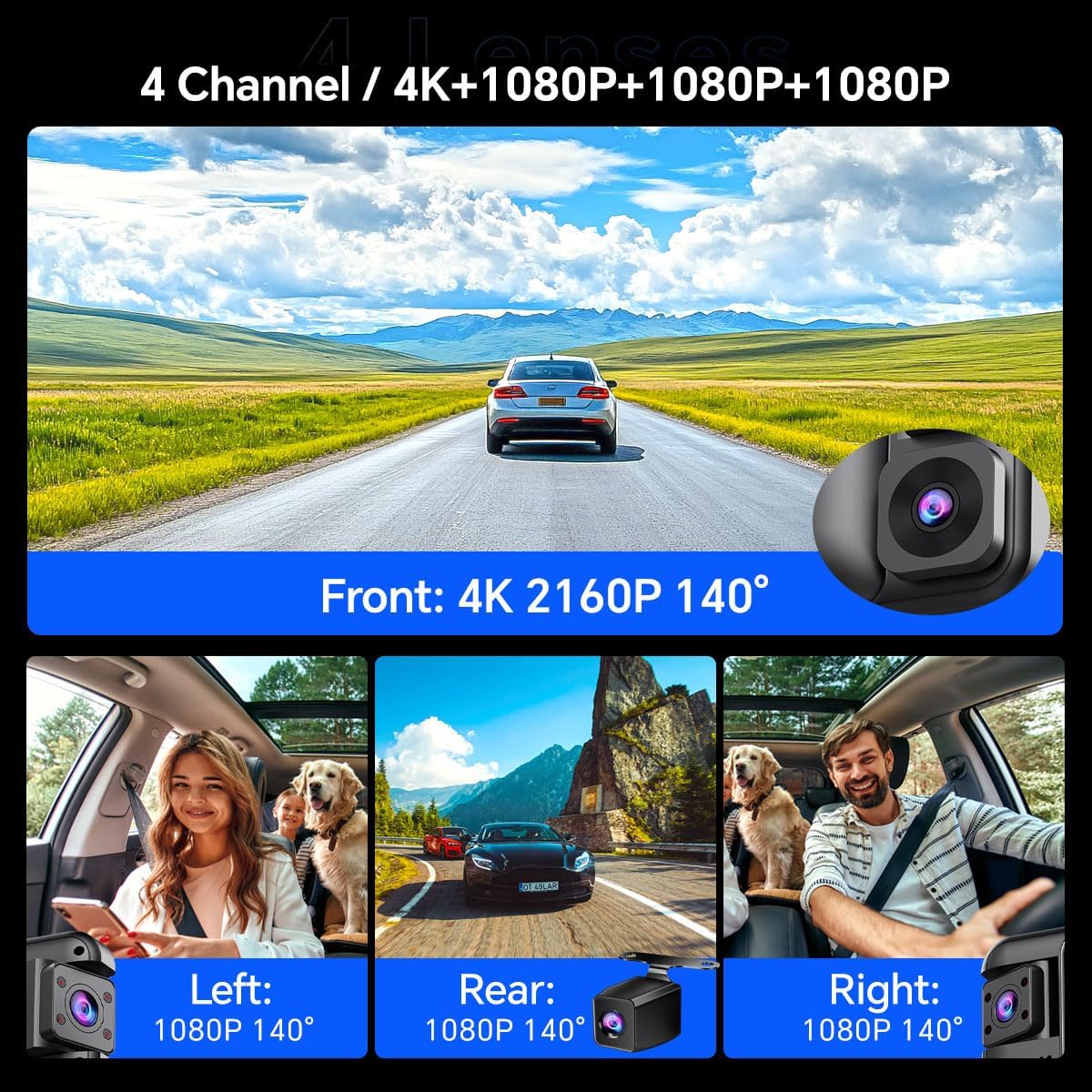
Image: The 11-inch touchscreen display of the D80 mirror camera.
2. 4-Channel Comprehensive Coverage
Equipped with four cameras (Front 4K, Rear 1080P, Left 1080P, Right 1080P), the system provides a complete 360-degree recording of your vehicle's surroundings. This ensures comprehensive evidence capture for various incidents.

Image: Visual representation of the 4-channel camera system providing 360-degree coverage.
3. Smart ADAS (Advanced Driver Assistance System)
The integrated ADAS technology provides voice alerts for critical driving situations, including front vehicle start, lane departure, forward collision, and pedestrian collision warnings. This system assists in maintaining driver awareness and safety.

이미지: 전amples of ADAS warnings for various road hazards.
4. BSD (Blind Spot Detection) Algorithm
The BSD system monitors blind spots not visible in standard mirrors. It detects vehicles in these areas and provides alerts to the driver, aiding in safer lane changes and preventing potential collisions.

Image: Illustration of the Blind Spot Detection system in action.
5. Rotating + Infrared Car Interior Lenses
The two internal cameras are equipped with infrared functionality, ensuring clear recording even in low-light conditions inside the vehicle. These lenses are rotatable, allowing adjustment to different angles or away from the interior for privacy.

Image: Detail of the rotatable interior cameras with infrared capability.
6. 64GB Memory Card Included
A 64GB memory card is included, providing ample storage for recordings and eliminating the need for a separate purchase. The dash cam supports memory cards up to 256GB.
7. 24시간 주차 감시
With the included hardware kit, the D80 offers 24-hour parking monitoring. This feature utilizes all four cameras to provide continuous surveillance of your vehicle, even when parked, with ultra-low power consumption.

이미지: 이상view of 24-hour parking monitoring features.
8. 다양한 표시 모드
The touchscreen supports various display modes, including single-screen, three-screen (1:1:1), and four-screen (1:1:1:1) views, allowing you to customize your monitoring preference.

이미지: 전amples of multiple camera display modes on the mirror screen.
9. Backup Camera Assist
When reversing, the system automatically displays the high-definition rear camera feed on the IPS screen with guidelines, assisting in safe parking and maneuvering.

Image: Full-screen reversing display with parking assist lines.
10. 루프 레코딩
The device supports automatic seamless loop recording, which overwrites the oldest unlocked footag메모리 카드가 가득 차면 자동으로 녹화가 중단됩니다. 이렇게 하면 수동 조작 없이도 지속적인 녹화가 가능합니다.

Image: Explanation of loop recording process.
11. G-센서
The built-in G-sensor automatically detects sudden impacts or collisions. Upon detection, it locks the current video footage to prevent it from being overwritten by loop recording, preserving critical evidence.

Image: G-Sensor function locking video during an incident.
12. Super Night Vision (HDR Display)
The D80 features Super Night Vision with HDR (High Dynamic Range) display technology, providing enhanced clarity and detail in low-light conditions, improving visibility during nighttime driving and parking monitoring.

Image: Comparison of normal night vision and Super Night Vision with HDR.
13. In-App Video Download & Real-time Viewing (Wi-Fi)
The device supports both iOS and Android systems, allowing users to view and download videos in real-time via the dash cam's built-in Wi-Fi. Emergency videos are automatically locked to prevent overwriting.

Image: In-app video management via Wi-Fi.
설정 및 설치
Proper installation is crucial for optimal performance. It is recommended to have this device professionally installed if you are unfamiliar with vehicle electrical systems.
1. Main Unit Installation (Rearview 거울)
- Secure the main unit over your existing rearview 제공된 고무 스트랩을 사용하여 거울을 고정하십시오. 거울이 단단히 고정되어 시야를 가리지 않는지 확인하십시오. view.
- Adjust the angle of the main unit's front camera to capture the road ahead clearly.

Image: Main unit dimensions and mounting overview.
2. 후방 카메라 설치
- Mount the rear camera at the back of your vehicle, typically above the license plate or inside the rear window. Ensure a clear, unobstructed view.
- Route the 6-meter rear camera cable to the main unit, tucking it neatly along the vehicle's interior trim.
- 후면 카메라 케이블을 본체의 지정된 포트에 연결하십시오.
3. 전원 연결
- Connect the cigarette lighter charger to the main unit's power input.
- Plug the charger into your vehicle's 12V cigarette lighter socket.
- For 24-hour parking monitoring, install the provided hardware kit by connecting it directly to your vehicle's fuse box. Refer to the hardware kit's specific instructions for detailed wiring.
4. 메모리 카드 삽입
- Insert the provided 64GB TF card into the memory card slot on the main unit. Ensure it is inserted correctly until it clicks into place.
- Format the memory card through the device's settings menu before first use to ensure compatibility and optimal performance.
작동 지침
1. 전원 켜기/끄기
- The device will automatically power on and begin recording when your vehicle's ignition is turned on.
- 시동을 끄면 자동으로 전원이 꺼집니다.
- 수동으로 전원을 켜거나 끄려면 기기 측면에 있는 전원 버튼을 길게 누르십시오.
2. 터치스크린 조작
- Tap the screen to access menus and settings.
- Swipe left/right on the screen to switch between different camera views (front, rear, left, right, or combined view에스).
- Swipe up/down to adjust brightness or switch between display modes.
3. 녹음 모드
- Driving Recording: 기기 전원을 켜면 연속 루프 녹화가 자동으로 시작됩니다.
- 주차 모니터링 : Activates when the vehicle is parked and ignition is off (requires hardware kit installation). Records events like impacts or motion detection.
- 비상 녹화(G-센서): 자동으로 비디오를 잠급니다 files upon detecting a collision or sudden movement, preventing them from being overwritten.
4. ADAS and BSD Functions
- ADAS and BSD systems are enabled by default. Voice alerts will be provided for detected hazards.
- These functions can be configured or disabled in the system settings if desired.
5. Wi-Fi 및 앱 연결
- Download the dedicated mobile application (search for "OBDPEAK" or refer to the manual for app name) from your device's app store.
- Enable Wi-Fi on the dash cam via the settings menu.
- Connect your smartphone to the dash cam's Wi-Fi network (SSID and password typically displayed on the dash cam screen).
- 앱을 사용하여 view 라이브 푸tag예, 녹화된 비디오 재생, 다운로드 file휴대폰으로 이동하여 설정을 조정하세요.
유지
- 청소: 화면과 카메라 렌즈는 부드럽고 마른 천으로 닦으십시오. 연마성 세척제나 용제는 사용하지 마십시오.
- 메모리 카드: Regularly format the memory card (at least once a month) to maintain optimal performance and prevent data corruption. Back up important files를 포맷하기 전에.
- 펌웨어 업데이트: 제조사 확인해보세요 website periodically for firmware updates. Updates can improve performance and add new features.
- 온도: Avoid exposing the device to extreme temperatures for extended periods, as this can affect battery life and component longevity.
문제 해결
| 문제 | 가능한 해결책 |
|---|---|
| 장치의 전원이 켜지지 않습니다. |
|
| 녹음이 중지되거나 정지됩니다. |
|
| 비디오 품질이 좋지 않습니다. |
|
| ADAS/BSD 알림이 작동하지 않습니다. |
|
| Wi-Fi 연결 문제. |
|
명세서
- 모델 이름: 디80
- 상표: 오브피크
- 전면 카메라 해상도: 4K(2160p)
- 후면 카메라 해상도: 1080p
- 실내 카메라 해상도: 1080p (Left & Right)
- 표시하다: 11인치 터치스크린
- 분야 View: Front 170 Degrees, Other cameras 140 Degrees
- 특별 기능: ADAS, BSD, 360 Degree Coverage, Automatic Incident Detection, Blind Spot Detection, Built-In Display, Parking Monitor, Super Night Vision, Loop Recording, G-Sensor, Wi-Fi
- 저장: Supports up to 256GB TF Card (64GB included)
- 연결성: USB, 무선(Wi-Fi)
- 전원: 1 Lithium Ion battery (included), Car Charger (12V)
- 제품 크기: 0.8 x 12.28 x 2.9 인치
- 품목 무게: 2.97파운드
보증 및 지원
For warranty information and technical support, please refer to the contact details provided in the packaging or visit the official OBDPEAK web대지. 보증 청구를 위해 구매 영수증을 보관하십시오.


