1. 중요 안전 지침
제품을 사용하기 전에 모든 지침을 읽으십시오. 나중에 참조할 수 있도록 이 설명서를 보관하십시오. 화재, 감전 또는 부상의 위험을 줄이기 위해 항상 기본적인 안전 수칙을 준수하십시오.
- 세탁기가 올바르게 접지되었는지 확인하세요.
- Do not operate the machine if it is damaged or malfunctioning. Contact customer service.
- 작동 중에는 어린이가 제품 가까이에 두지 않도록 하십시오.
- 가연성 물질로 오염된 품목은 세탁하지 마세요.
- 청소나 유지관리 작업을 하기 전에는 반드시 기기의 플러그를 뽑으세요.
2. 설치 및 설정
2.1 풀기
Carefully remove all packaging materials. Inspect the machine for any damage incurred during transit. Retain packaging for potential future transport.
2.2 위치 요구 사항
Place the washing machine on a firm, level surface. Ensure there is adequate space around the machine for ventilation and maintenance. Avoid direct sunlight or excessively humid environments.

이미지 설명: This diagram illustrates the necessary clearance for installation. It shows the product dimensions (57cm depth x 59cm width x 97cm height) and recommends additional space for door frames, entrances, and stairs. For example, an additional 10cm width is required for product dimensions when passing through narrow spaces. For installation, ensure at least 1cm clearance from the left/right wall and 1cm from the rear wall. When opening the top lid, allow 10-15cm clearance above the machine.
2.3 물 및 배수 연결
- Connect the water supply hose to the water inlet valve on the back of the machine and to a cold water tap. Ensure connections are tight to prevent leaks.
- Position the drain hose into a standpipe or laundry tub, ensuring it is securely fastened to prevent dislodging during the drain cycle. The drain hose connection should be at least 9cm above the floor.
2.4 기계 수평 맞추기
수평계를 사용하여 기계가 완벽하게 수평을 이루도록 하세요. 필요에 따라 기계 바닥의 수평 조절 다리를 조정하세요. 수평계는 작동 중 진동과 소음을 줄여줍니다.
3. 사용 설명서
3.1 제어판 이상view

이미지 설명: This image shows a close-up of the washing machine's touch control panel. It features an LED display in the center showing remaining time and settings. Buttons for water level, wash, rinse, spin, course selection, power, and start/pause are visible. The panel also indicates the 8.5kg capacity.
3.2 세탁물 넣기
Open the top lid and load clothes loosely into the tub. Do not overload the machine. For optimal washing performance, ensure clothes can move freely.

이미지 설명: 이 이미지는 위에서 아래로의 이미지를 제공합니다. view of the Haier washing machine with its glass lid open, revealing the stainless steel wash tub and the pulsator at the bottom. The control panel is visible at the front.
3.3 Automatic Detergent Dispenser
The machine features an automatic liquid detergent dispenser. Pour liquid detergent into the designated compartment. The machine will automatically dispense the appropriate amount based on the laundry load, eliminating the need for manual measurement each time.
이미지 설명: This image shows a hand refilling the automatic liquid detergent dispenser located on the top edge of the washing machine. The dispenser is a clear, elongated container designed for easy pouring and monitoring of detergent levels.
3.4 세척 코스 선택
Turn on the power and select your desired wash course using the control panel. The machine offers various programs tailored for different fabric types and washing needs.

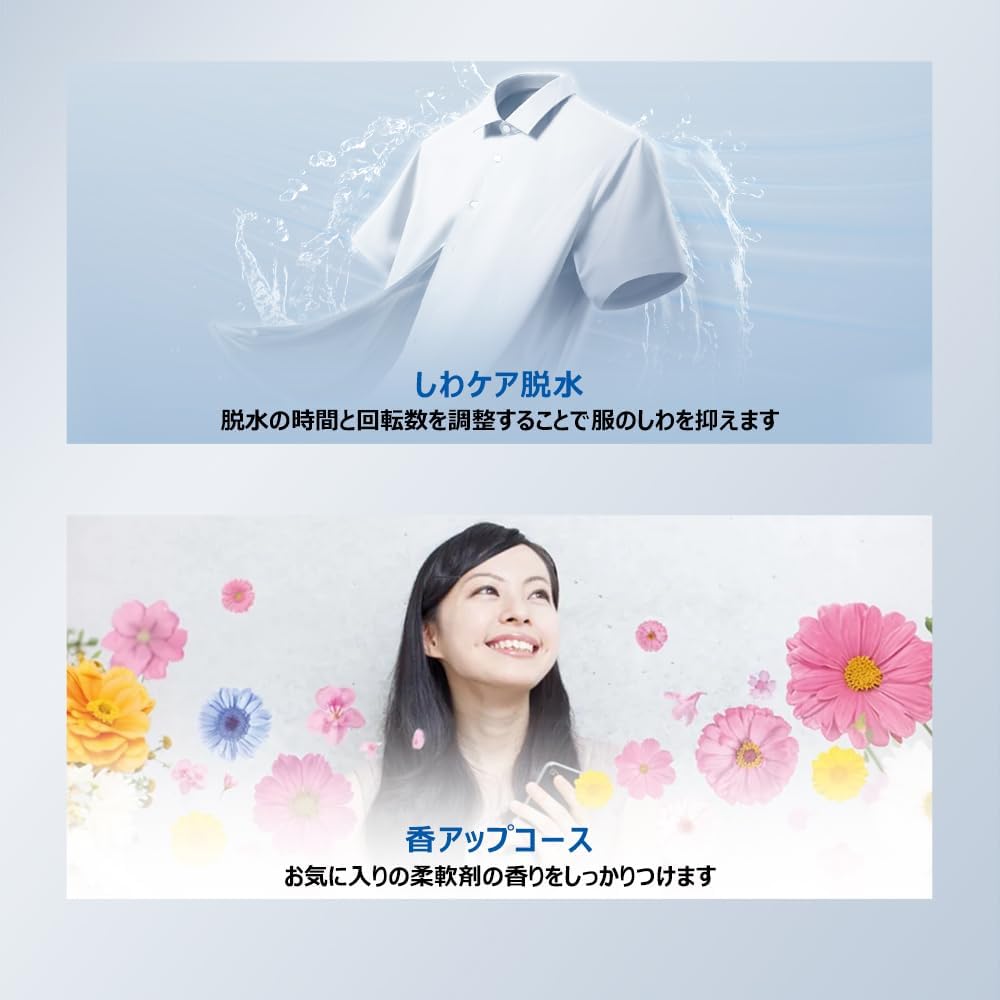
이미지 설명: This image displays a list of available wash courses for the Haier washing machine, including Standard A (daily wash), Standard B (single rinse), My Flow (custom settings), Careful (for jeans and thick items), Quick (for lightly soiled items), Blanket, Tub Air Dry, Fragrance Up (to enhance fabric softener scent), Dry (for delicate items), and Tub Cleaning.
이용 가능한 코스:
- 표준 A: 일상적인 세탁에 사용.
- 표준 B: For everyday laundry with a single rinse.
- My Flow: Allows you to save and use your preferred custom settings.
- 주의 깊은: Suitable for washing items like jeans and thick fabrics.
- 빠른: A 10-minute cycle for lightly soiled items, reducing household chores. (Max 2.0kg load)
- 담요: 담요나 큰 세탁물 세탁용입니다.
- Tub Air Dry: Reduces drying time and is ideal for indoor drying.
- Fragrance Up: Ensures fabric softener scent adheres evenly to clothes, enhancing the fragrance effect.
- 마른: 깨지기 쉬운 품목에 사용.
- 욕조 청소: For regular cleaning of the wash tub.
3.5 세탁 사이클 시작
Press the Start/Pause button to begin the selected wash cycle. The machine will automatically fill with water, dispense detergent, wash, rinse, and spin.
3.6 특수 기능
- High Concentration Spiral Wash: Creates a high-concentration detergent solution and powerful spiral water flow to effectively remove dirt.
- Wrinkle-Reducing Spin: Adjusts spin time and rotation speed to minimize wrinkles, reducing ironing time. (Max 1.0kg load)
- DD 인버터 모터: Direct drive inverter motor ensures low noise and low vibration operation, allowing for quiet washing even at night.

이미지 설명: This image highlights the washing machine's high cleaning power. It shows a shirt being washed in a powerful spiral water flow, alongside diagrams of the high-concentration spiral wash, 3D wing pulsator, and checkered tank design, all contributing to effective dirt removal.

이미지 설명: This diagram illustrates the internal structure of the DD Inverter motor, emphasizing its benefits: low noise, low vibration, and energy saving. It explains that the direct connection to the wash tub and precise control of rotation speed and friction contribute to reduced energy consumption.
4. 유지관리 및 청소
정기적인 유지관리를 통해 세탁기의 성능을 최적화하고 수명을 연장할 수 있습니다.
4.1 욕조 청소
Use the 'Tub Cleaning' course regularly to prevent mold and mildew buildup in the wash tub. The 'Quick Tub Cleaning' function takes approximately 2 minutes and is recommended after each wash cycle to suppress mold growth.

이미지 설명: This image shows the interior of the washing machine tub during a 'Quick Tub Cleaning' cycle, with water swirling inside. A timer indicating '2 minutes' is overlaid, highlighting the short duration of this maintenance function.
4.2 세제 디스펜서 청소
The automatic liquid detergent dispenser tank (approx. 540ml capacity) is removable for easy cleaning. Periodically remove and rinse it thoroughly to prevent residue buildup.
4.3 린트 필터 청소
Regularly clean the lint filter to ensure efficient lint removal and prevent drainage issues. Refer to the diagram in the full manual for filter location and removal instructions.
4.4. 외부 청소
Wipe the exterior of the machine, including the glass top, with a soft, damp cloth. The flat glass top design makes cleaning easy.
5. 문제 해결
고객 서비스에 문의하기 전에 다음의 일반적인 문제와 해결책을 참조하세요.
| 문제 | 가능한 원인 | 해결책 |
|---|---|---|
| 기계가 시작되지 않습니다 | 전원 코드가 뽑혀 있고, 뚜껑이 닫혀 있지 않으며, 급수 밸브가 잠겨 있습니다. | 전원 연결을 확인하고, 뚜껑이 완전히 닫혔는지 확인한 후, 수도꼭지를 여세요. |
| 과도한 진동/소음 | Machine not level, overloaded, foreign objects in tub. | Level the machine, reduce load, check for and remove foreign objects. |
| 물 누출 | Loose hose connections, clogged drain hose. | Tighten hose connections, clear drain hose. |
| 세제가 투입되지 않음 | Dispenser tank empty, clogged dispenser. | Refill dispenser, clean dispenser tank. |
6. 제품 사양
- 상표: 하이얼
- 모델 번호: JW-KD85B
- 제품 크기(깊이 x 너비 x 높이): 57cm x 59cm x 97cm
- 용량: 8.5kg
- 품목 무게: 40kg
- 색상: 하얀색
- 권tage: 100V(교류)
- 소음 수준: 38데시벨
- 제어 유형: Touch Screen (LED Display)
- 작동 모드: 완전 자동
- 프로그램 수: 13
- 특별 기능: Inverter, Start Reservation Timer, Child Lock, Drum Clean, Automatic Detergent Dispenser
- 욕조 소재: 스테인리스 스틸
- 포함된 구성 요소: Magic hose connection (1), Bottom cover (with 1 screw), Liquid detergent auto dispenser tank (1), Water supply hose (1)
7. 보증 정보
This Haier washing machine (Model JW-KD85B) comes with a 1년 제조사 보증 from the date of purchase. This warranty covers defects in materials and workmanship under normal use. Please retain your proof of purchase for warranty claims. For detailed terms and conditions, refer to the warranty card included with your product or contact Haier customer support.
8. 고객 지원
For any inquiries, technical assistance, or service requests, please contact Haier customer support. Haier offers comprehensive after-sales service across Japan.

이미지 설명: This image highlights Haier's nationwide after-sales service in Japan, available 365 days a year. It shows icons representing nationwide coverage across 47 prefectures and a 365-day reception service, indicating support from Haier Aqua Service and Haier Customer Center for repairs and consultations.
Haier Customer Center: Available 365 days a year for consultations and repairs.
Please visit the official Haier website or refer to the contact information provided in your product documentation for the most up-to-date support details.