소개
이 설명서는 NIIMBOT N1 블루투스 라벨 프린터의 설치, 작동 및 유지 관리에 대한 지침을 제공합니다. N1은 열전사 기술을 사용하여 내구성이 뛰어나고 고품질의 라벨을 출력하며, 블루투스를 통해 무선으로 연결하여 NIIMBOT 앱을 통해 편리하게 인쇄할 수 있습니다.

사진: 콤팩트한 흰색 기기인 니임봇 N1 블루투스 라벨 프린터가 라벨 리본 카트리지 두 개와 흰색 라벨 롤과 함께 изобра되어 있습니다.
상자 안에 무엇이 들어있나요?
- 1 x NIIMBOT N1 라벨 프린터
- 종이 롤 2개 (라벨 리본 카트리지)
설치 가이드
1. 앱 설치
사용하시는 기기의 앱 스토어에서 "NIIMBOT" 앱을 다운로드하세요(iOS 및 Android에서 사용 가능). 스마트폰 또는 태블릿이 앱 실행에 필요한 최소 시스템 요구 사항을 충족하는지 확인하십시오.
2. 라벨 리본 장착
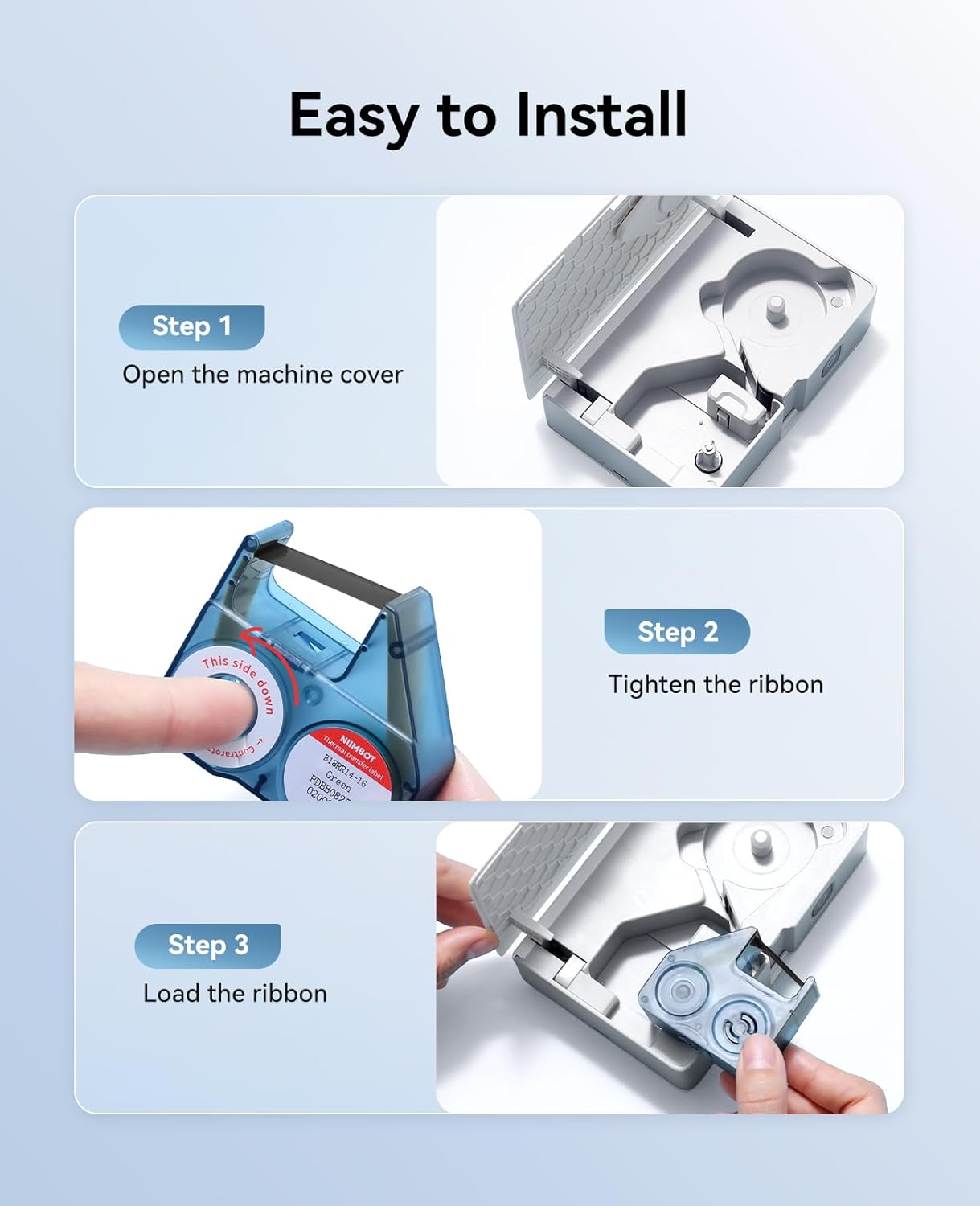
이미지: 라벨 리본 장착의 세 단계(기기 덮개 열기, 리본 조이기, 리본 카트리지 프린터에 장착하기)를 보여주는 시각적 안내.
- 1단계: 잠금 해제 버튼을 살짝 누르거나 덮개를 밀어서 기기 덮개를 여십시오.
- 2단계: 라벨 리본 카트리지를 삽입하십시오. 리본이 팽팽하게 당겨져 카트리지 내부에 올바르게 정렬되었는지 확인하십시오.
- 3단계: 프린터 내부의 지정된 슬롯에 리본 카트리지를 장착하십시오. 프린터 덮개를 단단히 닫으십시오.
3. 전원 켜기 및 블루투스 연결
- NIIMBOT N1의 전원 버튼을 표시등이 켜질 때까지 길게 누르십시오.
- 스마트폰이나 태블릿에서 블루투스를 활성화하세요.
- NIIMBOT 앱을 열고 화면의 지시에 따라 N1 라벨 프린터에 연결하세요. 기기 이름은 일반적으로 "NIIMBOT N1" 또는 이와 유사한 형식으로 표시됩니다.
작동 지침
1. 레이블 생성
NIIMBOT 앱 내에서 라벨을 디자인할 수 있습니다. 이 앱은 다양한 기능을 제공합니다.
- 텍스트 입력 : 라벨에 표시할 텍스트를 입력하세요.
- 템플릿: 자주 사용하는 라벨 유형에는 미리 디자인된 템플릿을 활용하세요.
- 기호 및 로고: 다양한 기호, 아이콘 또는 사용자 지정 로고를 추가하세요.
- 바코드 및 QR 코드: 바코드 또는 QR 코드를 생성하고 인쇄합니다.
- 이미지와 시간: 이미지나 현재 시간을 포함시키세요amps.
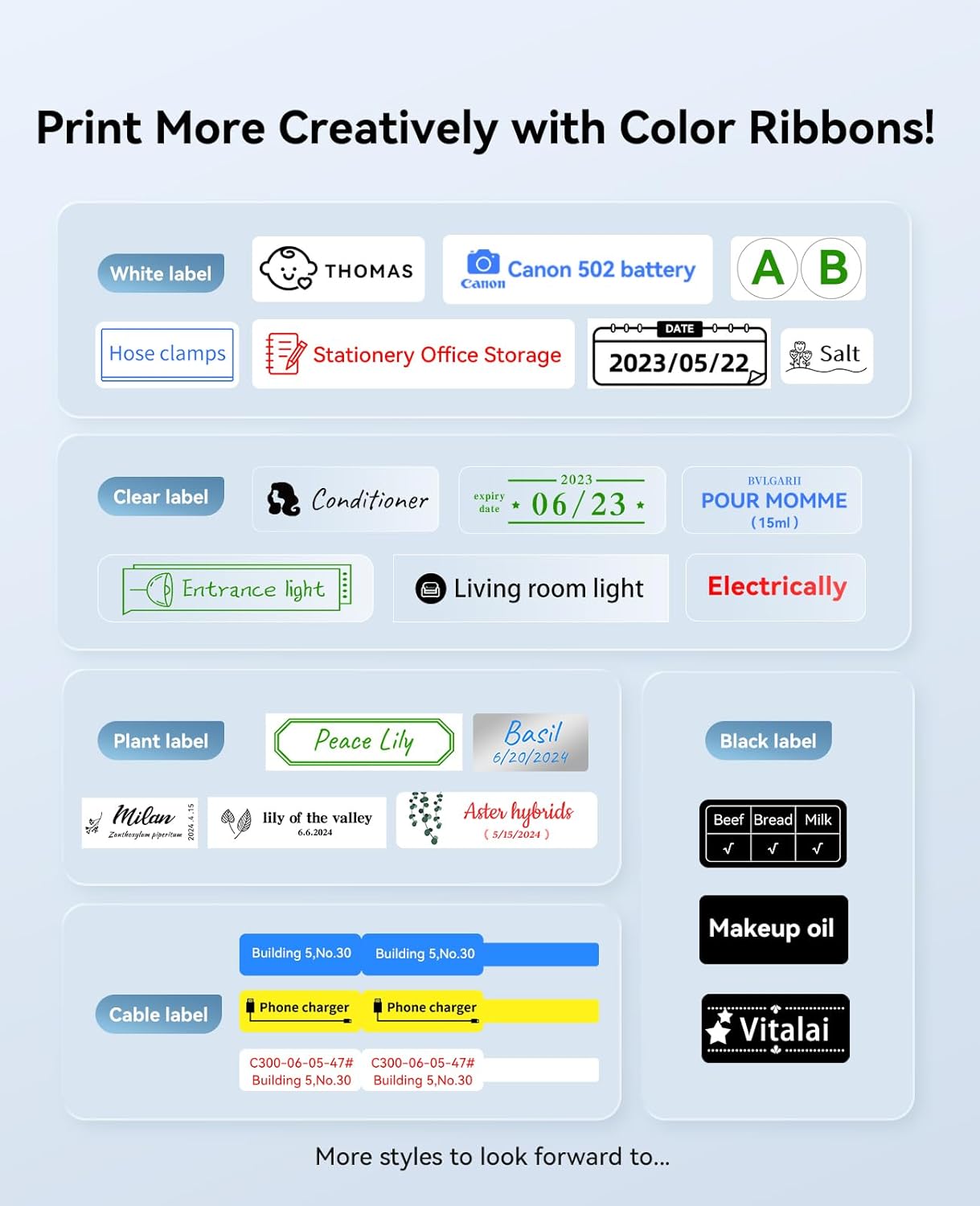
이미지: 흰색, 투명, 식물 무늬, 검정색, 케이블 무늬 라벨 등 다양한 라벨 디자인을 전시하여 여러 가지 색상의 리본을 활용해 창의적인 디자인을 연출할 수 있음을 보여줍니다.
2. 라벨 인쇄
라벨 디자인을 완료한 후 앱에서 인쇄 옵션을 선택하세요. 라벨 프린터가 연결되어 있고 배터리 잔량이 충분한지 확인하십시오. 앱에서 인쇄 실행 전 최종 설정 과정을 안내해 드립니다.
제품 특징
열전달 기술
N1 라벨 프린터는 열전사 기술(203 DPI)을 사용하여 일반 감열 인쇄보다 내구성이 뛰어나고 선명한 라벨을 출력합니다. 이 라벨은 마모, 긁힘, 방수 기능은 물론 고온 및 저온에도 강하여 인쇄된 내용을 더 오랫동안 보존할 수 있습니다.
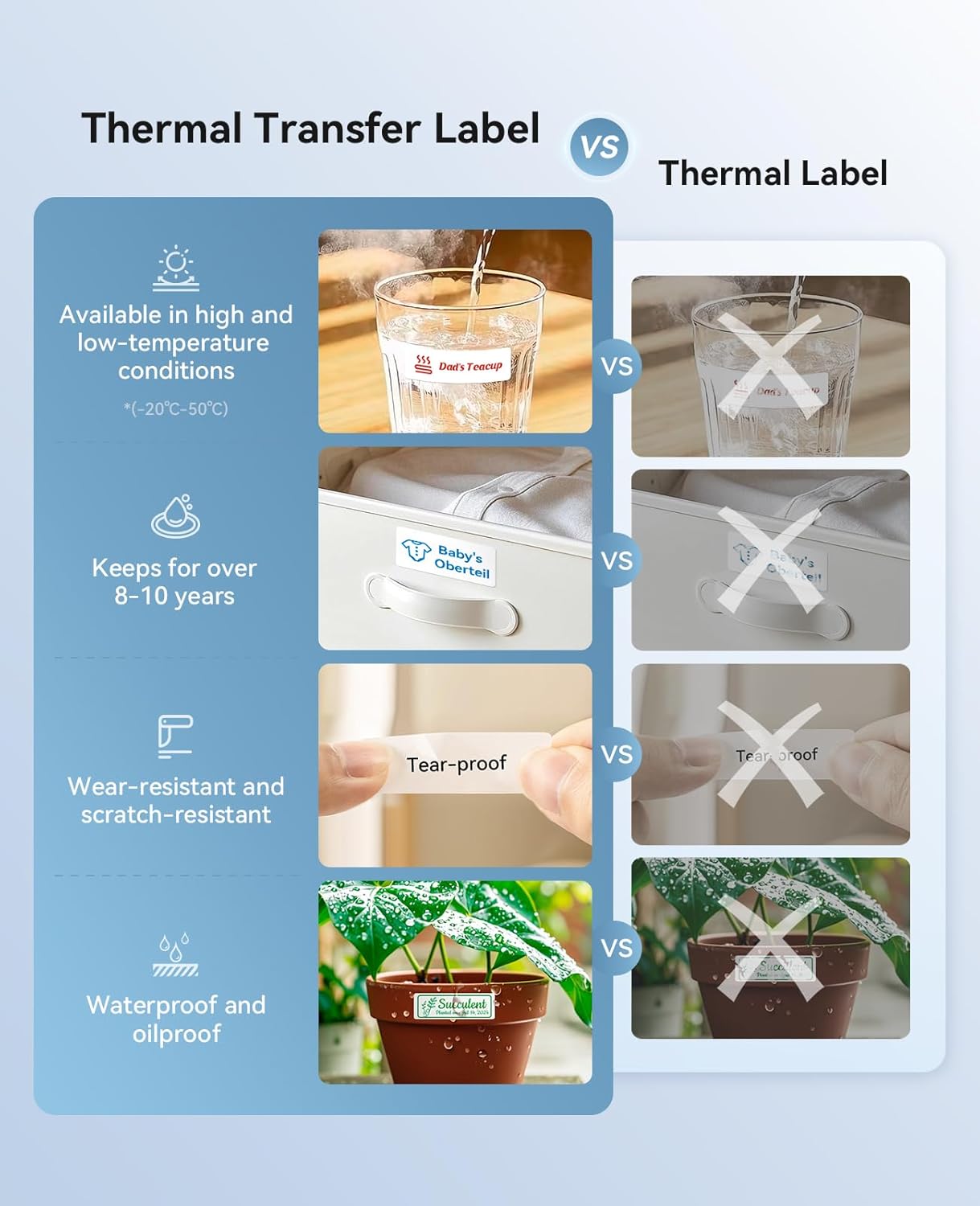
이미지: 열전사 라벨이 기존 감열 라벨에 비해 내열성, 내구성, 찢어짐 방지, 내수성/내유성 등 여러 장점을 제공하는 것을 보여주는 비교표.
컬러 인쇄 기능
N1은 다양한 색상의 리본을 사용하여 컬러 인쇄를 지원합니다. 이를 통해 더욱 다채롭고 시각적으로 차별화된 라벨을 제작할 수 있습니다.
무선 블루투스 연결
이 라벨 프린터는 블루투스를 통해 NIIMBOT 앱에 무선으로 연결되어 물리적인 케이블이나 복잡한 인터페이스 없이 편리하고 휴대 가능한 인쇄 환경을 제공합니다.
다양한 응용 프로그램
NIIMBOT N1은 다양한 라벨링 요구 사항에 적합합니다.
- 가정 및 사무실 정리: 라벨링 file수납 상자 및 용품.
- 주방 및 식품 보관: 냉장 보관이나 식료품 저장실에 보관할 식품 용기에 라벨을 붙이는 것.
- 케이블 관리 : 전자제품 및 네트워킹용 케이블 식별.
- 소매 및 재고: 가격 tags, 보석 tags그리고 소형 품목 분류.
- 원예: 야외 화분에 심은 식물에 이름표를 붙이기.
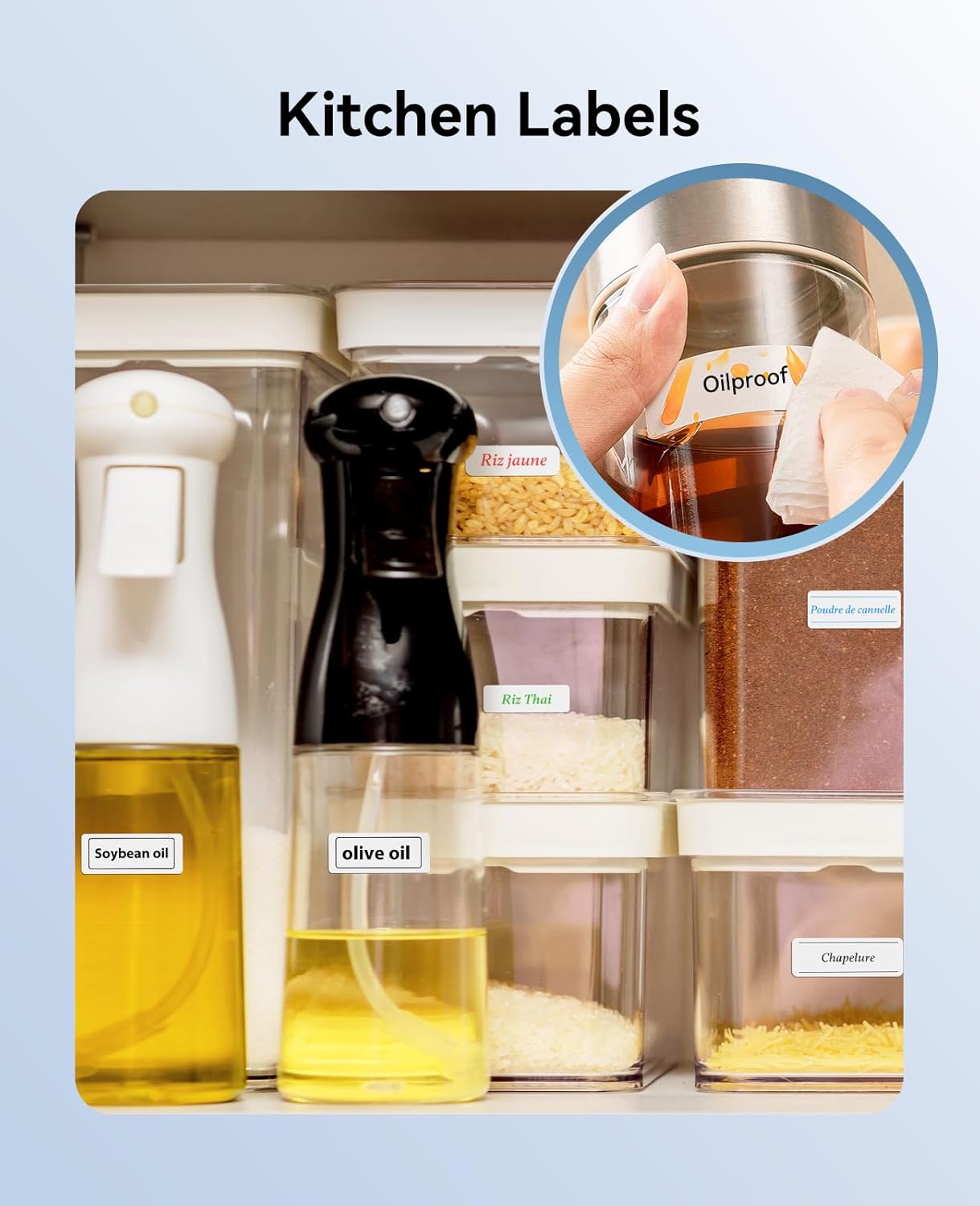
이미지: 다양한 식품 종류별로 라벨이 붙은 여러 용기들이 정리된 주방 팬트리.asin주방 정리를 위해 라벨 프린터를 사용하는 방법.

이미지: 전amp케이블 라벨은 보관함 안이나 멀티탭에 꽂힌 케이블에 부착하여 다양한 전자 케이블을 식별하는 데 사용됩니다.
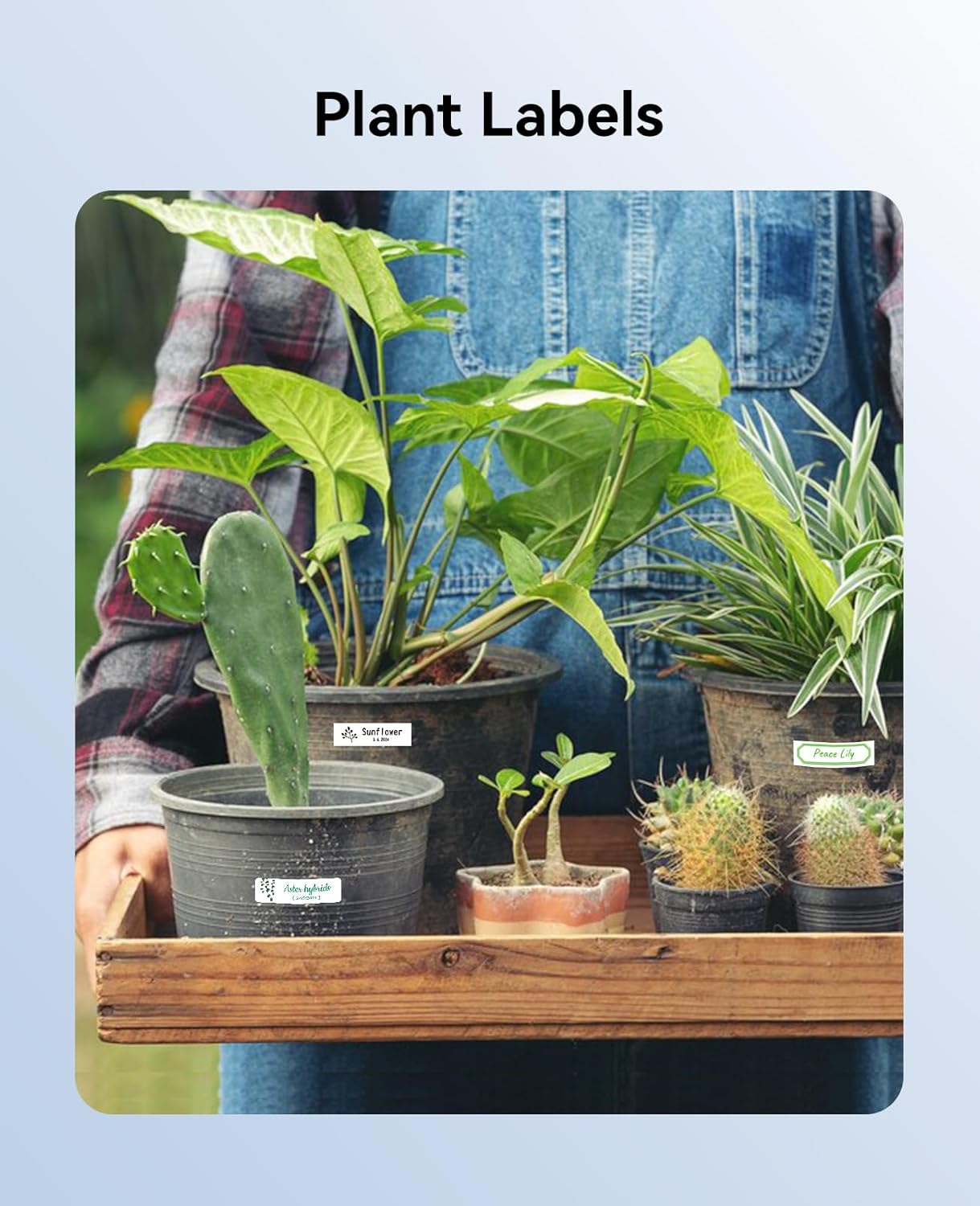
이미지: 화분에 심어진 식물들이 담긴 트레이를 들고 있는 사람. 각 화분에는 식물 이름을 적은 라벨이 붙어 있으며, 이는 원예 작업에 라벨 프린터를 사용하는 방법을 보여줍니다.
유지
- 청소: 라벨 프린터 외부를 부드럽고 마른 천으로 정기적으로 닦아주세요. 프린트 헤드 관리 방법은 앱 또는 제조사 설명서를 참조하십시오. web손상을 방지하기 위한 구체적인 청소 지침은 해당 사이트를 참조하십시오.
- 저장: 라벨 프린터는 직사광선과 극한 온도 변화를 피해 서늘하고 건조한 곳에 보관하십시오.
- 배터리 관리 : 배터리 수명을 최적화하려면 기기를 자주 완전히 방전시키지 마십시오. 장기간 사용하지 않더라도 정기적으로 기기를 충전하십시오.
문제 해결
- 장치가 연결되지 않음: 모바일 기기에서 블루투스가 활성화되어 있고 N1의 전원이 켜져 있는지 확인하세요. 앱과 라벨 프린터를 모두 재시작하세요. N1이 다른 기기와 페어링되었는지 확인하세요.
- 인쇄 품질 불량: 라벨 리본이 올바르게 장착되었는지, 손상되지 않았는지 확인하십시오. 필요한 경우 프린트 헤드를 청소하십시오. 앱에서 선택한 라벨 유형이 실제 리본과 일치하는지 확인하십시오.
- 라벨이 제대로 표시되지 않음: 라벨 부착 경로에 장애물이 있는지 확인하십시오. 리본 카트리지가 제대로 장착되었는지 확인하십시오.
- 앱 문제: NIIMBOT 앱을 최신 버전으로 업데이트하세요. 문제가 지속되면 앱 캐시를 삭제하거나 다시 설치하세요.
명세서
| 특징 | 세부 사항 |
|---|---|
| 상표 | 니임봇 |
| 모델명 | N1 |
| 연결 기술 | 블루투스 |
| 인쇄 기술 | 열전달 |
| 최대 인쇄 해상도 | 203DPI |
| 프린터 출력 | 색상 (호환되는 리본 포함) |
| 특징 | 가지고 다닐 수 있는 |
| 프린터 잉크 유형 | 열전사 리본 |
| 제품의 특정 용도 | 실내, 라벨 제작, 정리, 가정, 학교, 사무실, 식품 냉장 |
| 포함된 구성 요소 | 니임봇 N1 프린터 1대, 용지 롤 2개 |
보증 및 지원
NIIMBOT N1 라벨 프린터는 제한적 보증이 제공됩니다. 자세한 보증 정보, 제품 지원 또는 서비스 문의는 NIIMBOT 공식 웹사이트를 참조하십시오. web웹사이트를 방문하거나 NIIMBOT 고객 서비스에 직접 문의하십시오. 연락처 정보는 일반적으로 제품 포장이나 NIIMBOT 앱에서 찾을 수 있습니다.


