소개
This manual provides detailed instructions for the setup, operation, maintenance, and troubleshooting of your Azeyou 12 Inch Android 15 Tablet, model T12. Please read this manual thoroughly to ensure proper use and to maximize your device's performance and longevity.
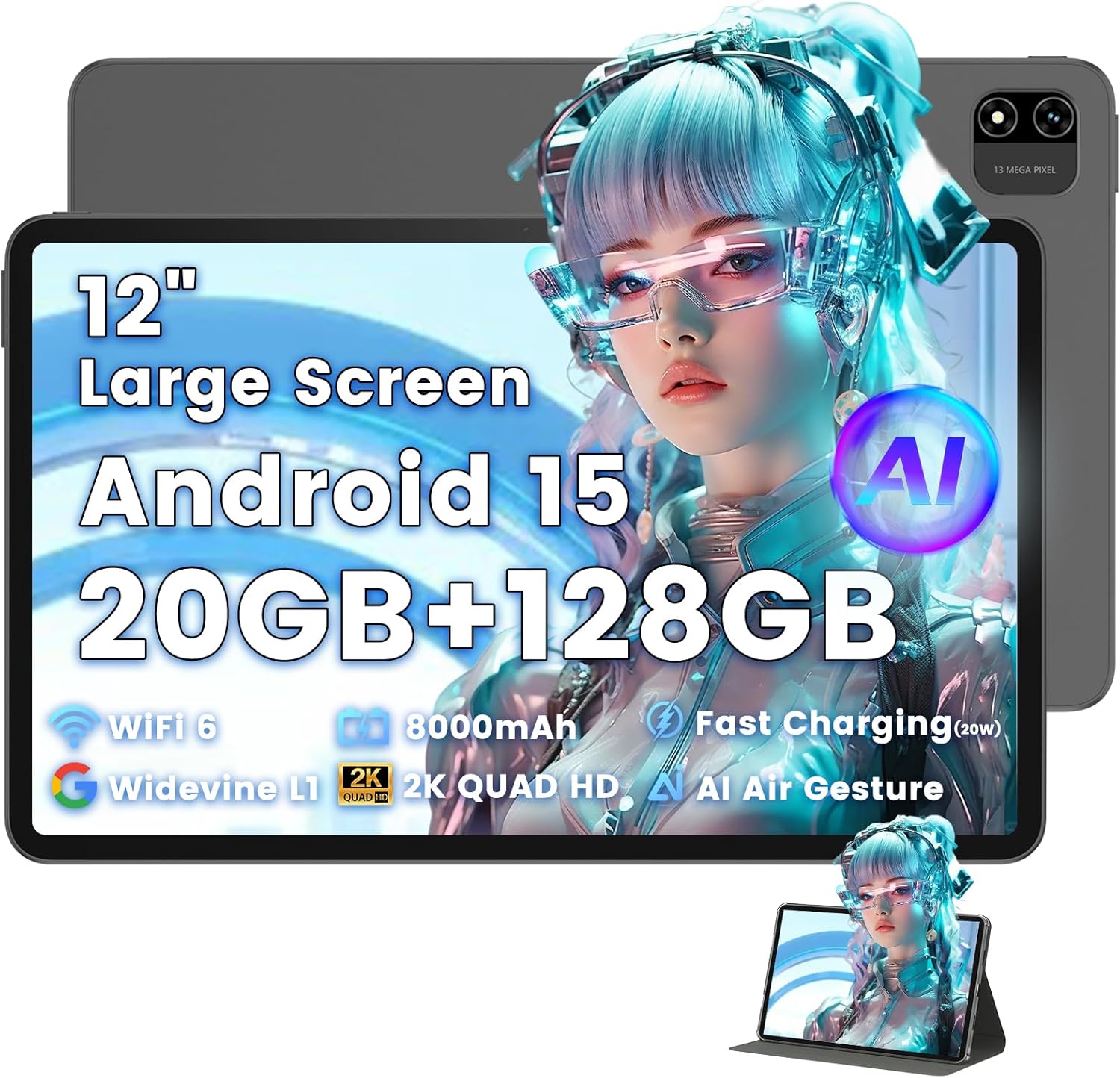
Image: The Azeyou T12 tablet, shown with its protective case, highlighting its large display and sleek design.
상자 안에 무엇이 들어있나요?
패키지에 모든 품목이 들어 있는지 확인하세요.
- 1x Azeyou Tablet (T12)
- 1x 충전 케이블(Type-C)
- 1x 사용자 설명서
- 1x 태블릿 케이스
설정
1. 초기 충전
Before first use, fully charge the tablet. Connect the provided Type-C charging cable to the tablet's charging port and the other end to a compatible 20W Power Delivery (PD) charger. The battery indicator on the screen will show charging status.

Image: An infographic detailing key features of the Azeyou T12 tablet, including its Android 15 operating system, AI octa-core processor, Wi-Fi 6, Bluetooth 5.0, dual cameras, storage capacity, Widevine L1 support, parental control, split-screen function, and 8000mAh battery.
2. 전원 켜기 및 끄기
- 전원을 켜려면: Press and hold the Power button located on the side of the tablet until the Azeyou logo appears.
- 전원을 끄려면: 전원 옵션이 화면에 나타날 때까지 전원 버튼을 길게 누른 다음 "전원 끄기"를 선택하세요.
- 재시작하기 위해: 전원 옵션이 나타날 때까지 전원 버튼을 길게 누른 다음 "다시 시작"을 선택하십시오.
3. 초기 설정 마법사
태블릿을 처음 켜면 초기 설정 과정을 안내해 줍니다.
- 언어 선택: 선호하는 언어를 선택하십시오.
- Wi-Fi 연결: 와이파이 네트워크를 선택하고 비밀번호를 입력하여 인터넷에 연결하세요.
- 구글 계정: Google 계정으로 로그인하거나 새 계정을 만드세요. Google Play 스토어에서 앱을 다운로드하고 데이터를 동기화하려면 Google 계정이 필요합니다.
- 날짜 및 시간: 올바른 날짜와 시간을 설정하거나 네트워크에서 자동으로 설정하도록 하세요.
- 보안: Set up a screen lock (PIN, pattern, password, or face unlock).
4. TF 카드 삽입 (선택 사항)
The tablet supports storage expansion up to 1TB via a TF (microSD) card. Locate the TF card slot, gently insert the card until it clicks into place. Ensure the tablet is powered off before inserting or removing the TF card.

Image: A visual representation of the tablet's memory and storage, indicating 20GB RAM (6GB physical + 14GB virtual), 128GB internal storage, and support for up to 1TB TF card expansion, alongside popular application icons.
작동 지침
1. 기본 탐색 및 제스처
- 수도꼭지: 항목을 선택하거나 앱을 엽니다.
- 길게 누르기 : 상황에 맞는 메뉴에 접근하거나 아이콘을 이동합니다.
- 강타: 화면이나 목록을 스크롤합니다.
- 핀치 투 줌: 이미지 확대/축소 및 web 페이지.
2. 디스플레이 기능
The Azeyou T12 features an 11.97-inch 2K FHD (2000x1200) display with a 90Hz refresh rate for smooth visuals.
- 밝기 조정: Swipe down from the top of the screen to access the Quick Settings panel and adjust the brightness slider.
- 블루 라이트 필터: The tablet includes a built-in blue light filter that automatically adjusts brightness to reduce eye strain. This can be managed in Display Settings.
- 와이드바인 L1: Enjoy high-definition content from streaming services like Netflix and Prime Video due to Widevine L1 certification.

Image: A visual representation of the tablet's display specifications, emphasizing its 12-inch screen, 16:10 aspect ratio, 2000x1200 resolution, and 90Hz refresh rate, with a child watching content on the screen.

Image: An illustration demonstrating the tablet's Widevine L1 certification for HD streaming and its quad-speaker system for rich, immersive audio, surrounded by logos of popular streaming services.
3. 성능 및 멀티태스킹
The tablet is equipped with an A733 octa-core processor and 20GB RAM (6GB physical + 14GB virtual) for smooth operation.
- 분할 화면 모드: To use two apps simultaneously, open one app, then swipe up from the bottom of the screen and hold to access recent apps. Tap the app icon at the top of the window and select "Split screen". Choose a second app to open in the other half of the screen.
- 앱 관리: Close background apps from the recent apps menu to optimize performance.
4. AI Smart Features
The A733 octa-core processor includes an AI chip that enables several intelligent functions:
- AI Posture Reminder: The tablet can monitor your sitting posture and provide gentle reminders to encourage better habits, especially useful for online learning or extended use.
- AI 제스처 제어: Navigate the tablet without touching the screen. Use simple hand movements in front of the camera to flip pages, pause videos, or browse content.
- AI 이미지 향상: The AI engine can enhance low-resolution photos and videos in real-time, improving clarity, detail, and overall visual quality.

Image: A collage demonstrating the tablet's AI capabilities, including an AI Posture Reminder for healthy habits, AI Gesture Control for touch-free navigation, and AI Image Enhancement for improved photo and video quality.
5. 카메라
The tablet features a 5MP front camera and a 13MP rear camera with autofocus and flash.
- 전면 카메라: Ideal for video calls, online classes, and selfies.
- 후방 카메라: Suitable for capturing photos and videos. Features autofocus and flash for improved image quality.
- 얼굴 인식 잠금 해제: 전면 카메라를 활용하여 기기에 빠르고 안전하게 접근하세요.

Image: A graphic highlighting the tablet's 5MP front camera and 13MP AI rear camera, showcasing features like AI-enhanced photos and Face Unlock for secure access.
6. 연결성
- 와이파이 6: Connect to high-speed Wi-Fi networks for stable streaming and low-latency online activities. Access Wi-Fi settings via the Quick Settings panel or the Settings app.
- 블루투스 5.0 : Pair with wireless keyboards, headphones, and other Bluetooth accessories. Enable Bluetooth in Quick Settings or the Settings app.
- C 형 포트 : Used for charging, fast data transfer, and audio output with compatible Type-C headphones.

Image: A visual representation of the tablet's connectivity features, including Wi-Fi 6, Bluetooth 5.0, and support for Type-C headsets, illustrating seamless integration with various devices and networks.
7. 배터리 관리
8000mAh 배터리는 장시간 사용을 가능하게 합니다. 배터리 수명을 최적화하려면 다음을 수행하십시오.
- 화면 밝기를 낮추세요.
- 사용하지 않을 때는 Wi-Fi와 블루투스를 끄세요.
- 불필요한 백그라운드 애플리케이션을 닫습니다.
- Use power-saving modes available in Battery Settings.
8. 자녀 보호 기능
The tablet includes a parental control mode to manage screen time, restrict content, and control app access for children. This feature can be configured in the tablet's settings under 'Digital Wellbeing & parental controls'.

Image: A screenshot of the Android 15 interface on the tablet, highlighting features such as HD streaming, parental control, and split-screen functionality, with various app icons visible.
유지
1. 태블릿 청소
- 부드럽고 보푸라기가 없는 천을 사용하여 태블릿의 화면과 본체를 닦으세요.
- 완고한 얼룩의 경우 약간 damp천에 물을 묻히거나 전자제품용 화면 세정제를 묻힙니다.
- 강한 화학 물질, 연마재 또는 과도한 습기를 사용하지 마십시오.
2. 소프트웨어 업데이트
최적의 성능, 보안 및 새로운 기능에 대한 액세스를 보장하려면 소프트웨어 업데이트를 정기적으로 확인하고 설치하세요. 설정 > 시스템 > 시스템 업데이트.
3. 스토리지 관리
성능을 유지하려면 태블릿의 저장 공간을 주기적으로 관리하세요.
- 불필요한 앱을 삭제하세요 files.
- 앱의 캐시 데이터를 지웁니다. 설정 > 앱 및 알림 > [앱 이름] > 저장공간 및 캐시.
- 클라우드 스토리지를 활용하거나 대용량 데이터를 전송하세요. files to an external TF card or computer.
문제 해결
If you encounter issues with your Azeyou T12 tablet, refer to the following common solutions:
- 태블릿의 전원이 켜지지 않음:
- 배터리가 충전되어 있는지 확인하세요. 충전기를 연결하고 몇 분 정도 기다린 후 전원을 켜보세요.
- 전원 버튼을 10~15초 동안 길게 눌러 강제로 재시작하십시오.
- 성능 저하 또는 정지:
- 불필요한 백그라운드 애플리케이션을 닫습니다.
- Clear app cache and data.
- 태블릿을 다시 시작하십시오.
- Check for available system updates.
- Wi-Fi 연결 문제:
- 태블릿에서 Wi-Fi가 켜져 있는지 확인하세요.
- Wi-Fi 라우터를 다시 시작하세요.
- Wi-Fi 설정에서 네트워크를 삭제하고 다시 연결하세요.
- 앱이 충돌하거나 응답하지 않는 경우:
- 앱을 강제로 종료합니다.Settings > Apps & notifications > [App Name] > Force stop).
- 앱의 캐시와 데이터를 삭제하세요.
- 앱을 제거했다가 다시 설치하세요.
- 앱이 최신 버전으로 업데이트되었는지 확인하세요.
- 화면이 응답하지 않음:
- Perform a forced restart.
- 화면이 깨끗하고 이물질이 없는지 확인하세요.
명세서
- 모델 이름:
- T12 태블릿
- 운영 체제:
- 안드로이드 15
- 프로세서:
- A733 Octa-Core Processor (Unisoc)
- 숫양:
- 20GB (실물 6GB + 가상 14GB)
- 내부 저장소(ROM):
- 128GB
- 확장 가능한 스토리지:
- TF 카드를 통해 최대 1TB
- 화면 크기:
- 11.97 인치
- 화면 해상도:
- 2000x1200 FHD
- 새로 고침 빈도:
- 90Hz
- 그래픽 보조 프로세서:
- Imagination Technologies BXM-4-64 MC1
- 후방 카메라:
- 13MP(자동 초점 및 플래시 포함)
- 전면 카메라:
- 5MP
- 배터리 용량:
- 8000mAh
- 충전 중:
- 20W Power Delivery (PD) Fast Charging via Type-C
- 무선 연결 :
- Wi-Fi 6(802.11a/b/g/n/ac), 블루투스 5.0
- 오디오:
- Quad-Speakers, Type-C Audio Output
- 크기(가로x세로x높이):
- 11 x 7 x 0.3 인치
- 품목 무게:
- 3.1파운드
- 색상:
- 회색
- 특별 기능:
- AI Posture Reminder, AI Gesture Control, AI Image Enhancement, Widevine L1, Parental Control, Split-Screen Mode, Face Unlock
보증 및 지원
보증 정보
Azeyou products typically come with a standard manufacturer's warranty. Please refer to the warranty card included in your product packaging or visit the official Azeyou website for specific warranty terms and conditions. The warranty generally covers manufacturing defects but does not cover damage caused by misuse, accidents, or unauthorized modifications.
고객 지원
For technical assistance, troubleshooting beyond this manual, or warranty claims, please contact Azeyou customer support. Contact details can usually be found on the official Azeyou website or on the product packaging. When contacting support, please have your tablet's model number (T12) and purchase information ready.
방문할 수 있습니다 Azeyou Store on Amazon 자세한 제품 정보와 지원 리소스를 확인하세요.


