1. 서론
Thank you for choosing the RAINPOINT 3 Zone Water Timer. This device is designed to automate your garden and lawn watering, providing precise control and water-saving features. With its durable construction and user-friendly interface, you can manage up to three independent watering zones efficiently. Please read this manual thoroughly before installation and operation to ensure proper use and longevity of your water timer.
2. 안전 정보
- Do not immerse the timer in water. The device is IP65 waterproof, meaning it is protected against water jets, but not submersion.
- Use only alkaline batteries (2 x AA, not included). Do not mix old and new batteries or different types of batteries.
- 타이머를 장기간 사용하지 않을 경우 배터리를 제거하십시오.
- 타이머가 얼지 않도록 보호하십시오. 겨울철에는 손상을 방지하기 위해 전원을 차단하고 실내에 보관하십시오.
- Ensure all connections are tight to prevent leaks. Use plumber's tape if necessary.
- 어린이의 손이 닿지 않는 곳에 보관하세요.
3. 제품 특징
- Durable & Reliable Performance: Features an upgraded metal inlet and coil valve for stable water flow and reduced leakage. Reinforced connectors and a metal head enhance overall durability.
- Precision Control for Diverse Needs: Three independent zones allow for customized scheduling, with durations from 1 minute to 8 hours and frequencies from every 1 hour up to every 7 days.
- Water-Saving & Weather-Resistant: Includes a rain delay function (24h/48h/72h) and boasts an IP65 waterproof rating with a UV-resistant ABS shell for outdoor resilience.
- Easy Installation & Flexible Operation: Installs easily on standard 3/4" faucets without tools. Offers both manual operation (1 minute to 8 hours) and automatic scheduling.
- User-Friendly & Clear Display: Ergonomic design with a large, sunlight-readable LCD screen and a low battery indicator for straightforward programming and operation.
4. 설정
4.1. 배터리 설치
The water timer requires 2 AA alkaline batteries (not included). To install:
- 타이머 뒷면에서 배터리 구획을 찾으세요.
- 배터리 덮개를 밀어서 떼어냅니다.
- 새로운 AA 알카라인 배터리 2개를 올바른 극성(+/-)에 맞춰 삽입합니다.
- Replace the battery cover securely. The LCD screen will activate.

Image: A person's hands installing batteries into the back of the water timer.
4.2. Connecting the Timer to the Faucet
Connect the timer to a standard 3/4-inch outdoor faucet.
- 수도꼭지가 깨끗하고 이물질이 없는지 확인하십시오.
- Screw the timer's brass inlet connector onto the faucet by hand until it is snug. Do not overtighten.
- If leakage occurs, unscrew, apply plumber's tape to the faucet threads, and re-tighten.

이미지: 자세한 view highlighting the reinforced brass inlet and outlet connections of the water timer, emphasizing durability.
4.3. Connecting Hoses to Outlets
Connect your garden hoses to the three independent outlets at the bottom of the timer.
- Screw each hose onto its respective outlet (Zone 1, Zone 2, Zone 3) by hand.
- Ensure connections are secure to prevent leaks.
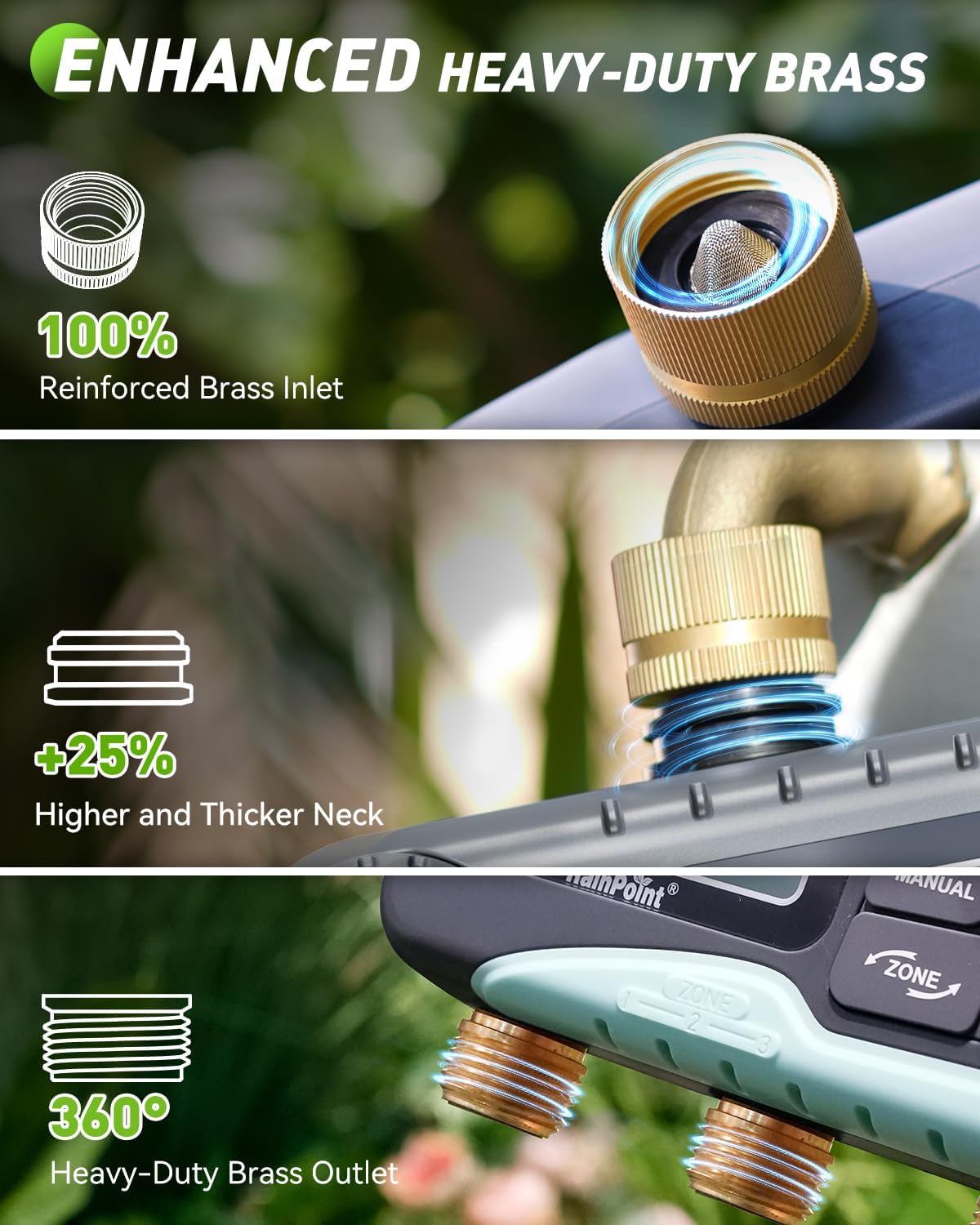
Image: The RAINPOINT 3 Zone Water Timer installed on an outdoor faucet, with three hoses extending to water different garden beds.
5. 사용 설명서
5.1. 현재 시간 설정
After battery installation, the LCD will display the default time. Set the current time:
- Turn the dial to the 'SET CLOCK' position.
- Use the '+' and '-' buttons to adjust the hour, then press 'OK' to confirm.
- 몇 분 동안 반복합니다.
- Press 'OK' to save and move to the next setting, or turn the dial to 'ON' to exit.
5.2. Programming Automatic Watering Schedules
The timer allows for independent programming of up to three zones.

Image: The water timer's LCD screen displaying options for setting clock, start time, watering duration, and frequency.
- 구역 선택: Press the 'ZONE' button to cycle through Zone 1, Zone 2, or Zone 3.
- 시작 시간 설정: Turn the dial to 'START TIME'. Use '+' and '-' to set the desired start time for the selected zone, then press 'OK'.
- 기간 설정: Turn the dial to 'HOW LONG'. Use '+' and '-' to set the watering duration (1 minute to 8 hours), then press 'OK'.
- 빈도 설정: Turn the dial to 'HOW OFTEN'. Use '+' and '-' to set the watering frequency (e.g., every 1 hour, every 12 hours, every 1 day, every 7 days), then press 'OK'.
- Repeat steps for each zone you wish to program.
- Turn the dial to 'ON' to activate the programmed schedules.
5.3. 수동 물주기
설정된 급수 일정에 영향을 주지 않고 즉시 물을 주는 방법:
- 다이얼이 'ON' 위치에 있는지 확인하십시오.
- Press the 'MANUAL' button.
- Use '+' and '-' to set the desired manual watering duration (1 minute to 8 hours).
- Press 'OK' to start manual watering. The selected zone(s) will water for the set duration.
- To stop manual watering, press 'MANUAL' again or turn the dial to 'OFF' and then back to 'ON'.

Image: A man manually watering plants with a hose connected to the RAINPOINT water timer, illustrating the manual watering feature.
5.4. 비 지연 기능
To pause your watering schedule due to rain or wet conditions:
- 다이얼이 'ON' 위치에 있는지 확인하십시오.
- '지연' 버튼을 누르세요.
- Use '+' and '-' to select a delay period (24, 48, or 72 hours).
- Press 'OK' to activate the rain delay. The timer will pause for the selected duration and resume its schedule automatically afterward.
- To cancel rain delay, press 'DELAY' again.
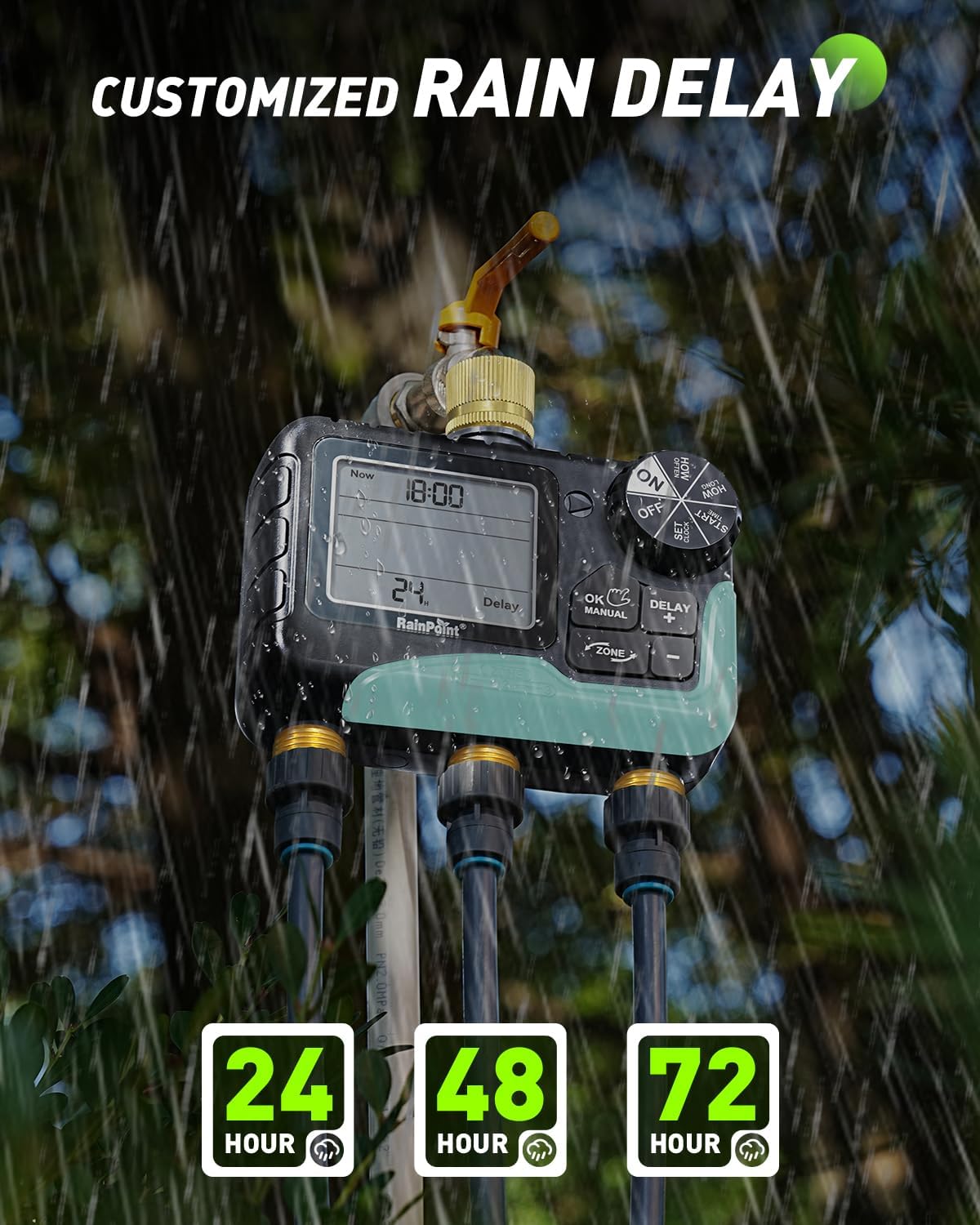
Image: The water timer's display showing the rain delay function activated for 24 hours, with raindrops falling in the background.
6. 유지관리
6.1. 배터리 교체
When the low battery indicator appears on the LCD, replace the batteries promptly to avoid interruption of watering schedules. The timer features a low battery auto shut-off valve to prevent continuous watering if batteries die during operation.

Image: The water timer's display indicating a low battery reminder and explaining the auto shut-off valve feature.
6.2. 청소
Periodically check the inlet filter for debris and clean it to ensure proper water flow. Use a soft brush and water to clean the exterior of the timer.
6.3. 동절기 준비
Before the first frost, disconnect the timer from the faucet and hoses. Remove the batteries. Store the timer indoors in a dry, protected area to prevent freezing and potential damage to internal components.
7. 문제 해결
| 문제 | 가능한 원인 | 해결책 |
|---|---|---|
| 물의 흐름이 없습니다 | Faucet off, low batteries, clogged filter, incorrect programming. | Ensure faucet is fully open. Replace batteries. Clean inlet filter. Check programmed start times and durations. |
| 물 누출 | Loose connections, damaged O-ring/washer, high water pressure. | Tighten all connections. Check and replace O-rings/washers if damaged. Use plumber's tape. Ensure water pressure is within acceptable limits. |
| 디스플레이가 비어 있거나 읽을 수 없습니다. | Dead batteries, moisture inside screen. | Replace batteries. If moisture is present, disconnect, remove batteries, and allow to dry in a warm, dry place. If issue persists, contact customer support. |
| 타이머가 예정된 시간에 물을 주지 않음 | Incorrect clock setting, rain delay active, incorrect program. | Verify current time. Check if rain delay is active. Review and re-program watering schedules for each zone. |
8. 사양
- 모델 번호: IOB347
- 상표: 레인포인트
- 구역 수: 3
- 물주기 시간: 1분부터 8시간까지
- 물주기 빈도: Every 1 hour to every 7 days
- 비로 인한 연기 옵션: 24h, 48h, 72h
- 입구/출구 재질: 놋쇠
- 방수 등급: IP65
- 전원: AA 알카라인 배터리 2개(포함되지 않음)
- 품목 무게: 0.85 킬로그램
9. 보증 정보
RAINPOINT offers a 5-year warranty for this product, covering defects in materials and workmanship under normal use. This warranty does not cover damage caused by misuse, neglect, freezing, accident, or unauthorized modification. Please retain your proof of purchase for warranty claims.
10. 고객 지원
For any questions, technical assistance, or warranty claims, please contact RAINPOINT customer support. We are committed to providing lifetime support for our products.
- 온라인 지원: RAINPOINT 공식 웹사이트를 방문하세요. webFAQ 및 지원 리소스를 위한 사이트입니다.
- 이메일 지원: Available 24/7. Refer to your product packaging or the official web연락처 정보 사이트.
- 전화 지원: Call our customer service center during business hours.

Image: A customer support representative wearing a headset, working at a computer, symbolizing available assistance.


