소개
Thank you for choosing the GOBOULT Soniq Over Ear Bluetooth Headphones. These headphones are designed to provide a superior audio experience with features like 70 hours of playtime, 40mm bass drivers, Zen™ ENC microphone, Type-C fast charging, and dual device pairing. This manual will guide you through the setup, operation, and maintenance of your new headphones to ensure optimal performance.
상자 안에 무엇이 들어있나요?
모든 품목이 들어 있는지 확인하려면 패키지 내용물을 확인하세요.
- Soniq Headphone
- Type-C 충전 케이블
- 사용자 설명서
- 이어쿠션(사전 설치)
- 보증 카드
제품 특징 이상view
The GOBOULT Soniq headphones come equipped with several advanced features:
- 연장된 플레이 시간: 한 번 충전으로 최대 70시간 동안 오디오 재생이 가능합니다.
- 사용자 지정 가능한 EQ 모드: 사운드 프로 조정files for bass boost, balanced audio, or vocal clarity.
- 환경 소음 제거(ENC): 배경 소음을 줄여 통화 음질을 향상시킵니다.
- 듀얼 기기 페어링: 두 기기를 동시에 끊김 없이 연결하고 전환하세요.
- 강력한 오디오 드라이버: 40mm bass-boosted drivers for rich sound.
- Latest Bluetooth Technology: Bluetooth 5.4 for faster pairing and stable connections.
- 편안한 디자인: Lightweight build with cushioned earcups for prolonged wear.
- 방수 기능: IPX5 rating for splash, rain, and sweat protection.
- 촉각 제어: Easy-to-use physical buttons for volume, playback, and mode switching.
- AI 음성 비서 지원: Compatible with Google Assistant and Siri.

이미지: 이상view of key features including 70H battery, EQ modes, ENC, dual pairing, 40mm drivers, and Bluetooth 5.4.

Image: Close-up of the GOBOULT Soniq headphone earcup highlighting the 40mm power-packed bass neodymium drivers with BoomX™ Technology and Memory Foam.
설치 가이드
1. 헤드폰 충전
Before first use, fully charge your GOBOULT Soniq headphones. Use the provided Type-C charging cable to connect the headphones to a compatible USB power source.
- 완충 시 최대 70시간 동안 재생할 수 있습니다.
- Fast charging feature: 10 minutes of charge provides approximately 8 hours of playtime.
- LED 표시등은 충전 상태를 표시하고, 완전히 충전되면 꺼지거나 색상이 바뀝니다.

Image: GOBOULT Soniq headphones connected via Type-C cable, illustrating 70 hours playtime and fast charging capability.
2. 전원 켜기 / 끄기
To power on, press and hold the Power button for approximately 3 seconds until the LED indicator lights up. To power off, press and hold the Power button again for 3 seconds until the LED indicator turns off.
3. 블루투스 페어링
다음 단계에 따라 헤드폰을 Bluetooth 지원 기기와 페어링하세요.
- 헤드폰이 완전히 충전되었고 전원이 꺼져 있는지 확인하세요.
- 전원 버튼을 5~7초 동안 길게 누르면 LED 표시등이 빨간색과 파란색으로 번갈아 깜빡이며 페어링 모드에 진입합니다.
- 기기(스마트폰, 태블릿, 노트북)에서 Bluetooth를 활성화하고 사용 가능한 기기를 검색하세요.
- Select "GOBOULT Soniq" from the list of found devices.
- 연결되면 LED 표시등이 파란색으로 천천히 깜빡이거나 파란색으로 계속 켜져 있습니다.

Image: GOBOULT Soniq headphones highlighting Bluetooth 5.4 for fast and stable connection.
작동 지침
1. 기본 제어
The headphones feature tactile buttons for easy control:
- 전원 버튼: 길게 누르면 전원이 켜지고, 짧게 누르면 재생/일시 정지됩니다.
- 볼륨 높이기(+): 짧게 누르면 볼륨이 커지고, 길게 누르면 다음 트랙으로 넘어갑니다.
- 볼륨 낮추기(-): 짧게 누르면 볼륨이 감소합니다. 길게 누르면 이전 트랙으로 돌아갑니다.
- Multi-function Button (often combined with Power or a dedicated button): Answer/End calls, activate voice assistant.

Image: Close-up of the right earcup showing tactile button controls for volume and play/pause.
2. EQ 모드
Customize your audio experience with multiple EQ modes. Press the dedicated EQ button (or a specific combination, refer to quick start guide if available) to cycle through modes:
- 베이스 부스트 모드: Enhances low frequencies for a deeper bass sound.
- 균형 모드: 중립적인 사운드 프로를 제공합니다file 다양한 장르에 적합합니다.
- 보컬 모드: 더 선명한 보컬을 위해 중간 주파수를 최적화합니다.
- 게임 모드: Reduces latency for a more synchronized gaming audio experience (60ms ultra-low latency).
- 음악 모드: 스탠다드 오디오 프로file 일반적인 음악 감상용.
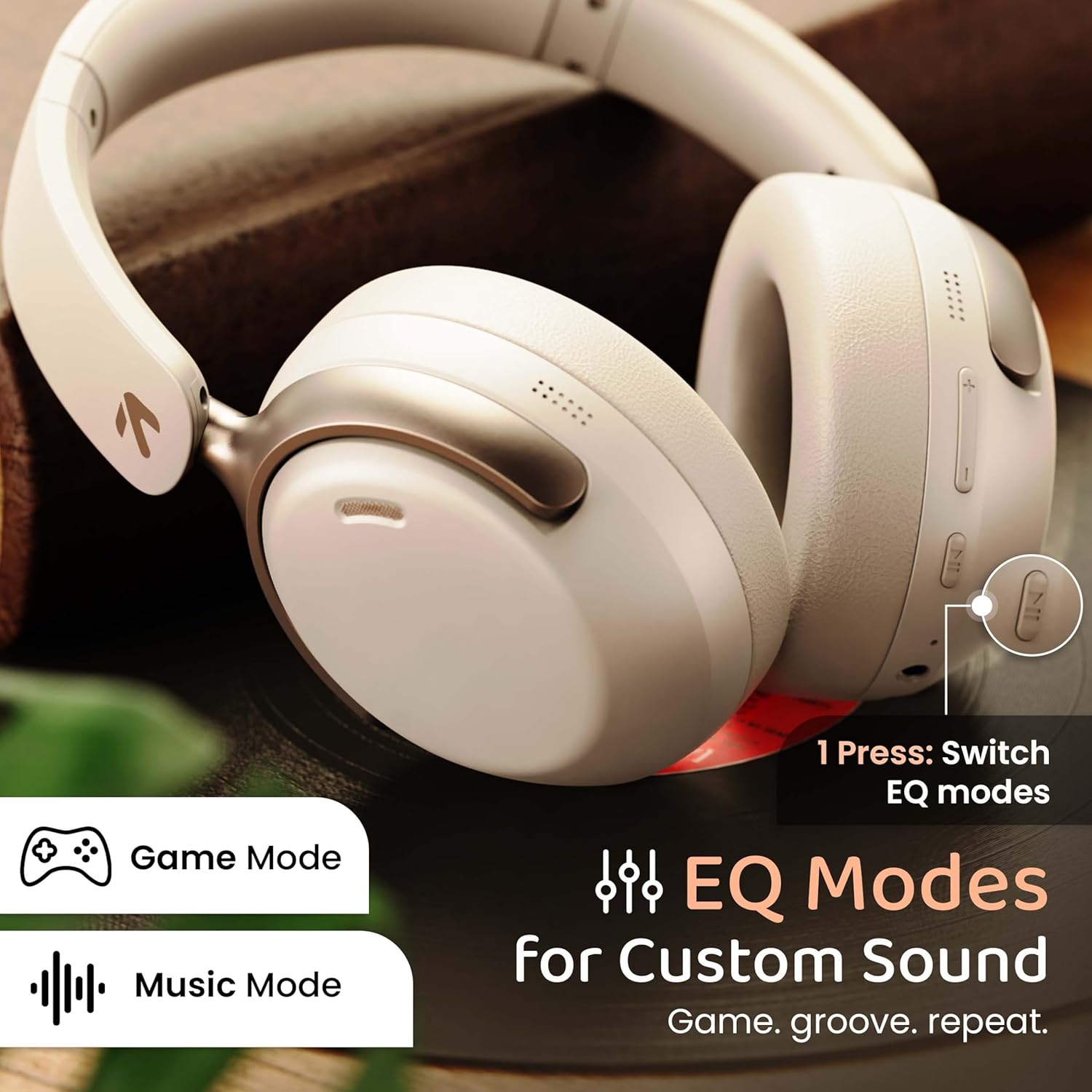
Image: GOBOULT Soniq headphones illustrating the EQ modes for custom sound, including Game Mode and Music Mode.

Image: GOBOULT Soniq headphones highlighting Combat™ Gaming Mode with 60ms ultra-low latency, tailored for mobile gaming and real-time sound accuracy.
3. 두 기기 페어링
The headphones support dual device pairing, allowing you to connect to two devices simultaneously and switch between them seamlessly.
- "블루투스 페어링" 섹션에 설명된 대로 헤드폰을 첫 번째 장치와 페어링합니다.
- 첫 번째 기기에서 Bluetooth를 비활성화합니다.
- 헤드폰을 두 번째 장치와 페어링합니다.
- 첫 번째 기기에서 Bluetooth를 다시 활성화하세요. 헤드폰이 두 기기에 자동으로 연결될 것입니다.
- Audio will play from the device currently active. To switch, pause audio on the first device and start playing on the second.

Image: GOBOULT Soniq headphones demonstrating dual device connectivity with a laptop and a smartphone.
4. 유선 모드(AUX)
For a wired connection, use a standard 3.5mm AUX cable (not included) to connect the headphones to your audio source. In wired mode, the headphones operate passively, and the built-in microphone will not function.

Image: GOBOULT Soniq headphones showing the option for wireless mode and an optional wired mode via AUX cable, noting that the mic is off in wired mode.
5. 통화를 위한 환경 소음 제거(ENC)
The Zen™ ENC microphone technology helps reduce ambient noise during calls, ensuring clearer conversations. This feature is automatically active during phone calls.

Image: Close-up of the GOBOULT Soniq headphone earcup highlighting the Zen™ ENC Mic for processed calling, ambient noise isolation, enhanced call experience, and sharper voice clarity.
6. 음성 지원
Activate your device's voice assistant (Google Assistant or Siri) by pressing the multi-function button (or specific button, refer to quick start guide) for approximately 2 seconds.

Image: GOBOULT Soniq headphones with icons for Google Assistant and Siri, indicating personalized AI assistant support.
유지 보수 및 관리
- 청소: 부드럽고 마른 천으로 헤드폰을 닦으세요. 연마성 세제나 용제를 사용하지 마세요.
- 방수 기능: The headphones are IPX5 water resistant, meaning they are protected against splashes, rain, and sweat. Do not submerge them in water or expose them to strong jets of water.
- 저장: 사용하지 않을 때는 직사광선과 극한의 온도를 피해 서늘하고 건조한 곳에 보관하세요. 접이식 디자인으로 컴팩트하게 보관할 수 있습니다.
- 배터리 관리 : 배터리 수명을 연장하려면 헤드폰을 자주 완전히 방전시키지 마세요. 계속 사용하지 않더라도 정기적으로 충전하세요.
Image: GOBOULT Soniq headphones illustrating IPX5 water resistance, indicating protection against splash, rain, and sweat.

Image: GOBOULT Soniq headphones showcasing their adjustable headband, foldable design, and movable earcups for maximum comfort and portability.
문제 해결
| 문제 | 가능한 해결책 |
|---|---|
| 헤드폰의 전원이 켜지지 않습니다. | 헤드폰이 충전되어 있는지 확인하십시오. Type-C 케이블을 사용하여 전원에 연결하십시오. |
| 기기와 페어링할 수 없습니다. |
|
| 소리가 나지 않거나 볼륨이 작습니다. |
|
| 유선 모드에서는 마이크가 작동하지 않습니다. | The built-in microphone is not active when using the AUX wired connection. This is normal operation. |
| 연결이 간헐적입니다. |
|
명세서
| 특징 | 세부 사항 |
|---|---|
| 모델명 | 에어베이스 |
| 연결 기술 | 블루투스, 유선, 무선 |
| 무선 통신 기술 | 블루투스 5.4 |
| 블루투스 범위 | 10 미터 |
| 오디오 드라이버 크기 | 40 밀리미터 |
| 오디오 드라이버 유형 | 동적 드라이버 |
| 배터리 수명 | 40시간 |
| 충전 포트 | 타입C 고속 충전 잭 |
| 소음 제어 | 환경 소음 제거(ENC) |
| 방수 레벨 | IPX5 (Splash, Rain, Sweat Proof) |
| 오디오 지연 | 60밀리초(게임 모드) |
| 이어피스 모양 | 귀 위 |
| 재료 | Memory Foam (Ear Cushions) |
| 품목 무게 | 227그램 |
| 제품 크기(LxWxH) | 17 x 5.5 x 19 센티미터 |
| 컨트롤러 유형 | Button, Google Assistant |
| 임피던스 | 32옴 |
| 감광도 | 118데시벨 |
보증 및 지원
Your GOBOULT Soniq Over Ear Bluetooth Headphones come with a 1년 제조사 보증 from the date of purchase. This warranty covers manufacturing defects and ensures the reliability of your product.
For warranty claims, technical support, or any inquiries, please refer to the contact information provided on the warranty card included in your package or visit the official GOBOULT support web대지.
보증 적용을 위해 구매 영수증을 보관해 주십시오.


