1. 서론
Thank you for choosing the Dreo 110-Pint Smart Dehumidifier. This appliance is designed to efficiently remove excess moisture from large spaces up to 4500 square feet, such as basements, bedrooms, living rooms, bathrooms, and laundry rooms. Featuring smart controls, multiple operating modes, and dual drainage options, it provides a comfortable and healthy environment by maintaining optimal humidity levels. Please read this manual thoroughly before operation to ensure proper use and maintenance.
2. 중요 안전 지침
화재, 감전 또는 부상의 위험을 줄이려면 이 기기를 작동할 때 항상 기본적인 안전 예방 조치를 따르세요.
- 제습기를 사용하기 전에 모든 사용 설명서를 읽으십시오.
- 이 제품은 실내에서만 사용하세요.
- 전원 공급 장치가 볼륨과 일치하는지 확인하십시오.tag등급 라벨에 지정되어 있습니다.
- 손상된 코드나 플러그로 제습기를 작동하지 마세요.
- Always unplug the unit before cleaning, servicing, or moving.
- 공기 흡입구나 배출구를 막지 마십시오.
- Keep the unit upright for at least 24 hours before plugging it in after transport.
- The Dreo Dehumidifier is ETL-certified to meet stringent electrical safety standards, featuring a 90° tilt waterproof design that automatically powers off when tilted, along with comprehensive thermal protection (23°F to 248°F) to prevent overheating and 15A overcurrent protection against power surges.
3. 제품 오버view
3.1. 구성 요소
The Dreo 110-Pint Smart Dehumidifier is designed for efficient and user-friendly operation. Below are the main components:
- 제어판: Located on the top, with touch buttons and a digital display.
- 공기 배출구: Top-mounted for efficient moisture expulsion.
- 공기 유입구: Rear-mounted for air intake.
- 수조: Front-loading, 2-gallon (8L) capacity with a visible water level indicator.
- Drain Hose Outlet: Located at the rear for continuous drainage.
- 캐스터 휠: 360° smooth-rolling wheels for easy mobility.
- 손잡이: Integrated on the sides for convenient lifting.
- 빨 필터: Easily accessible for cleaning to maintain air quality.
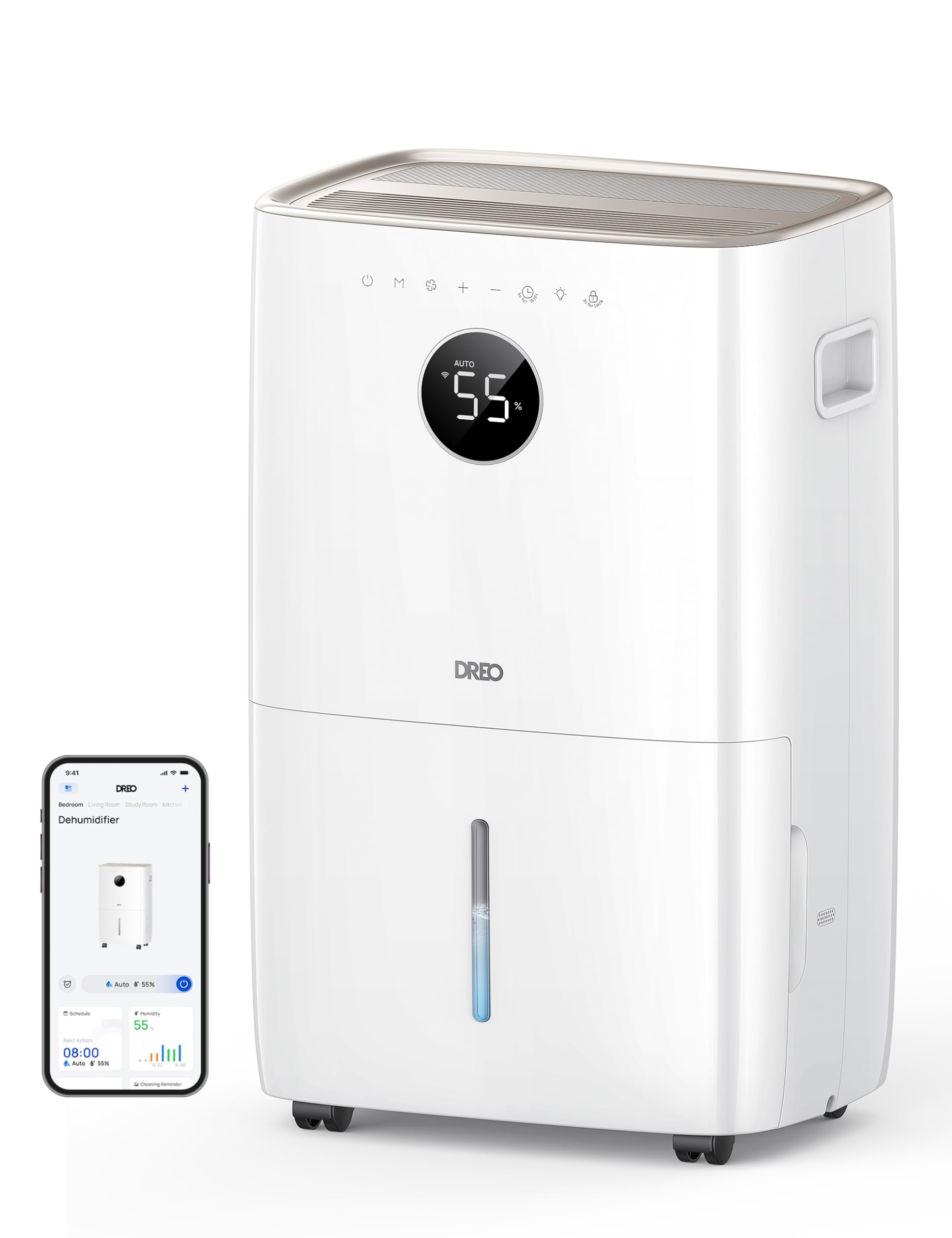
이미지: 앞면 view of the Dreo 110-Pint Smart Dehumidifier, highlighting its compact design and dimensions (11.3"D x 15.4"W x 24.4"H).
3.2. 제어판
The intuitive control panel allows for easy operation and monitoring of your dehumidifier.
- 전원 버튼: 장치를 켜거나 끕니다.
- 모드 버튼: Cycles through Auto, Comfort, and Continuous modes.
- 팬 속도 버튼: 팬 속도를 조절합니다(낮음, 중간, 높음).
- 습도 조절 버튼(+/-): Sets desired humidity level in Auto Mode.
- 타이머 버튼: Sets a 24-hour timer for automatic on/off.
- Wi-Fi 표시기: Wi-Fi 연결 상태를 보여줍니다.
- 어린이 잠금 버튼: 실수로 변경되는 것을 방지하기 위해 제어판을 잠급니다.
- 필터 재설정 표시기: 필터 청소가 필요할 때 표시등이 켜집니다.
- 물 가득 차 경보: Illuminates when the water tank is full, and the unit stops operation.
- 제상 표시기: Activates automatically at 41°F (5°C) for optimal performance in cold environments.

Image: Close-up of the dehumidifier's control panel, showing the digital display set to 55% humidity in Auto Mode, with various function icons.
4. 설정
4.1. 풀기 및 배치
- 제습기를 포장에서 조심스럽게 꺼내세요.
- Place the unit upright on a flat, stable surface. Ensure there is at least 8 inches (20 cm) of space around the air inlets and outlets for proper airflow.
- 냉매가 안정될 수 있도록 제품을 최소 24시간 동안 똑바로 세운 후 전원을 연결하십시오.
4.2. 전원 연결
Plug the power cord into a grounded electrical outlet. Ensure the outlet meets the electrical requirements of the dehumidifier.
4.3. 배수 옵션
The Dreo dehumidifier offers two drainage methods: manual emptying of the water tank or continuous drainage via a hose.

Image: The dehumidifier illustrating both the manual water tank removal and the continuous drainage hose connection.
4.3.1. 수동 배수
- When the water tank is full, the unit will automatically stop and display a "Water Full" alert.
- Carefully pull out the water tank from the front of the unit using the integrated handle.
- 모은 물을 싱크대나 배수구에 비우세요.
- 빈 물탱크를 딸깍 소리가 나면서 제자리에 고정될 때까지 본체 안으로 다시 밀어 넣으십시오. 그러면 제습기가 다시 작동합니다.
4.3.2. 연속 배수
- Locate the drain hose outlet at the rear of the dehumidifier.
- 콘센트에서 고무 마개를 제거하세요.
- Connect the provided drain hose (or a standard garden hose) to the outlet. Ensure the connection is secure to prevent leaks.
- Route the hose to a suitable drain point (e.g., floor drain, sink, or sump pump). Ensure the hose is sloped downwards to allow gravity to drain the water and is free of kinks.
- The dehumidifier will now continuously drain water without needing to empty the tank manually.
5. 사용 설명서
를 누르세요 전원 버튼 to turn the dehumidifier on. The unit will start operating in its last used mode and settings.
5.1. 작동 모드
를 누르세요 모드 버튼 사용 가능한 작동 모드를 순환하려면:
- 자동 모드 : The dehumidifier intelligently adjusts fan speed to maintain your target humidity level within a 5% tolerance. Use the +/- 버튼 to set your desired humidity (e.g., 45-55% is generally recommended).
- 컴포트 모드: The unit operates to maintain a comfortable humidity level based on ambient temperature.
- 연속 모드: The dehumidifier runs continuously at the selected fan speed, regardless of the ambient humidity. This is ideal for very damp conditions or for continuous drainage.
5.2. 팬 속도 조절
In Auto or Continuous mode, press the 팬 속도 버튼 to select between Low, Medium, or High fan speeds.
5.3. 타이머 기능
를 누르세요 타이머 버튼 to set a desired operating duration (from 1 to 24 hours). The unit will automatically turn on or off after the set time has elapsed.
5.4. Smart Control (DREO App)
The Dreo 110-Pint Smart Dehumidifier can be controlled remotely via the DREO app on your smartphone or through voice assistants like Alexa and Google Home.

Image: A smartphone displaying the DREO app interface, showing remote control capabilities for the dehumidifier.
5.4.1. Connecting to the DREO App
- Download the DREO app from your smartphone's app store (available on iOS and Android).
- 계정을 만들거나 로그인하세요.
- Follow the in-app instructions to add your Dreo 110-Pint Smart Dehumidifier (Model DH711S). Ensure your phone is connected to a 2.4GHz Wi-Fi network.
Video: This video demonstrates the process of downloading the DREO app and creating a new user account to manage your smart dehumidifier.
Video: This video provides a step-by-step guide on how to connect your Smart Dehumidifier DH711S to the DREO app for remote control and smart features.
5.4.2. 앱 기능
Through the DREO app, you can:
- 실시간 습도 수준을 모니터링하세요.
- 일정과 타이머를 설정하세요.
- Adjust operating modes and fan speeds.
- Receive notifications (e.g., water tank full, filter cleaning reminder).
- Control the unit using voice commands with Alexa or Google Home.
6. 유지관리
정기적인 유지관리를 통해 제습기의 최적의 성능과 수명을 보장할 수 있습니다.
6.1. 공기 필터 청소
The filter reset indicator will light up after approximately 250 hours of operation, signaling that the filter needs cleaning.
- 제습기의 플러그를 전원 콘센트에서 뽑으세요.
- 기기 뒷면에서 공기 필터를 제거하십시오.
- Wash the filter with clean water (no hotter than 104°F / 40°C) and a mild detergent.
- Rinse thoroughly and allow it to air dry completely before reinstalling.
- 필터를 다시 설치한 후, 장치의 전원을 연결하고 버튼을 누르십시오. 필터 재설정 버튼 for 3 seconds to clear the indicator.

Image: A hand removing the washable air filter from the back of the dehumidifier for cleaning.
6.2. 물탱크 청소
곰팡이와 녹이 생기는 것을 예방하려면 물탱크를 정기적으로 청소하세요.
- 수동 배수 섹션에 설명된 대로 물탱크를 제거하십시오.
- 물탱크를 따뜻한 물과 순한 세제로 씻으세요.
- 깨끗하게 헹구고 완전히 말린 후 기기에 다시 넣어주세요.
6.3. 일반 청소
부드러운 천으로 제습기의 외부를 닦고 damp 옷감. 강한 화학 물질이나 연마성 세제를 사용하지 마십시오.
7. 문제 해결
제습기에 문제가 발생하면 다음의 일반적인 문제와 해결 방법을 참조하세요.
| 문제 | 가능한 원인 | 해결책 |
|---|---|---|
| 제습기가 켜지지 않습니다. | No power, power cord loose, water tank full. | Check power connection, ensure plug is secure, empty water tank. |
| 장치가 물을 모으지 못하고 있습니다. | Humidity level too low, room temperature too low, air filter clogged. | Increase target humidity, ensure room temp is above 41°F (5°C), clean air filter. |
| 이 장치는 시끄럽습니다. | 제품이 수평면에 놓여 있지 않거나 공기 필터가 막혔습니다. | 평평한 곳에 놓고 깨끗한 공기 필터를 사용하십시오. |
| 장치에서 물이 새고 있습니다. | Water tank not properly installed, continuous drain hose is loose or kinked. | Reinstall water tank correctly, check drain hose connection and ensure no kinks. |
| Display shows fluctuating numbers. | Normal adjustment to current humidity. | This is normal operation as the sensor adjusts to ambient conditions. |
| Unit isn't defrosting automatically. | Issue with the condenser. | 도움이 필요하면 고객 지원팀에 문의하세요. |
8. 사양
| 특징 | 세부 사항 |
|---|---|
| 상표 | 드레오 |
| 모델명 | DR-HDH001S |
| 용량 | 110 Pints (at 86°F, RH 90%) / 50 Pints per Day (DOE Standard) |
| 적용 범위 | 최대 4500평방피트 |
| 물탱크 용량 | 2 갤런 (8L) |
| 작동 모드 | Auto, Comfort, Continuous |
| 팬 속도 | 3(낮음, 중간, 높음) |
| 기류 용량 | 210 분당 입방피트(CFM) |
| 습도 조절 | Adjustable, with ±5% precision sensor |
| 특별 기능 | Smart Control (DREO App, Alexa, Google Home), Auto-Defrost, 90° Tilt Waterproof Design, Thermal Protection, 15A Overcurrent Protection, Washable Filter, 360° Caster Wheels |
| 제품 치수 | 11.3인치 깊이 x 15.4인치 너비 x 24.4인치 높이 |
| 품목 무게 | 43.7파운드 |
| 재료 | 금속, 플라스틱 |
| 인증 | ETL 인증 |
9. 보증 및 지원
Dreo products come with a standard warranty. For specific warranty details, please refer to the warranty card included in your product packaging or visit the official Dreo web대지.
9.1. 고객 지원
If you have any questions, concerns, or require assistance with your Dreo 110-Pint Smart Dehumidifier, please contact Dreo Customer Support:
- 이메일: support@dreo.com
- Web대지: www.dreo.com
Please have your model number (DR-HDH001S) and purchase information ready when contacting support.


