1. 서론
The CIO NovaPort SLIM QUAD for DESK 67W is an ultra-thin, high-performance USB charger designed for desktop use. It features a compact form factor and offers versatile charging capabilities for a wide range of devices, from laptops to smartphones and gaming consoles. Equipped with CIO's proprietary NovaIntelligence and NovaSafety2.0 technologies, it ensures optimal power distribution and enhanced safety during charging.

Figure 1: NovaPort SLIM QUAD charger in white and black, showcasing its compact design and four charging ports (3x USB-C, 1x USB-A).
2. 안전 정보
Please read all safety instructions carefully before using this product to prevent injury or damage to the device.
- 충전기를 물, 습기 또는 극한 온도에 노출시키지 마세요.
- 충전기를 떨어뜨리거나 강한 충격을 주지 마십시오.
- Do not disassemble, modify, or attempt to repair the charger yourself. Contact qualified service personnel for assistance.
- Ensure the power cable is fully inserted into the wall outlet and the charger.
- 천둥번개가 칠 때나 장기간 사용하지 않을 때는 충전기를 뽑아 두십시오.
- 어린이의 손이 닿지 않는 곳에 보관하세요.
- The charger may become warm during operation, especially under heavy load. This is normal. Ensure adequate ventilation.
3. 설정
Follow these steps to set up your NovaPort SLIM QUAD charger:
- 전원 케이블 연결: Insert the included 1.5m power cable (figure-8 type) into the charger's power input port.
- 콘센트에 연결하십시오: Connect the other end of the power cable to a standard AC wall outlet (100-240VAC, 50/60Hz). The charger features a 스윙 플러그 for flexible placement, allowing it to fit in narrow spaces or behind furniture.
- 장치 연결: Use appropriate USB-C or USB-A cables (not included) to connect your devices to the available charging ports on the NovaPort SLIM QUAD.

Figure 2: The swing plug allows for flexible positioning in tight spaces, such as behind furniture or desks.
4. 사용 설명서
The NovaPort SLIM QUAD is designed for simple and efficient charging.
4.1. Multi-Device Charging
This charger features three USB Type-C ports and one USB Type-A port, allowing you to charge up to four devices simultaneously. The total output can reach up to 65W when multiple devices are connected.

Figure 3: Simultaneous charging of multiple devices, including a laptop, smartphone, smartwatch, and earbuds.
4.2. NovaIntelligence Technology
The NovaPort SLIM QUAD incorporates NovaIntelligence technology, which automatically adjusts power distribution to connected devices. This means you do not need to worry about which port to use for specific devices; the charger will optimize the output for the fastest possible charging.

Figure 4: NovaIntelligence automatically allocates optimal power to each connected device.
4.3. Rapid Charging Quick Reference
Refer to the table below for detailed output specifications when charging one or more devices.
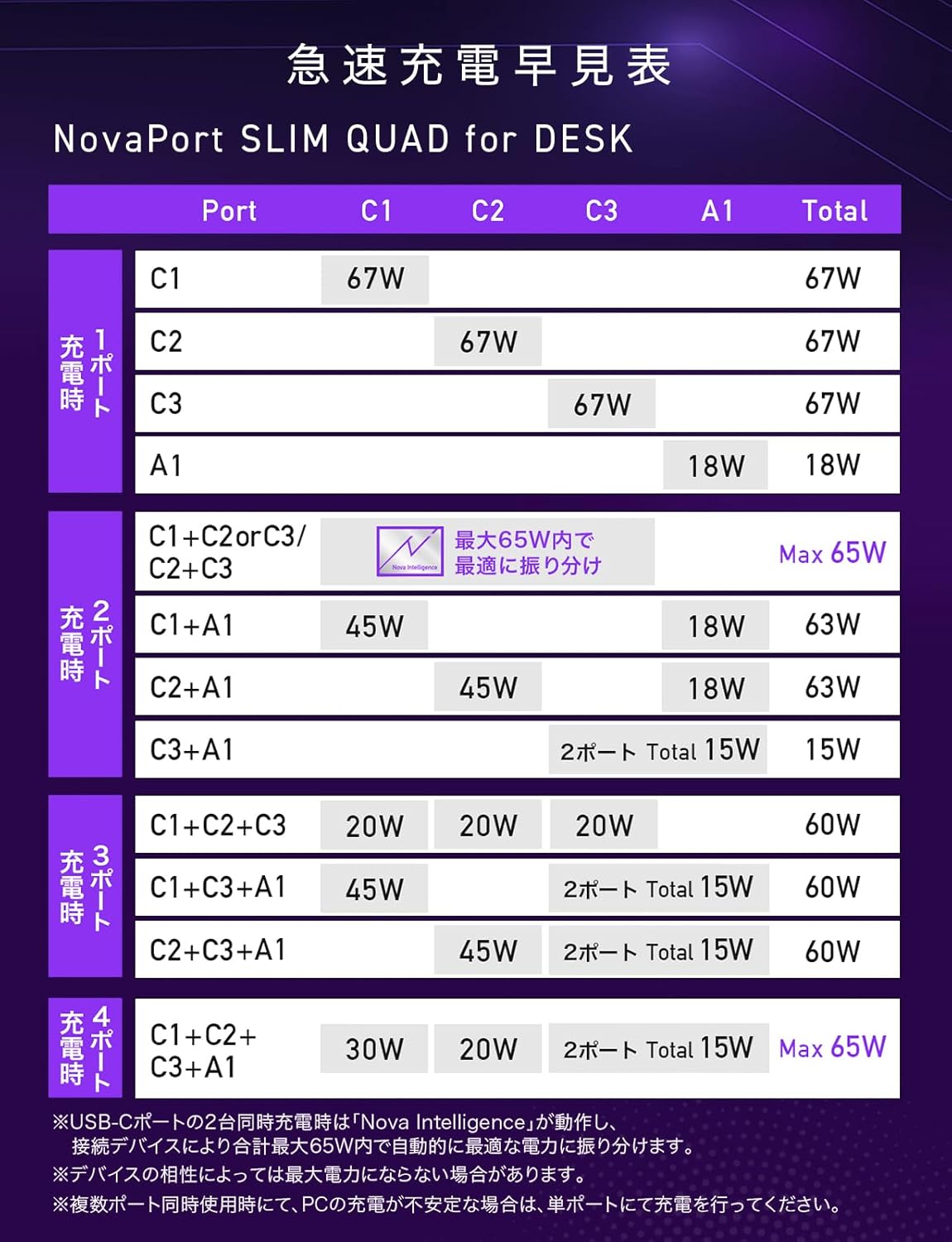
Figure 5: Rapid Charging Quick Reference Table for NovaPort SLIM QUAD, showing power output configurations.
Note: Maximum output may not be achieved for all devices due to compatibility. For PC charging, verify the required voltage와 왓tage with your PC manufacturer.
5. 유지관리
To ensure the longevity and optimal performance of your NovaPort SLIM QUAD charger, follow these maintenance guidelines:
- 청소: 청소하기 전에 충전기를 전원 콘센트와 모든 기기에서 분리하세요. 부드럽고 마른 천으로 표면을 닦으세요. 액체 세제나 에어로졸은 사용하지 마세요.
- 저장: 직사광선이나 극한의 온도를 피하고 서늘하고 건조한 곳에 충전기를 보관하세요.
- 미끄럼 방지 바닥: The charger features an anti-slip silicone base to prevent accidental movement and protect your desk surface.
- 긁힘 방지 마감: The surface material has a textured finish designed to resist minor scratches, helping to maintain its appearance over time.

Figure 6: The anti-slip silicone base ensures stability and protects surfaces.
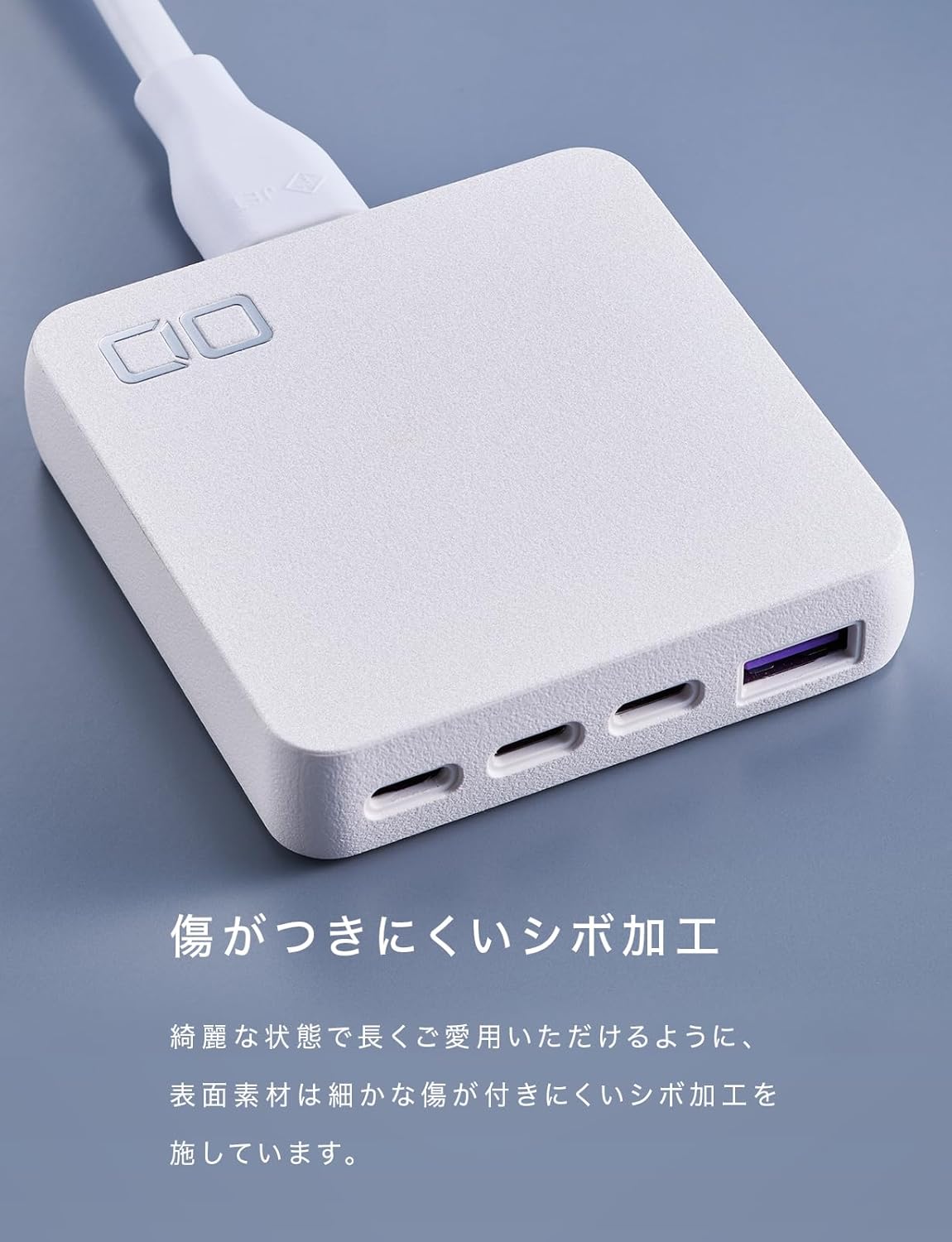
Figure 7: The textured finish helps prevent scratches and maintain the charger's aesthetic.
6. 문제 해결
If you encounter issues with your NovaPort SLIM QUAD, refer to the following common problems and solutions:
- 기기가 충전되지 않거나 충전 속도가 느립니다.
- Ensure the charger is properly connected to a power outlet.
- Check that the charging cable is securely connected to both the charger and your device.
- Verify that your device and cable support the charging standards (PD3.0, QC4.0+, PPS) and power output of the charger.
- If charging multiple devices, the power is distributed. For maximum speed on a single device, try charging it alone.
- 충전기가 따뜻함을 느낀다:
- It is normal for the charger to become warm during operation, especially when charging multiple devices or high-power devices like laptops.
- 충전기에 적절한 통풍이 이루어지고 덮여 있지 않은지 확인하세요.
- The NovaSafety2.0 technology monitors product temperature and automatically adjusts power to prevent overheating.
- Power output fluctuates or devices disconnect briefly when a new device is connected:
- This is a normal behavior for multi-port chargers with intelligent power distribution (NovaIntelligence). When a new device is connected, the charger performs a 're-handshake' to re-evaluate and redistribute power optimally among all connected devices. This may cause a brief interruption in charging for other devices.
- PC charging is unstable with multiple devices:
- If you experience unstable charging for your laptop when other devices are also connected, try charging the laptop on a single, dedicated USB-C port for optimal performance.
7. 사양
Below are the detailed technical specifications for the CIO NovaPort SLIM QUAD for DESK 67W charger.

그림 8: 자세한 제품 사양.
| 특징 | 세부 사항 |
|---|---|
| 모델 번호 | CIO-G67W3C1AD-S |
| 입력 | 100-240VAC, 50/60Hz, 1.5A |
| USB 포트 | 3 x USB Type-C, 1 x USB Type-A (Total 4 ports) |
| USB-C 출력(C1/C2/C3) | 5V=3A / 9V=3A / 12V=3A / 15V=3A / 20V=3.35A (Max 67W) PPS:5-11V=5A |
| USB-A 출력 | 5V=3A / 9V=2A / 12V=1.5A (Max 18W) |
| Multi-Port Output (Examp르) | USB-(C1+C2/C1+C3/C2+C3): 30W+30W or 45W+20W or 20W+45W (Max 65W) USB-(C1+A/C2+A): 45W+18W (Max 63W) USB-(C1+C2+C3): 20W+20W+20W (Max 60W) USB-(C1+C2+A): 20W+20W+18W (Max 58W) USB-(C1/C2+(C3+A)): 45W+15W (Max 60W) USB-(C3+A): 5V=3A (Max 15W) USB-(C1+C2+(C3+A)): 30W+20W+15W (Max 65W) |
| 고속 충전 지원 | PD3.0 / QC4.0+ / PPS |
| 치수 | 약 70 x 72 x 16.8mm |
| 무게 | 약 136g |
| 포함된 케이블 길이 | 1.5분 |
| Included Cable Weight | 약 100g |
| 색상 | White (This variant) |
| 특징 | Multi-device charging, Lightweight design, High-speed charging, NovaIntelligence, NovaSafety2.0 |
8. 보증 및 지원
For warranty information and customer support, please refer to the documentation included with your product or visit the official CIO website. The included accessories are an instruction manual (Japanese/English) and a 1.5m power cord.
고객 지원 관련 연락처 정보는 일반적으로 제조업체 웹사이트에서 확인할 수 있습니다. web사이트 또는 제품 포장에 표시되어 있습니다.