1. 제품 오버view
The Xprinter XP-420B is a high-speed direct thermal label printer designed for various applications, including shipping labels. It offers a maximum print speed of 152 mm/s (6 inches/second) and a resolution of 203 DPI, ensuring clear and precise prints. Its robust double-walled clamshell design enhances durability, and the intelligent print head temperature control system ensures stable output. This printer is compatible with both Windows and Mac operating systems, making it a versatile solution for your labeling needs.
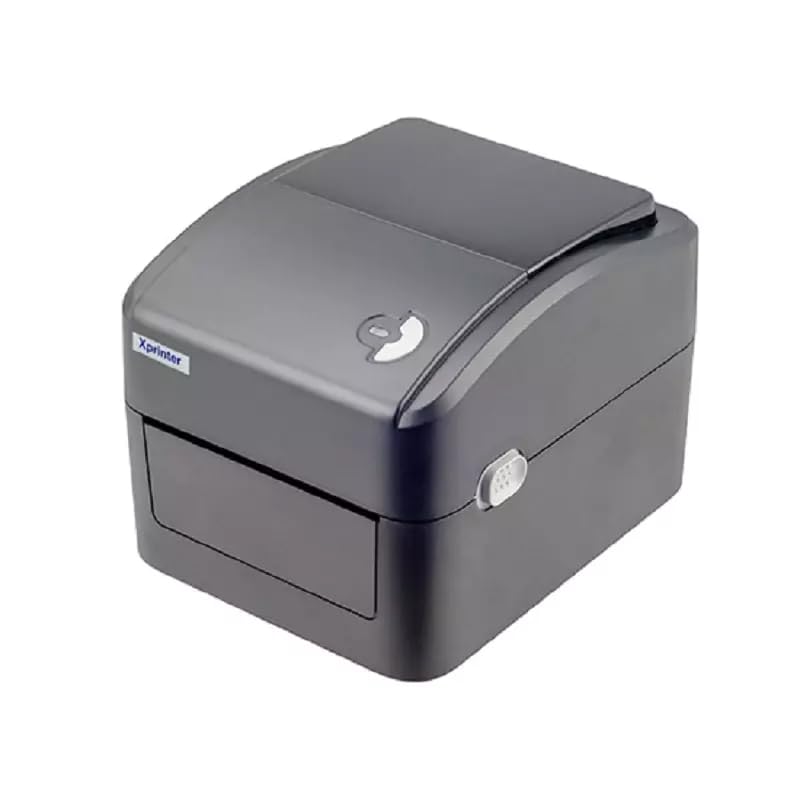
그림 1: 전면 view of the Xprinter XP-420B thermal label printer.
2. 설정 가이드
2.1 포장 풀기 및 초기 검사
- 프린터와 모든 액세서리를 포장에서 조심스럽게 꺼내세요.
- Verify that all components are present: printer unit, power adapter, USB cable, and user manual.
- Inspect the printer for any visible damage that may have occurred during transit.
2.2 프린터 연결
- 전원 어댑터를 프린터의 전원 포트에 연결한 다음 전원 콘센트에 꽂으세요.
- Connect one end of the provided USB cable to the printer's USB port and the other end to an available USB port on your computer.
- Power on the printer using the power switch, usually located on the side or rear.

Figure 2: Xprinter XP-420B showing USB connectivity.
2.3 라벨 로딩
- 프린터 상단 덮개의 양쪽에 있는 잠금장치를 눌러 덮개를 여세요.
- Place the roll of thermal labels onto the label spindle, ensuring the labels feed from the bottom of the roll.
- Feed the leading edge of the labels through the label guide until it extends slightly past the print head.
- Adjust the movable label guides to fit the width of your labels snugly, without pinching them.
- Close the top cover firmly until it latches securely.
- The printer will automatically calibrate and detect the label size.
2.4 드라이버 설치
Before printing, you must install the appropriate printer drivers on your computer. Drivers are typically provided on a CD included with the printer or can be downloaded from the official Xprinter website. The XP-420B supports both Windows and Mac operating systems.
- Windows의 경우: Run the setup executable from the driver CD or downloaded file 화면의 지시를 따르세요.
- Mac의 경우: Download the Mac driver from the Xprinter website and follow the installation prompts.
3. 사용 설명서
3.1 기본 인쇄
- 프린터의 전원이 켜져 있고 컴퓨터에 연결되어 있는지 확인하세요.
- 인쇄하려는 문서 또는 애플리케이션(예: 배송 소프트웨어, 워드 프로세서)을 엽니다.
- 애플리케이션 메뉴에서 "인쇄"를 선택하세요.
- Choose "Xprinter XP-420B" as your printer.
- In the printer settings or preferences, ensure the correct label size is selected. The printer supports adjustable label sizes.
- "인쇄"를 클릭하여 인쇄 작업을 프린터로 보내십시오.
3.2 Adjusting Label Size
The XP-420B allows for adjustable label sizes. This adjustment is primarily done through the printer driver settings on your computer and by physically adjusting the label guides within the printer.
- Software Adjustment: In your printing application or printer driver settings, navigate to the "Page Setup" or "Paper Size" options. Select or define the custom dimensions for your labels (e.g., 4x6 inches for shipping labels).
- Physical Adjustment: As described in Section 2.3, ensure the internal label guides are set correctly to the width of your loaded labels.
4. 유지관리
4.1 프린트 헤드 청소
Regular cleaning of the print head is crucial for maintaining print quality and extending the printer's lifespan. It is recommended to clean the print head after every roll of labels or if print quality degrades.
- 프린터 전원을 끄고 전원 코드를 뽑으세요.
- 프린터의 상단 덮개를 엽니다.
- 프린터를 최근에 사용했다면 프린트 헤드가 식을 때까지 몇 분 정도 기다리십시오.
- Gently wipe the print head surface with an alcohol swab or a lint-free cloth lightly damp이소프로필 알코올로 소독함.
- 프린트 헤드가 완전히 마를 때까지 기다린 후 덮개를 닫고 전원을 다시 연결하십시오.
4.2 일반 청소
- 프린터 외부를 닦을 때는 부드럽고 마른 천을 사용하십시오.
- Remove any dust or label debris from the inside of the printer using a soft brush or compressed air.
- 연마성 세척제나 용제를 사용하지 마십시오.
5. 문제 해결
| 문제 | 가능한 원인 | 해결책 |
|---|---|---|
| 프린터가 응답하지 않습니다 | Power off; USB cable disconnected; Driver issue. | Ensure power is on and connected. Check USB cable. Reinstall printer driver. |
| 인쇄 품질이 좋지 않음 (흐릿하고 줄무늬가 있음) | 프린트 헤드가 더럽거나, 라벨 종류가 잘못되었거나, 인쇄 밀도 설정이 낮으면 오류가 발생할 수 있습니다. | Clean the print head (Section 4.1). Ensure you are using direct thermal labels. Adjust print density in driver settings. |
| 라벨이 제대로 공급되지 않음 | Labels improperly loaded; Label guides not adjusted; Sensor obstruction. | Reload labels correctly. Adjust label guides. Clean any dust or debris from sensors. |
| 프린터가 빈 라벨을 인쇄합니다. | Labels loaded upside down; Not a direct thermal label. | Ensure labels are loaded with the printable side facing up. Verify labels are direct thermal. |
6. 제품 사양
| 특징 | 세부 사항 |
|---|---|
| 상표 | 엑스프린터 |
| 모델명 | XP-420B |
| 연결 기술 | USB |
| 인쇄 기술 | 직접 열 |
| 해결 | 203DPI |
| 최대 인쇄 속도 | 152mm/s (6인치/초) |
| 메모리 | 8MB SDRAM, 8MB 플래시 |
| 프린터 출력 | 단색화 |
| 품목 무게 | 3 킬로그램 |
| 제품 치수 | 20D x 6W x 10H 센티미터 |
| 호환성 | 윈도우, 맥 |
7. 보증 및 지원
7.1 보증 정보
Xprinter XP-420B에는 다음과 같은 구성품이 포함되어 있습니다. 1년 보증 구매일로부터. 본 보증은 정상적인 사용 중 발생한 제조상의 결함 및 고장에 적용됩니다. 보증 청구를 위해 구매 증빙 자료를 보관해 주십시오.
7.2 고객 지원
For technical assistance, troubleshooting beyond this manual, or warranty service, please contact Xprinter customer support. Refer to the contact information provided with your product packaging or visit the official Xprinter web최신 지원 세부 정보는 사이트에서 확인하세요.


