1. 서론
This manual provides essential information for the safe and efficient use of your LG 43-Inch QNED80 4K Smart TV. Please read this manual thoroughly before operating your TV and retain it for future reference. The LG QNED80 4K Smart TV offers a vibrant visual experience with advanced AI processing and smart features.
2. 주요 특징
- Dynamic QNED Colour with 100% Color Volume: LG's wide color gamut technology delivers colorful images for a vivid immersive experience.
- α7 AI 프로세서 Gen8: Enhanced brightness, improved sound, and refined picture detail with 4K upscaling and Dynamic Tone Mapping Pro.
- HDR10 프로: Delivers a dramatic visual experience and elevated picture quality by enhancing each color on your screen.
- 영화 제작자 모드: Watch films as directors intended with automatic preservation of original colors, settings, and frame rates.
- WebOS Smart TV Platform: A smarter, more personalized experience with access to streaming apps and LG Channels. Includes Re:New Program for software updates.
- AI Magic Remote: Features a dedicated AI button for AI Chatbot, AI Concierge, AI Search, AI Picture Wizard, and AI Sound Wizard.
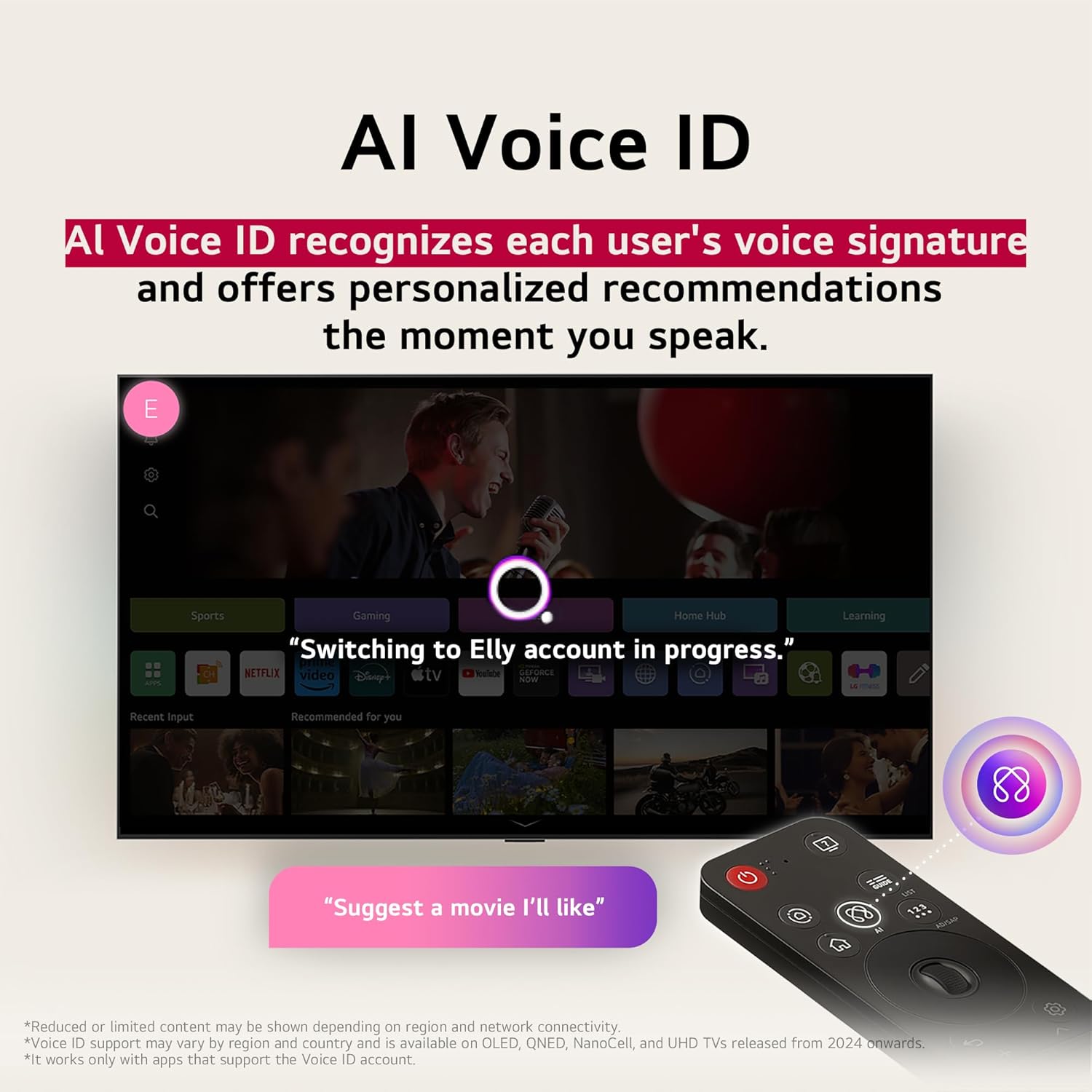
- AI 음성 ID: Recognizes user's voice signature for personalized recommendations.
3. 설정
3.1 언박싱 및 초기 검사
Carefully remove the TV and all accessories from the packaging. Ensure all components listed in the 'What's in the Box' section are present and undamaged. Keep packaging for potential future transport or returns.
3.2 스탠드 조립 또는 벽걸이 설치
If using the included stand, follow the instructions provided in the separate quick setup guide to securely attach the stand to the TV. If wall-mounting, ensure you use a compatible VESA mount and follow the mount manufacturer's instructions, paying attention to weight limits and wall type. Always ensure the TV is securely fastened to prevent accidental falls.
3.3 주변기기 연결하기
Connect your external devices (e.g., cable box, Blu-ray player, gaming console) to the appropriate HDMI ports. For internet connectivity, use an Ethernet cable for a stable wired connection or connect via Wi-Fi during the initial setup process. Ensure the power cable is securely connected to the TV and a power outlet.
3.4 초기 전원 켜기 및 설정 마법사
Press the power button on the TV or the Magic Remote. The TV will guide you through the initial setup wizard, including language selection, network connection, channel scanning, and smart TV account setup. Follow the on-screen prompts to complete the process.
4. 사용 설명서
4.1 매직리모컨 사용하기
The Magic Remote allows for intuitive control of your TV. Point and click, use the scroll wheel, or utilize voice commands. Dedicated buttons provide quick access to popular streaming services and AI features.
4.2 탐색 WebOS
그만큼 WebOS platform provides a user-friendly interface for accessing apps, live TV, and connected devices. Use the Magic Remote's pointer to select icons on the home screen launcher bar. Customize the launcher bar to prioritize your favorite apps.
4.3 AI 기능
- AI 음성 ID: Set up your voice profile to receive personalized content recommendations and settings adjustments.
- AI 검색: Use voice commands to search for content, information, or additional solutions.
- AI 컨시어지: Provides customized keywords and recommendations based on your view역사.
- AI 챗봇: Understands your intent and provides immediate solutions for configuration settings or troubleshooting.
5. 미디어 통합
5.1 제품 이미지
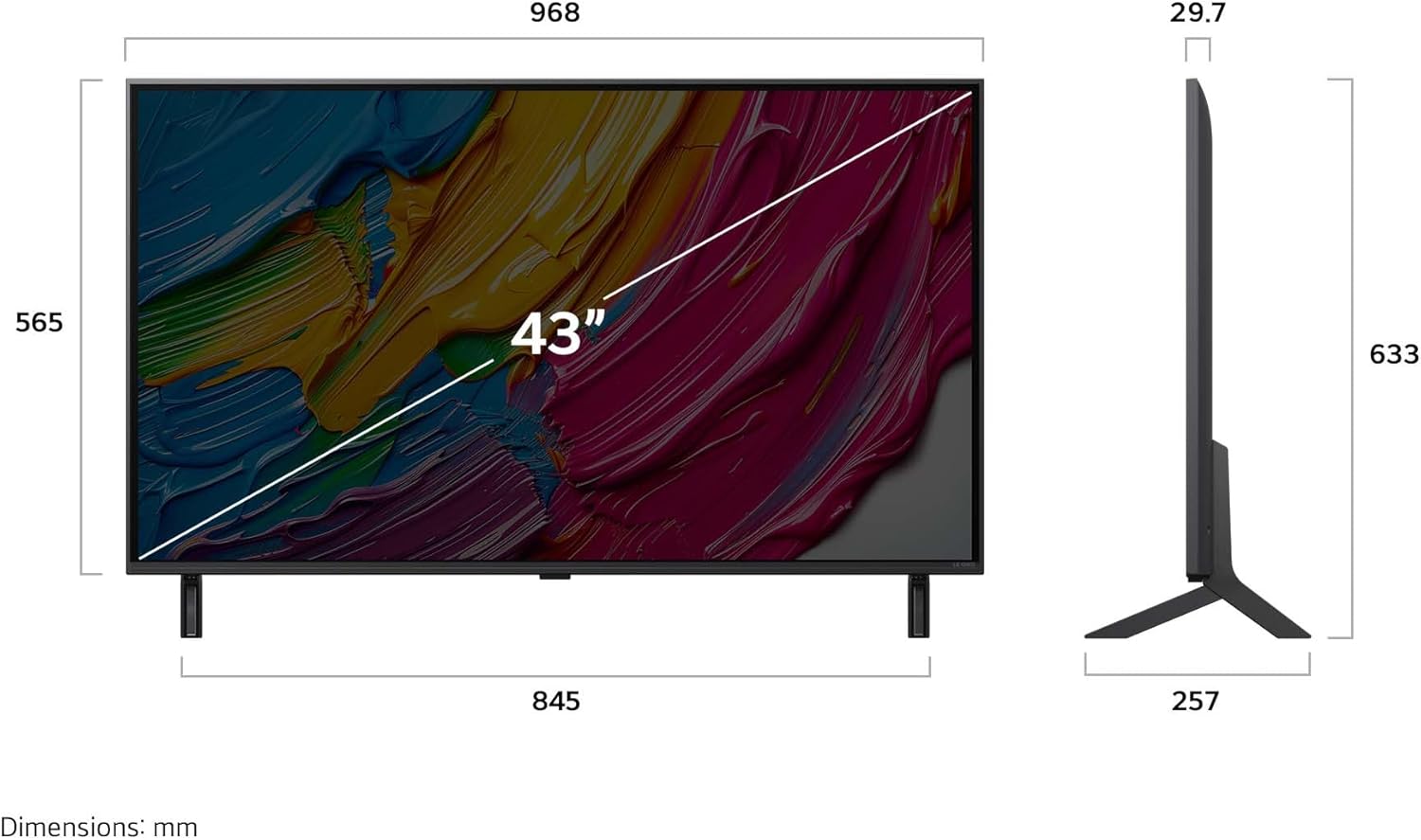
앞쪽 view of the LG 43-Inch QNED80 4K Smart TV.

사이드 프로file of the LG 43-Inch QNED80 4K Smart TV, showcasin슬림한 디자인입니다.

뒤쪽 view of the LG 43-Inch QNED80 4K Smart TV, highlighting connectivity ports.

Illustration of Dynamic QNED Colour with 100% Color Volume for vibrant visuals.

The α7 AI Processor Gen8, responsible for upscaling 4K visuals with stunning color and brightness.

Visual comparison demonstrating Precision Dimming Technology for sharper pictures and finer details.

Demonstration of 4K Super Upscaling, boosting resolution for enhanced clarity, brightness, and detail.
Experience your favorite films, sports, and games on the LG Ultra Big TV with high resolution.

The AI Magic Remote, completing your AI experience with dedicated AI buttons for various functions.

AI Voice ID recognizing a user's voice signature to offer personalized recommendations.

AI Search providing personalized recommendations and additional solutions based on user requests.
5.2 공식 제품 영상
제공된 기준에 따라 판매자가 제공하는 공식 제품 동영상을 삽입할 수 없었습니다.
6. 유지관리
6.1 TV 청소
Always unplug the TV before cleaning. Use a soft, dry cloth to wipe the screen and exterior surfaces. For stubborn marks, lightly dampen the cloth with water or a specialized screen cleaner. Avoid using harsh chemicals, abrasive materials, or spraying liquids directly onto the TV.
6.2 소프트웨어 업데이트
Your LG Smart TV will periodically receive software updates to improve performance and add new features. Ensure your TV is connected to the internet. Software updates will automatically download, or you may receive a notification to accept or deny the update. It is recommended to keep your TV's software up to date for optimal performance and security.
7. 문제 해결
If you encounter issues with your LG QNED80 4K Smart TV, refer to the following common troubleshooting steps:
- 전원 없음: 전원 코드가 TV와 벽면 콘센트에 제대로 꽂혀 있는지 확인하세요. 다른 콘센트에 꽂아 보세요.
- 화면/소리 없음: Ensure the correct input source is selected. Check all cable connections (HDMI, antenna, etc.) for looseness.
- 원격 제어가 작동하지 않음: Replace the batteries in the Magic Remote. Ensure there are no obstructions between the remote and the TV. Re-pair the remote if necessary (refer to the on-screen guide for pairing instructions).
- 화질이 좋지 않음: TV 메뉴에서 화면 설정(밝기, 명암, 선명도)을 조정하십시오. 입력 소스에서 고품질 신호가 나오는지 확인하십시오.
- 인터넷 연결 문제: Check your Wi-Fi router and modem. Restart them if needed. Reconnect the TV to the Wi-Fi network or try a wired Ethernet connection.
- 스마트 TV 앱이 작동하지 않습니다: Ensure your TV's software is up to date. Try clearing the app's cache or reinstalling the app.
For more detailed troubleshooting, consult the on-screen user guide available through the WebOS 인터페이스를 확인하거나 LG 지원 페이지를 방문하세요. web대지.
8. 사양
| 특징 | 세부 사항 |
|---|---|
| 상표 | LG |
| 모델 번호 | 43QNED80AUA |
| 화면 크기 | 43 인치 |
| 디스플레이 기술 | 4K QNED |
| 해결 | 4K(3840 x 2160) |
| 새로 고침 빈도 | 60Hz |
| 프로세서 | α7 AI 프로세서 4K 8세대 |
| 특별 기능 | HDR10 Pro, AI webOS, LG Channels, webOS Re:New, Magic Remote |
| 연결 기술 | 블루투스, 이더넷, HDMI, USB, Wi-Fi |
| HDMI 포트 | 3 |
| USB 포트 | 2 |
| 종횡비 | 16시 9분 |
| 품목 무게 | 26.4파운드 |
| 제품 크기(D x W x H) | 10.12 x 38.11 x 24.92 인치 |
| 색상 이름 | 검은색 |
| 포함된 구성 요소 | 전원 케이블, 매직 리모컨, 스탠드, 리모컨 배터리 |
9. 보증 및 지원
9.1 제품 보증
Your LG 43-Inch QNED80 4K Smart TV comes with a standard manufacturer's warranty. Please refer to the warranty card included in your product packaging for specific terms, conditions, and duration. Keep your proof of purchase for warranty claims.
9.2 확장 보호 계획
Extended protection plans are available for purchase to provide additional coverage beyond the manufacturer's warranty. Options include a 4-Year Protection Plan and a Complete Protect plan. For details on these plans, please refer to the product listing or contact your retailer.
9.3 고객 지원
For technical assistance, service requests, or further information, please visit the official LG support website or contact LG customer service directly. You can find contact information and online resources in your product documentation or on the LG web대지.