제품 끝view
The Vantrue S1 Pro Max is an advanced dual dash camera system designed to capture high-resolution video footage from both the front and rear of your vehicle. It features dual Sony STARVIS 2 IMX678 sensors, 4K (3840x2160) resolution for both cameras, HDR, PlatePix™ technology for enhanced license plate clarity, 5GHz Wi-Fi, built-in GPS, and comprehensive parking surveillance modes. This manual provides detailed instructions for the installation, operation, and maintenance of your S1 Pro Max dash cam.
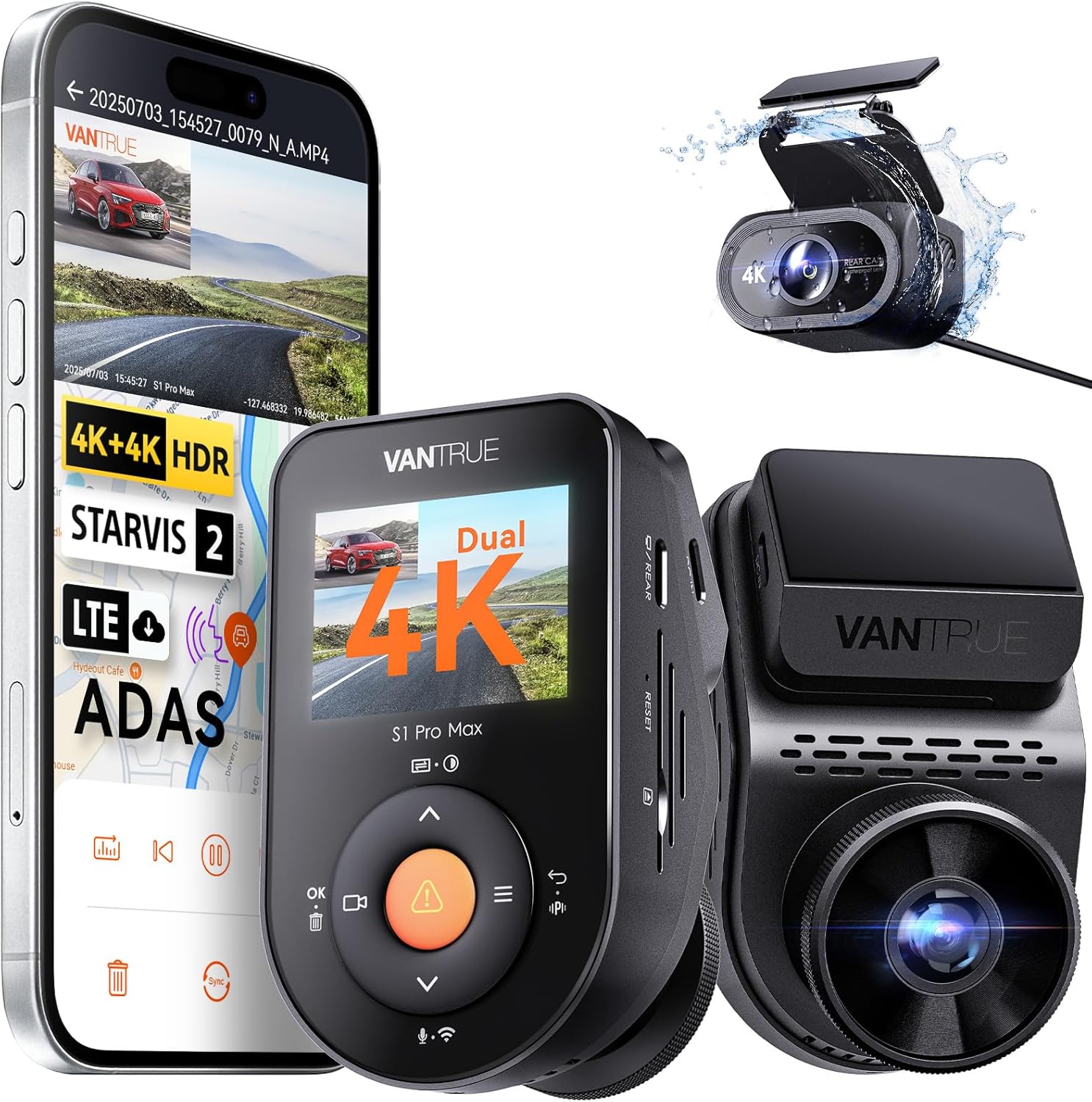
Image: The Vantrue S1 Pro Max dash cam system, showcasing the front camera, the rear camera, and a smartphone displaying the companion app interface with live view and map tracking.
상자 안에 무엇이 들어있나요?
아래 나열된 모든 품목이 패키지에 포함되어 있는지 확인하세요.
- VANTRUE S1 PRO MAX Front Dash Cam
- 후방 카메라
- GPS 접착 마운트
- Warning Stickers (x2)
- 자동차 충전기
- 케이블 클립
- 정전기 스티커 (2개)
- Type-C USB 데이터 케이블
- 바
- 먼지 없는 천
- 접착 스티커 (x2)
- VANTRUE Smart Card
- 사용자 가이드
- 후방 카메라 케이블

Image: A complete layout of all components included with the Vantrue S1 Pro Max dash cam, such as the front and rear cameras, various cables, mounting accessories, and documentation.
설정
1. 전면 카메라 설치
The front dash cam is designed for discreet installation behind your rearview mirror. Use the provided electrostatic sticker and adhesive mount to secure the camera to the windshield. The detachable mount allows for easy removal, and the rotatable lens ensures optimal view잉 각도 조정.

Image: Visual guide demonstrating the hidden installation of the front camera behind the rearview mirror and highlighting its rotatable lens for flexible positioning.
2. 후방 카메라 설치
The IP67-rated rear camera is waterproof and can be installed either inside the vehicle (e.g., on the rear windshield) or outside (e.g., near the license plate). Connect the rear camera to the front unit using the provided rear camera cable. Ensure the cable is routed safely and does not interfere with vehicle operations.

Image: Diagrams illustrating the versatility of the IP67 waterproof rear camera, showing options for both interior and exterior mounting, compatible with sedans, SUVs, roadsters, pickups, trucks, and RVs.
3. 전원 연결
Connect the car charger to your vehicle's cigarette lighter socket and the other end to the front dash cam's 5V In port. For 24/7 parking mode functionality, a hardwire kit (ASIN: B083XB8T7T, sold separately) is required to provide continuous power.
4. SD 카드 삽입
Insert a compatible microSD card (up to 1TB, sold separately; Vantrue recommends Vantrue SD card, ASIN: B09SNRFSS3) into the designated slot on the dash cam. It is recommended to format the SD card within the camera's settings before first use to ensure proper functionality and recording.
작동 지침
1. 기본 작업
The dash cam will automatically power on and begin recording when connected to a power source and the vehicle ignition is turned on. To manually power on/off, press and hold the power button. Use the navigation buttons (M, OK, arrows) to access menus and settings on the display.
2. Wi-Fi 연결 및 앱 사용
The S1 Pro Max features built-in 5GHz Wi-Fi for faster data transfer. Download the Vantrue Free app on your smartphone. Connect to the dash cam's Wi-Fi network to view 라이브 푸tag예, 녹화된 비디오 재생, 다운로드 files to your phone, and adjust camera settings. The app also supports over-the-air (OTA) firmware updates.

Image: A smartphone screen showing the Vantrue app, demonstrating fast 5GHz Wi-Fi connectivity for quick footage download and GPS tracking with mileage statistics.
3. GPS 기능
The integrated GPS module accurately records your driving route, speed, and location data. This information is embedded into the video footage and can be viewed during playback on the Vantrue app or a compatible computer application. This feature is useful for incident documentation and insurance claims.
4. 음성 제어
Operate the dash cam hands-free using simple voice commands. Commands include "Start recording," "Take photo," and "Lock video." This feature enhances driving safety by minimizing manual interaction with the device.
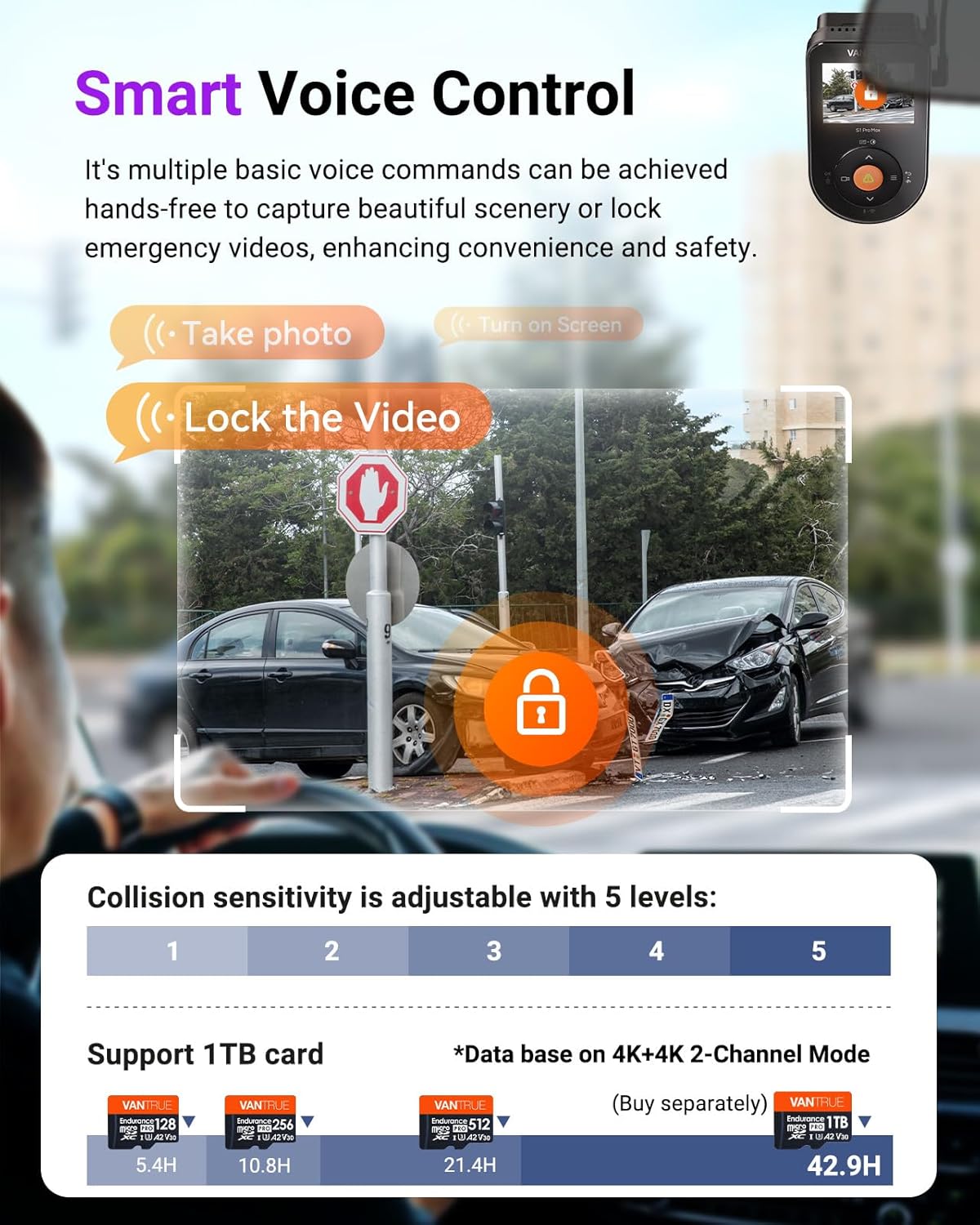
Image: A visual representation of the smart voice control feature, showing how commands like "Take photo" and "Lock the Video" can be used hands-free, with an example of a collision scene.
5. 주차 모드
The S1 Pro Max offers 24/7 buffered parking surveillance with multiple modes. A hardwire kit (ASIN: B083XB8T7T) is required for continuous power in parking mode.
- 버퍼링된 모션 감지: Records 15 seconds before and 30 seconds after a detected motion event, capturing the entire incident. Motion detection areas can be customized.
- 충돌 감지: Automatically triggers recording upon detecting an impact or collision. Sensitivity is adjustable (5 levels).
- Low-Bitrate Mode: Sustains 24-hour surveillance at 720p/15fps, minimizing storage consumption.
- Low Frame Rate Mode: Records time-lapse video at a lower frame rate (e.g., 1fps, 5fps, 10fps, 15fps) to maximize storage and battery efficiency during long parking periods.

이미지: 오버헤드 view of a parking lot with a car, illustrating the 24/7 buffered parking mode, showing motion detection and collision detection zones around the vehicle.
6. 루프 레코딩
The dash cam continuously records video in segments. When the memory card is full, the oldest files are automatically overwritten by new recordings, ensuring uninterrupted surveillance. This feature maximizes storage efficiency.
7. Variable Sensitivity G-Sensor
The built-in G-sensor detects sudden movements, impacts, or collisions. Upon detection, it automatically locks the current video segment, preventing it from being overwritten. This ensures critical footage is preserved for evidence. Sensitivity can be adjusted across 5 levels.
8. Supercapacitor
The S1 Pro Max utilizes a supercapacitor instead of a traditional lithium-ion battery. This provides enhanced durability and reliability, especially in extreme temperature conditions (14°F to 158°F), and reduces the risk of overheating or battery-related issues.
9. 타임 랩스
This function allows the dash cam to capture still images at set intervals and compile them into a time-lapse video. It is ideal for recording long journeys or monitoring parked vehicles over extended periods, significantly saving SD card space.
10. ADAS/BSD Alerts
The dash cam is equipped with advanced driver-assistance systems (ADAS) and blind-spot detection (BSD) features that provide real-time voice alerts to enhance driving safety. These include:
- ADAS: Real-time collision warnings, forward collision alerts, lane departure warnings, pedestrian detection, and forward vehicle start alarms.
- 비에스디: Lane change assist alarm and rear collision warning.
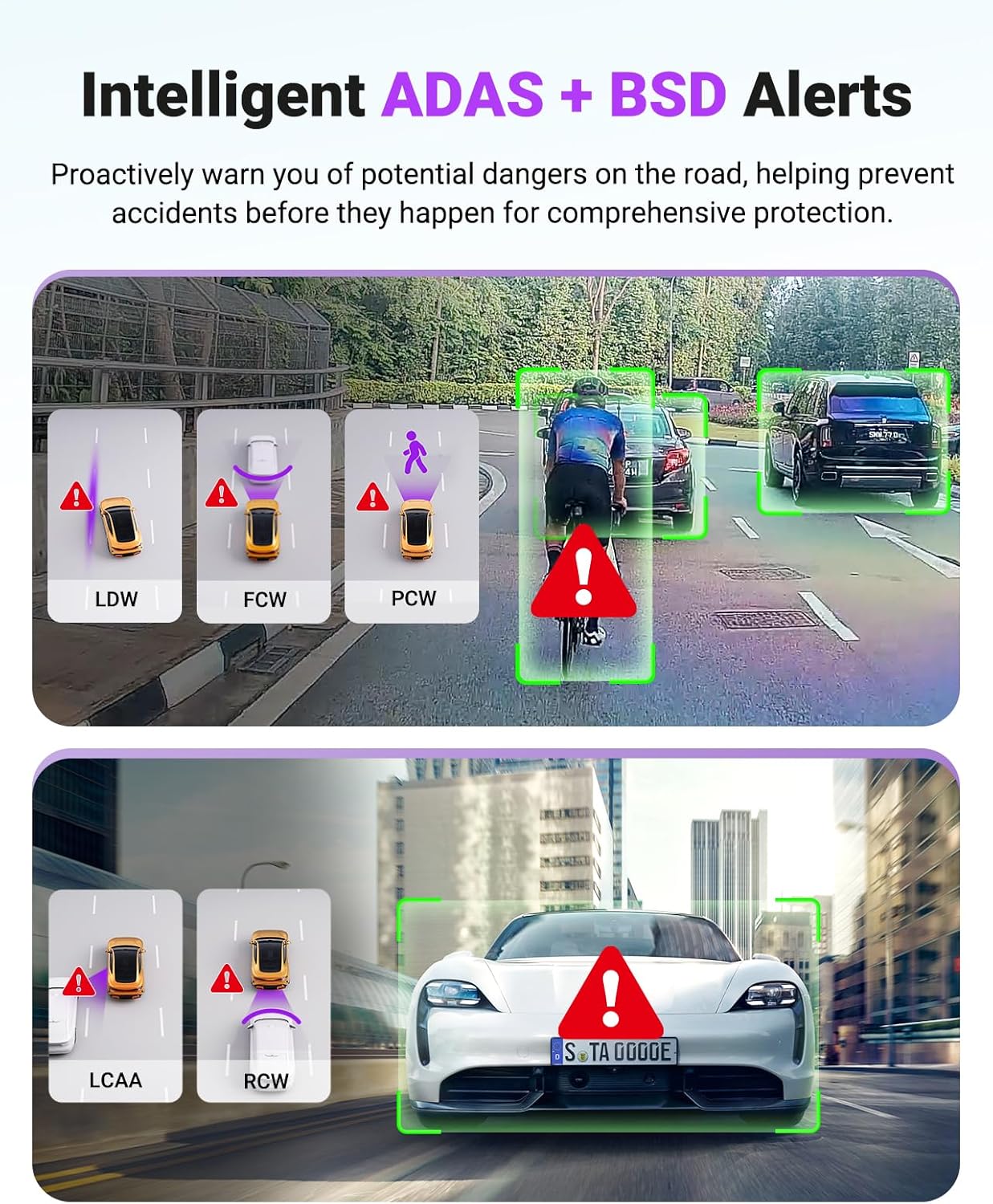
Image: Icons and scenarios depicting various Intelligent ADAS and BSD alerts, such as Lane Departure Warning (LDW), Forward Collision Warning (FCW), Pedestrian Collision Warning (PCW), Lane Change Assist Alarm (LCAA), and Rear Collision Warning (RCW).
11. Optional LTE Module
An optional LTE module (ASIN: B0F1ZY4Y3S, sold separately) allows for remote monitoring of your vehicle. When connected, you can access real-time video previews, receive impact alerts, track vehicle location, and manage settings from your smartphone, even when away from the vehicle.
유지
To ensure the longevity and optimal performance of your Vantrue S1 Pro Max dash cam, follow these maintenance guidelines:
- 청소: Use the provided dust-free cloth to gently wipe the camera lenses and body. Avoid using harsh chemicals or abrasive materials that could scratch the surfaces.
- 온도: While the supercapacitor allows for operation in extreme temperatures, prolonged exposure to direct sunlight in a parked car can still generate significant heat. If possible, park in shaded areas or remove the dash cam when the vehicle is left in extreme heat for extended periods.
- SD 카드 관리: Regularly format the microSD card (at least once a month) to prevent data corruption and ensure smooth recording. Back up important footag서식을 적용하기 전에 e를 입력하세요.
- 펌웨어 업데이트: Keep the dash cam's firmware updated via the Vantrue Free app to benefit from performance improvements and new features.
문제 해결
If you encounter issues with your Vantrue S1 Pro Max dash cam, refer to the following common problems and solutions:
| 문제 | 가능한 해결책 |
|---|---|
| 카메라의 전원이 켜지지 않습니다. | Check the power connection. Ensure the car charger is properly inserted into the vehicle's socket and the camera. Test the charger with another device if possible. |
| 녹화가 예기치 않게 중단됩니다. | Check the SD card. Ensure it is properly inserted and has sufficient space. Format the SD card regularly. Use a high-speed (Class 10 or U3) microSD card. |
| 비디오 푸tage는 흐릿하거나 불분명합니다. | Clean the camera lenses with the provided dust-free cloth. Ensure the protective film has been removed from the lenses. Adjust the front camera's rotatable lens for optimal focus. |
| Wi-Fi 연결 문제. | Ensure the camera's Wi-Fi is enabled. Restart both the camera and your smartphone. Try connecting to the 2.4GHz Wi-Fi band if the 5GHz band is unstable. |
| 주차 모드가 작동하지 않습니다. | A hardwire kit (ASIN: B083XB8T7T) is required for 24/7 parking mode. Ensure it is correctly installed and providing continuous power. Check parking mode settings in the camera menu. |
| 음성 제어가 응답하지 않습니다. | Ensure the microphone is not blocked. Speak clearly and at a normal volume. Check voice control settings in the camera menu. |
추가적인 도움이 필요하시면 Vantrue 고객 지원팀에 문의하십시오.
명세서
| 특징 | 세부 사항 |
|---|---|
| 모델명 | S1 PRO Max |
| 비디오 캡처 해상도 | Dual 4K+4K (2160P+2160P)/30FPS |
| 이미지 센서 | 듀얼 소니 STARVIS 2 IMX678 |
| 렌즈 각도 | Dual 155° Ultra-Wide Lenses |
| 나이트 비전 | PlatePix™ + HDR Night Vision 4.0 |
| 연결성 | 5GHz Wi-Fi, USB |
| GPS | Built-in GPS for speed and route tracking |
| 주차 모드 | 24/7 Buffered (Motion Detection, Collision Detection, Low-Bitrate, Low Frame Rate) - requires hardwire kit |
| 스토리지 지원 | Up to 1TB external memory card (sold separately) |
| 전원 | Built-in Supercapacitor (14°F to 158°F operating range) |
| 특별 기능 | App Control, OTA Updates, ADAS/BSD Alerts, Voice Control, Loop Recording, G-Sensor, Time Lapse, Optional LTE Module |
| Rear Camera Rating | IP67 방수 |
| 제품 치수 | 2.17 x 3.9 x 2.24 인치 |
| 품목 무게 | 5.7 온스 |
보증 및 지원
Vantrue provides comprehensive support for the S1 Pro Max dash cam:
- 품질 보증: The S1 Pro Max comes with an extendable 18-month quality assurance period.
- 고객 지원: 이메일 지원은 24시간 이내에 제공됩니다.
- 만족 보장: 100% satisfaction assurance is provided.
For any inquiries or support needs, please contact Vantrue directly:
- 이메일: support@vantrue.net
- 핸드폰: 510-666-4086