1. 서론
This manual provides detailed instructions for the safe and efficient use of your ThruNite Ti Mini Keychain Flashlight. Designed for everyday carry, this compact and powerful USB-C rechargeable flashlight offers multiple lighting modes and a magnetic tailcap for versatile use in various indoor and outdoor scenarios.

Image: The ThruNite Ti Mini Keychain Flashlight, demonstrating its small form factor when held in a hand.
2. 상자 안에 무엇이 들어있나요?
수령 후 패키지 내용물을 확인하세요.
- ThruNite Ti Mini Flashlight (with built-in battery)
- USB-C 충전 케이블
- Pocket Clip (pre-installed or included separately)
- Keychain Ring
- Spare USB-C Port Cover
- 사용자 설명서
3. 제품 오버view

이미지: 폭발 view diagram of the ThruNite Ti Mini, highlighting its key components such as the switch button, charging indicator, keychain, LED, magnetic cap, USB-C port, and two-way clip.
- 스위치 버튼: 전원 및 모드 선택을 제어합니다.
- 충전 표시기: Displays charging status (red for charging, green for fully charged).
- Keychain: Attachment point for keys or lanyards.
- 고성능 LED: 조명을 제공합니다.
- 자석 캡: 손을 사용하지 않고도 금속 표면에 부착할 수 있습니다.
- USB-C 충전 인터페이스: 내장 배터리를 충전합니다.
- Two-way Clip: For securing the flashlight to pockets, hats, or gear.
4. 사양
| 특징 | 세부 사항 |
|---|---|
| 최대 출력 | 650루멘 |
| 최대 투척 | 105 미터 |
| 최대 런타임 | 51 days (Firefly mode) |
| 전원 | Built-in 350mAh Lithium-Ion Battery |
| 충전 중 | USB-C 충전식 |
| 재료 | Aerospace-grade 6061-T6 Aluminum |
| 마치다 | Type III Hard-Anodized |
| 방수성 | IPX-8 (Waterproof to 2 meters) |
| 충격 저항성 | 1.5 미터 |
| 치수 | 60.8mm(길이) x 16.5mm(직경) |
| 무게 | 26.5g(0.93온스) |

Image: Dimensions of the ThruNite Ti Mini, illustrating its compact size relative to a common earbud case.
5. 설정
5.1 초기 충전
Before first use, fully charge the flashlight. Open the USB-C port cover and connect the included USB-C cable to the flashlight and a power source (e.g., computer, USB wall adapter).
- 충전 표시등이 켜집니다 빨간색 충전 중.
- The indicator will turn 녹색 충전이 완료되면.
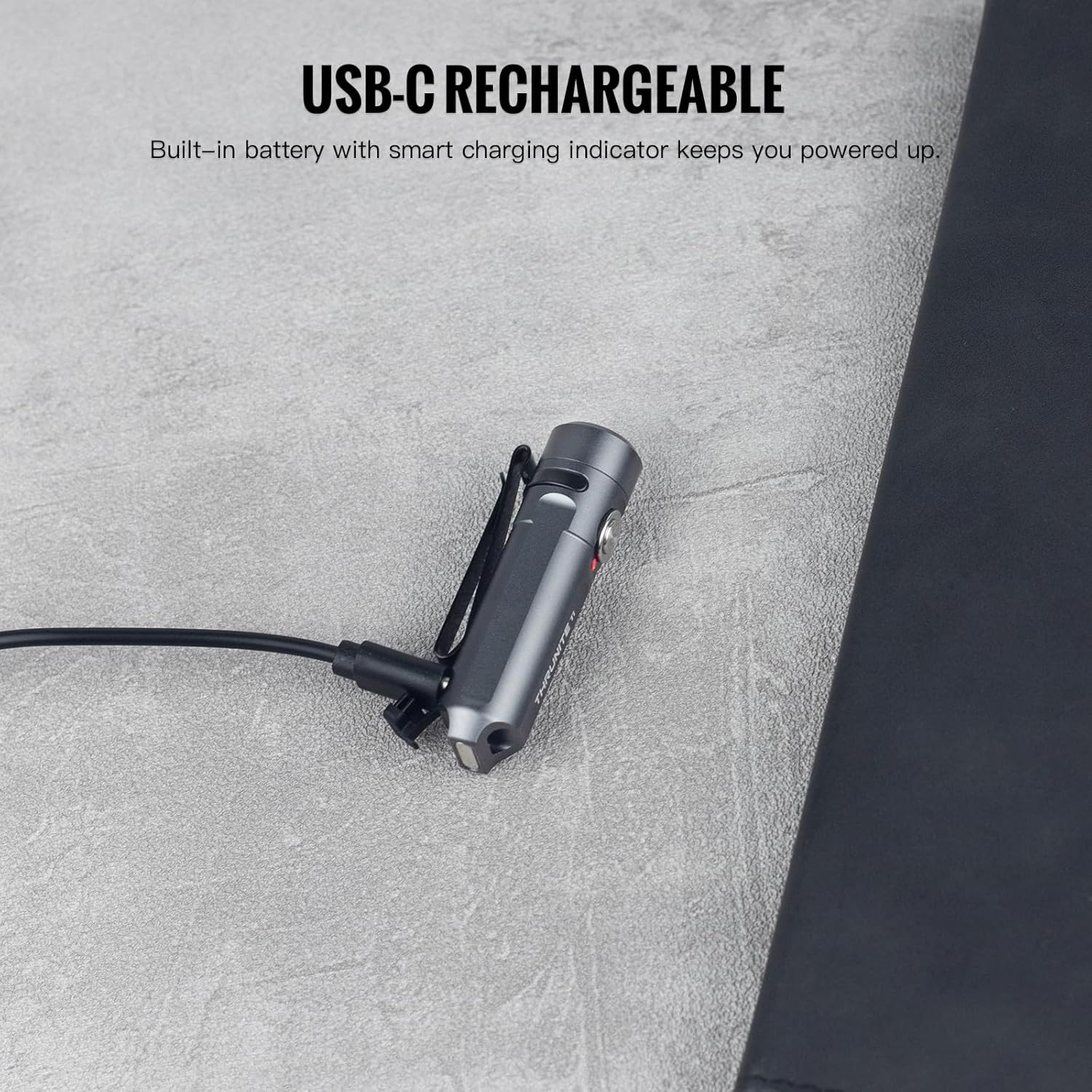
Image: The ThruNite Ti Mini connected to its USB-C charging cable, showing the charging port and indicator light.
5.2 액세서리 부착하기
The flashlight comes with a keychain ring and a two-way pocket clip for various carrying options.
- Keychain: Attach the included keychain ring to the designated loop at the tail of the flashlight.
- 포켓 클립: The two-way clip can be used to secure the flashlight to a pocket, belt, or the brim of a hat. It can be reversed for different carrying preferences.

이미지: 전amples of the ThruNite Ti Mini being used as an EDC companion, clipped to a backpack and attached to a keychain.
6. 사용 설명서
6.1 기본 작업
- 켜기/끄기: Double-click the side switch to turn the light ON. Press and hold the switch to turn it OFF.
- 모드 변경: When the light is ON, single-click the switch to cycle through Firefly, Low, Medium, and High modes. The light will remember the last used mode (except Strobe).
- 순간적인 고조감: From OFF, press and hold the switch to activate the highest mode (650 lumens) temporarily. Release the switch to turn OFF.
- 스트로브 모드: Triple-click the switch from any state (ON or OFF) to activate Strobe mode. Single-click to return to the previously used mode.
6.2 Mode Details and Runtimes
| 방법 | 산출 | 실행 시간 |
|---|---|---|
| 높은 | 650루멘 | 1시간 35분 |
| 중간 | 200루멘 | 2시간 20분 |
| 낮은 | 30루멘 | 9.5시간 |
| 반딧불이 | 0.2루멘 | 51시간 |
| 스트로브 | 650루멘 | — |

Image: Detailed table outlining the output and runtime for each lighting mode of the ThruNite Ti Mini.
6.3 핸즈프리 작동
The magnetic tailcap allows the flashlight to be securely attached to most metal surfaces, providing convenient hands-free illumination. This is ideal for tasks requiring both hands, such as vehicle maintenance or working in dimly lit areas.

Image: The ThruNite Ti Mini utilizing its magnetic tailcap for hands-free lighting, attached to different metal objects.
7. 유지관리
- 청소: 손전등 본체를 부드러운 천으로 정기적으로 닦아주세요.amp 옷감. 가혹한 화학 물질이나 연마재를 사용하지 마십시오.
- USB-C 포트: Ensure the USB-C charging port cover is properly sealed when not charging to maintain its waterproof rating. If the cover is damaged or lost, use the provided spare.
- 저장: 장기간 사용하지 않을 때는 손전등을 서늘하고 건조한 곳에 보관하십시오.
8. 문제 해결
8.1 조명이 켜지지 않음
- 배터리 충전: Ensure the battery is sufficiently charged. Connect the flashlight to a USB-C power source and check the charging indicator.
- 작업 순서: Confirm you are using the correct operation sequence: double-click to turn ON, press and hold to turn OFF.
8.2 충전 문제
- 케이블 연결: USB-C 케이블이 손전등과 전원에 제대로 연결되어 있는지 확인하십시오.
- Port Condition: Check the USB-C port for any debris or damage. Clean gently if necessary.
- 전원: Try a different USB power source or cable to rule out issues with the charging equipment.
9. 보증 및 지원
9.1 보증 정보
The ThruNite Ti Mini Keychain Flashlight comes with a limited warranty. Please refer to the warranty card included in your package for specific terms and conditions. This typically covers manufacturing defects under normal use.
9.2 고객 지원
For further assistance, technical support, or warranty claims, please contact ThruNite customer service. You can usually find contact information on the official ThruNite web사이트나 구매 플랫폼을 통해서도 구매하실 수 있습니다.
Note: Always refer to the official ThruNite website or your product packaging for the most up-to-date support information.