1. 서론
구매해주셔서 감사합니다asing the Supersonic Professional Stereo Amplifier AV-972SA. This amplifier is designed to provide high-fidelity audio for your home entertainment or karaoke system. With its versatile features, including USB/SD card playback, FM radio, and microphone inputs, it offers a powerful and clear sound experience. Please read this manual carefully before operating the unit to ensure proper use and to maximize its performance.
2. 중요 안전 지침
- 전원 공급 장치: 전원 공급 장치 볼륨을 확인하십시오.tage matches the requirements specified on the unit (220V~250V/50Hz).
- 통풍: 환기구를 막지 마십시오. 제조업체의 지침에 따라 설치하십시오.
- 물과 습기: 본 기기를 비나 습기에 노출시키지 마십시오. 꽃병과 같이 액체가 담긴 물건을 기기 위에 올려놓지 마십시오.
- 열: 라디에이터, 난방 조절기, 스토브 또는 기타 장치(다음을 포함)와 같은 열원 근처에 설치하지 마십시오. amp열을 생성하는 발전기.
- 청소: 마른 천으로만 닦으십시오.
- 서비스: 이 제품을 직접 수리하려고 하지 마십시오. 모든 서비스는 자격을 갖춘 서비스 담당자에게 문의하십시오.
- 스피커 연결: Ensure correct polarity when connecting speakers to prevent damage to the amp라이터와 스피커.
3. 주요 특징
- Luxury Color Pointer Screen Display
- High-Fidelity Stereo Dynamic Amp리피어 디자인
- Bass-enhancement Technology
- 강력한 3000W 출력
- Professional Karaoke FM Radio Tuner
- USB/SD Card Playback for MP3 files
- Low Leak Magnetic Ring type Voltage
- Optimized for use with 12", 15", and 18" loudspeakers
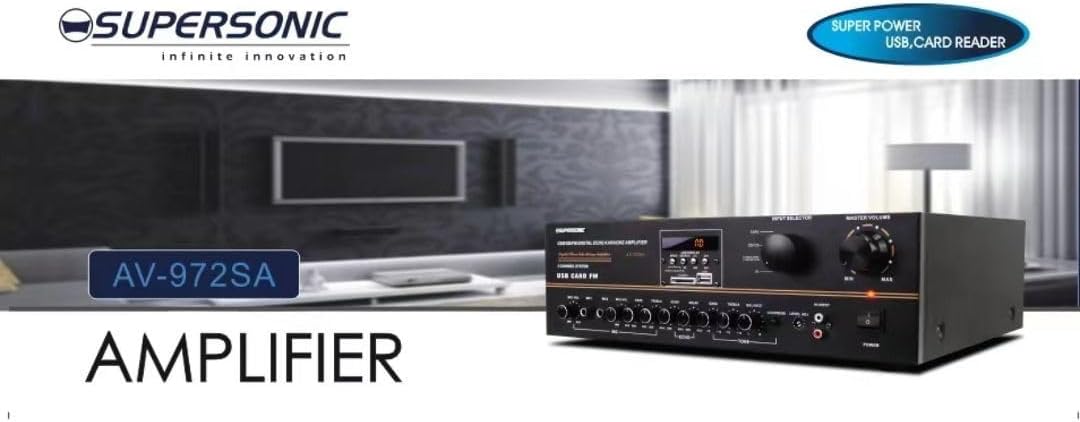
이미지 3.1: A visual representation of the key features of the Supersonic AV-972SA amplifier, including its display, power output, and connectivity options.
4. 제품 오버view
The Supersonic AV-972SA amplifier features a user-friendly front panel for easy control and a rear panel for all necessary connections.
4.1 전면 패널

이미지 4.1: 앞쪽 view of the Supersonic AV-972SA amp리파이어, 쇼크asing its controls, display, and input ports in a home setting.
전면 패널에는 다음이 포함됩니다.
- 전원 버튼: 회전합니다 ampliifier를 켜거나 끕니다.
- 마스터 볼륨 컨트롤: 전체 출력 볼륨을 조절합니다.
- 저음/고음 컨트롤: Adjusts low and high frequency response.
- 입력 선택기 : Switches between different audio sources (e.g., USB, SD, FM, AUX).
- USB/SD 카드 슬롯: 오디오 재생을 위해 fileUSB 드라이브나 SD 카드에서 직접 다운로드할 수 있습니다.
- FM Tuner Controls: For radio station selection and tuning.
- 마이크 입력 : For connecting microphones for karaoke or public address.
- 디스플레이 화면: 현재 모드, 트랙 정보 또는 FM 주파수를 표시합니다.
4.2 후면 패널
The rear panel provides all necessary connections for speakers, power, and external audio sources.
- 스피커 터미널 : Connect your loudspeakers here. Ensure correct polarity (+ to + and - to -).
- 오디오 입력(RCA): For connecting external audio devices like CD players, DVD players, or other audio sources.
- 전원 코드 입력: 제공된 전원 코드를 여기에 연결하십시오.
- FM 안테나 입력: 라디오 수신 성능 향상을 위해 FM 안테나를 연결하세요.
5. 설정 가이드
Follow these steps to set up your Supersonic AV-972SA amp정수기:
- 놓기: 배치하다 amplifier on a stable, flat surface with adequate ventilation around it. Avoid direct sunlight, heat sources, or areas with high humidity.
- 스피커 연결: Connect your loudspeakers to the speaker terminals on the rear panel. Match the positive (+) terminal on the amplifier to the positive (+) terminal on your speaker, and the negative (-) to the negative (-). Ensure all connections are secure. This amplifier is designed to work best with 12", 15", or 18" loudspeakers.
- 오디오 소스 연결:
- 외부 장치: Connect your CD player, DVD player, or other audio sources to the RCA audio input jacks on the rear panel.
- USB/SD 카드: Insert a USB flash drive or SD card into the respective slot on the front panel.
- FM 안테나: Connect the FM antenna to the designated input on the rear panel for optimal radio reception.
- 전원 연결: 확인하십시오 amp앰프의 전원 스위치가 OFF 위치에 있습니다. 전원 코드를 콘센트에 연결하십시오. amplifier's power input and then plug it into a suitable 220V~250V/50Hz AC power outlet.
6. 사용 설명서
6.1 전원 켜기/끄기
를 누르세요 전원 버튼 전면 패널을 돌려서 amplifier ON. The display will illuminate. Press it again to turn the ampLIFIER OFF.
6.2 Selecting Audio Source
사용하세요 입력 선택기 button or knob on the front panel to cycle through available audio sources: USB, SD, FM, or AUX (RCA input).
6.3 볼륨 및 톤 조절
- 마스터 볼륨: 회전하다 마스터 볼륨 knob to adjust the overall sound level. Start with a low volume and gradually increase it.
- 저음/고음: 사용하세요 베이스 그리고 고음부 knobs to fine-tune the low and high frequencies of the audio output to your preference.
6.4 USB/SD 카드 재생
Once a USB drive or SD card containing MP3 audio files is inserted, the amplifier will automatically switch to USB/SD mode and begin playback. Use the control buttons (Play/Pause, Next, Previous) on the front panel to manage playback.
6.5 FM 라디오 작동
Select the FM input using the 입력 선택기. Use the FM tuner controls to scan for and select radio stations. The display will show the current frequency.
6.6 마이크 사용법 (노래방)
Connect your microphones to the microphone input jacks on the front panel. Adjust the microphone volume and echo effects (if available) using the dedicated controls. Ensure the main volume is set appropriately to avoid feedback.
7. 유지관리
- 청소: 청소하기 전에 전원을 차단하세요. 부드럽고 마른 천으로 제품 외부를 닦으세요. amp증폭기. 액체 세척제나 에어로졸 스프레이를 사용하지 마십시오.
- 통풍: 과열을 방지하기 위해 환기구에 먼지와 이물질이 없는지 정기적으로 점검하십시오.
- 저장: 저장하는 경우 amplifier for an extended period, ensure it is in a cool, dry place, away from direct sunlight and extreme temperatures.
8. 문제 해결
| 문제 | 가능한 원인 | 해결책 |
|---|---|---|
| 전원이 없습니다 | 전원 코드가 연결되지 않았습니다. 전원 콘센트에 결함이 있습니다. Amp앰프 전원 스위치 끄기 | 전원 코드 연결 상태를 확인하십시오. 다른 콘센트에 연결해 보십시오. 전원 스위치가 켜져 있는지 확인하십시오. |
| 사운드 출력이 없습니다 | Volume too low; Incorrect input selected; Speaker wires loose or incorrectly connected; Faulty audio source | Increase master volume; Select correct input; Check speaker connections and polarity; Test with a different audio source |
| FM 수신 불량 | 안테나가 연결되지 않았거나 위치가 잘못되었습니다. 신호가 약합니다. | Connect FM antenna securely; Adjust antenna position; Try manual tuning |
| USB/SD 카드가 재생되지 않습니다 | 잘못된 file format; USB/SD card faulty or not inserted correctly; Amp앰프가 USB/SD 모드가 아닙니다. | 보장하다 files are MP3 format; Reinsert USB/SD card; Select USB/SD input mode |
9. 사양
| 특징 | 사양 |
|---|---|
| 상표 | 초음속 |
| 모델 번호 | AMP-AV972SA |
| 출력 와트tage | 3000와트 |
| 연결 기술 | USB |
| 특징 | 컴팩트한 디자인 |
| 색상 | 검은색 |
| 제품 치수 | 25D x 45W x 26H 센티미터 |
| 품목 무게 | 1킬로그램 |
| 제어 방법 | 만지다 |
| 전원 공급 장치 | 220V~250V/50Hz |
10. 보증 및 지원
This Supersonic AV-972SA amplifier는 6개월 제조사 보증 from the date of purchase. This warranty covers manufacturing defects under normal use. It does not cover damage caused by misuse, accidents, unauthorized modifications, or improper installation.
For warranty claims or technical support, please contact your retailer or the Supersonic customer service department. Please have your proof of purchase and product model number (AMP-AV972SA) ready when contacting support.


