1. 서론
This manual provides essential information for setting up, operating, and maintaining your NIMO 15.6-inch FHD Laptop. Please read this guide thoroughly to ensure optimal performance and longevity of your device. Keep this manual for future reference.
2. 상자 안에 무엇이 들어있나요?
- NIMO N155 노트북 1대
- Type-C 65W PD 고속 충전기 1개
- 1 x 사용자 설명서
- 윈도우 11 홈 (사전 설치됨)
- 2년 보증, 90일 반품 안내
3. 제품 오버view
The NIMO 15.6-inch FHD Laptop is designed for efficiency and convenience, featuring a robust AMD Ryzen 5 processor, ample memory, and fast storage. Its sleek design and comprehensive connectivity options make it suitable for various tasks.
3.1. 노트북 구성 요소

Figure 1: NIMO 15.6-inch FHD Laptop (Rose Gold variant)
This image displays the NIMO 15.6-inch FHD Laptop in Rose Gold, showcasing its full-size keyboard, large touchpad, and the vibrant display. Key features like fingerprint sensor, Type-C PD charger, and backlit keyboard are highlighted on the screen.
3.2. 포트 및 커넥터

Figure 2: NIMO Laptop Ports Diagram
This diagram illustrates the available ports on the NIMO laptop, including Micro SD card reader, USB 2.0, USB 3.2 Gen1, Audio Jack, Kensington Lock on one side, and Type-C, USB 3.2 Gen1 Full-function, HDMI 1.4, and a Charge LED on the other side.
- USB 3.0 포트: For high-speed data transfer and connecting peripherals.
- USB 2.0 포트 : 표준 USB 장치를 연결하는 데 사용됩니다.
- C 형 포트 : Supports 65W Power Delivery (PD) for fast charging and data transfer.
- HDMI 1.4 : 외부 디스플레이에 연결합니다.
- 마이크로 SD 카드 리더: 저장공간 확장이나 전송을 위해 file메모리 카드에서.
- 오디오 잭 : 헤드폰이나 외부 스피커를 연결하는 데 사용합니다.
- 켄싱턴 잠금 슬롯: 기기의 물리적 보안을 위해서입니다.
4. 설정
4.1. 초기 전원 켜기
- 상자에서 노트북과 모든 액세서리를 꺼냅니다.
- Connect the 65W Type-C PD Fast Charger to the laptop's Type-C port and a power outlet.
- 노트북 덮개를 여세요. 노트북이 자동으로 켜질 수 있습니다. 자동으로 켜지지 않으면 키보드 오른쪽 상단에 있는 전원 버튼을 누르세요.
- 화면의 지침에 따라 언어, 지역, 네트워크 연결, 사용자 계정 생성 등 Windows 11 Home 설정을 완료하세요.
4.2. 네트워크에 연결하기
During the initial setup or at any time, you can connect your NIMO laptop to a Wi-Fi network:
- 시스템 트레이(화면 오른쪽 하단)에 있는 Wi-Fi 아이콘을 클릭하세요.
- 목록에서 원하는 Wi-Fi 네트워크를 선택하세요.
- 메시지가 나타나면 네트워크 비밀번호를 입력하고 '연결'을 클릭하세요.
5. 사용 설명서
5.1. 전원 관리
- 전원 켜기: 전원 버튼을 누르세요.
- 수면 모드 : 뚜껑을 닫거나 전원 버튼을 짧게 누르세요.
- 종료: 시작 버튼을 클릭한 다음 전원 > 시스템 종료를 클릭합니다.
- 다시 시작: 시작 버튼을 클릭한 다음 전원 > 다시 시작을 클릭합니다.
5.2. 키보드 및 터치패드
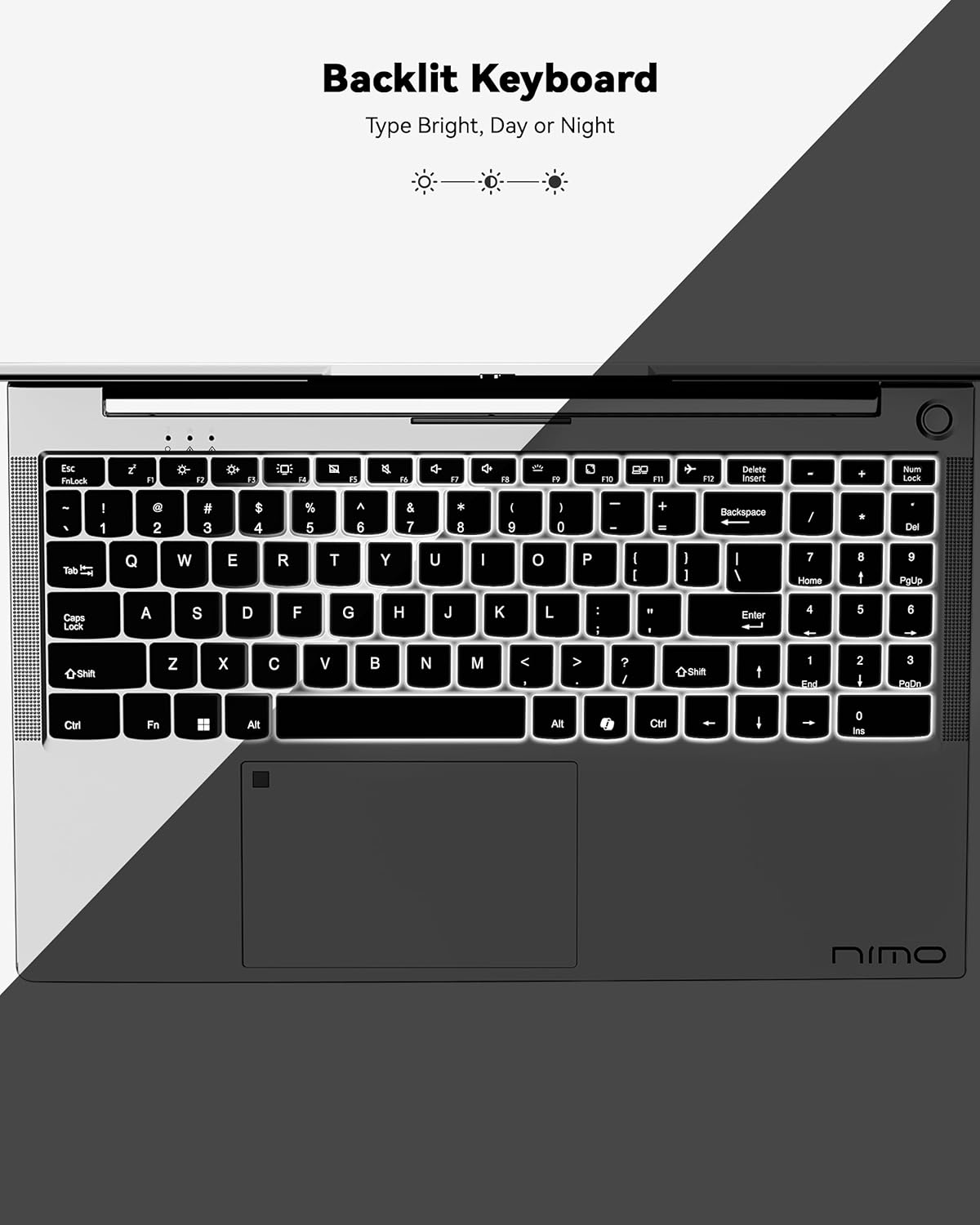
그림 3: 백라이트 키보드
This image highlights the backlit keyboard feature of the NIMO laptop, demonstrating how the keys illuminate for typing in low-light conditions.
- 백라이트 키보드: 누르다 FN + F5 (or the key with the keyboard backlight icon) to toggle the backlight on/off or adjust brightness.
- 터치패드: Supports multi-touch gestures for scrolling, zooming, and navigation. Refer to Windows settings for customization.
- 지문 센서 : Located on the touchpad for secure and instant login. Set up your fingerprint in Windows Settings > Accounts > Sign-in options.

Figure 4: Fingerprint Sensor on Touchpad
This image shows a close-up of the NIMO laptop's touchpad, clearly indicating the integrated fingerprint sensor for quick and secure access.
5.3. Web캠
이 노트북에는 2MP 카메라가 탑재되어 있습니다. webcam for video calls and conferences. Ensure proper lighting for best image quality.
5.4. 오디오
The integrated speakers provide clear audio. You can also connect headphones or external speakers via the audio jack.
6. 주요 특징
- Vivid 15.6" Full HD Display: Enjoy stunning visuals with the 15.6" Full HD (1920x1080) IPS anti-glare display, featuring an 85% screen-to-body ratio and micro-edge design.
- 강력한 성능: Equipped with an AMD Ryzen 5 processor, 16GB DDR4 RAM, and a 1TB PCIe SSD for fast boot-ups, seamless multitasking, and efficient handling of applications.
- Upgradable Components: The RAM and SSD slots are expandable, allowing for future memory and storage upgrades.
- 65W USB-C PD 고속 충전기: The included charger provides rapid power delivery, offering 2 hours of use from just 15 minutes of charging. It is also versatile for charging other compatible devices.
- Secure & Instant Login: Integrated fingerprint reader on the touchpad ensures quick and secure access to your device.
- Ergonomic Backlit Keyboard: Work comfortably in any environment with the backlit keyboard, featuring adjustable brightness.
- 원활한 연결성: Features Wi-Fi 6 and Bluetooth 5.2 for stable, high-speed wireless connections, along with multiple USB 3.0 ports and HDMI for versatile peripheral connections.
Video 1: NIMO Laptop - Perfect for Work and Study, Anytime, Anywhere
This video demonstrates the NIMO laptop's versatility for various tasks, highlighting its portability and performance for work, study, and entertainment in different settings.
Video 2: NIMO 15.6 FHD Laptop for Students Home Work
This video showcases the NIMO 15.6 FHD laptop as an ideal device for students, home users, and professionals, emphasizing its suitability for educational and work-related tasks.
7. 유지관리
- 청소: 부드럽고 보풀이 없는 천을 사용하여 화면과 외부를 닦으세요. 독한 화학 물질은 피하세요.
- 배터리 관리 : To prolong battery life, avoid fully discharging the battery frequently. Store the laptop in a cool, dry place.
- 소프트웨어 업데이트: 최적의 성능과 보안을 유지하려면 Windows 운영 체제와 드라이버를 정기적으로 업데이트하십시오.
- 통풍: Ensure the laptop's ventilation openings are not blocked to prevent overheating. Use on a hard, flat surface.
8. 문제 해결
- 노트북 전원이 켜지지 않음: Ensure the charger is securely connected and the battery has sufficient charge. Try a different power outlet.
- 화면이 비어 있습니다. Connect to an external monitor to check if the display is the issue. Restart the laptop.
- Wi-Fi 연결 문제: Restart your router and the laptop. Check Wi-Fi settings and ensure airplane mode is off.
- 느린 성능: Close unnecessary applications, check for malware, and ensure sufficient free storage space. Consider upgrading RAM or SSD if performance remains an issue.
- 키보드 또는 터치패드가 응답하지 않음: 노트북을 재시작하세요. 장치 관리자에서 드라이버 업데이트를 확인하세요.
For persistent issues, please refer to the support section or contact NIMO customer service.
9. 사양
| 특징 | 사양 |
|---|---|
| 스탠딩 스크린 디스플레이 크기 | 15.6 인치 |
| 화면 해상도 | 1920 x 1080픽셀(풀 HD) |
| 프로세서 | AMD 라이젠 5 (3.7GHz) |
| 숫양 | 16GB DDR4 (업그레이드 가능) |
| 메모리 속도 | 4800MHz |
| 하드 드라이브 | 1024GB SSD (업그레이드 가능) |
| 그래픽 코프로세서 | AMD 통합 그래픽 |
| 운영 체제 | 윈도우 11 홈 |
| 무선형 | 802.11a/b/g/n/ac (Wi-Fi 6) |
| 블루투스 | 블루투스 5.2 |
| USB 2.0 포트 수 | 1 |
| USB 3.0 포트 수 | 3 |
| 평균 배터리 수명 | 9시간 |
| 품목 무게 | 5파운드 |
| 제품 치수 | 14.07 x 8.98 x 0.76 인치 |
| 뒤쪽 Web캠 해상도 | 2 MP |
| 특별 기능 | 백라이트 키보드, 지문 인식기, HD 오디오, 숫자 키패드 |
10. 보증 및 지원
Your NIMO laptop comes with a 2년 제조사 보증또한 NIMO는 다음과 같은 기능을 제공합니다. 90일 이내 번거로움 없는 반품 및 교환 정책. Our dedicated support team is available to assist with any issues or replacements.
10.1. 지원팀에 문의하기
- For product-related questions or technical assistance, please contact NIMO customer service via their official web사이트, 이메일 또는 전화번호.
- Contact information can typically be found on the NIMO official web사이트 또는 제품 페이지.
11. 안전 정보
- 정품 충전기만 사용하고 케이블에 손상이 있는지 정기적으로 점검하십시오.
- 노트북은 받침대를 잡고 다루며, 보호 케이스 사용을 고려해 보세요. 노트북 위에 무거운 물건을 올려놓지 마세요.
- Place the laptop on a hard, flat surface to ensure proper ventilation and prevent overheating. Keep it away from extreme temperatures and moisture.
- 배터리를 과충전하지 마십시오. 배터리가 부풀어 오르거나 손상된 흔적이 보이면 사용을 중단하십시오.
- Set strong passwords, keep software updated, use antivirus protection, and regularly back up your data.
- 액체를 쏟았을 경우 즉시 노트북의 전원 플러그를 뽑고 완전히 건조시킨 후 전원을 켜십시오.
- For any technical issues, consult qualified professionals. Do not attempt to disassemble or repair the device yourself.
12. 법적 고지사항
This laptop is provided "as is," with no express or implied warranties except for the manufacturer's limited warranty (if applicable). Implied warranties of merchantability or fitness for a specific purpose are disclaimed. NIMO is not liable for damages resulting from misuse (e.g., non-approved chargers, unauthorized repairs), physical damage, or failure to follow safety guidelines, including data loss or business interruption. Users are responsible for regularly backing up their data. This disclaimer does not exclude liability for manufacturing defects or violations of mandatory local laws. By using the NIMO laptop, you accept these terms, which are governed by applicable jurisdiction laws.


