1. 서론
This manual provides essential information for the safe and efficient use of your HOTWAV R9 Plus Rugged Tablet. Please read it thoroughly before operating the device to ensure optimal performance and longevity. This tablet is designed for durability and high performance in various environments.
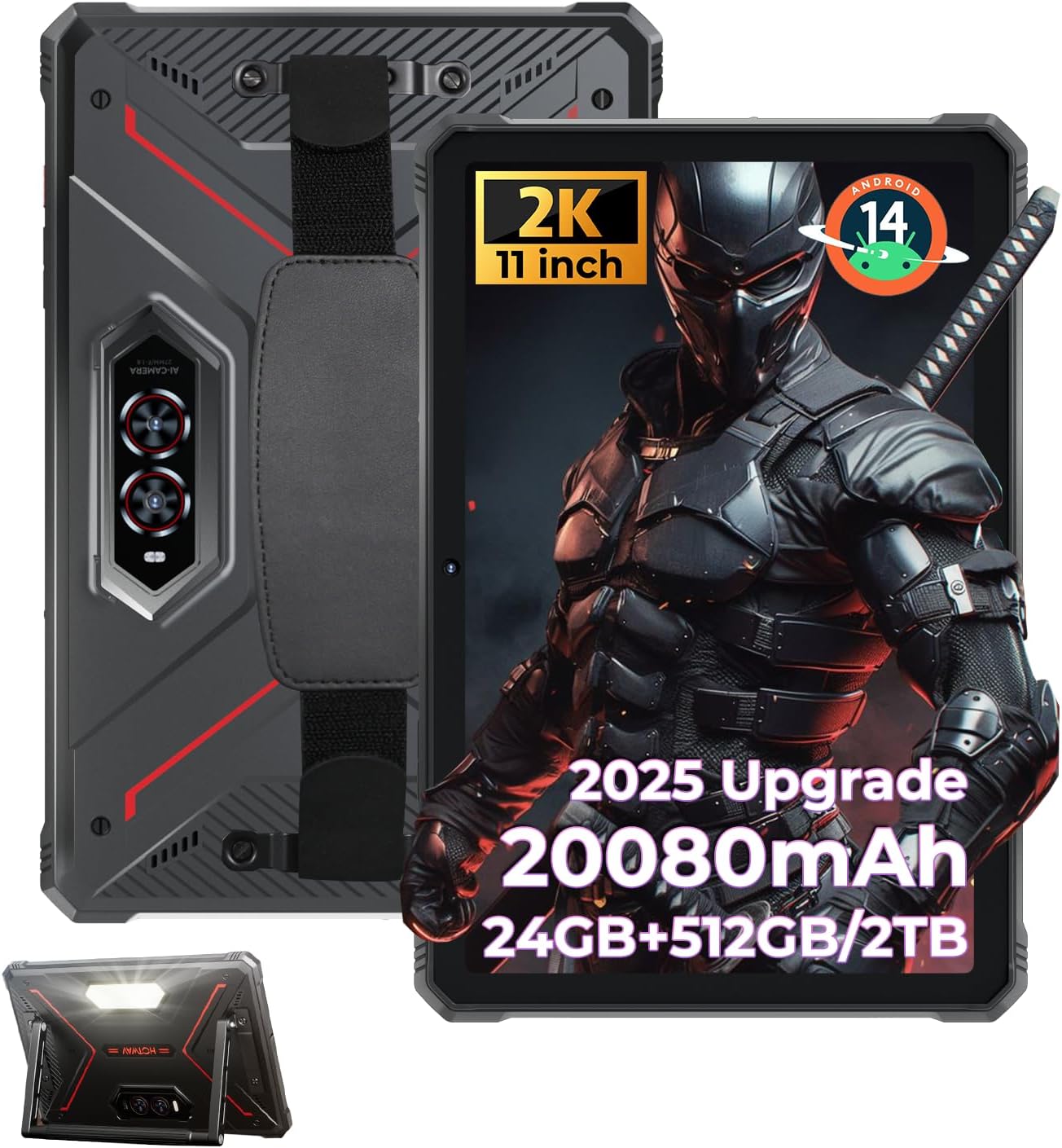
Figure 1: HOTWAV R9 Plus Rugged Tablet Overview
2. 주요 특징
- 내구성: IP68, IP69K, and MIL-STD-810H certified for water, dust, and drop resistance.
- 표시하다: 11-inch 2K FHD+ IPS scratch-resistant display (1200x1920 resolution).
- 성능: Unisoc T7280 Octa-Core processor with 24GB RAM (8GB fixed + 16GB expandable) and 512GB ROM, expandable up to 2TB via TF card.
- 배터리: 20080mAh mega battery with 20W fast charging and OTG reverse charging support.
- 카메라: 64MP rear camera, 16MP front camera, with underwater photography capability.
- 운영 체제: Android 14 with Gemini AI Smart Assistant.
- 연결성: Dual SIM 4G LTE, 2.4G/5G dual-band WiFi, Bluetooth 5.0, multi-satellite GPS (GPS/Beidou/GLONASS/Galileo), Face ID.
- 추가 기능: 조정 가능한 Campinglight, aluminum stand, and attachable hand strap.
3. 설정
3.1 초기 전원 켜기
- 태블릿 측면에 있는 전원 버튼을 화면이 켜질 때까지 길게 누릅니다.
- 화면의 지시에 따라 언어와 지역을 선택하세요.
3.2 구글 계정 설정
To access the Google Play Store and other Google services, you will need to sign in with your Google account. You can create a new account if you do not have one. This step can be skipped, but functionality will be limited.
3.3 Security Setup (PIN/Pattern/Password)
For enhanced security, set up a screen lock method. A PIN of at least 4 digits is required, with a 6-digit PIN recommended. Other options include pattern or password.
3.4 Wi-Fi 연결
Connect your tablet to a Wi-Fi network for internet access. Go to Settings > Network & Internet > Wi-Fi, select your network, and enter the password.
3.5 앱 설치
Once connected to Wi-Fi and signed into your Google account, you can download and install applications from the Google Play Store.
비디오 1: 끝view of the HOTWAV R9 Plus Rugged Tablet, demonstrating various features and usage scenarios.
4. 운영
4.1씨ampinglight Function
The tablet features a powerful Campinglight on its rear. Access its controls through the quick settings panel or a dedicated app to adjust brightness (up to 350 lumens) and modes (Lighting, Sharp Light, SOS, High-Medium-Low, Dauer).

Figure 2: Rear Campinglight in operation.
4.2 수중 카메라 모드
Utilize the tablet's waterproof design for underwater photography. Activate the underwater camera mode from the camera app settings to capture photos and videos while submerged.

Figure 3: Tablet used for underwater photography.
4.3 글러브 모드
The R9 Plus supports Glove Mode, enhancing touchscreen sensitivity for use with gloves. This feature is beneficial in cold weather, construction sites, or outdoor activities.

Figure 4: Tablet touchscreen responsive with gloves.
4.4 OTG 역충전
The tablet supports OTG (On-The-Go) reverse charging, allowing it to function as a power bank to charge other devices. Connect your device to the tablet using a compatible OTG cable.

Figure 5: OTG reverse charging in action.
5. 연결성
5.1 Dual SIM 4G LTE
The tablet supports dual SIM cards for 4G LTE connectivity, allowing for flexible network usage. Insert your SIM cards into the designated tray.
5.2 5G WiFi & Bluetooth 5.0
Enjoy fast and stable wireless connections with 2.4G/5G dual-band WiFi and Bluetooth 5.0 for connecting peripherals.
5.3 Multi-Satellite GPS
The tablet integrates GPS, Beidou, GLONASS, and Galileo for accurate and reliable positioning and navigation.

Figure 6: Multi-satellite GPS for precise navigation.
5.4 얼굴 ID
Unlock your tablet quickly and securely using facial recognition technology.
6. 성능 및 저장 용량
6.1 프로세서
The HOTWAV R9 Plus is powered by a Unisoc T7280 Octa-Core chip, providing efficient performance for multitasking and demanding applications.

그림 7: 유니소크 T7280 옥타코어 프로세서.
6.2 RAM & ROM
The tablet features 24GB RAM (8GB fixed + 16GB expandable) and 512GB of internal storage (ROM), which can be expanded up to 2TB using a TF (microSD) card.

Figure 8: Memory and storage capacity.
6.3 Gemini AI Smart Assistant
The tablet is equipped with Gemini AI Smart Assistant for instant answers, multi-language support, and seamless device synchronization.
7. Display & Camera
7.1 디스플레이
Experience vibrant visuals on the 11-inch 2K FHD+ IPS scratch-resistant display with a resolution of 1200x1920 pixels and a 14.5:9 screen ratio.

Figure 9: 11-inch 2K FHD+ Display.
7.2개의 카메라
The tablet features a 64MP rear camera for high-resolution photos and videos, and a 16MP front camera for selfies and video calls.

Figure 10: Dual camera system (64MP Rear + 16MP Front).
8. 내구성
The HOTWAV R9 Plus is built to withstand harsh conditions, certified with IP68, IP69K, and MIL-STD-810H standards. It is drop-proof up to 1.2m and water/dust-resistant up to 2m depth for at least 30 minutes.

Figure 11: Durability features (Drop-proof, Waterproof, Dust-proof).
8.1 Corning Gorilla Glass 3
The display is protected by Corning Gorilla Glass 3, offering enhanced scratch resistance and durability.
9. 배터리 및 충전
The tablet is equipped with a massive 20080mAh battery, providing extended usage times:
- 최대 3000시간의 대기 시간.
- 통화 시간은 최대 100시간입니다.
- 최대 1000시간 동안 음악을 재생할 수 있습니다.
It supports 20W fast charging via a Type-C port for quick power replenishment.

Figure 12: 20080mAh Massive Battery.
10. 문제 해결
10.1 네트워크 호환성
Please note that HOTWAV rugged tablets are not compatible with AT&T, Cricket, or Verizon networks. They fully support T-Mobile, Mint, Boost, and Google Fi.
10.2 일반 문제
- 장치가 응답하지 않음: 전원 버튼을 10~15초간 길게 눌러 강제로 다시 시작하세요.
- Wi-Fi 연결 문제: Ensure your Wi-Fi router is working correctly and the password is entered accurately. Try restarting both the tablet and the router.
- 느린 성능: Close unused applications, clear cache, or restart the tablet. Consider freeing up storage space.
11. 유지관리
- 청소: 부드러운 d를 사용하세요amp cloth to clean the tablet's screen and body. Avoid harsh chemicals or abrasive materials.
- 저장: 정제는 직사광선과 극한의 온도를 피해 서늘하고 건조한 곳에 보관하세요.
- 배터리 관리 : 배터리를 자주 완전히 방전하지 마세요. 장기간 보관 시에는 배터리를 50~60% 정도 충전해 두세요.
- 포트 보호: 방수 및 방진 기능을 유지하려면 모든 포트 덮개가 단단히 닫혀 있는지 확인하십시오.
12. 사양
| 특징 | 사양 |
|---|---|
| 모델 | R9 플러스 |
| 운영 체제 | 안드로이드 14 |
| 디스플레이 크기 | 11 인치 |
| 화면 해상도 | 1920 x 1200 pixels (2K FHD+) |
| 프로세서 | 유니속 T7280 옥타코어 |
| 숫양 | 24GB (고정 8GB + 확장 가능 16GB) |
| 내부 저장소(ROM) | 512GB |
| 확장 가능한 스토리지 | TF 카드를 통해 최대 2TB까지 지원 |
| 후방 카메라 | 64MP |
| 전면 카메라 | 16MP |
| 배터리 용량 | 20080mAh |
| 빠른 충전 | 20와트 |
| 방수/방진 | IP68 및 IP69K |
| 낙하 저항 | MIL-STD-810H (1.2m) |
| 무선형 | 802.11ac, 802.11n (2.4G/5G WiFi) |
| 블루투스 | 5.0 |
| GPS | GPS/Beidou/GLONASS/Galileo |
| 품목 무게 | 4.02파운드 |
| 제품 치수 | 26.5 x 16.8 x 1.2 인치 |
13. 보증 및 지원
The HOTWAV R9 Plus tablet comes with:
- A 30-day no-questions-asked return policy.
- A 2-year warranty.
- 평생 기술 지원.
- 24시간 고객 서비스.
For any inquiries or support, please contact HOTWAV customer service.


