1. 서론
Thank you for choosing the Start Black Arc 250 Inverter Welding Machine. This professional-grade, versatile welding equipment is designed for both MMA (Shielded Metal Arc Welding) and TIG (Gas Tungsten Arc Welding) processes. Its compact and portable design, weighing approximately 3.8 kg, ensures high performance and efficiency for a wide range of metalworking tasks.
This manual provides essential information for the safe and effective operation, setup, and maintenance of your welding machine. Please read it thoroughly before use and keep it for future reference.
주요 특징:
- MMA/TIG Processes: Supports both electrode (MMA) and TIG welding (TIG torch not included).
- High Welding Capacity: 100% duty cycle at 250A, allowing for continuous operation.
- 탁월한 휴대성: Lightweight design (3.8 kg) for easy transport and handling.
- 과열 보호: Built-in protection mechanism to prevent damage from excessive heat.
- Anti-Stick Function: Prevents electrode sticking, improving weld quality and process efficiency.
- 디지털 디스플레이: For precise current adjustment and monitoring.
- 조정 가능한 전류: Welding current range from 20A to 250A.
2. 중요 안전 지침
Welding can be dangerous. Always follow safety precautions to prevent injury or damage. Read and understand all safety warnings before operating the machine.
일반 안전 경고:
- 전기 충격: Welding current can cause fatal electric shock. Ensure proper grounding. Do not touch live electrical parts. Wear dry welding gloves and protective clothing.
- 연기 및 가스: 용접 시 발생하는 연기와 가스는 건강에 해로울 수 있습니다. 환기가 잘 되는 곳에서 작업하십시오. 필요한 경우 연기 추출기를 사용하십시오.
- 아크 광선: Arc rays can burn eyes and skin. Wear a welding helmet with appropriate shade filter and protective clothing. Protect bystanders with welding screens.
- 화재 및 폭발: 용접 시 발생하는 불꽃과 뜨거운 금속은 화재나 폭발을 일으킬 수 있습니다. 인화성 물질은 용접 구역에서 멀리하십시오. 소화기를 즉시 사용할 수 있도록 비치하십시오.
- 핫 부품: Hot parts can cause severe burns. Allow the machine and welded materials to cool before handling.
- 소음: 과도한 소음은 청력을 손상시킬 수 있습니다. 귀 보호구를 착용하십시오.
Specific Operational Safety:
- Always use electrodes suitable for the material and process.
- Ensure adequate ventilation in the work area to dissipate fumes and heat.
- The TIG torch is not included with this machine. If performing TIG welding, ensure you have the correct torch and accessories.
- Always wear complete Personal Protective Equipment (PPE), including a welding helmet, gloves, protective clothing, and safety shoes.
- 기계를 d에서 작동하지 마십시오.amp 또는 습한 환경.
- 케이블과 연결부에 손상이 있는지 정기적으로 검사하십시오.
3. 패키지 내용
포장을 풀 때 아래 나열된 모든 품목이 들어 있고 손상되지 않았는지 확인하세요.
- 1 x Start Black Arc 250 Inverter Welding Machine
- 1 x Electrode Holder Clamp
- 1 x 접지 Clamp
- 1 x 사용자 매뉴얼(이 문서)
Note: A TIG torch is not included and must be purchased separately for TIG welding operations.
4. 제품 오버view
Familiarize yourself with the components and controls of your Start Black Arc 250 welding machine.

그림 4.1: 전체 view of the Start Black Arc 250 Inverter Welding Machine, showing its compact yellow and black casing, digital display, control knob, and included electrode and ground clamps.
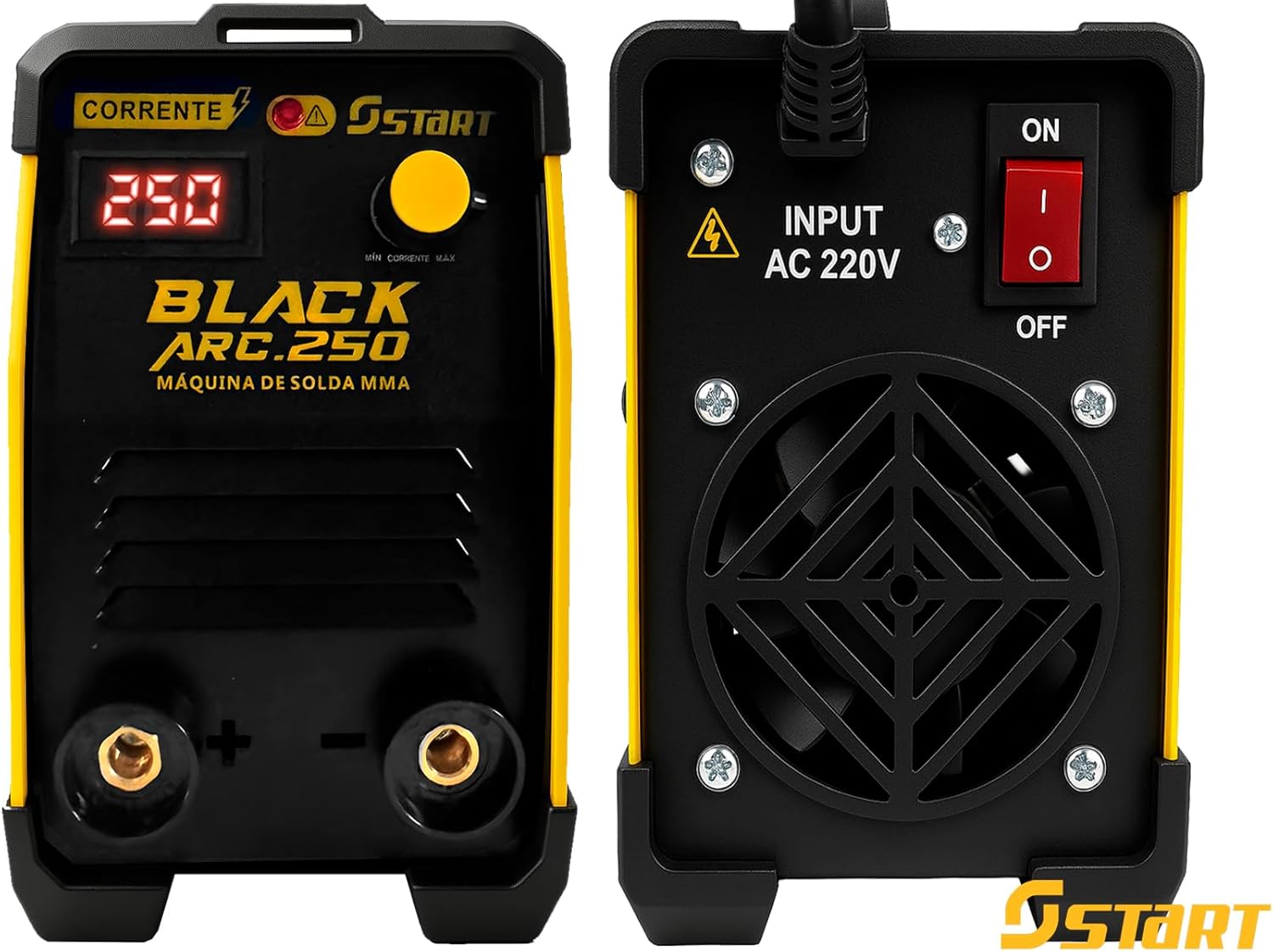
Figure 4.2: Front panel with digital current display, current adjustment knob, and positive/negative terminals. Rear panel showing the AC 220V input, power switch, and cooling fan.

Figure 4.3: Visual representation of key features including digital display, 100% duty cycle, MMA and TIG welding capabilities, and 250A current capacity.
제어 및 표시기:
- 디지털 디스플레이: Shows the set welding current in Amp에레스.
- 현재 조정 손잡이: Used to precisely set the welding current (20-250A).
- 양극(+) 단자: For connecting the electrode holder (MMA) or TIG torch.
- 음극(-) 단자: For connecting the ground clamp.
- 전원 스위치(켜기/끄기): 뒷면 패널에 위치해 있습니다.
- 입력 전압: AC 220V 전원 입력 연결.
- 냉각 팬: Located on the rear panel for heat dissipation.
- 과열 표시기: (If present, typically a light) Illuminates when the machine is overheating.
5. 기술 사양
| 특징 | 사양 |
|---|---|
| 모델 | Black Arc 250 (Model Number: 2109) |
| 입력 Voltage | 220V Monophase |
| 입력 전류 | 25A |
| 용접 공정 | MMA (Shielded Metal Arc), TIG (Lift Arc, with dry torch - not included) |
| 조정 가능한 전류 범위 | 20 - 250A |
| 듀티 사이클 | 100A에서 250 % |
| 호환 전극 | Up to 3.25mm (e.g., AWS E6013, E7018) |
| 용접 가능한 재료 | 탄소강, 스테인리스강 |
| Anti-Stick Function | 예 |
| 개방 회로 Voltag전자 (Voc) | 56V |
| 보호 등급 | IP21S |
| 치수(길이 x 너비 x 높이) | 34cm x 15cm x 27.5cm (약 13.4 x 5.9 x 10.8인치) |
| 무게 | 3.8kg(약 8.4파운드) |
| 재료 | 강철 |
| 전원 유형 | 전력 |

Figure 5.1: Approximate dimensions of the welding machine: 30cm length, 12cm width, 19cm height (Note: Product specifications list 34 x 15 x 27.5 cm, use table values as primary).
6. 설정 및 연결
Before connecting the machine, ensure the power switch is in the OFF position and the work area is clean, dry, and well-ventilated.
6.1 전원 연결:
- Ensure your power supply is 220V monophase and can handle a 25A input current.
- Connect the machine's power cord to a suitable grounded 220V outlet.
6.2 MMA (Electrode) Welding Setup:
- 전극 홀더 cl을 연결하십시오amp 케이블에 양수(+) terminal on the front panel.
- 접지선을 연결하세요amp 케이블에 음수 (-) terminal on the front panel.
- 접지선을 안전하게 부착하세요amp to the workpiece or a sturdy metal workbench that is in direct contact with the workpiece. Ensure a clean, bare metal connection for optimal conductivity.
- 적절한 전극을 전극 홀더에 삽입하십시오.
6.3 TIG Welding Setup (Optional, TIG torch not included):
For TIG welding, you will need a separate TIG torch (dry torch type) and a gas cylinder with regulator (e.g., Argon). This machine supports Lift Arc TIG.
- Connect the TIG torch cable to the 양수(+) terminal on the front panel.
- 접지선을 연결하세요amp 케이블에 음수 (-) terminal on the front panel.
- 접지선을 안전하게 부착하세요amp 공작물에.
- Connect the gas hose from the TIG torch to the gas regulator on your shielding gas cylinder.
7. 사용 설명서
7.1 Powering On and Current Adjustment:
- After completing all connections, turn the power switch on the rear panel to the ON position.
- The digital display on the front panel will illuminate, showing the current setting.
- Use the current adjustment knob to set the desired welding current. Refer to electrode manufacturer guidelines or welding charts for appropriate current settings based on electrode type and material thickness.
7.2 MMA (Electrode) Welding:
- Ensure proper PPE is worn.
- 전극을 공작물에 가볍게 접촉시킨 후 재빨리 살짝 들어 올려 아크를 발생시키십시오.
- Maintain a consistent arc length and travel speed for a stable weld bead.
- The Anti-Stick function will reduce the current if the electrode sticks to the workpiece, making it easier to detach without damaging the electrode or machine.
7.3 TIG (Lift Arc) Welding (with optional TIG torch):
- Ensure proper PPE is worn and shielding gas is flowing.
- Gently touch the tungsten electrode to the workpiece.
- Slowly lift the torch to initiate the arc. The machine will automatically detect the lift and start the welding current.
- 짧은 호의 길이와 일정한 이동 속도를 유지하십시오.
8. 유지관리
정기적인 유지보수는 용접기의 수명 연장과 최적의 성능을 보장합니다. 유지보수를 수행하기 전에는 항상 용접기의 전원을 차단하십시오.
8.1 청소:
- 주기적으로 기계 외부를 부드럽고 마른 천으로 청소하세요.
- Use compressed air to blow out dust and debris from the cooling vents and internal components. Ensure the air is dry and oil-free.
- Clean the terminals and cable connections to ensure good electrical contact.
8.2 검사:
- Regularly inspect all cables, including the power cord, electrode holder cable, and ground clamp cable, for cuts, cracks, or damage. Replace damaged cables immediately.
- Check the electrode holder and ground clamp 마모를 위해.
- 모든 패스너가 단단히 고정되어 있는지 확인하세요.
8.3 보관:
용접기를 사용하지 않을 때는 깨끗하고 건조하며 먼지가 없는 곳에 보관하십시오. 극한의 온도와 습도로부터 보호하십시오.
9. 문제 해결
이 섹션에서는 발생할 수 있는 일반적인 문제에 대해 설명합니다. 여기에 나열되지 않은 문제가 발생하거나 해결 방법으로 문제가 해결되지 않으면 고객 지원팀에 문의하십시오.
| 문제 | 가능한 원인 | 해결책 |
|---|---|---|
| 기계가 켜지지 않습니다 | No power supply; Power switch off; Faulty power cord/outlet | Check power connection; Turn power switch ON; Test outlet with another device; Inspect power cord. |
| No welding arc or weak arc | Poor ground connection; Incorrect current setting; Wet/damaged electrode; Faulty cables | 접지를 확보하세요amp has clean, bare metal contact; Adjust current; Use dry, undamaged electrodes; Inspect and replace cables if necessary. |
| Overheat indicator is on | Machine is overheating due to prolonged use or insufficient ventilation | Stop welding and allow the machine to cool down; Ensure adequate ventilation around the machine; Check for blocked cooling vents. |
| 전극이 자주 찝힙니다 | Low current setting; Incorrect electrode angle; Anti-Stick not functioning | Increase welding current; Adjust electrode angle; Ensure Anti-Stick feature is active (it is automatic on this model). |
10. 보증 및 지원
보증 정보:
Your Start Black Arc 250 Inverter Welding Machine is covered by a manufacturer's warranty against defects in materials and workmanship. Please refer to the warranty card included with your purchase for specific terms and conditions, including the warranty period.
Extended warranty options may be available for purchase, offering additional coverage against failures and defects for 12 or 24 months beyond the standard warranty period. Please check with your retailer for details on purchasing extended protection plans.
고객 지원:
If you have any questions, require technical assistance, or need to report a problem with your welding machine, please contact the retailer or manufacturer's customer service department. Have your product model (Black Arc 250), model number (2109), and purchase date ready when contacting support.


