1. 서론
This manual provides detailed instructions for the proper use and maintenance of your havit OWS915 Open Ear Headphones. Please read this manual thoroughly before using the product to ensure optimal performance and longevity. Keep this manual for future reference.
2. 패키지 내용
아래 나열된 모든 품목이 패키지에 포함되어 있는지 확인하세요.
- havit OWS915 Open Ear Headphones (Left and Right earbuds)
- 충전 케이스
- USB 충전 케이블
- 사용자 설명서
Image: Contents of the havit OWS915 package, showing the earbuds, charging case, USB cable, and user manual.
3. 제품 오버view
The havit OWS915 headphones feature an open-ear design for comfort and situational awareness. Each earbud is lightweight (7.9 grams) and equipped with a flexible TPU ear hook for a secure fit. The charging case provides extended battery life.
주요 구성 요소:
- 이어 버드 : 왼쪽과 오른쪽에는 이어후크와 터치 컨트롤 영역이 통합되어 있습니다.
- 충전 케이스: Houses and charges the earbuds, with a USB-C charging port.
- LED 표시등: On earbuds and charging case for status updates.
- 마이크: Four built-in microphones with ENC technology for clear calls.
- 스피커: 14.2mm dynamic drivers for audio output.

Image: The havit OWS915 Open Ear Headphones and their charging case.

이미지: 폭발된 view of the havit OWS915 earbud and charging case, detailing internal components and features.
4. 설정
4.1. 헤드폰 충전
Before first use, fully charge the headphones and charging case. Place the earbuds into the charging case. Connect the USB charging cable to the USB-C port on the case and to a power source. The LED indicator on the case will show charging status.
A full charge of the case takes approximately 2.5 hours. The earbuds provide up to 8.5 hours of playtime at 60% volume on a single charge, with the charging case extending total playtime to 64 hours.
Video: Demonstration of how to use the HAVIT LIFE app with wireless earbuds, including a visual of the charging indicator on the case.
4.2. 블루투스 페어링
To pair your havit OWS915 headphones with your device:
- 충전 케이스를 여세요. 이어버드가 자동으로 페어링 모드로 진입합니다.
- 기기(스마트폰, 태블릿 등)에서 Bluetooth를 활성화하세요.
- 검색 "HAVIT OWS915" in the list of available Bluetooth devices.
- Select "HAVIT OWS915" to connect. A voice prompt will confirm successful pairing.
헤드폰을 케이스에서 꺼내면 기기에서 블루투스가 활성화된 경우 마지막으로 페어링된 장치에 자동으로 다시 연결됩니다.

Image: A diagram illustrating the Bluetooth 5.4 chip, emphasizing stable and easy pairing with various operating systems.
5. 착용 지침
To ensure a comfortable and secure fit, follow these steps:
- 왼쪽(L)과 오른쪽(R) 이어버드를 식별하세요.
- Gently hook the earbud over your ear, positioning the speaker part towards your ear canal.
- Adjust the ear hook and earbud until it rests comfortably and securely on your ear. The flexible TPU material allows for slight adjustments.

Image: A visual guide demonstrating the correct method for wearing the havit OWS915 headphones.
6. 헤드폰 작동
6.1. 터치 컨트롤
The havit OWS915 headphones feature intuitive touch controls on each earbud:
- 재생/일시 중지: 이어버드 중 하나를 두 번 탭하세요.
- 이전 노래: Touch and hold the left earbud for 1 second.
- 다음 노래: Touch and hold the right earbud for 1 second.
- 전화 받기/종료: 이어버드 중 하나를 두 번 탭하세요.
- 전화 거부: Touch and hold either earbud for 1 second.
- 음성 어시스턴트 : Tap the left earbud thrice.
- 게임 모드/음악 모드: Tap the right earbud thrice.

Image: A visual representation of the touch control functions on the havit OWS915 earbuds.
6.2. HAVIT LIFE App
Enhance your listening experience by customizing settings via the HAVIT LIFE App:
- 이퀄라이저 설정: 오디오 프로 조정file귀하의 선호도에 따라.
- Customize Touch Settings: Personalize earbud touch controls.
- Headphone Battery Display: 배터리 수준을 모니터링합니다.
- 게임 모드: Optimize audio for gaming with reduced latency.
- 장치 이름 변경: Rename your headphones for easy identification.
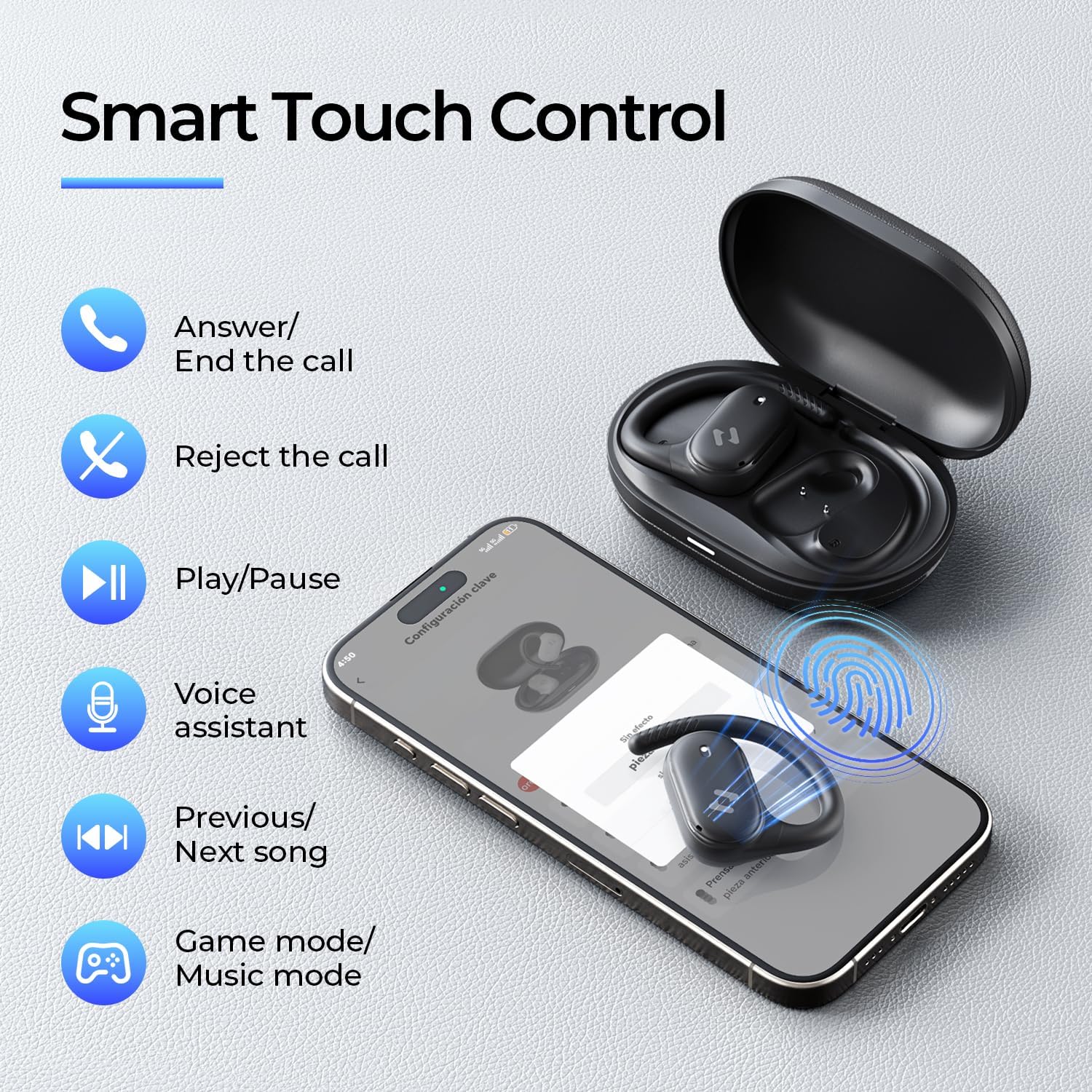
Image: Screenshots of the HAVIT LIFE App demonstrating various customization options.
Video: A guide on how to download, connect to, and customize settings within the HAVIT LIFE App.
7. 유지관리
헤드폰의 성능과 외관을 유지하려면 다음 사항을 준수하십시오.
- 청소: 이어버드와 충전 케이스는 부드럽고 마른 천으로 닦아주세요. 강한 화학 약품이나 연마성 재질은 사용하지 마세요.
- 저장: 사용하지 않을 때는 헤드폰을 충전 케이스에 보관하여 먼지와 손상으로부터 보호하세요.
- 배터리 관리 : Charge the headphones regularly, even if not in frequent use, to prolong battery life. Avoid extreme temperatures.
- 방수 기능: The headphones are IPX5 waterproof, meaning they are resistant to sweat and splashes. Do not submerge them in water. Ensure they are dry before placing them back in the charging case.

Image: The havit OWS915 headphones demonstrating their IPX5 water resistance.
8. 문제 해결
If you encounter issues with your havit OWS915 headphones, refer to the following common solutions:
| 문제 | 해결책 |
|---|---|
| 기기와 페어링할 수 없습니다 | Ensure Bluetooth is enabled on your device. Make sure the earbuds are charged and in pairing mode. Try restarting your device and the headphones. |
| 소리가 나지 않거나 볼륨이 작음 | Check the volume level on both your device and the headphones. Ensure the headphones are properly connected. Clean any debris from the speaker grilles. |
| 이어폰이 충전되지 않음 | 충전 케이블이 케이스와 전원에 제대로 연결되어 있는지 확인하십시오. 이어버드와 케이스의 충전 접점이 깨끗한지 확인하십시오. 다른 충전 케이블이나 전원 어댑터를 사용해 보십시오. |
| 연결 불안정 | Ensure your device is within the Bluetooth range (10 meters). Avoid obstacles between the headphones and your device. Disconnect and re-pair the headphones. |
| HAVIT LIFE App connection fails | Ensure you have the latest version of the HAVIT LIFE App installed. Check your device's internet connection. Restart the app and your headphones. |
9. 사양
| 특징 | 세부 사항 |
|---|---|
| 모델명 | OWS915 |
| 블루투스 버전 | 5.4 |
| 블루투스 범위 | 10 미터 |
| 배터리 수명(이어버드) | 8.5시간(60% 볼륨) |
| 총 재생 시간(케이스 포함) | 64시간 |
| 충전 케이스 배터리 | 1000mAh |
| 충전 케이스 시간 | 2.5시간 |
| 오디오 드라이버 크기 | 14.2 밀리미터 |
| 방수 레벨 | IPX5(방수) |
| 제품 무게 (이어폰) | 7.9그램(각각) |
| 재료 | PC + ABS + TPU |
| 제어 방법 | 앱, 터치 |
| 소음 제어 | 없음 (통화 시 ENC 기능 포함) |
| 주파수 응답 | 20 kHz (XNUMX kHz) |
| 감광도 | 118데시벨 |
| 임피던스 | 32옴 |
10. 보증 및 지원
Your havit OWS915 Open Ear Headphones come with a standard manufacturer's warranty. Please refer to the warranty card included in your package for specific terms and conditions. For technical support or customer service inquiries, please contact havit customer support through their official web사이트 또는 보증서에 제공된 연락처 정보를 참조하세요.
11. 중요한 안전 정보
- 청력 보호: To protect your hearing, avoid listening at high volume levels for extended periods.
- 환경 인식: The open-ear design allows you to hear your surroundings. However, always exercise caution when using headphones in situations requiring full attention, such as driving or cycling.
- 어린이들: Keep the headphones and accessories out of reach of children under three years of age to prevent choking hazards.
- 충전 중: 제공된 충전 케이블과 인증된 전원 어댑터만 사용하십시오. 기기가 젖었을 경우 충전하지 마십시오.
- 분해 : Do not attempt to disassemble or modify the headphones or charging case, as this may void the warranty and cause damage.


