1. 서론
This manual provides essential information for setting up, operating, and maintaining your DOOGEE Tab A9 Pro Android 15 Tablet. Please read it thoroughly to ensure proper usage and to maximize your device's capabilities.
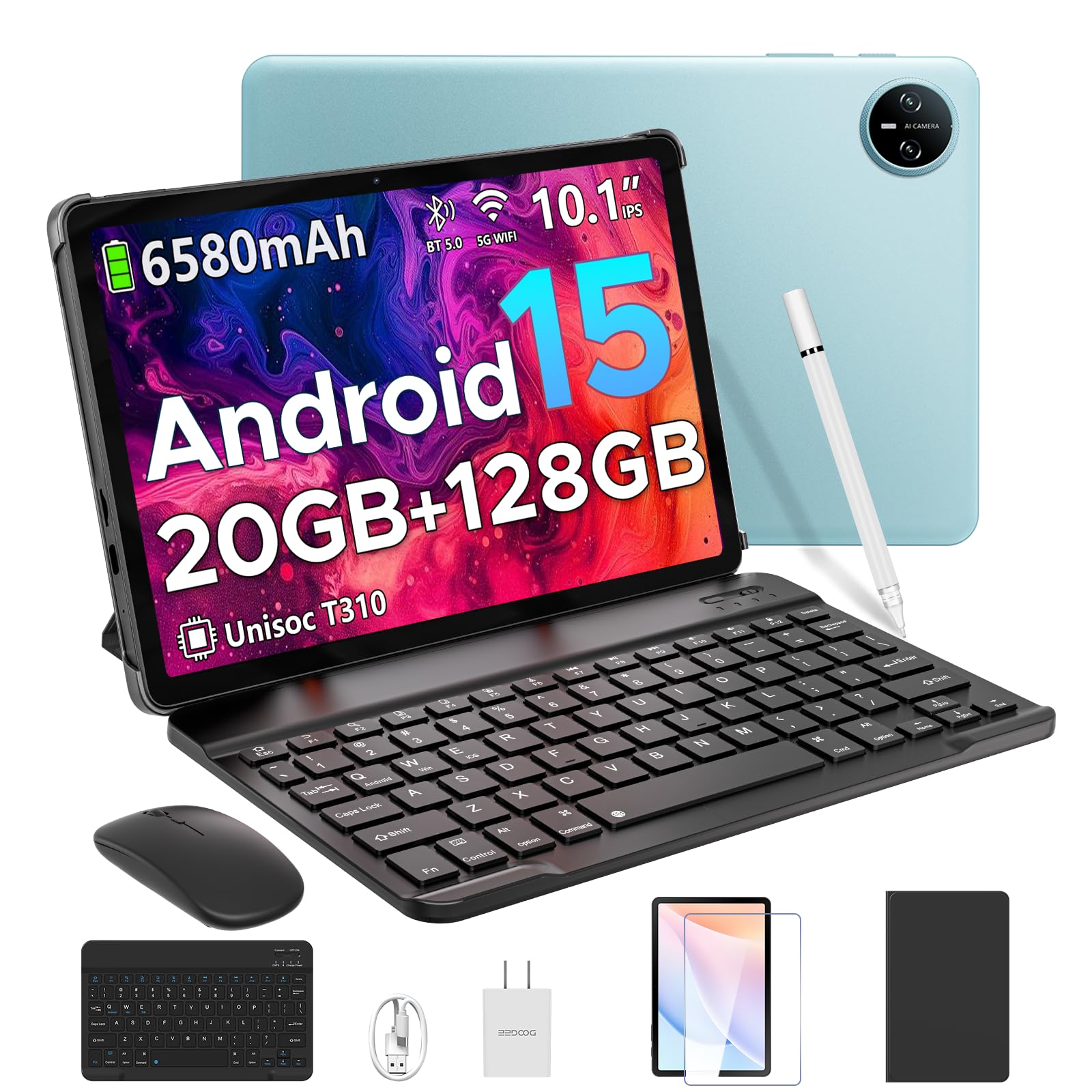
Image 1.1: The DOOGEE Tab A9 Pro Tablet.
2. 상자 안에 무엇이 들어있나요?
Your DOOGEE Tab A9 Pro package includes the following items:
- DOOGEE Tab A9 Pro Tablet (x1)
- USB 타입 C 케이블 (1개)
- 충전기(x1)
- 수동(x1)
- 보증서(x1)
- 블루투스 키보드 (VIP 에디션)
- 블루투스 마우스 (VIP 에디션)
- 스타일러스(VIP 에디션)
- 가죽 보호 커버 (VIP 에디션)
- 강화 필름 (VIP 에디션)

Image 2.1: All items included in the DOOGEE Tab A9 Pro package.
3. 제품 오버view
The DOOGEE Tab A9 Pro features a sleek design with essential components for user interaction and connectivity.
3.1 물리적 특징
- 표시하다: 10.1-inch IPS HD Ultra-Clear Display.
- 카메라: 8MP 메인 카메라(후면)와 5MP 전면 카메라.
- 오디오: High-Quality Dual Speakers and a 3.5mm Audio Jack.
- 포트: 충전 및 데이터 전송용 USB Type-C 포트.
- 버튼: Power button and volume controls located on the side.

이미지 3.1: 후면 view of the DOOGEE Tab A9 Pro, highlighting the camera module.

이미지 3.2: 측면 view of the tablet, illustrating the power button, volume controls, and ports.
비디오 3.1: 짧은 비디오 쇼asing the ultra-thin body and design of the DOOGEE Tab A9 Pro.
4. 설정
4.1 초기 충전
Before first use, fully charge your tablet using the provided Type-C USB cable and charger. The battery indicator on the screen will show charging progress.
4.2 전원 켜기/끄기
- 전원을 켜려면: DOOGEE 로고가 나타날 때까지 전원 버튼을 길게 누르세요.
- 전원을 끄려면: 전원 버튼을 길게 누른 다음, 화면에 나타나는 옵션에서 '전원 끄기'를 선택하세요.
4.3 초기 설정 마법사
Upon first power-on, follow the on-screen instructions to complete the initial setup, including language selection, Wi-Fi connection, and Google account login.
5. 운영체제 (안드로이드 15)
The DOOGEE Tab A9 Pro runs on the Android 15 operating system, offering a smart, fluid, and secure user experience with enhanced privacy features.

Image 5.1: Visual representation of the Android 15 system interface.
비디오 5.1: 오버view of the DOOGEE Tab A9 Pro running Android 15.
6. 성능 및 저장 용량
The tablet is designed for smooth operation and amp파일 저장 용량.
6.1 프로세서
Powered by the energy-efficient Unisoc T310 octa-core processor, the tablet ensures seamless performance for various tasks.

Image 6.1: Diagram illustrating the Unisoc T310 Quad-Core Processor.
6.2 RAM and Storage
The tablet features 20GB of RAM (4GB physical + 16GB virtual) and 128GB of internal storage. Storage can be expanded up to 2TB using a microSD card (sold separately).

Image 6.2: Visual representation of the tablet's RAM and ROM configuration.
7. Display & Audio
Experience vibrant visuals and clear sound with your tablet.
7.1 디스플레이
The 10.1-inch IPS HD display offers wide viewing angles and a resolution of 1280x800 for an immersive visual experience.

Image 7.1: The 10.1-inch IPS HD display with key specifications.
7.2 오디오
Built-in dual speakers deliver clear and dynamic sound for movies, music, and video calls.

Image 7.2: Illustration of the tablet's dual speaker system.
8. 카메라
Capture moments and conduct video calls with the integrated cameras.
8.1 Main Camera
The 8MP main camera allows you to take sharp photos.

Image 8.1: Close-up of the 8MP main camera on the tablet's rear.
8.2 전면 카메라
5만 화소 전면 카메라는 셀카 및 영상 통화에 적합합니다.

Image 8.2: The 5MP front camera in use for a video call.
9. 연결성
다양한 무선 옵션을 통해 연결 상태를 유지하세요.
9.1 와이파이
Supports 2.4G/5G dual-band Wi-Fi for smooth, high-speed internet access.

Image 9.1: Features of WiFi 5 connectivity on the tablet.
9.2 블루투스
Equipped with Bluetooth 5.0 for connecting wireless accessories.
9.3 GPS
Built-in GPS provides accurate navigation for travel and outdoor activities.
10. 액세서리
The DOOGEE Tab A9 Pro comes with a suite of accessories to enhance its functionality.
10.1 블루투스 키보드
Connect the Bluetooth keyboard for a desktop-like typing experience, ideal for productivity tasks.

Image 10.1: The tablet connected to its Bluetooth keyboard for efficient typing.
10.2 Mouse and Stylus
The included mouse and stylus further enhance navigation and interaction, especially for note-taking and creative tasks.

Image 10.2: The tablet shown with its accompanying keyboard and mouse.

Image 10.3: The tablet being used with the stylus for precise input.
10.3 보호 케이스
The protective case shields your tablet from drops and scratches and can also function as a stand.

Image 10.4: The tablet securely placed within its protective case.
11. 배터리 관리
The tablet is equipped with a high-capacity battery for extended use.
11.1 배터리 용량
Features a long-lasting 6580mAh battery, providing hours of power for various activities without frequent recharging.

Image 11.1: Diagram showing the 6580mAh battery inside the tablet.
Video 11.1: A video highlighting the large battery capacity of the DOOGEE Tab A9 Pro.
12. 보안 기능
내장된 보안 옵션으로 기기와 데이터를 보호하세요.
12.1 얼굴인식 잠금해제
Effortlessly unlock your tablet using facial recognition technology.

Image 12.1: Illustration of the facial recognition unlock feature.
12.2 Fortified Privacy Shield
Android 15 provides enhanced privacy controls, robust data encryption, timely security patches, and proactive app screening for unbreakable security.

이미지 12.2: 이상view of Android 15's privacy features.
13. Multitasking & Productivity
Optimize your workflow and entertainment with these features.
13.1 분할 화면 멀티태스킹
Run two applications simultaneously side-by-side for enhanced productivity.

Image 13.1: The tablet displaying two apps in split-screen mode.
13.2 내장 WPS 오피스
The tablet comes with WPS Office pre-installed, providing PC-level productivity for documents, spreadsheets, and presentations (Note: WPS Office feature may be unavailable in certain regions).

이미지 13.2: 태블릿에 표시된 내용asing WPS Office applications.
Video 13.1: A video demonstrating the DOOGEE Tab A9 Pro's capabilities for learning and work.
14. 유지관리
14.1 청소
부드럽고 보풀이 없는 천을 사용하여 태블릿 화면과 본체를 닦으세요. 강한 화학 물질이나 연마재는 사용하지 마세요.
14.2 소프트웨어 업데이트
최적의 성능, 보안 및 새로운 기능 이용을 위해 정기적으로 시스템 업데이트를 확인하고 설치하십시오. 다음 경로로 이동하세요. 설정 > 시스템 > 시스템 업데이트 업데이트를 확인하세요.
15. 문제 해결
이 섹션에서는 태블릿에서 발생할 수 있는 일반적인 문제에 대해 설명합니다.
15.1 태블릿 전원이 켜지지 않음
- 태블릿이 충분히 충전되었는지 확인하세요. 최소 30분 동안 충전기에 연결해 두세요.
- 전원 버튼을 10~15초간 길게 눌러 강제 재시작을 실행하세요.
15.2 느린 성능
- 불필요한 백그라운드 애플리케이션을 닫습니다.
- 자주 사용하는 앱의 캐시 데이터를 지웁니다.
- Ensure sufficient storage space is available. Delete old files or transfer them to external storage.
- 태블릿을 다시 시작하십시오.
15.3 Wi-Fi 연결 문제
- Wi-Fi 라우터와 태블릿을 다시 시작하세요.
- 와이파이 네트워크를 삭제하고 다시 연결하세요.
- Wi-Fi 신호 범위 내에 있는지 확인하세요.
15.4 액세서리가 연결되지 않음
- Ensure Bluetooth is enabled on the tablet and the accessory.
- Check if the accessory is charged and in pairing mode.
- Refer to the accessory's individual manual for specific pairing instructions.
16. 사양
| 특징 | 사양 |
|---|---|
| 상표 | 두기 |
| 모델명 | 타바9프로 |
| 품목 모델 번호 | 탭 A9 프로 |
| 운영 체제 | 안드로이드 15 |
| 스탠딩 스크린 디스플레이 크기 | 10.1 인치 |
| 화면 해상도 | 1280*800 HD |
| 최대 화면 해상도 | 1280*800 픽셀 |
| 프로세서 브랜드 | 유니소크 |
| 그래픽 코프로세서 | Mali-G52 1코어-2EE |
| 메모리 저장 용량 | 128GB (microSD 카드를 통해 최대 2TB까지 확장 가능) |
| 숫양 | 20GB(물리적 4GB + 가상 16GB) |
| 무선형 | 802.11ac, 802.11n (2.4G/5G Dual-band WiFi) |
| 블루투스 | 5.0 |
| 배터리 용량 | 6580mAh 리튬 폴리머(포함) |
| 평균 배터리 수명 | Up to 2 years (estimated lifespan) |
| 품목 무게 | 1.05파운드 |
| 제품 치수 | 9.55 x 6.33 x 0.31 인치 |
| 색상 | Blue (other colors available) |
| 첫 번째 이용 가능 날짜 | 23년 2025월 XNUMX일 |
17. 보증 및 지원
17.1 보증 정보
Your DOOGEE Tab A9 Pro comes with a 2-Year Limited Warranty. Please refer to the included Warranty Card for detailed terms and conditions.
17.2 고객 지원
For any questions or technical assistance, please contact our support team. We aim to respond within 24 hours.
- 온라인 지원: 연중무휴 24시간 이용 가능합니다.
- 보고: 30일 환불 보장 및 무료 반품.


