1. 서론
This manual provides detailed instructions for the setup, operation, and maintenance of your hygger HG146-NEW 10 Gallon Smart Aquarium Starter Kit. Please read this manual thoroughly before use to ensure proper function and longevity of your aquarium system.
2. 안전 지침
- 유지보수나 청소를 하기 전에 항상 모든 전기 제품의 플러그를 뽑으십시오.
- Ensure the aquarium is placed on a sturdy, level surface capable of supporting its full weight when filled with water and decorations.
- Do not operate any damaged electrical components. Inspect cords and plugs regularly.
- Keep electrical connections dry. Use drip loops for all power cords to prevent water from traveling along the cord to the outlet.
- 이 제품은 실내에서만 사용하세요.
- 어린이와 애완동물의 손이 닿지 않는 곳에 보관하세요.
3. 패키지 내용
포장을 풀 때 아래 나열된 모든 품목이 있는지, 그리고 양호한 상태인지 확인하십시오.
- 10 Gallon Glass Aquarium Tank
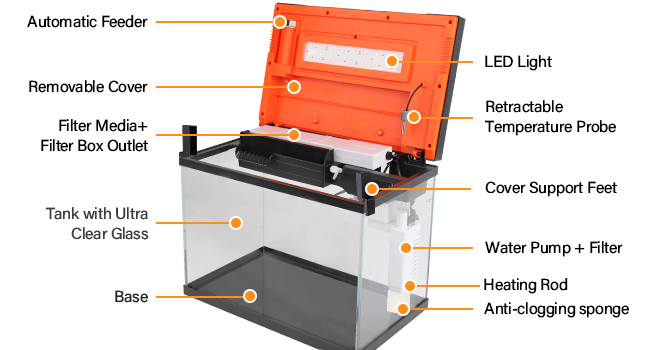
- Removable Multi-function Touch Screen Setting Panel Cover (includes light and power cord)
- Water Pump with Wide Filter Rainforest Tube
- Adjustable Constant Temperature Heater
- Filter Media (White filter floss and 8D sponge media)
- UV 엘amp
- Automatic Feeding Cup (35ML)
- 청소 장갑
- Fishing Net (retractable pole)
- Manual Water Changer with Hose
- 청소용 브러시
- Two Lid Support Feet

4. 설정 지침
- 구성 요소 풀기: Carefully remove all items from the packaging. Inspect the glass tank for any cracks or damage.
- 탱크의 위치를 조정하세요: Place the aquarium on a stable, level surface away from direct sunlight, heat sources, and drafts.
- 베이스 플레이트를 설치하세요: Ensure the load-bearing bottom plate is securely in place at the base of the tank.
- Assemble Filter and Water Pump:
- Insert the filter media (white filter floss and 8D sponge) into the filter box.
- Connect the water pump to the filter rainforest tube and position it inside the tank, ensuring the bottom water inlet pipe and oil film water inlet are correctly oriented.
- Attach the aeration outlet hose and regulating valve if desired for additional oxygen.
- 히터 설치: Place the adjustable constant temperature heater inside the tank, ensuring it is fully submerged.
- Attach Lid and Light: Place the removable multi-function touch screen setting panel cover onto the tank. Connect the light and other integrated components. If using the lid support feet, position them as desired to allow for increased heat dissipation.
- 바닥재와 장식물을 추가하세요: Rinse any substrate (gravel, sand) and decorations thoroughly before adding them to the tank.
- 물로 채우십시오: Slowly fill the tank with dechlorinated water.
- 전원 연결: Plug in the main power cord, ensuring drip loops are formed for all electrical connections.

5. 사용 설명서
5.1. Aquarium Light (RGB 5050 LED)
- 24/7 모드: The light features a default 24/7 mode with automatic time and brightness changes, cycling through orange-white-blue colors.
- 단일 모드: For customized lighting, you can set specific start and end times. Available colors include white, light white, yellow and white, pink and white, blue and white, and a multi-color cycle.

5.2. Water Pump and Filtration System
The 3-in-1 power pump head provides water filtration, water circulation, and air aeration.
- 물 흐름 모드: The 120 GPH (gallons per hour) 10W water pump offers three selectable water flow modes (P1, P2, P3).
- 여과법: The filter box (L 9.5in * W 3.3in * H 1.5in) is designed for easy replacement of filter material. It includes white filter floss and 8D sponge media.
- 통기: A separate aeration outlet is available to add oxygen to the tank. It is equipped with a hose regulating valve to adjust the bubble flow.
- Oil Film Water Inlet: In addition to the bottom water inlet, the pump features an oil film water inlet for surface skimming.


5.3. Automatic Feeder
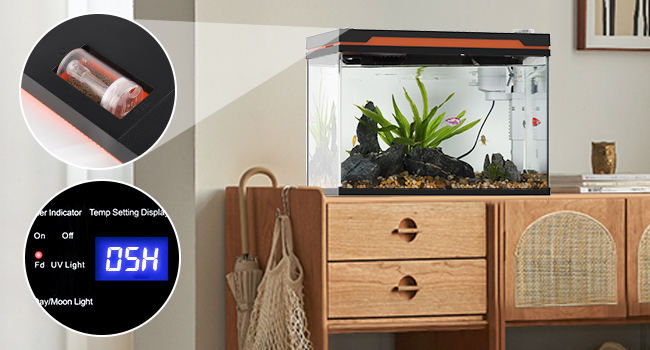
- The included 35ML feeding cup allows for automatic feeding at fixed intervals (from 01H to 99H).
- To manually feed at any time, double-click the feeder button.

5.4. Adjustable Heater
- The heater maintains a constant temperature adjustable between 21°C~37°C (70°F~99°F).
- A temperature probe is integrated, and the lid's digital display shows the real-time temperature in Celsius or Fahrenheit units.

6. 유지관리
6.1. 정기적인 청소
The kit includes three accessories for daily aquarium cleaning:
- Fishing Net: The pole is retractable from 5.1in to 12.8in, making it easy to scoop fish or remove debris.
- Manual Water Changer: Comes with a hose for convenient water removal during partial water changes.
- 청소 브러시 : Designed for basic cleaning tasks without requiring direct hand immersion in the water.


6.2. 필터 매체 교체
The filter box allows for easy replacement of filter media. Regularly check the white filter floss and 8D sponge media and replace them as needed to maintain optimal water quality.
7. 문제 해결
If you encounter issues with your hygger Smart Aquarium Starter Kit, please refer to the following common solutions:
- No Power to Components: Check all power connections. Ensure the main power cord is securely plugged into a functional outlet. Verify that the lid's setting panel is properly seated.
- 조명이 작동하지 않음: Confirm the light settings on the touch screen panel. If in 24/7 mode, observe during the appropriate cycle.
- Water Pump Not Circulating: Ensure the water pump is fully submerged and free from obstructions. Check for blockages in the water inlet pipes or filter media. Verify the selected water flow mode (P1, P2, P3).
- 히터가 온도를 유지하지 못함: Ensure the heater is fully submerged. Verify the desired temperature setting on the digital display. Allow sufficient time for the heater to adjust the water temperature. Note that the included heater is 10W, and for a 10-gallon tank, a 50W heater is generally recommended for effective heating, especially in cooler environments.
- Automatic Feeder Not Dispensing: Check if the feeding cup contains food. Ensure the timer settings are correctly configured or double-click for manual feeding.
- 흐린 물: This can be caused by overfeeding, insufficient filtration, or new tank syndrome. Perform a partial water change, reduce feeding, and ensure filter media is clean and properly installed.
For persistent issues, please contact hygger customer support.
8. 사양
| 특징 | 세부 사항 |
|---|---|
| 모델명 | HG146-NEW |
| 탱크 용량 | 10갤런 |
| 재료 | Ultra-white Glass |
| 품목 무게 | 20 파운드 |
| 품목 패키지 크기(L x W x H) | 22.75 x 19.05 x 15.5 인치 |
| 라이트 타입 | RGB 5050 LED (5W) |
| 워터 펌프 유량 | 120 GPH (10W) |
| 히터 온도 범위 | 21°C~37°C / 70°F~99°F |
| 급지 용량 | 35ml |
| Filter Box Dimensions | L 9.5in * W 3.3in * H 1.5in |


9. 보증 및 지원
For warranty information, technical support, or any inquiries regarding your hygger Smart Aquarium Starter Kit, please contact hygger customer service directly. Refer to the product packaging or the official hygger web최신 연락처 정보는 사이트에서 확인하세요.


