제품 끝view
The SMALLRIG 7 Inch Magic Arm with Crab-Shaped Clamp (Model 5310) is a versatile mounting solution designed for photographers, videographers, and content creators. It features a robust articulating arm with a crab-shaped clamp on one end and a 1/4"-20 screw with anti-twist retractable pins on the other. This design allows for secure and flexible positioning of various accessories such as action cameras, monitors, video lights, and microphones in diverse shooting environments.
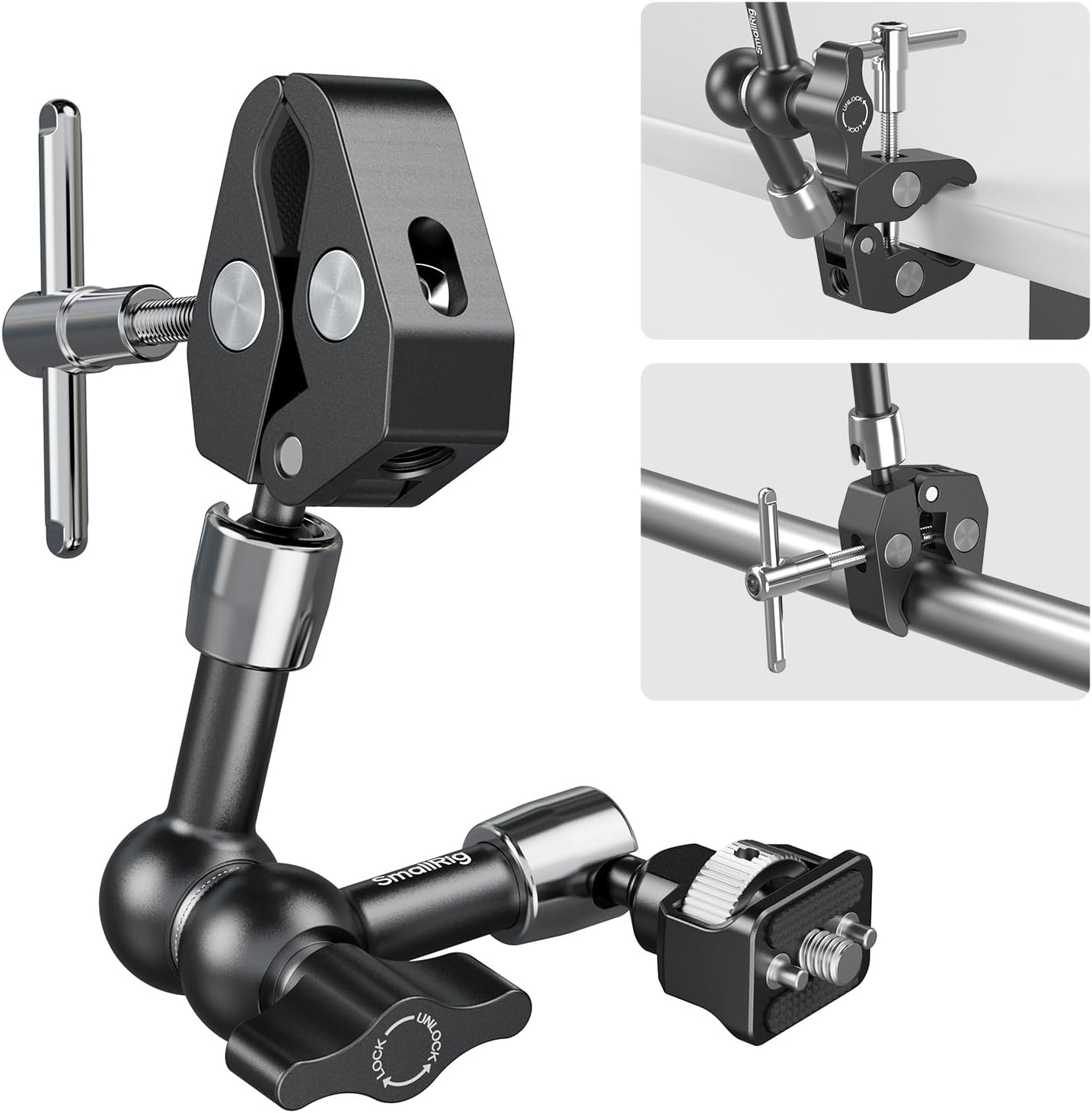
Image: The SMALLRIG 7 Inch Magic Arm with Crab-Shaped Clamp, 보여 주다asing its articulating design and dual attachment points.
패키지 내용
- Knurled Magic Arm x 1
- 게 모양의 Clamp x 1
- 알렌 렌치 x 1

Image: All components included in the package: the knurled magic arm, crab-shaped clamp, and an Allen wrench.
설정 및 조립
1. Attaching the Magic Arm
The magic arm features a 1/4"-20 screw with retractable anti-twist pins on one end. To attach your device (e.g., action camera, monitor, light):
- Align the 1/4"-20 screw with the mounting hole on your device.
- If your device has anti-twist holes, ensure the retractable pins align with them. The pins will retract if not needed.
- 손잡이를 조이세요urled thumbscrew clockwise until your device is securely fastened. For additional security, use the included Allen wrench in the securing hole to further tighten.
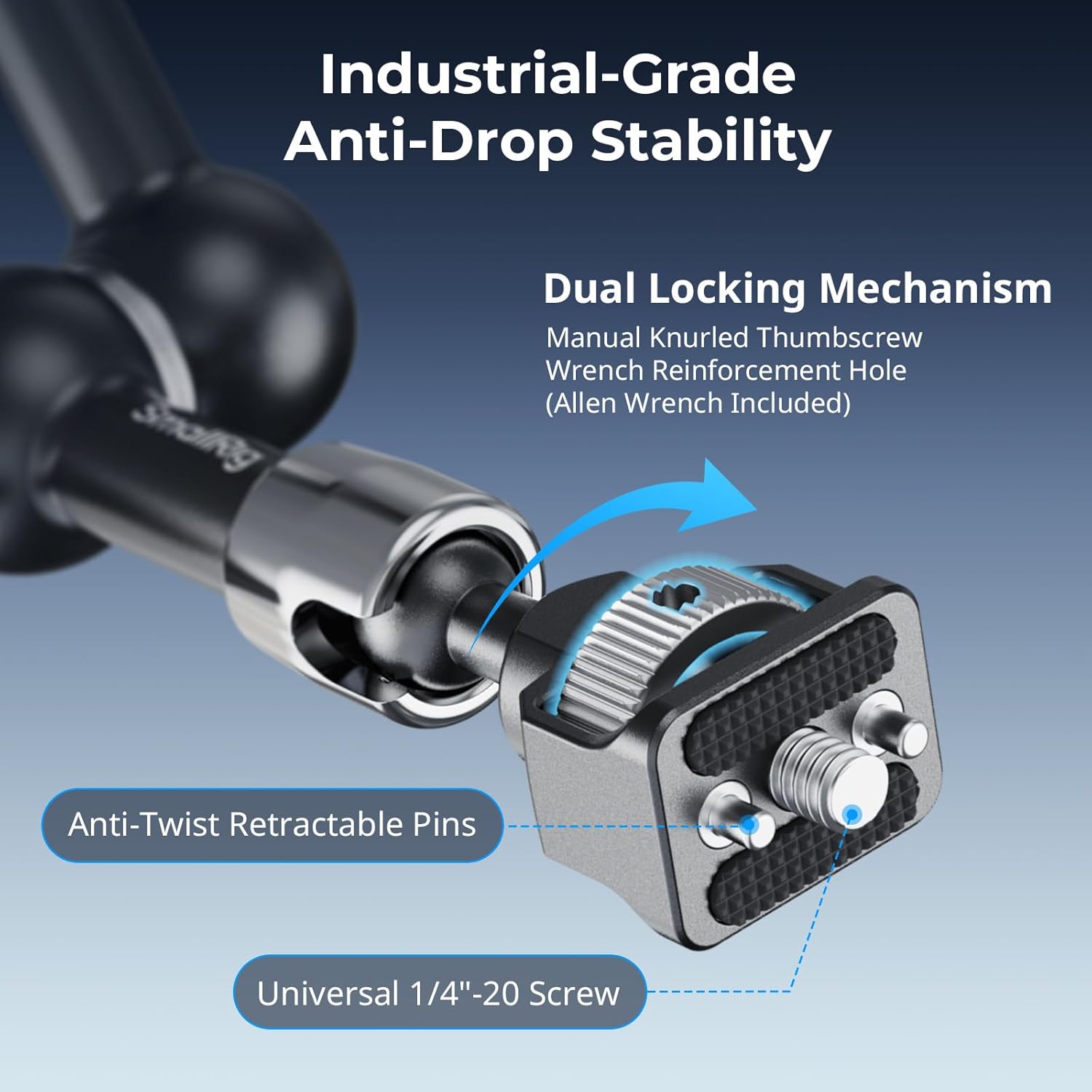
이미지: 클로즈업 view of the 1/4"-20 screw with retractable anti-twist pins, ensuring stable mounting for compatible devices.
2. Adjusting the Crab Clamp
The crab-shaped clamp is designed for quick and secure attachment to various surfaces:
- Identify the surface you wish to clamp to (e.g., tube, table, tripod leg). The clamp accommodates diameters from 15 to 40 mm (0.6 to 1.6 inches).
- Loosen the T-handle screw on the crab clamp 입을 벌리게 하다.
- cl 위치amp around the desired surface. The built-in anti-slip pads will protect your equipment and enhance stability.
- Tighten the T-handle screw firmly until the clamp 안전합니다.

Image: The adjustable crab clamp, showing its clamping range and non-slip protective pads for secure attachment to various surfaces.
작동 지침
1. 360° Ball Head Adjustment
The magic arm features a central wingnut that controls the articulation of both ball joints. This allows for smooth 360° rotation and precise device repositioning:
- To adjust the angle, loosen the central wingnut. This will allow the ball joints to move freely.
- Position your device to the desired angle and orientation.
- Tighten the central wingnut firmly to lock the ball joints in place, ensuring your setup remains stable.

Image: Illustration of the 360° ball head, demonstrating its full range of motion for achieving perfect angles and secure device repositioning.
2. 다양한 장착 옵션
The combination of the magic arm and crab clamp provides extensive mounting possibilities:
- Tables & Desks: 안전하게 clamp to the edge of tables or desks for stable camera or monitor setups.
- Tubes & Poles: Attach to various tubes, poles, or railings, ideal for mounting lights or action cameras in unique positions.
- 삼각대 다리: Expand the functionality of your tripod by clamping accessories directly to its legs.
- Stabilizer Handheld Rings: Integrate additional accessories onto your camera stabilizer for enhanced functionality.
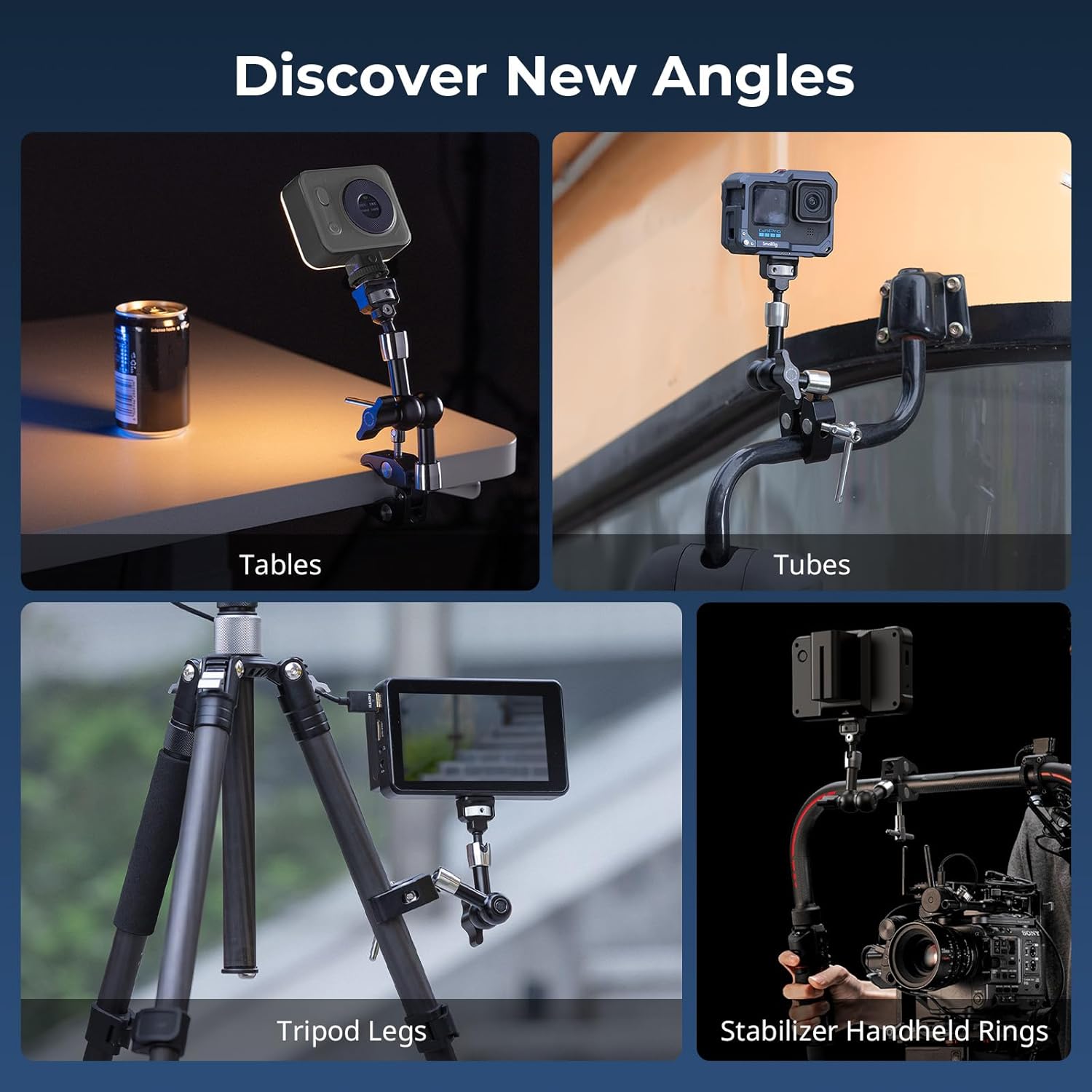
이미지: 전amples of the magic arm and crab clamp in use, demonstrating its adaptability for mounting on tables, tubes, tripod legs, and stabilizer handheld rings.
유지
- 청소: Wipe the product with a soft, dry cloth to remove dust and debris. Avoid using harsh chemicals or abrasive materials.
- 저장: Store the magic arm and clamp in a dry, cool place away from direct sunlight and extreme temperatures.
- 매끄럽게 하기: Periodically check the moving parts. If articulation becomes stiff, a small amount of silicone-based lubricant can be applied to the ball joints.
- 점검: Regularly inspect all screws and connections to ensure they are tight and secure before each use.
문제 해결
| 문제 | 가능한 원인 | 해결책 |
|---|---|---|
| Device twists or rotates after tightening. | Insufficient tightening of the thumbscrew; anti-twist pins not engaged. | Ensure the thumbscrew is fully tightened. If your device has anti-twist holes, verify the pins are properly seated. Use the Allen wrench for maximum tightness. |
| Clamp slips on surface. | Clamp not tightened enough; surface is too smooth or outside clamp범위. | Tighten the T-handle screw firmly. Ensure the surface is within the 15-40mm diameter range. Clean the anti-slip pads if they are dirty. |
| Magic arm articulation is stiff. | Lack of lubrication; dust/debris in joints. | Clean the joints and apply a small amount of silicone-based lubricant. |
| Maximum payload exceeded. | Device is too heavy for the arm. | Ensure the total weight of the mounted device does not exceed 1.5kg (3.3lb). |
제품 사양

Image: The magic arm highlighting its robust construction from aerospace-grade aluminum alloy and sturdy stainless steel, with a maximum payload of 1.5kg (3.3lb).
| 특징 | 세부 사항 |
|---|---|
| 제품 치수 | 5.28 x 5.28 x 0.98인치(134.0 x 134.0 x 25.0mm) |
| 품목 무게 | 11.4온스(322그램) |
| 기재) | 알루미늄 합금, 스테인리스 스틸 |
| 최대 중량 권장 사항 | 1.5킬로그램(3.3파운드) |
| 게 Clamp Clamp범위 | 15-40mm(0.6-1.6인치) |
| 장착점 | 1/4"-20 screw with retractable anti-twist pins, 3/8" hole on clamp |
| 색상 | 검은색 |
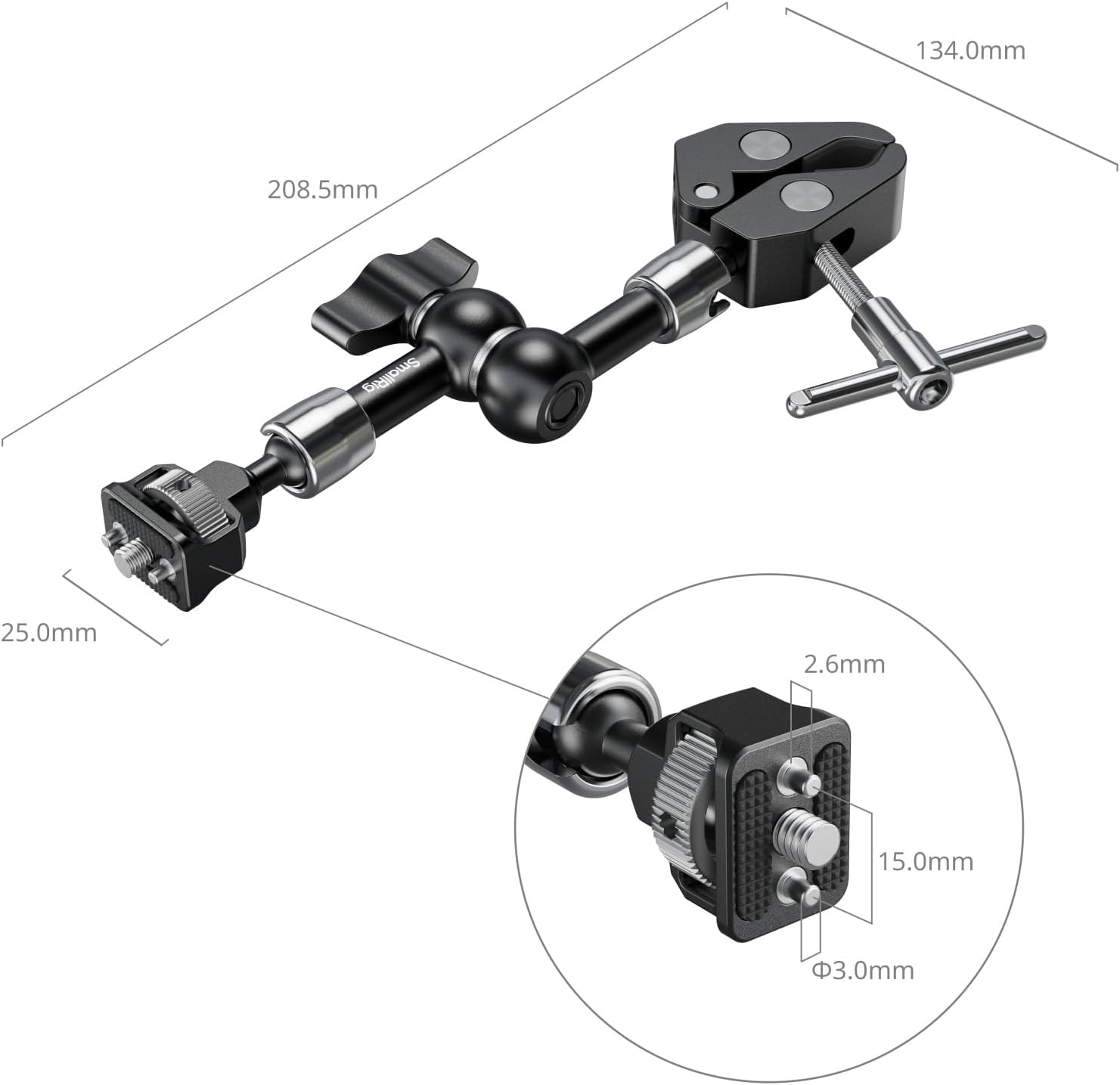
Image: Technical drawing showing the detailed dimensions of the SMALLRIG Magic Arm and its components.
보증 및 지원
SMALLRIG products are designed for durability and performance. For specific warranty details and support inquiries, please refer to the official SMALLRIG web사이트를 방문하거나 고객 서비스에 직접 문의하세요. 보증 청구를 위해 구매 영수증을 보관하세요.
- 온라인 지원: Visit the official SMALLRIG webFAQ, 제품 등록, 지원 리소스를 제공하는 사이트입니다.
- 고객 서비스: Contact SMALLRIG customer service for technical assistance or warranty service.


