소개
The Victrola Journey II is the next generation of the iconic Victrola portable suitcase record player. It features improved sound, updated design details, and modern wireless capabilities. This manual provides essential information for setting up, operating, and maintaining your record player.

Image: The Victrola Journey II record player in black, showcasing its open design with a vinyl record placed on the turntable. The Victrola logo is visible on the inside lid.
주요 특징
- 향상된 스테레오 사운드: Upgraded stereo speakers with an integrated bass port for richer, more dynamic audio.
- 3단 속도 턴테이블: Supports 33 1/3, 45, and 78 RPM records with an auto-stop function.
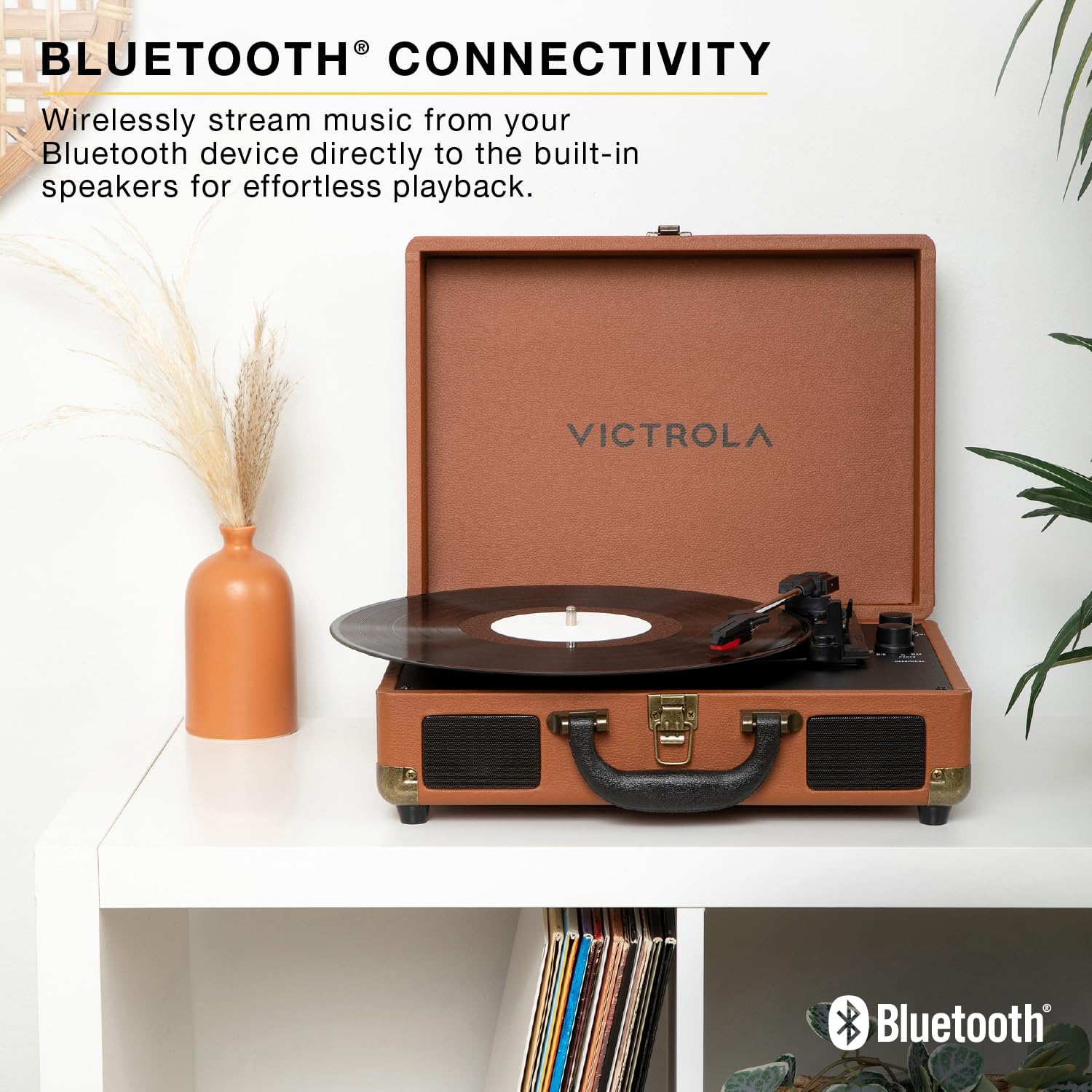
- 블루투스 입력 : Stream music wirelessly from your Bluetooth device to the built-in speakers.
- VINYLSTREAM™ Bluetooth Output: Play records wirelessly through Bluetooth headphones or external speakers.
- 다양한 연결성: Includes RCA output for external speakers, 3.5mm line input for external devices, and a headphone jack for private listening.
- Compact Suitcase Design: 휴대가 간편하고 보관하기 쉽습니다.
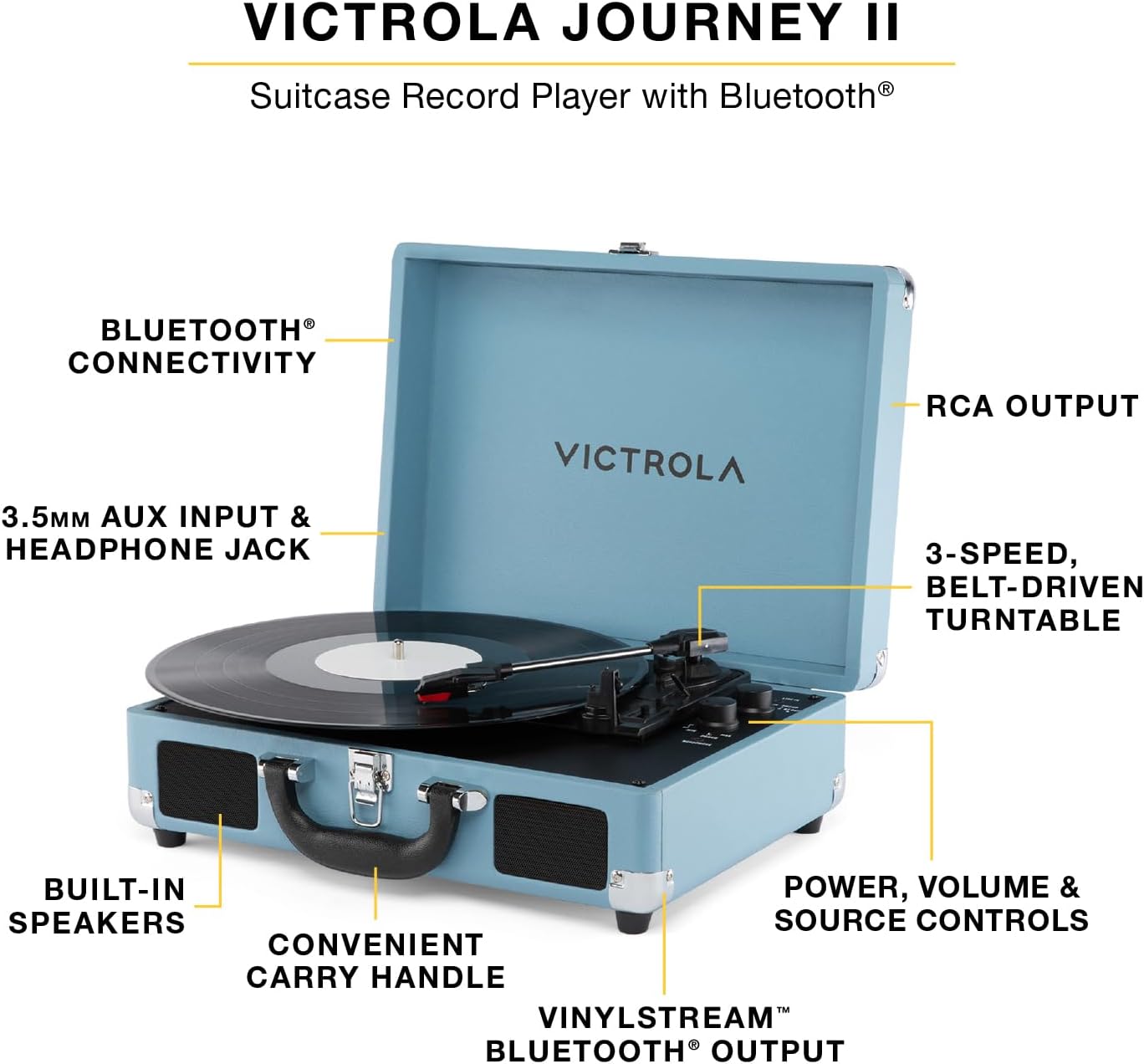
Image: A turquoise Victrola Journey II record player, open to reveal its components. Labels highlight key features such as Bluetooth connectivity, RCA output, 3-speed belt-driven turntable, built-in speakers, convenient carry handle, and power/volume/source controls.
설정
- 짐 풀기: Carefully remove the record player from its packaging. Ensure all components listed in the box are present.
- 전원 연결: Connect the included power adapter to the DC 5V 1A input port on the back of the unit. Plug the adapter into a wall outlet.
- Remove Needle Guard: Before first use, gently remove the white needle guard from the stylus.
- Tone Arm Release: Release the tone arm clip to allow the tone arm to move freely.
이미지: 자세한 view of the Victrola Journey II's control panel and turntable. The tone arm with its red stylus is visible, along with knobs for power/volume and a switch for input selection (Line In, Phono, BT). A headphone jack is also present.
작동 지침
비닐 레코드 재생
- 전원 켜기: Turn the POWER/VOLUME knob clockwise to power on the unit. The power indicator light will illuminate.
- 소스 선택: Set the FUNCTION switch to "PHONO".
- 장소 기록: 턴테이블 플래터에 비닐 레코드를 놓습니다.
- 속도 선택: Adjust the SPEED SELECTOR switch to match the RPM of your record (33 1/3, 45, or 78 RPM). Use the included 45 RPM adapter for 7-inch records with large center holes.
- 재생 시작: Gently lift the tone arm using the cue lever and position it over the desired track on the record. Slowly lower the tone arm using the cue lever. The record will begin to play.
- 볼륨 조절: Rotate the POWER/VOLUME knob to adjust the listening volume.
- 자동 정지 기능: The turntable features an auto-stop function that will stop the platter from spinning when the record finishes. To disable this, set the AUTO STOP switch to OFF.
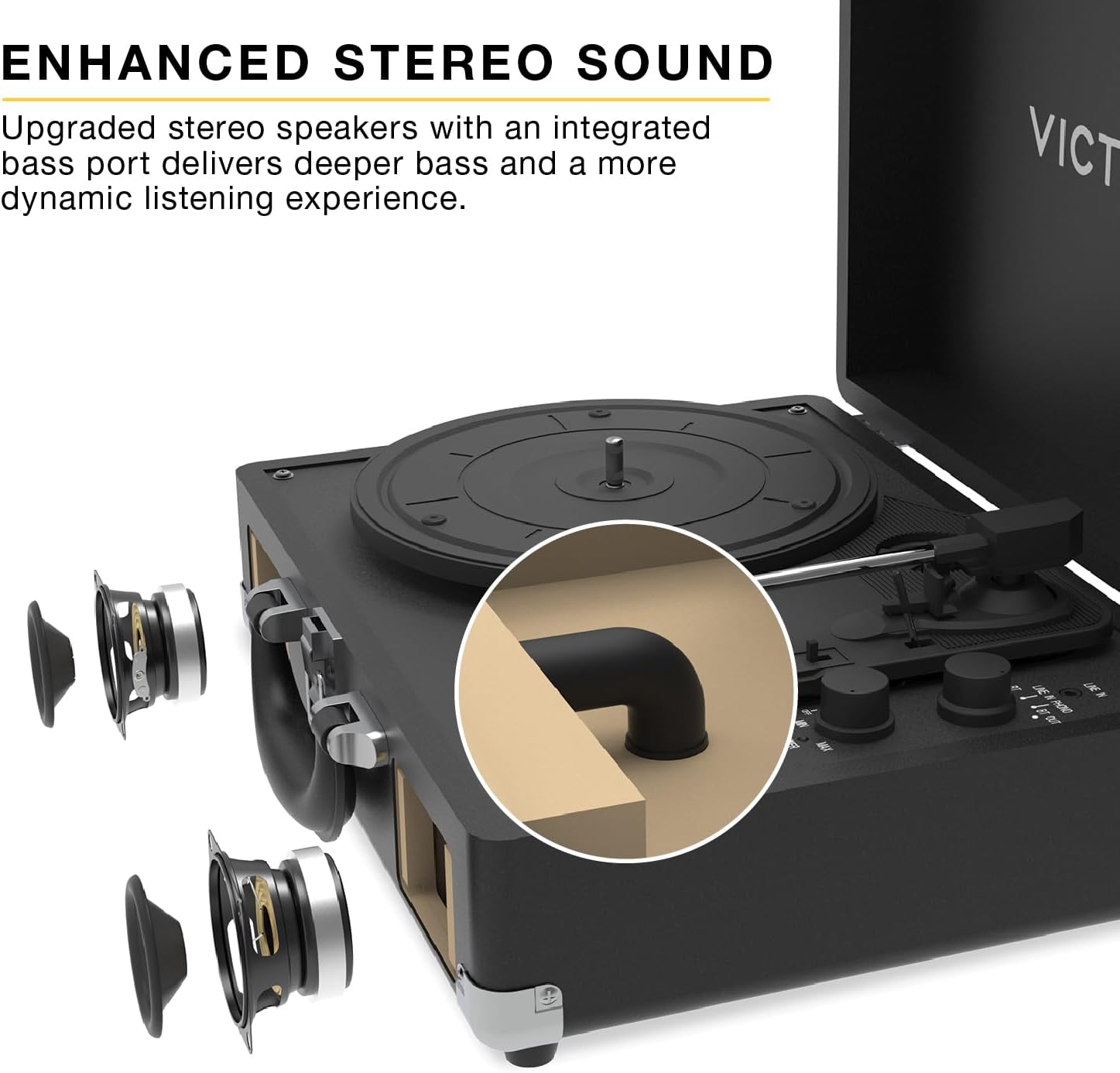
Image: A close-up of the Victrola Journey II turntable in action, with a vinyl record spinning and the tone arm positioned on the record's grooves, indicating playback.
Bluetooth Input (Streaming from a Device)
- 전원 켜기: Turn the POWER/VOLUME knob clockwise to power on the unit.
- 소스 선택: Set the FUNCTION switch to "BT IN". The Bluetooth indicator light will flash, indicating pairing mode.
- 페어링 장치: On your Bluetooth-enabled device (smartphone, tablet, etc.), search for "Victrola Journey II" in the Bluetooth settings and select it to pair. Once paired, the indicator light will stop flashing and remain solid.
- 음악 재생: Begin playing music on your device. The audio will stream through the record player's built-in speakers.
- 볼륨 조절: Adjust the volume using both your device's volume controls and the POWER/VOLUME knob on the record player.

Image: A brown Victrola Journey II record player is displayed open on a white shelf, with a vinyl record on its platter. The image emphasizes its Bluetooth connectivity feature, allowing users to stream music from their devices to the player's built-in speakers.
VINYLSTREAM™ Bluetooth Output (Streaming to Headphones/Speakers)
- 전원 켜기: Turn the POWER/VOLUME knob clockwise to power on the unit.
- 소스 선택: Set the FUNCTION switch to "BT OUT". The Bluetooth indicator light will flash, indicating pairing mode.
- 페어링 장치: Ensure your Bluetooth headphones or external speaker are in pairing mode. The record player will automatically search for and connect to the nearest Bluetooth audio device. Once paired, the indicator light will stop flashing and remain solid.
- 재생/녹음: Follow the steps for "Playing a Vinyl Record" to start playing your vinyl. The audio will stream wirelessly to your paired Bluetooth headphones or speaker.
- 볼륨 조절: Adjust the volume directly on your Bluetooth headphones or external speaker. The record player's volume knob will not control the output volume in this mode.

Image: A pink Victrola Journey II record player is shown open on a white shelf, with a vinyl record on its platter. The image emphasizes its VINYLSTREAM Bluetooth output feature, allowing users to stream vinyl audio wirelessly to compatible Bluetooth headphones or speakers.
Using External Audio Devices (Line In)
- 장치 연결: Connect an external audio device (e.g., MP3 player, CD player) to the 3.5mm LINE IN port on the back of the record player using an audio cable (not included).
- 소스 선택: Set the FUNCTION switch to "LINE IN".
- 음악 재생: Begin playing music on your external device.
- 볼륨 조절: Adjust the volume using both your external device's volume controls and the POWER/VOLUME knob on the record player.
외부 스피커 연결 (RCA 출력)
- 케이블 연결: Connect RCA audio cables (not included) from the "OUT" ports on the back of the record player to the corresponding audio input ports on your external stereo system or powered speakers.
- 소스 선택: Ensure the FUNCTION switch on the record player is set to "PHONO".
- 재생/녹음: Follow the steps for "Playing a Vinyl Record".
- 볼륨 조절: Adjust the volume directly on your external stereo system or powered speakers. The record player's volume knob will not control the output volume in this mode.

Image: The rear panel of a turquoise Victrola Journey II record player, clearly showing the red and white RCA "OUT" ports for connecting to external speakers, and the DC 5V 1A power input jack.
헤드폰 사용
Plug 3.5mm headphones into the HEADPHONE jack on the front of the unit for private listening. The built-in speakers will be muted when headphones are connected.
유지
- 장치 청소: Use a soft, dry cloth to wipe the exterior of the record player. Avoid using harsh chemicals or abrasive cleaners.
- 스타일러스 청소하기: Gently brush the stylus (needle) from back to front with a soft brush designed for stylus cleaning. Do not use excessive force.
- 기록 관리: LP 레코드를 깨끗하게 유지하고 먼지가 쌓이지 않도록 하세요. 레코드가 휘어지는 것을 방지하기 위해 슬리브에 넣어 세워서 보관하십시오.
- 저장: When not in use, close the lid of the record player to protect the turntable and stylus from dust and damage.
문제 해결
| 문제 | 가능한 원인 | 해결책 |
|---|---|---|
| 전원이 없습니다 | 전원 어댑터가 연결되지 않았거나 콘센트가 작동하지 않습니다. | 전원 어댑터가 제대로 연결되어 있고 작동하는 콘센트에 꽂혀 있는지 확인하십시오. |
| 스피커에서 소리가 나지 않음 | Volume too low, incorrect source selected, or headphones connected. | Increase volume, select correct source (PHONO for vinyl, BT IN for Bluetooth input), or disconnect headphones. |
| 레코드 건너뛰기 | Dirty or damaged record, dirty stylus, or unit not on a stable surface. | Clean record, clean stylus, or place unit on a flat, stable surface away from vibrations. |
| 블루투스 페어링 문제 | Device too far, incorrect mode, or device already paired. | Ensure device is within range, select correct BT mode (BT IN or BT OUT), or unpair from other devices. |
명세서
- 모델 번호: VSC-600SB-BLK
- 상표: 빅트롤라
- 턴테이블 속도: 33 1/3, 45, 78 RPM
- 연결성: Bluetooth Input, VINYLSTREAM™ Bluetooth Output, RCA Output, 3.5mm Line Input, 3.5mm Headphone Output
- 스피커: Built-in Stereo Speakers with Enhanced Bass Port
- 힘: 직류 5V 1A
- 치수: 13.78 x 10 x 5인치(약 350 x 255 x 126mm)
- 무게: 7.76파운드(약 3.52kg)
- 재료: 플라스틱
- 포함된 구성 요소: Record Player, 45 RPM Adapter
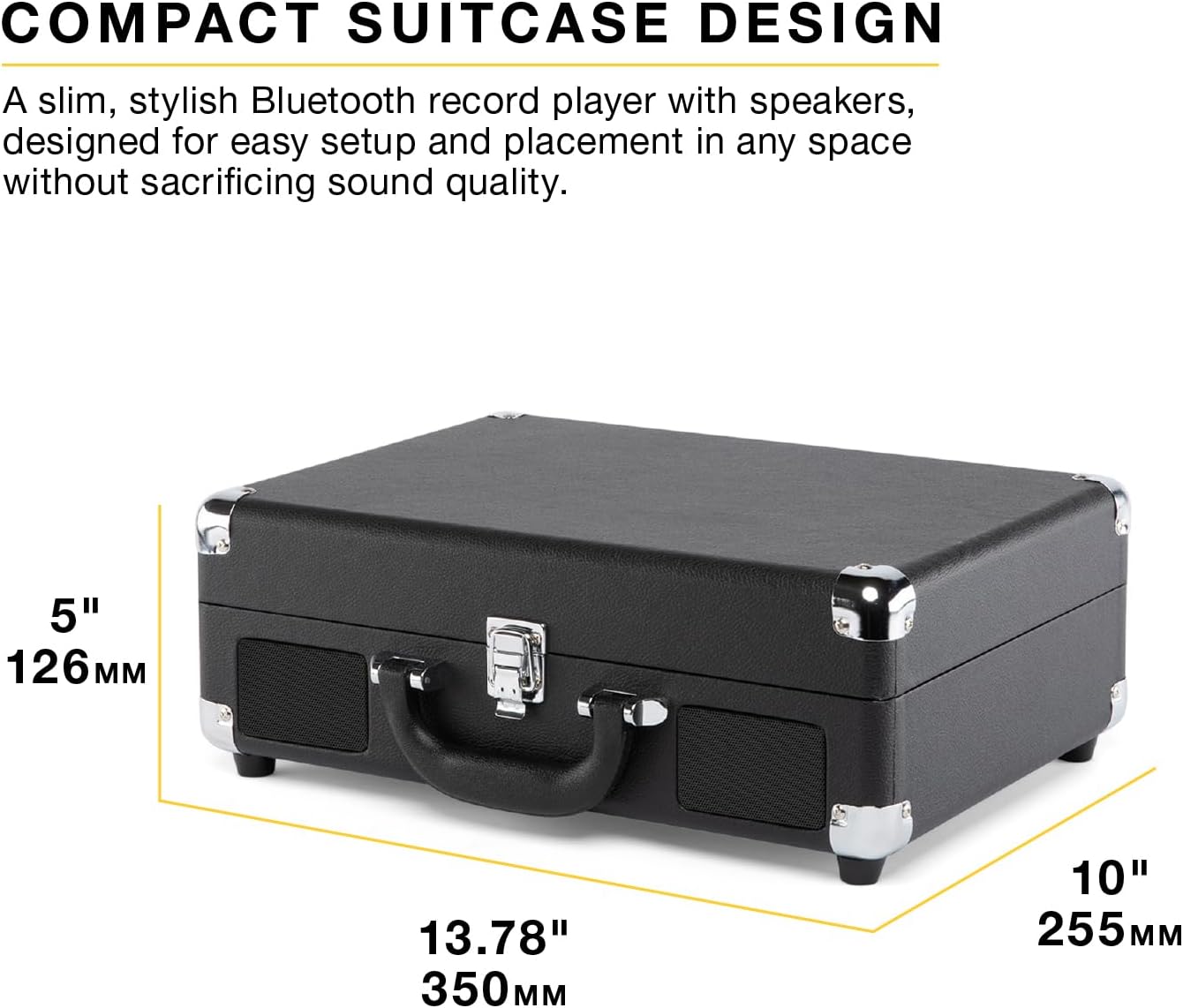
Image: A black Victrola Journey II record player, closed in its suitcase form, with its approximate dimensions clearly labeled: 13.78 inches (350mm) in width, 10 inches (255mm) in depth, and 5 inches (126mm) in height.
보증 및 지원
The Victrola Journey II includes 1 year of dedicated after-sales support and US-based customer support. For warranty claims or technical assistance, please refer to the contact information provided in your product packaging or visit the official Victrola web대지.
제품 비디오
Victrola Journey II Overview
영상: 공식 발표view of the Victrola Journey II record player, showcasing its classic suitcase design, 3-speed turntable, upgraded stereo sound with bass port, Bluetooth input for streaming music, and VINYLSTREAM Bluetooth output for wireless record playback. This video highlights the product's main features and various color options.


