소개
This manual provides comprehensive instructions for the OMAIC EN2Q36H replacement remote control, designed for Hisense Smart TVs. It covers essential information regarding setup, operation, and maintenance to ensure optimal performance and user experience. This remote offers a direct replacement solution without the need for complex programming.
설정
The OMAIC EN2Q36H remote control is designed for immediate use with compatible Hisense Smart TVs. No programming or pairing is required.
배터리 설치
- 리모콘 뒷면에서 배터리함을 찾으세요.
- 배터리 덮개를 아래쪽으로 또는 화살표 방향으로 밀어서 여세요.
- AAA 알칼리 건전지 2개(별도 구매)를 넣을 때, 건전지함 안쪽의 표시와 양극(+) 및 음극(-) 단자가 정확히 일치하는지 확인하십시오.
- 배터리 덮개를 다시 밀어서 제자리에 고정하고 딸깍 소리가 날 때까지 밀어 넣습니다.
Once batteries are installed, the remote is ready to operate your Hisense Smart TV.

작동 지침
This remote control utilizes infrared (IR) technology for communication with your Hisense Smart TV. Ensure a clear line of sight between the remote and the TV's IR receiver for optimal performance.
주요 특징
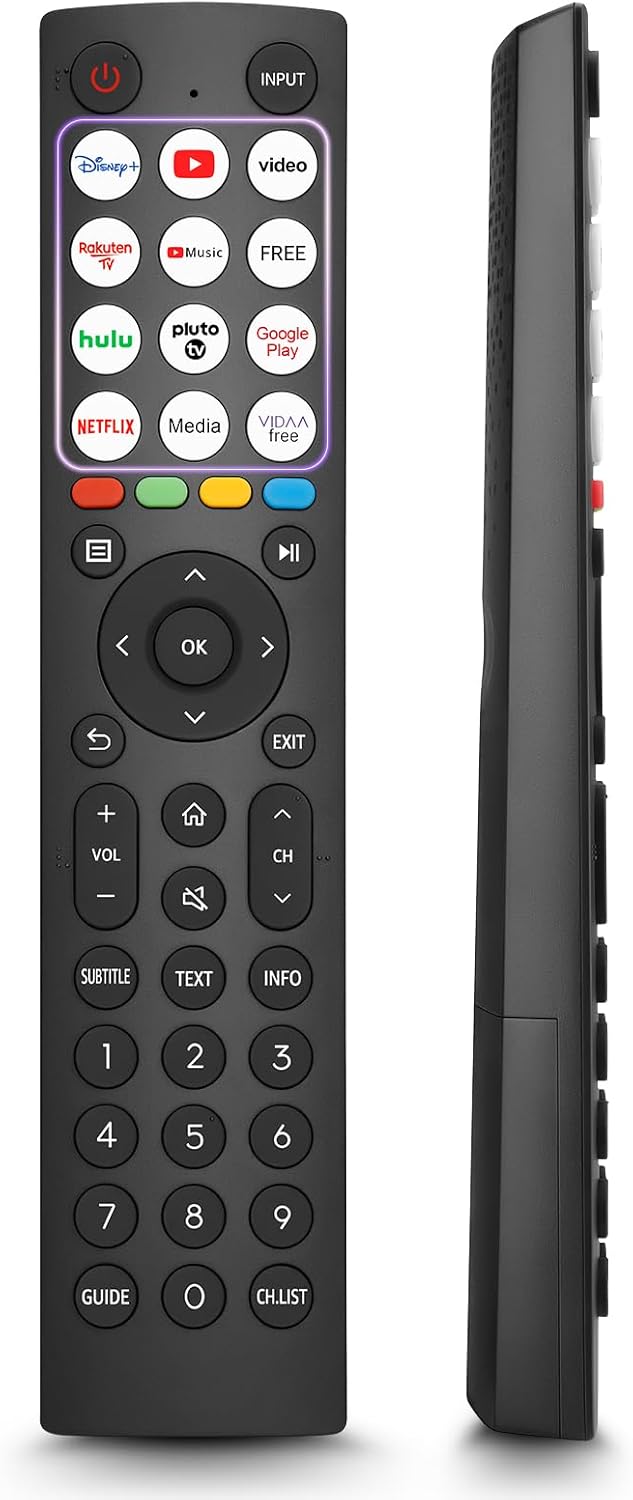
- 12 Shortcut Buttons: Quickly access popular streaming services and applications with dedicated buttons.
- Strong IR Signal: Provides a longer transmission distance and quick response without noticeable delay.
- 내구성 있는 구조: Made from high-quality ABS and silicone materials for extended lifespan.

버튼 기능
Familiarize yourself with the functions of each button on your OMAIC EN2Q36H remote control:
| 단추 | 기능 |
|---|---|
| 힘 | Switches the TV on or into standby mode. |
| 입력 | 입력 소스(HDMI, AV 등)를 선택합니다. |
| APP Buttons | Quick access buttons for specific applications (e.g., Disney+, Netflix, YouTube). |
| 메뉴 | Displays the Quick Setup menu. |
| 미디어 제어 | Buttons for Play, Pause, Stop, Fast Forward, Rewind. |
| 탐색(위/아래/왼쪽/오른쪽) | Navigates on-screen menus and adjusts system settings. |
| OK | Confirms selection in on-screen menus. |
| 뒤쪽에 | 이전 메뉴로 돌아갑니다. |
| EXIT | 현재 메뉴를 종료합니다. |
| 볼륨 +/- | 볼륨 레벨을 조절합니다. |
| 집 | Enters the Home screen. |
| 음소거 | TV 사운드를 음소거하거나 복원합니다. |
| CH ^/v | Switches channels. |
| 자막 | Activates or deactivates subtitle mode. |
| 텍스트 | Turns teletext function on and off. |
| 정보 | 현재 프로그램 정보를 표시합니다. |
| NUMBER Buttons (0-9) | Direct channel selection or number input. |
| 가이드 | Displays the Electronic Programme Guide (DTV input). |
| 채널 목록 | Displays the Channel List on the screen. |

Compatible Hisense TV Models
The OMAIC EN2Q36H replacement remote control is compatible with the following Hisense VIDAA 4K HDTV Smart TV series:
- 32A4K, 40A4K, 43A4K
- 32A5KQ, 40A5KQ
- 43A6K, 50A6K, 55A6K, 58A6K, 65A6K, 70A6K, 75A6K, 85A6K
- 55U6KQ, 65U6KQ
- 43A7KQ, 50A7KQ, 55A7KQ, 65A7KQ, 75A7KQ
- 43E7KQ, 50E7KQ, 55E7KQ, 65E7KQ, 75E7KQ
유지
리모컨의 수명과 정상적인 작동을 보장하려면 다음 유지 관리 지침을 따르십시오.
- 청소: Use a soft, dry cloth to clean the remote. Avoid using liquid cleaners or abrasive materials, as they may damage the surface or internal components.
- 배터리 교체: Replace batteries when the remote's response becomes sluggish or stops working. Always replace both batteries at the same time with new ones of the same type (AAA alkaline).
- 저장: 리모컨은 직사광선, 극한 온도, 높은 습도를 피해 서늘하고 건조한 곳에 보관하세요.
- 낙하 방지: 리모컨을 물리적 충격으로부터 보호하십시오. 떨어뜨리면 내부 회로가 손상될 수 있습니다.
문제 해결
If you encounter issues with your remote control, refer to the following troubleshooting steps:
| 문제 | 가능한 원인 | 해결책 |
|---|---|---|
| 리모콘이 응답하지 않음 | 배터리가 방전되었거나 잘못 삽입되었습니다. | 올바른 극성을 유지한 채 새 AAA 알카라인 배터리로 교체하세요. |
| 리모콘이 응답하지 않음 | 리모컨과 TV 사이에 장애물이 있습니다. | Ensure a clear line of sight to the TV's IR receiver. Remove any objects blocking the path. |
| 리모콘이 응답하지 않음 | 리모컨이 TV에서 너무 멀리 떨어져 있어요. | Move closer to the TV. The remote has an extended range, but extreme distances may affect performance. |
| 버튼이 고정되어 있거나 반응하지 않습니다. | 단추 아래에 먼지나 이물질이 있습니다. | Gently clean around the buttons with a soft, dry cloth. Avoid liquids. |
| 특정 기능이 작동하지 않습니다 | TV model incompatibility (rare). | Verify your Hisense TV model is listed in the 'Compatible Hisense TV Models' section. |
명세서
| 특징 | 세부 사항 |
|---|---|
| 모델명 | EN2Q36H |
| 상표 | 오마이크 |
| 호환 장치 | Hisense Smart TVs |
| 연결 기술 | 적외선 (IR) |
| 버튼의 수 | 48 |
| 제어 유형 | 버튼 제어 |
| 특별 기능 | Universal, Comfortable |
| 색상 | 검은색 |
| 배터리 설명 | AAA (Alkaline) |
| Supported Devices (Max) | 1 |
| 제품 크기(대략) | 34.7 x 24.7 x 2.2cm |
| 제품 무게(대략) | 80그램 |

보증 및 지원
OMAIC is committed to the quality and compatibility of its replacement remote controls. We provide professional after-sales support to ensure customer satisfaction.
If you have any questions or concerns regarding your OMAIC EN2Q36H remote control or your order, please contact us directly. Our support team aims to respond to inquiries within 12 working hours.