1. 서론
This instruction manual provides detailed guidance for the assembly, operation, maintenance, and troubleshooting of your YOMILUVE 50.4 Inch Computer Desk. Please read this manual thoroughly before beginning assembly or use to ensure proper setup and safe operation. Keep this manual for future reference.
2. 제품 오버view
The YOMILUVE 50.4 Inch Computer Desk is designed for home office, study, or gaming environments, offering a spacious work surface and integrated storage solutions. Key features include:
- Eight Fabric Drawers: 제공합니다 ample storage for office supplies, documents, and personal items.
- 통합 전원 스트립: 기기 충전이 편리하도록 AC 콘센트 2개와 USB 포트 2개가 장착되어 있습니다.
- 내구성 있는 구조: Made from high-quality MDF board with a sturdy metal frame for stability and longevity.
- 조절 가능한 다리: 고르지 않은 표면에서도 안정성을 보장합니다.
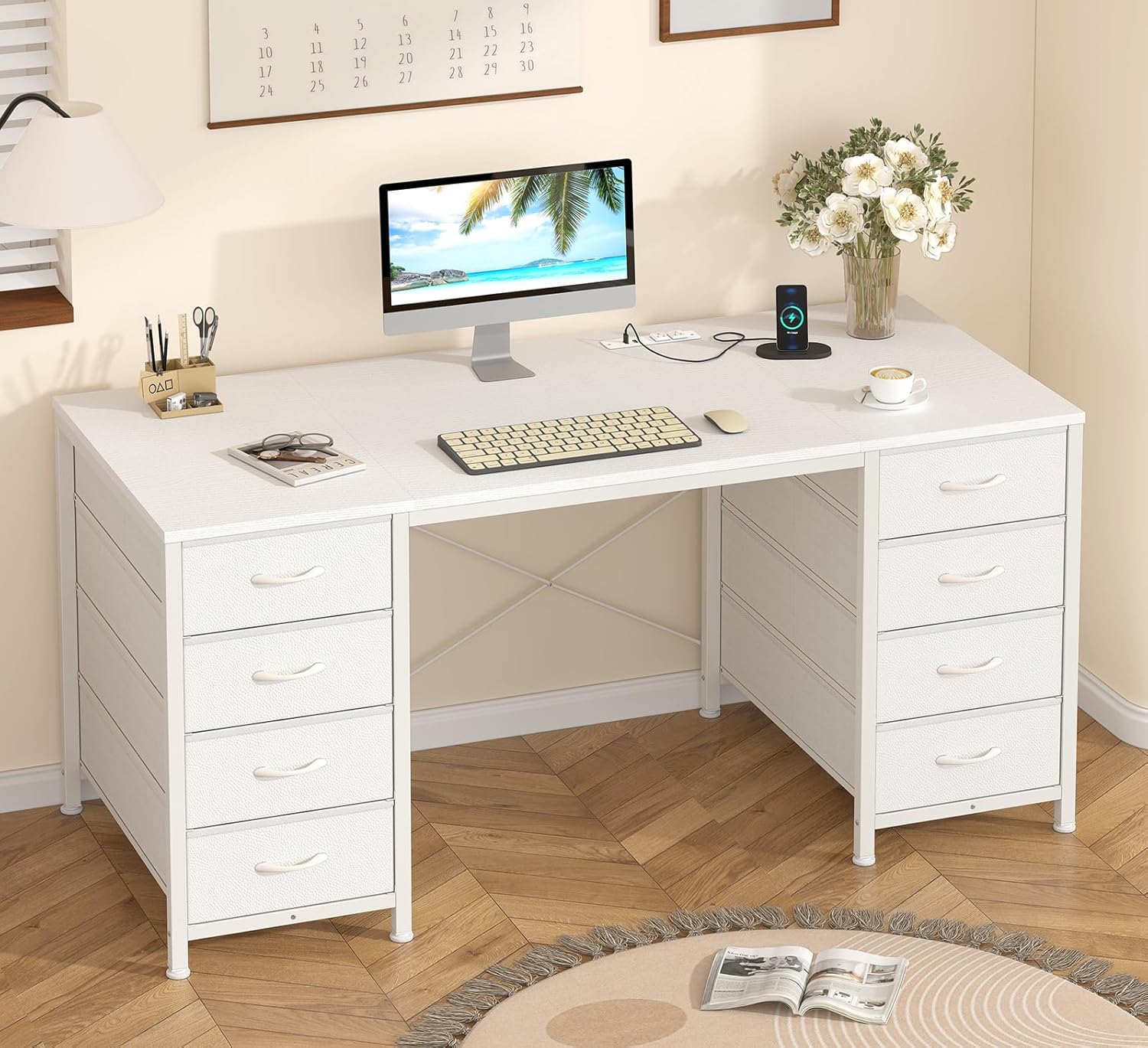
Image 2.1: The YOMILUVE 50.4 Inch Computer Desk, showcasin디자인 및 저장 기능에 있어서.

Image 2.2: Detail of the eight fabric drawers, designed for organized storage.
3. 설치 및 조립 지침
Assembly of the YOMILUVE Computer Desk requires careful attention to the included instructions. All necessary parts and tools are provided in the package.
3.1 시작하기 전에
- Verify all components are present by comparing them with the parts list in your separate assembly guide.
- 조립을 위한 충분한 공간이 있는지 확인하세요.
- 어린이와 애완동물을 집회 장소에 가까이 두지 마십시오.
3.2 조립 단계
- Follow the step-by-step instructions provided in the separate assembly manual included with your desk.
- Identify each part using the labels.
- Assemble the metal frame first, ensuring all screws are tightened securely.
- 조립된 프레임에 데스크탑을 부착하세요.
- Insert the fabric drawers into their designated compartments. Refer to the diagram for proper drawer assembly.
- Adjust the leveling feet at the bottom of the desk to ensure stability.

Image 3.1: Illustration of the fabric drawer assembly process.
4. 사용 설명서
4.1 통합 멀티탭 사용 방법
The desk features a built-in power strip for convenient access to power. It includes 2 standard AC outlets and 2 USB ports.
- Connect the desk's power cord (approximately 4.9 feet long) to a grounded wall outlet.
- Plug your devices into the AC outlets (125V/12A) or USB ports (5V/2A) as needed.
- 기기가 제공된 전원 사양과 호환되는지 확인하십시오.

Image 4.1: The integrated power strip with 2 AC outlets and 2 USB ports.
4.2 패브릭 서랍 사용하기
The eight fabric drawers are designed for lightweight storage and easy access.
- Pull the drawer handles to open and push to close.
- Avoid overloading drawers to ensure smooth operation and prevent damage.
- The drawers are suitable for storing books, headphones, files, and various office supplies.
5. 유지관리
To ensure the longevity and appearance of your YOMILUVE Computer Desk, follow these maintenance guidelines:
- 청소: 부드러운 천으로 책상 표면을 닦으세요.amp cloth. Avoid abrasive cleaners or harsh chemicals, as the MDF board is scratch and dust resistant, and waterproof.
- 서랍 관리: 패브릭 서랍은 순한 세제로 부분적으로 세척할 수 있습니다.amp 천으로 닦아 완전히 자연 건조하세요.
- 하드웨어: 모든 나사와 패스너가 단단히 조여져 있는지 정기적으로 점검하세요. 필요하면 다시 조이세요.
- 놓기: 책상을 직사광선이나 열원 근처에 두지 마십시오. 재질이 손상되는 것을 방지할 수 있습니다.
6. 문제 해결
If you encounter issues with your YOMILUVE Computer Desk, refer to the following common solutions:
| 문제 | 가능한 원인 | 해결책 |
|---|---|---|
| 책상이 흔들린다 | 고르지 않은 바닥; 느슨한 패스너 | Adjust the leveling feet; check and tighten all assembly screws. |
| Power strip not working | 플러그가 꽂혀 있지 않음; 차단기가 작동함 | Ensure the desk's power cord is securely plugged into a functional wall outlet. Check your home's circuit breaker. |
| 서랍을 열고 닫기가 어렵습니다 | Overloaded; improperly assembled | Reduce the weight in the drawer; ensure the drawer is correctly inserted and not obstructed. |
If the problem persists, please contact YOMILUVE customer support for further assistance.
7. 사양
Detailed product specifications for the YOMILUVE 50.4 Inch Computer Desk:
- 상표: YOMILUVE
- 모델: 50.4 Inch Desk
- 제품 크기(깊이 x 너비 x 높이): 18.9인치 x 50.4인치 x 29.3인치
- 색상: 하얀색
- 스타일: 현대의
- 기본 재료: 금속
- 최고 물자 유형: 엔지니어링 목재
- 서랍 수 : 8
- 서랍 유형: Multi-drawer, Fabric
- 특징: Built-In USB Outlet, Built-in Power Strip
- Power Strip Output: 2개의 AC 콘센트(125V/12A), 2개의 USB 포트(5V/2A)
- 전원 코드 길이: 약 4.9피트
- 필요한 조립: 예 (도구 포함)
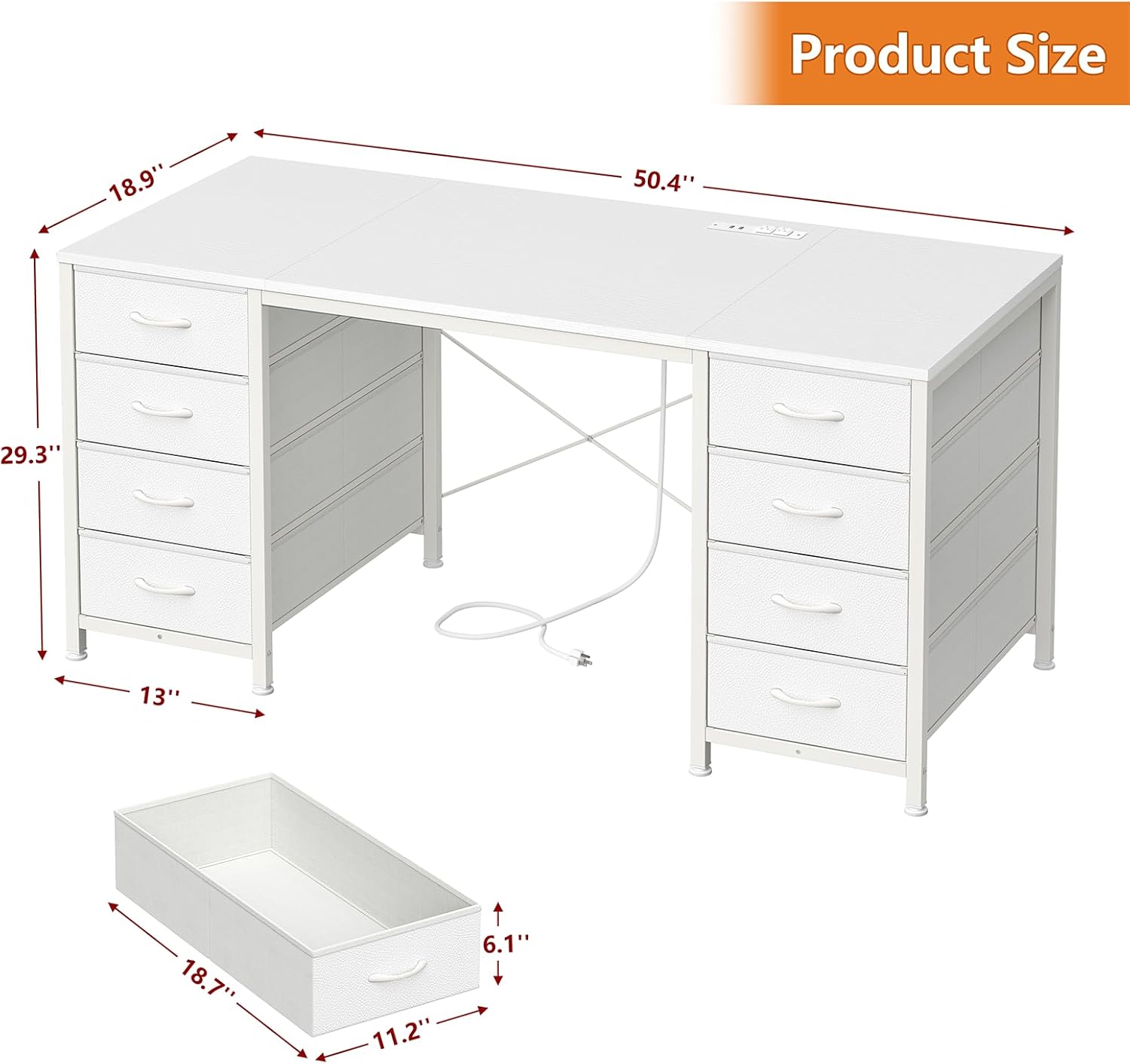
Image 7.1: Product dimensions of the YOMILUVE 50.4 Inch Computer Desk.
8. 보증 및 지원
For any questions, concerns, or issues regarding your YOMILUVE 50.4 Inch Computer Desk, please contact YOMILUVE customer support. Refer to the product packaging or the YOMILUVE official website for contact information and details regarding warranty coverage.


